Introdución
The Dyson Gen5detect is Dyson's most powerful cordless vacuum cleaner, engineered for deep and hygienic cleaning. It features advanced HEPA filtration, intelligent suction optimization, and illumination technology to reveal invisible dust. This manual provides essential information for setting up, operating, maintaining, and troubleshooting your Dyson Gen5detect.

The Dyson Gen5detect, Dyson's most powerful cordless vacuum, showcasing its advanced internal motor and filtration system.
Compoñentes incluídos
Your Dyson Gen5detect package includes the following components:
- Cordless vacuum main body
- Cabezal de limpeza Digital Motorbar™
- Cabezal de limpeza Fluffy Optic™
- Ferramenta de parafuso de pelo
- Ferramenta de combinación
- Built-in dusting and crevice tool (integrated into the wand)
- Variña
- Cargador
- Estación de acoplamento
- Batería (1)
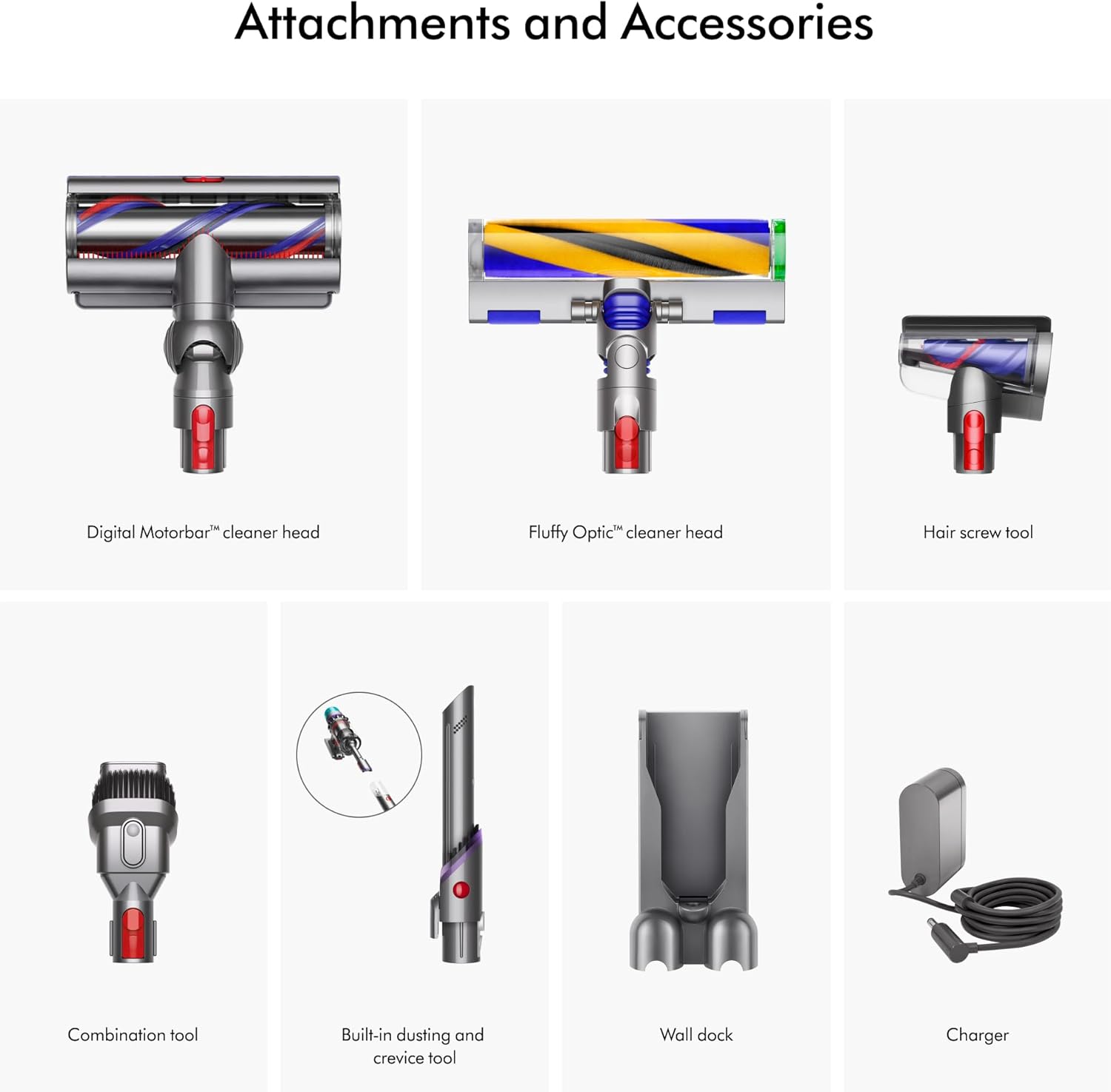
Unha completa view of all included attachments and accessories for the Dyson Gen5detect, including the Digital Motorbar cleaner head, Fluffy Optic cleaner head, Hair screw tool, Combination tool, Built-in dusting and crevice tool, Wall dock, and Charger.
Configuración
Carga inicial
The vacuum ships partially charged. For optimal performance, fully charge the battery before first use. Connect the charger to the docking station or directly to the vacuum's charging port. A full charge typically takes approximately 4.5 hours.
Asemblea
- Enganchar a variña: Align the wand with the main body of the vacuum and push until it clicks securely into place.
- Attach a Cleaner Head: Select either the Digital Motorbar™ cleaner head or the Fluffy Optic™ cleaner head. Align it with the end of the wand and push until it clicks.
- Install Docking Station: The docking station can be mounted to a wall for convenient storage and charging. Refer to the separate installation guide for detailed wall-mounting instructions.

The Dyson Gen5detect cordless vacuum assembled with the Fluffy Optic cleaner head, alongside its various attachments and wall-mounted docking station.
Instrucións de funcionamento
Acendido e apagado
The Dyson Gen5detect is operated by a power button for continuous cleaning. Press the red power button on the handle to turn the vacuum on. Press it again to turn it off.
Modos de potencia
The vacuum features multiple power modes to suit different cleaning tasks and surfaces:
- Modo Eco: Ofrece o maior tempo de funcionamento para tarefas de limpeza máis lixeiras.
- Modo automático: Intelligently adapts suction power based on floor type and debris detected, optimizing performance and run time.
- Modo de aumento: Delivers maximum suction for intensive spot cleaning or heavily soiled areas, with a shorter run time.
You can switch between power modes using the button on the LCD screen at the back of the vacuum.

Key features of the Dyson Gen5detect: up to 70 minutes run time, 115% more power than Dyson V8, intelligent suction adaptation, and Fluffy Optic illumination.
Cleaner Heads and Attachments
- Digital Motorbar™ Cleaner Head: Designed for deep cleaning carpets and hard floors, automatically de-tangling long hair and pet hair.
- Fluffy Optic™ Cleaner Head: Features precisely angled light to reveal microscopic dust on hard floors, making invisible dust visible.
- Ferramenta de parafuso de cabelo: Ideal for removing long hair and pet hair from upholstery and tight spaces without tangles.
- Ferramenta de combinación: A versatile tool with a wide nozzle and brush for switching between cleaning and dusting tasks.
- Built-in Dusting and Crevice Tool: Integrated into the wand, this tool allows for quick transitions to handheld cleaning for tight corners and delicate surfaces.

The Digital Motorbar cleaner head for deep cleaning all floor types, and the Fluffy Optic cleaner head which reveals invisible dust on hard floors.
Pantalla LCD
The LCD screen provides real-time information during cleaning and a summary after each clean:
- Dust Particle Count: In Auto mode, the screen displays bars that grow and shrink according to the volume of particles removed, indicating when an area is clean.
- Modo de enerxía: Shows the current power mode (Eco, Auto, Boost).
- Tempo de execución restante: Displays the battery run time to the second.
- Alertas de mantemento: Provides notifications for filter cleaning or blockages.

The LCD screen on the Dyson Gen5detect displays color-coded bars indicating high to low levels of dust, showing when your floor is clean.

Examples of Dyson Gen5detect usage: powering on with a button press, cleaning high and low areas, de-tangling long hair and pet hair, and switching between tough cleaning and gentle dusting.
Mantemento
Baleirando a papeleira
To maintain optimal suction, empty the dust bin when debris reaches the MAX fill line. The Dyson Gen5detect features a no-touch bin emptying mechanism:
- Hold the vacuum over a trash can.
- Push the red lever down firmly to release the bin and eject debris.
- Close the bin until it clicks securely.

Illustrations of the no-touch bin emptying process and the easy wall-mounted docking and charging of the Dyson Gen5detect.
Mantemento de filtros
The Dyson Gen5detect features advanced whole-machine HEPA filtration that traps 99.99% of particles as small as 0.1 microns. The filter is washable and should be cleaned regularly according to the instructions on the LCD screen or when suction performance drops.
- Twist the filter counter-clockwise to remove it from the top of the main body.
- Lave o filtro con auga fría corrente ata que a auga saia limpa.
- Shake off excess water and leave to dry completely for at least 24 hours in a warm, dry place. Do not dry in a tumble dryer, microwave, or near a naked flame.
- Once completely dry, reinsert the filter and twist clockwise to secure.

A detailed diagram illustrating the HEPA filtration system of the Dyson Gen5detect, which traps particles as small as 0.1 microns.
Mantemento de cabezas limpadoras
- Digital Motorbar™ Cleaner Head: Periodically check the brush bar for tangled hair or debris. The de-tangling feature minimizes this, but manual removal may occasionally be necessary.
- Fluffy Optic™ Cleaner Head: The soft roller brush bar can be removed and washed under cold water. Ensure it is completely dry before reattaching.
Resolución de problemas
If you encounter issues with your Dyson Gen5detect, refer to the common problems and solutions below. For more detailed assistance, visit the official Dyson support websitio ou póñase en contacto co servizo de atención ao cliente.
| Problema | Causa posible | Solución |
|---|---|---|
| Sen alimentación / Non se acende | Battery not charged; Power button not pressed correctly. | Ensure battery is fully charged. Press the power button firmly for continuous operation. |
| Potencia de succión reducida | Dust bin full; Filter needs cleaning; Blockage in wand or cleaner head. | Empty the dust bin. Wash and dry the filter. Check for and clear any blockages in the airways. |
| O cabezal do limpador non xira | Obstrución na barra do cepillo; cabezal do limpador non conectado correctamente. | Remove any obstructions from the brush bar. Ensure the cleaner head is securely clicked into place. |
| LCD screen error message | Specific issue indicated by the message (e.g., filter, blockage). | Follow the instructions displayed on the screen. Refer to the Dyson support websitio para códigos de erro específicos. |
Especificacións
| Característica | Detalle |
|---|---|
| Marca | Dyson |
| Nome do modelo | Gen5 detect |
| Número de modelo | 447930-01 |
| Característica especial | Bagless, Cordless, Washable HEPA Filter, Illumination Technology |
| Tipo de filtro | Filtro HEPA |
| É sen fíos? | Si |
| Capacidade | 0.2 litros |
| Wattage | 350 vatios |
| Tempo de carga | 4.5 horas |
| Lonxitude da mangueira | 47.8 polgadas |
| Usos recomendados | Carpets and Hard Floors |
| Factor de forma | Palo |
| Cor | Purple/Purple |
| Dimensións do produto | 10.9 cm de longo x 47.8 cm de ancho x 9.8 cm de alto |
| Peso do elemento | 7.6 libras |
| Tipo de batería | Litio-Ion |
| Nivel de ruído | 82 dB |
| Duración da batería | Ata 70 minutos |
| Tipo de controlador | Pulsador |
| Método de control | Toca |
| Número de velocidades | 1 |
| Número de niveis de potencia | 2 |
| Uso interior/exterior | Interior |
| UPC | 885609031156 |
Garantía e Soporte
The Dyson Gen5detect Cordless Vacuum Cleaner comes with a 2 ano de garantía covering parts and labor. This warranty ensures your product is free from defects in material and workmanship under normal household use.
For personalized machine guides, maintenance tips, and support, it is recommended to register your machine on the MyDyson™ app or the official Dyson website. You can also find comprehensive support resources, FAQs, and contact information for customer service on the Soporte de Dyson websitio.


