1. Introdución
This manual provides essential information for the proper setup, operation, and maintenance of your Best Choice Products 88-Key Weighted Full Size Digital Piano. Please read these instructions thoroughly before using the product to ensure optimal performance and longevity. Retain this manual for future reference.

Figure 1: Best Choice Products 88-Key Weighted Full Size Digital Piano set.
2. Contido do paquete
Verifique que todos os compoñentes que se indican a continuación estean incluídos no paquete. Se falta algunha peza ou está danada, póñase en contacto co servizo de atención ao cliente.
- 88-Key Weighted Digital Piano Unit
- U-Stand (for piano support)
- Music Stand (sheet music holder)
- Three Sustain Pedal Unit (Soft, Selective Sustain, Sustain)
- Taburete de piano
- Funda de teclado
- Adaptador de alimentación
- Manual de instrucións
- Key Stickers (for white keys)

Figure 2: Unboxed components of the digital piano set.
3. Instrucións de configuración
Follow these steps to assemble your digital piano. It is recommended to have two people for assembly due to the weight of the piano unit.
- Desempaquetar compoñentes: Carefully remove all items from the packaging and place them on a soft, flat surface to prevent scratches.
- Assemble the U-Stand: Connect the wooden parts of the U-stand using the provided screws and screwdriver. Ensure all connections are secure and stable.
- Coloca a unidade de piano: Gently lift the 88-key digital piano unit and place it securely onto the assembled U-stand. Ensure it is centered and stable.
- Conecta a unidade de pedal: Locate the pedal input port on the underside of the piano unit. Connect the three sustain pedal unit cable firmly into this port.
- Fixar o atril: Insert the music stand into the designated slot on the top panel of the piano.
- Conexión de alimentación: Connect the power adapter to the DC 12V input port on the rear of the piano. Plug the adapter into a standard electrical outlet.
- Optional: Apply Key Stickers: If desired, carefully apply the provided key stickers to the white keys, following the numerical and alphabetical order from left to right as indicated on the sticker sheet.
Vídeo 1: Rematadoview of the 88-Key Piano with U-Stand, demonstrating the assembled product and its components.
4. Instrucións de funcionamento
4.1 Encendido/apagado
To power on the piano, locate the power switch on the rear panel and toggle it to the 'ON' position. The display will illuminate. To power off, toggle the switch back to 'OFF'.
4.2 Keys and Touch Sensitivity
The piano features 88 fully weighted, hammer-action, and touch-sensitive keys. This design mimics the feel of an acoustic piano, providing a responsive playing experience. The volume and tone of the notes will vary based on the pressure applied to the keys.

Figure 3: Detail of the 88 fully weighted keys, illustrating their hammer-action and touch-sensitive design.
4.3 Pedal Unit Functions
The included three sustain pedal unit offers enhanced expressive control:
- Pedal suave: Reduces the volume and softens the tone of notes.
- Selective Sustain Pedal: Sustains only the notes held down while the pedal is pressed, allowing other notes to decay normally.
- Pedal de sustentación: Sustains all notes played while the pedal is pressed, creating a continuous sound.

Figure 4: The triple pedal unit, detailing the function of each pedal.
4.4 Sound Selection and Controls
Your digital piano includes a wide array of preset sounds and functions:
- Timbres: Access 140 different instrument sounds. Use the 'Timbre' buttons and numerical selection to choose.
- Ritmos: Select from 128 built-in rhythms to accompany your playing. Use the 'Rhythm' buttons for selection.
- Cancións de demostración: Explore 100 pre-recorded demo songs. Use the 'Demo' button to play.
- Interface MIDI: Connect to external MIDI devices for expanded sound libraries and recording capabilities.
- Control de volume: Adjust the overall output volume using the dedicated volume knob.
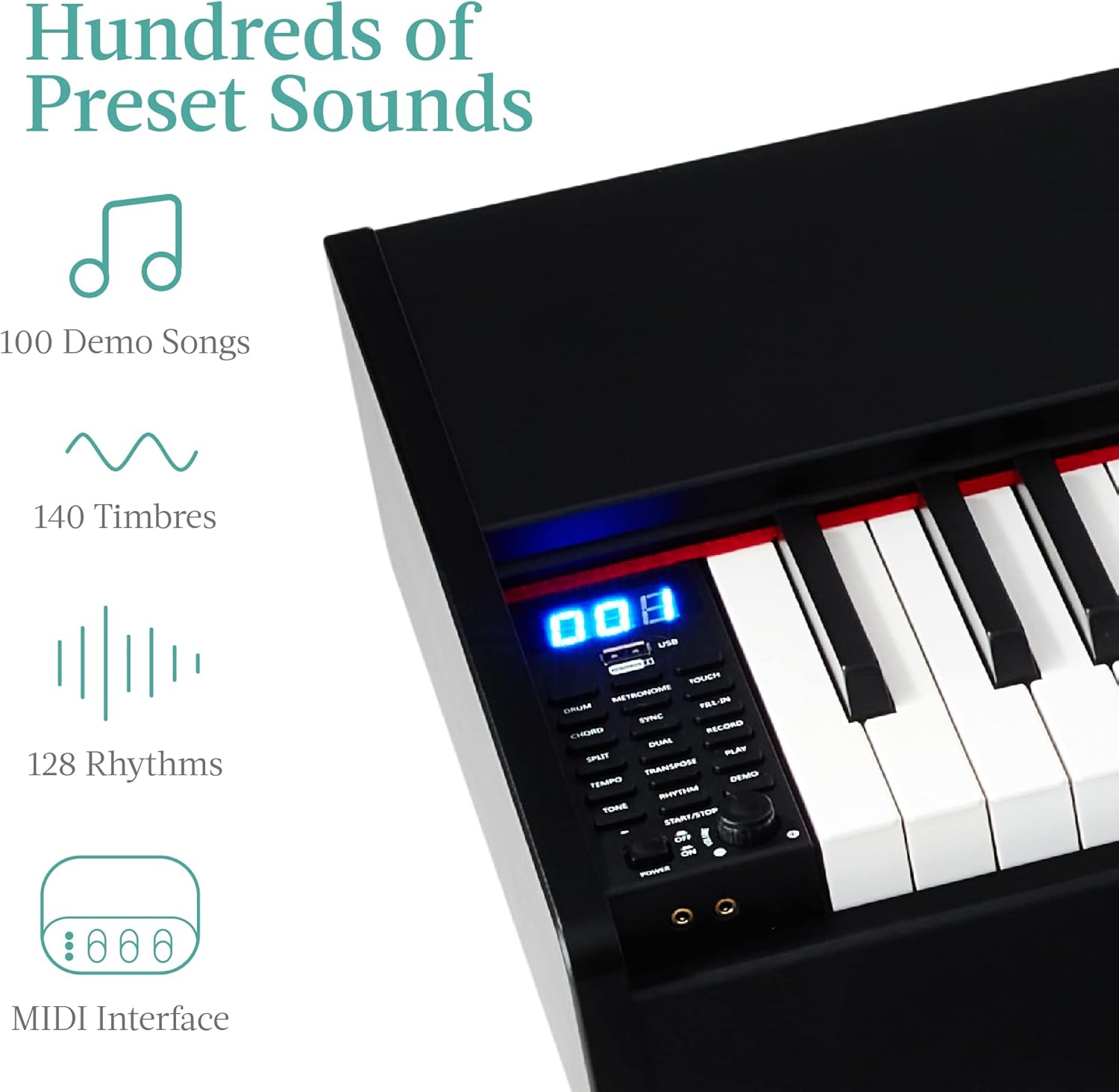
Figure 5: The piano's control panel, illustrating various sound selection and function buttons.
4.5 Compatibilidade con medios
The piano offers various connectivity options:
- MIDI/USB Outputs: Connect to computers or other devices for recording, music production, or interactive learning software.
- Tomas para auriculares: Two 3.5mm headphone jacks are available for private practice or shared listening without external speakers.

Figure 6: Connectivity options, showing the piano linked to a tablet for interactive use.
5. Mantemento
Proper care ensures the longevity of your digital piano:
- Limpeza: Use a soft, dry cloth to wipe the surface of the piano and keys. Avoid abrasive cleaners or solvents.
- Protección contra po: Use the provided keyboard cover when the piano is not in use to protect it from dust and debris.
- Colocación: Keep the piano away from direct sunlight, heat sources, and areas with high humidity to prevent damage to electronic components and wood materials.
- Transporte: When moving the piano, ensure it is properly disassembled and packed to prevent damage.
6 Solución de problemas
Se tes problemas, consulta as seguintes solucións habituais:
- Sen son:
- Asegúrate de que o adaptador de corrente estea conectado correctamente e que o piano estea acendido.
- Check the master volume level; increase if necessary.
- Se tes uns auriculares conectados, desconéctaos para comprobar a saída do altofalante.
- As teclas non responden:
- Verify the piano is powered on.
- Asegúrate de que non haxa obxectos estraños aloxados entre as teclas.
- Pedals Not Functioning:
- Confirm the pedal unit cable is fully inserted into the correct port.
- Son distorsionado:
- Baixa o volume principal.
- Check for any connected external devices that might be causing interference.
Para obter máis axuda, póñase en contacto co servizo de atención ao cliente.
7. Especificacións
| Característica | Detalle |
|---|---|
| Marca | Mellores produtos de elección |
| Número de modelo | CEO 6604 |
| Número de chaves | 88 |
| Tipo de chave | Weighted, Hammer-Action, Touch-Sensitive |
| Dimensións (L x W x H) | 52" x 13" x 36" |
| Peso do elemento | 56 libras |
| Tipo de material | 38% plastic, 60% MDF wooden parts |
| Cor | Negro |
| Fonte de enerxía | Enchufe |
| Jack para auriculares | Conector de 3.5 mm (x2) |
| Tecnoloxía de conectividade | Auxiliary, MIDI/USB Outputs |
| Capacidade de peso das feces | 220 libras. |

Figure 7: Product dimensions for the digital piano and accompanying accessories.
8. Garantía e soporte
8.1 Información da garantía
This product comes with a standard manufacturer's warranty. For specific details regarding warranty coverage, duration, and terms, please refer to the warranty card included in your product packaging or visit the official Best Choice Products websitio.
8.2 Atención ao cliente
For any questions, technical support, or assistance with your product, please contact Best Choice Products customer service. Contact information can typically be found on the product packaging, the official brand websitio web ou a través dos canais de asistencia do teu vendedor.


