1. Introdución
Thank you for choosing the GenMachine Mini PC. This compact yet powerful computer is designed to deliver exceptional performance for a variety of tasks, including gaming, office productivity, and creative design. Equipped with an AMD Ryzen 7 3750H processor, ample memory, and fast storage, it offers a seamless computing experience. This manual provides essential information for setting up, operating, maintaining, and troubleshooting your new Mini PC.
2. Que hai na caixa
Please verify that all items are present and in good condition upon unboxing.
- 1 x GenMachine Mini PC
- 1 x cable HDMI
- 1 x adaptador de alimentación
- 1 x Manual de usuario (este documento)
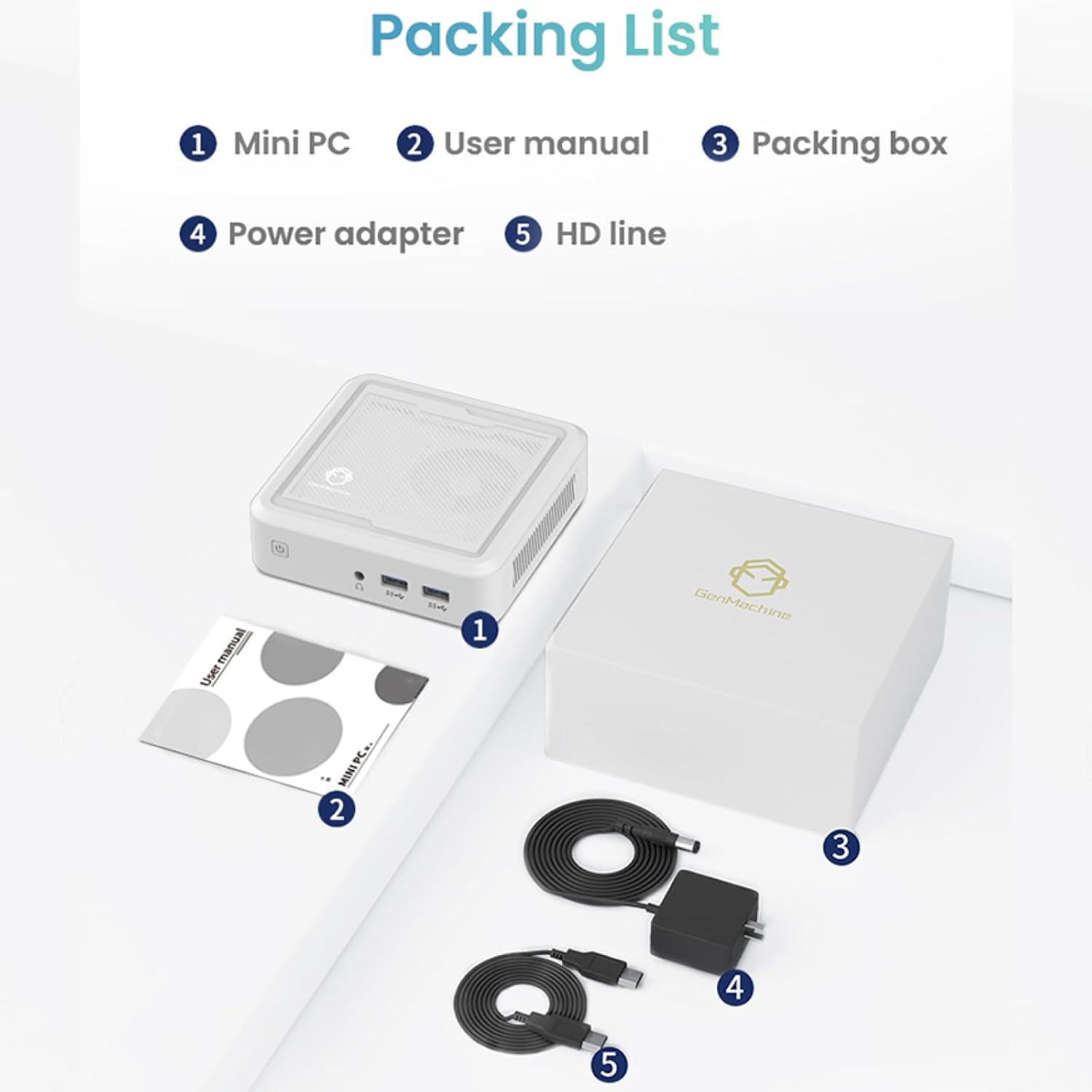
Figure 2.1: Packaging contents of the GenMachine Mini PC.
3. Características do produto
The GenMachine Mini PC is engineered with features to enhance your computing experience:
- Potente rendemento: Equipped with an AMD Ryzen 7 3750H processor, delivering speeds up to 4.0GHz with 4 cores and 8 threads for demanding tasks.
- Ample Memory and Storage: Features 8GB of DDR4 RAM and a 256GB SSD with M.2 NVMe support for seamless multitasking and quick file acceso.
- Conectividade versátil: Advanced WiFi 6 and Bluetooth 5.2 capabilities ensure high-speed internet and smooth device pairing.
- Deseño compacto: A sleek, small form factor that fits easily into any workspace or gaming setup.
- Múltiples opcións de visualización: HDMI and DisplayPort outputs support dual 4K displays for expanded productivity and immersive visuals.

Figura 3.1: Fronte view of the GenMachine Mini PC.
3.1 Rich Interface for Easy Connection
The Mini PC offers a comprehensive set of ports to meet various connectivity needs:
- USB 3.0 x 4
- HDMIx1
- DisplayPort (DP) x 1
- LAN (Ethernet) x 1
- 3.5mm Audio Jack x 1
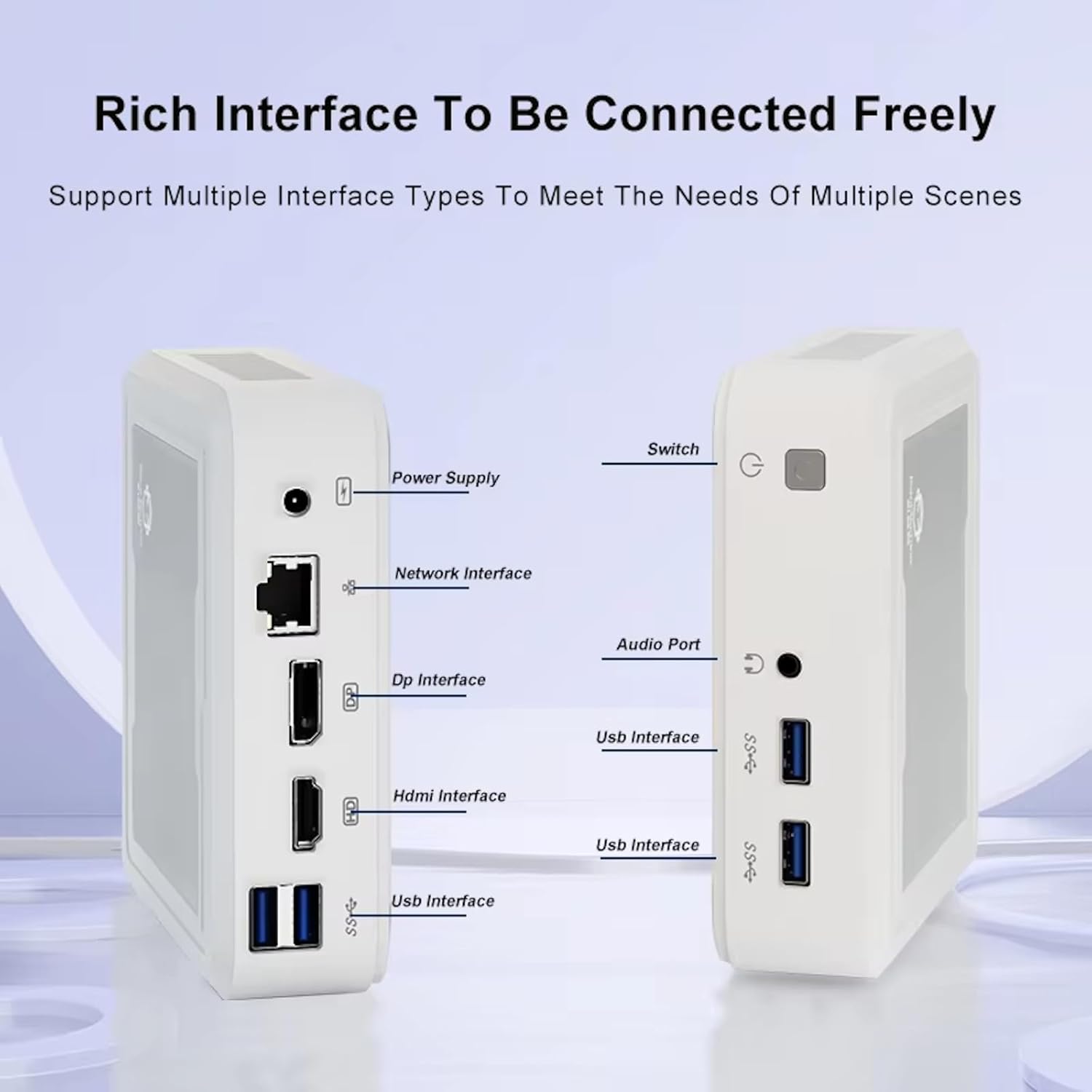
Figure 3.2: Available ports on the GenMachine Mini PC.
3.2 Dual Monitor Support
Enhance your productivity or gaming experience by connecting up to two 4K displays simultaneously using the HDMI and DisplayPort outputs.

Figure 3.3: Dual 4K display setup with the GenMachine Mini PC.
Video 3.1: Demonstration of the GenMachine Mini PC supporting two monitors simultaneously.
3.3 Energy Efficiency and Quiet Operation
Designed for low noise operation, the Mini PC maintains a quiet environment, making it suitable for various settings.

Figure 3.4: Noise level comparison of the GenMachine Mini PC.
3.4 Compact and Durable Design
The Mini PC features an ultra-durable, lightweight metal casing, making it space-saving and robust for any work environment.
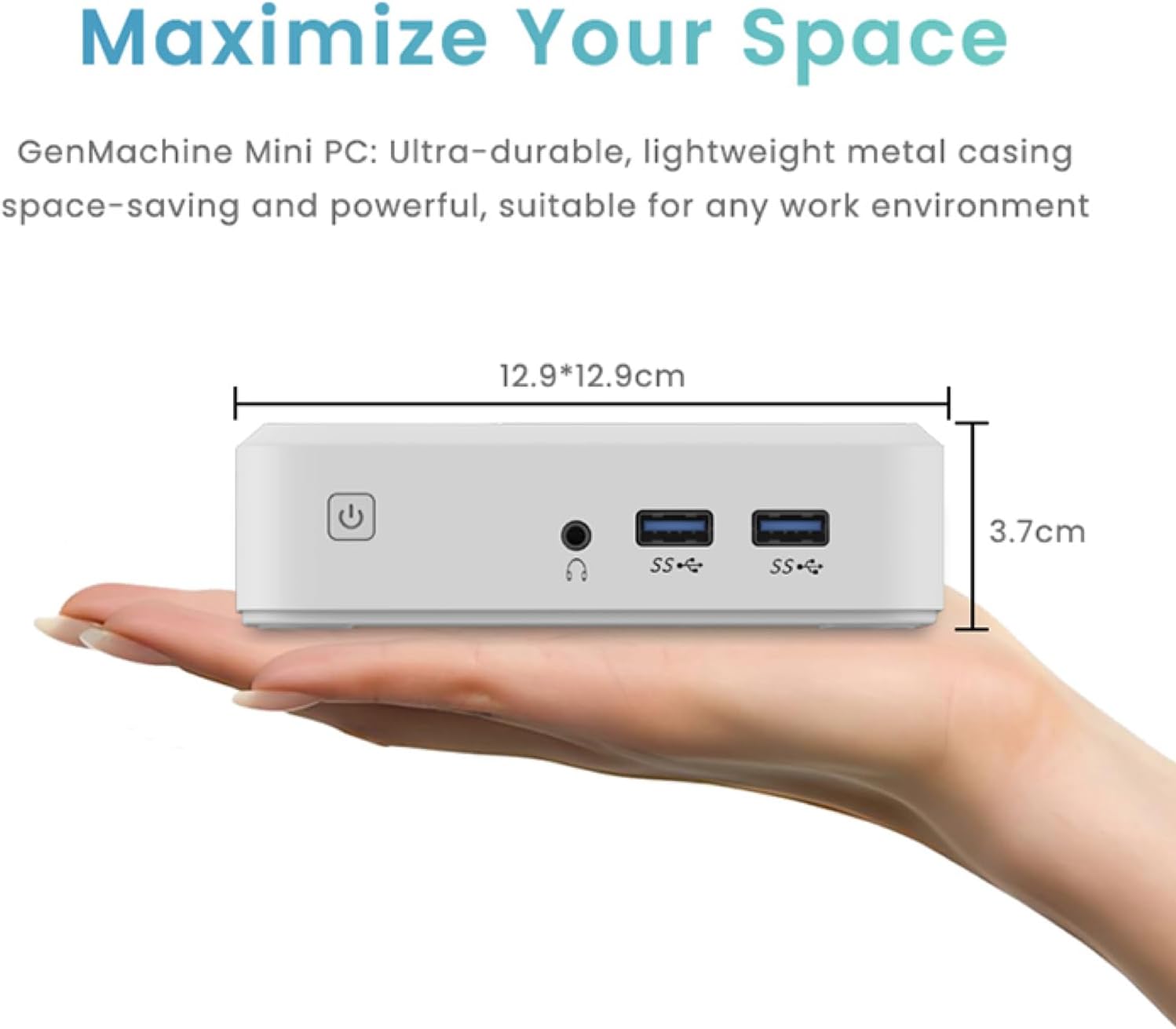
Figure 3.5: Compact size of the GenMachine Mini PC.
Vídeo 3.2: Rematadoview of the GenMachine Mini PC's features and compact design.
4. Guía de configuración
Follow these steps to set up your GenMachine Mini PC:
- Unpack the Mini PC: Retire coidadosamente todos os compoñentes da embalaxe.
- Conectar a unha pantalla: Use the provided HDMI cable to connect the Mini PC to your monitor or TV. If using a DisplayPort monitor, use a compatible DP cable (not included).
- Conectar periféricos: Conecta o teclado, o rato e calquera outro dispositivo USB aos portos USB 3.0 dispoñibles.
- Conectar á rede (opcional): For a wired internet connection, connect an Ethernet cable to the LAN port. For wireless, ensure your WiFi network is available during initial setup.
- Conectar enerxía: Plug the power adapter into the DC-in port on the Mini PC, then plug the adapter into a power outlet.
- Encendido: Press the power button on the front of the Mini PC. The system should boot up.
5. Instrucións de funcionamento
5.1 Arranque inicial e configuración do sistema operativo
Upon first power-on, the Mini PC will guide you through the operating system setup process. Follow the on-screen prompts to configure language, region, user accounts, and network settings.
5.2 Xestión de enerxía
- Encendido: Preme o botón de acendido unha vez.
- Apagar: Access the power options through the operating system's start menu and select 'Shut down'.
- Reiniciar: Access the power options through the operating system's start menu and select 'Restart'.
- Modo de suspensión: Access the power options through the operating system's start menu and select 'Sleep'.
5.3 Conexión a Wi-Fi e Bluetooth
To connect to a wireless network or Bluetooth device, use the respective settings within your operating system. The Mini PC supports WiFi 6 and Bluetooth 5.2 for fast and reliable connections.
6. Mantemento
Un mantemento regular axuda a garantir a lonxevidade e o rendemento óptimo do seu mini PC:
- Limpeza: Use a soft, dry cloth to clean the exterior. For dust in vents, use compressed air. Ensure the device is powered off and unplugged before cleaning.
- Ventilación: Ensure the Mini PC is placed in a well-ventilated area. Do not block the air vents.
- Actualizacións de software: Regularly update your operating system, drivers, and applications to ensure security and performance.
- Copia de seguridade de datos: Periodically back up important data to an external drive or cloud storage.
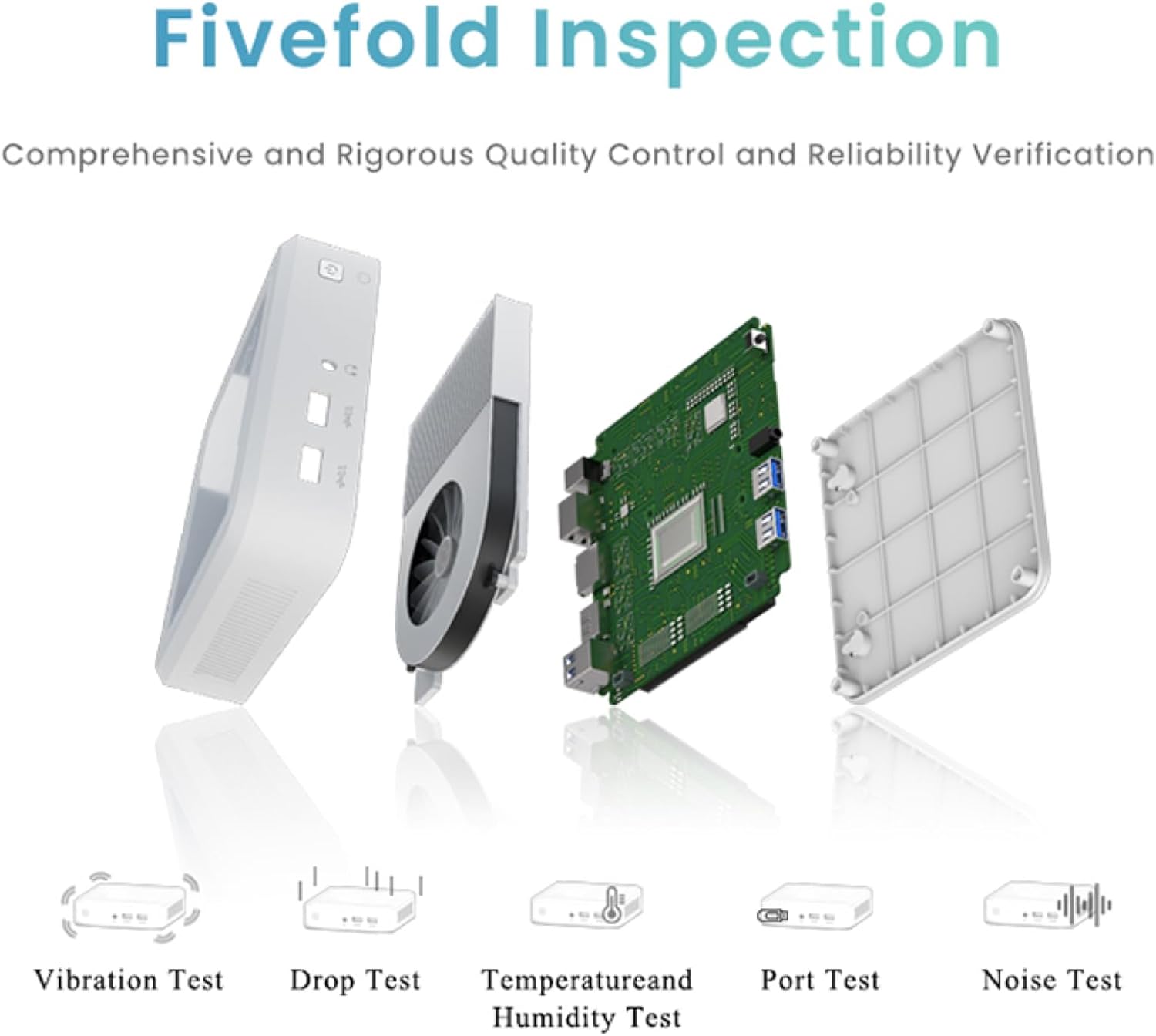
Figure 6.1: GenMachine's Fivefold Inspection process for quality control.
7 Solución de problemas
If you encounter issues with your Mini PC, refer to the following common problems and solutions:
- Sen enerxía:
- Asegúrate de que o adaptador de corrente estea conectado correctamente tanto ao Mini PC como a unha toma de corrente que funcione.
- Proba cunha toma de corrente diferente.
- Sen visualización:
- Verify that the HDMI or DisplayPort cable is securely connected to both the Mini PC and the monitor.
- Asegúrate de que o monitor estea acendido e configurado na fonte de entrada correcta.
- Proba cun cable de pantalla ou monitor diferente se é posible.
- O sistema conxélase ou non responde:
- Perform a hard reset by holding the power button for 5-10 seconds until the device powers off, then restart.
- Ensure the operating system and drivers are up to date.
- Check for overheating; ensure proper ventilation.
- Run a system diagnostic or memory test if the issue persists.
- Sen conexión a Internet:
- Para conexións con cable, comprobe o estado do cable Ethernet e do enrutador.
- Para a conexión Wi-Fi, asegúrate de que a conexión Wi-Fi estea activada no sistema operativo e de que esteas conectado á rede correcta co contrasinal correcto.
- Reinicia o teu router/módem.
8. Especificacións
| Característica | Especificación |
|---|---|
| Procesador | AMD Ryzen 7 3750H (4 cores, 8 threads, up to 4.0GHz) |
| RAM | 8 GB DDR4 |
| Almacenamento | 256GB SSD (with M.2 NVMe support) |
| Coprocesador gráfico | Gráficos AMD Radeon Vega 10 |
| Resolución máxima de pantalla | 3840 x 2160 píxeles (4K) |
| Tipo sen fíos | 802.11ac (WiFi 6), Bluetooth 5.2 |
| Portos USB | 4 x USB 3.0 |
| Saídas de vídeo | HDMI, DisplayPort |
| Sistema Operativo | OS (Pre-installed) |
| Peso do elemento | 2.1 libras |
| Dimensións do produto | 4.9 x 4.9 x 1.4 polgadas |
| Cor | Negro |
9. Garantía e soporte
For warranty information and technical support, please refer to the warranty card included with your product or visit the official GenMachine websitio. Garde o recibo da compra como xustificante de compra para reclamacións de garantía.
If you require further assistance, please contact GenMachine customer support through the channels provided on their official websitio.


