1. Introdución
Thank you for choosing the LD Systems MAUI 28 G3 Compact Cardioid Column PA System. This system is designed to deliver powerful, clear, and precise sound for a variety of applications, including live music, DJ sets, and public address. Its compact design and advanced acoustic features make it an ideal solution for professionals seeking high-quality audio performance and ease of use.
This manual provides essential information for the safe and efficient operation of your MAUI 28 G3 system. Please read it thoroughly before initial use and keep it for future reference.
2. Instrucións de seguridade
Observe as seguintes precaucións de seguridade para evitar descargas eléctricas, incendios ou danos na unidade:
- Fonte de enerxía: Conecte a unidade só a unha toma de corrente alterna do volume especificadotage.
- Conexión a terra: Asegúrese de que a unidade estea debidamente conectada a terra para evitar descargas eléctricas.
- Humidade: Non expoña a unidade á choiva nin á humidade. Non coloque obxectos cheos de líquidos enriba da unidade.
- Ventilación: Asegúrese de que haxa unha ventilación axeitada. Non bloquee as aberturas de ventilación.
- Calor: Non coloque a unidade preto de fontes de calor nin baixo a luz solar directa.
- Servizo: Non intente realizar o mantemento da unidade vostede mesmo. Encargue calquera mantemento a persoal cualificado.
- Cables: Protexa os cables de alimentación de ser pisados ou pinchados.
- Estabilidade: Place the system on a stable, level surface to prevent tipping.
3. Contido do paquete
Verifica que todos os compoñentes estean presentes no teu paquete:
- 1 x MAUI 28 G3 Subwoofer
- 2 x MAUI 28 G3 Column Elements
- 1 x cable de alimentación
- 1 x Manual de usuario (este documento)
4. Produto rematadoview
The MAUI 28 G3 system consists of a powerful subwoofer and two column elements that integrate seamlessly to form a compact and high-performance PA system.
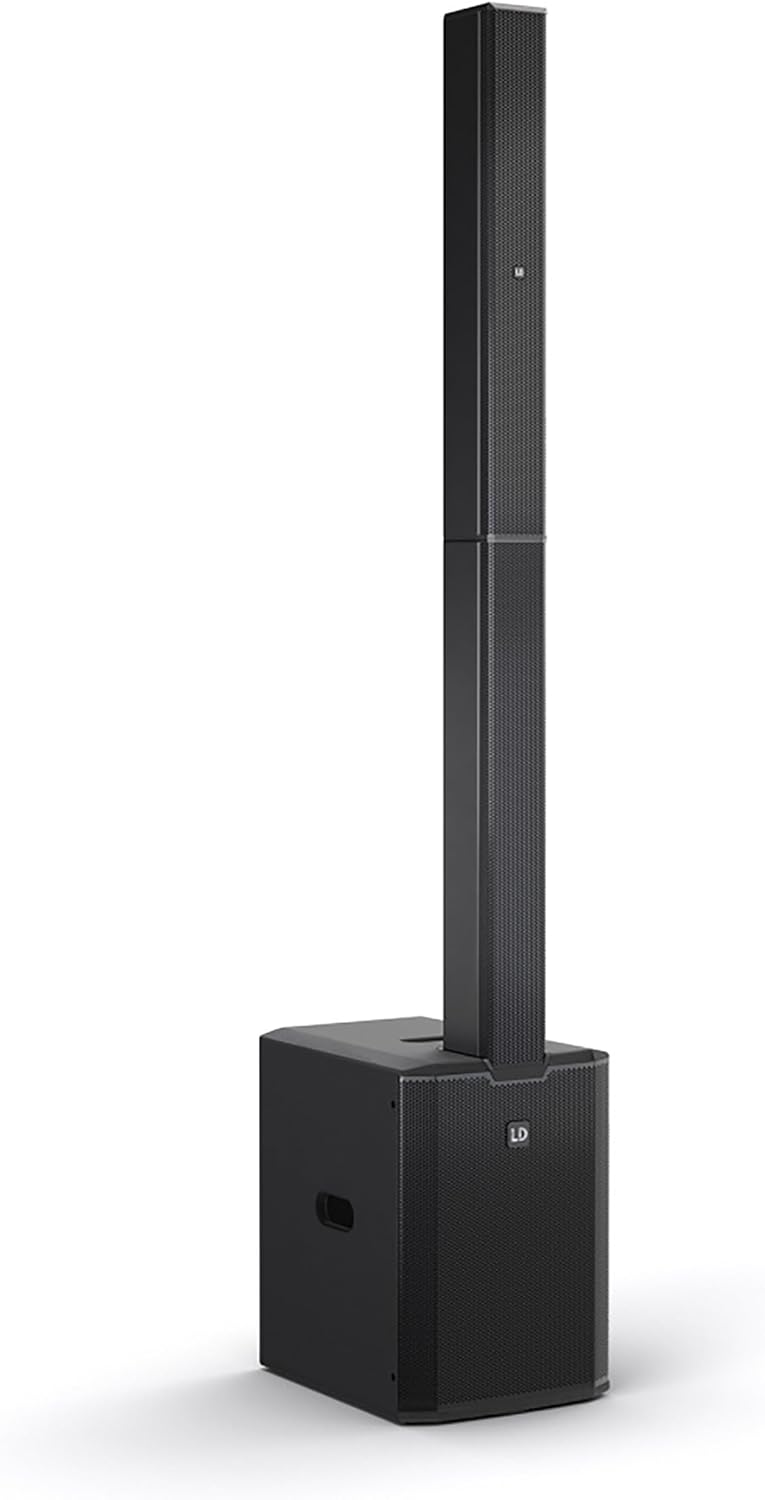
This image displays the complete LD Systems MAUI 28 G3 PA system, showing the subwoofer base with the two column elements securely mounted on top, forming a single, integrated unit.
4.1. Subwoofer
O subwoofer alberga o cable principal amplifier, power supply, and all input/output connections and controls. It provides robust bass frequencies for a full-range sound experience.

A direct, clear view of the MAUI 28 G3 subwoofer's control panel, detailing all labels for inputs, outputs, and adjustment knobs for main, sub, and cardioid settings.
Subwoofer Rear Panel Controls:
- MAIN Level: Axusta o volume de saída xeral do sistema.
- SUB Level: Adjusts the volume of the subwoofer independently.
- Cardioid ON/OFF: Activates or deactivates the cardioid dispersion mode for the subwoofer, reducing rearward sound radiation.
- Input L/R: XLR/TS combo jacks for connecting audio sources (e.g., mixer, instrument).
- THRU L/R: XLR outputs for linking to additional PA systems or monitors.
- SUB OUT: XLR output for connecting an external subwoofer.
- Interruptor de alimentación: Acende ou apaga a unidade.
- Entrada de alimentación: Para conectar o cable de alimentación CA.

An angled close-up of the subwoofer's rear panel, showing the various input and output connectors, level controls, and mode switches.
4.2. Column Elements
The two column elements contain 12 x 3.5-inch midrange drivers and 2 x 1-inch tweeters, designed for even sound distribution and constant horizontal dispersion. They connect directly to the subwoofer.

Un detallado view of the protective metal grille covering the speakers within one of the MAUI 28 G3 column elements.

A close-up image of the base of a column element, highlighting the multi-pin connector and alignment pins used to secure it to the subwoofer or another column element.
5. Configuración
Follow these steps to assemble and connect your MAUI 28 G3 system:
- Desempaquetar compoñentes: Retire con coidado todos os compoñentes da súa embalaxe.
- Posición do subwoofer: Place the subwoofer on a stable, level surface in your desired location.
- Assemble Column Elements:
- Take the first column element and align its base connector with the top connector of the subwoofer. Gently push down until it clicks into place.
- Take the second column element and align its base connector with the top connector of the first column element. Gently push down until it clicks into place.
- Conectar a fonte de audio: Connect your mixer, instrument, or other audio source to the Input L/R XLR/TS combo jacks on the subwoofer's rear panel.
- Conectar enerxía: Plug the supplied power cable into the power inlet on the subwoofer and then into a suitable AC power outlet.

The subwoofer and the two column elements are shown individually, positioned to demonstrate how they connect to form the complete PA system.

This image illustrates the three main components of the MAUI 28 G3 system: the subwoofer base and the two distinct column elements, shown detached and ready for assembly.
6. Funcionamento
- Encendido: Ensure all connections are secure, then switch the power button on the subwoofer to the 'ON' position.
- Axustar niveis: Comeza co MAIN Level e Nivel SUB knobs set to their minimum positions. Gradually increase the MAIN Level to your desired overall volume. Adjust the Nivel SUB to balance the bass frequencies with the rest of the sound.
- Modo cardioide: If you wish to reduce sound radiation behind the subwoofer, activate the Cardioid ON switch. This can help minimize stage rumble and improve sound clarity in certain environments.
- Monitoring/Linking: Usa o POR L/R outputs to send the audio signal to additional PA systems or stage monitors if required. The SUB OUT can be used to connect an external subwoofer for enhanced bass.
- Apagado: Before disconnecting power, turn down all level controls to minimum, then switch the power button to 'OFF'.
7. Mantemento
- Limpeza: Use a soft, dry cloth to clean the exterior surfaces of the system. Do not use abrasive cleaners or solvents.
- Almacenamento: When not in use, store the system in a dry, dust-free environment. If transporting, use appropriate protective covers or cases.
- Inspección: Comprobe periodicamente todos os cables e conectores para detectar signos de desgaste ou danos.
8 Solución de problemas
| Problema | Causa posible | Solución |
|---|---|---|
| Sen poder | Power cable disconnected; Power outlet faulty; Unit switched off | Check power cable connection; Test power outlet; Ensure power switch is ON |
| Sen saída de son | Input cables disconnected; Volume levels too low; Source device not playing | Check all audio cable connections; Increase MAIN/SUB levels; Verify audio source is active |
| Son distorsionado | Input signal too high; Volume levels too high; Faulty cable | Reduce input signal level from source; Lower MAIN/SUB levels; Try a different audio cable |
| O subwoofer non funciona | SUB Level too low; Cardioid mode affecting perception | Increase SUB Level; Test with Cardioid mode OFF |
9. Especificacións
| Característica | Detalle |
|---|---|
| Número de modelo | MAUI 28 G3 |
| Fonte de enerxía | Eléctrico con cable |
| Material | Aluminio |
| Peso do elemento | 60 libras |
| Número de canles | 2 |
| Entrada de audio | XLR/TS, 1/4'' (for line-level sources) |
| Tecnoloxía de conectividade | XLR |
| Cor | Negro |
| Tipo de montaxe | Montaxe de enchufe |
| Dispositivos compatibles | Headphone, Keyboard, DVD Player, Headset, Guitar, Smartphone, Television, Drum, Tablet, Laptop, Piano, MP3 Player |
10. Garantía e soporte
LD Systems products are manufactured to high-quality standards and come with a manufacturer's warranty. For specific warranty terms and conditions, please refer to the warranty card included with your product or visit the official LD Systems websitio.
For technical support, service, or inquiries, please contact your authorized LD Systems dealer or visit the Sistemas LD websitio para información de contacto.


