1. Produto rematadoview
The Technoline WT8945 is a radio-controlled wall clock designed for indoor use, offering precise timekeeping along with integrated temperature and humidity displays. Its timeless design with a black frame and white dial ensures clear readability and aesthetic appeal in various indoor environments.
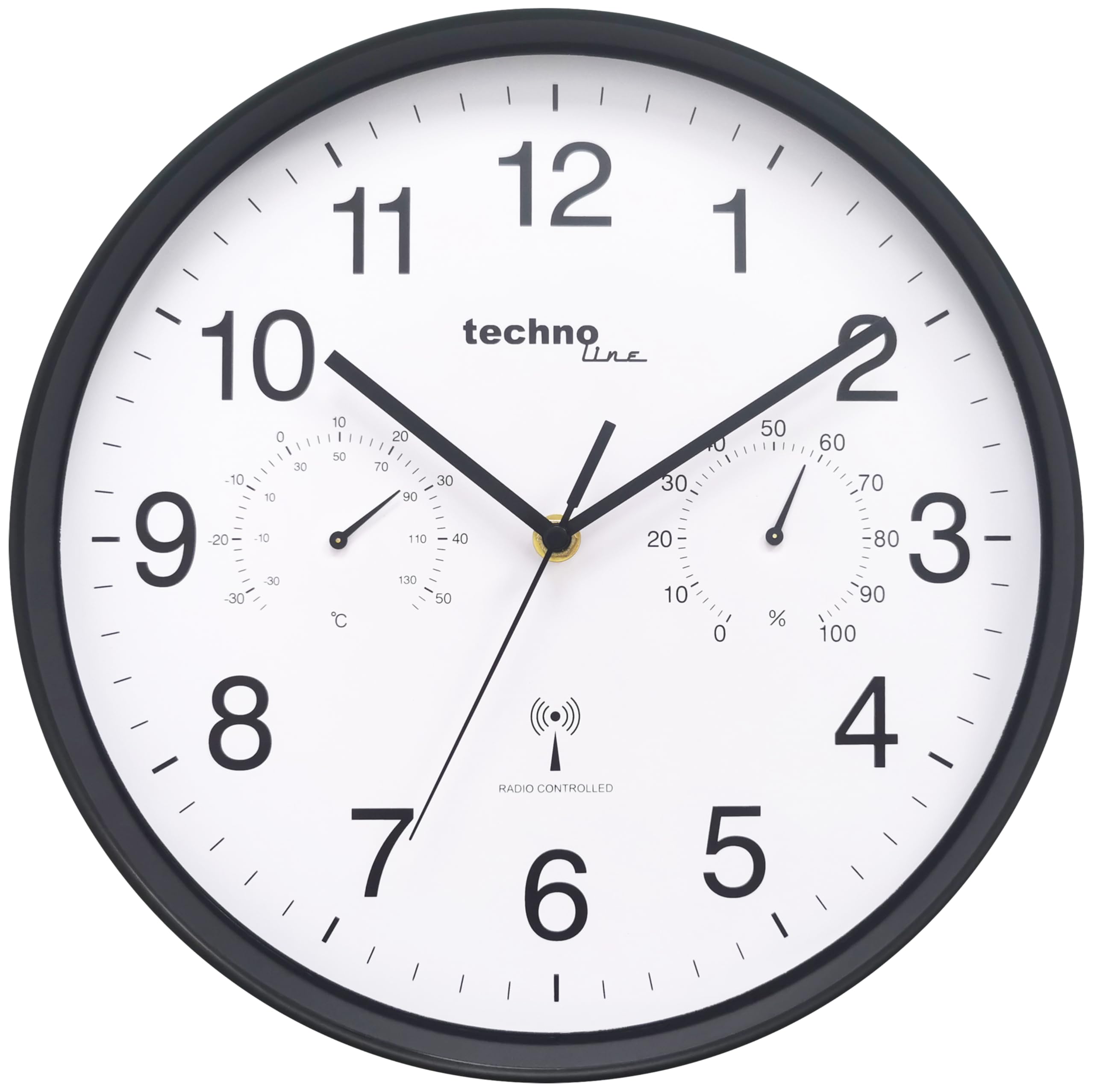
Imaxe 1.1: Fronte view of the Technoline WT8945 Radio-Controlled Wall Clock. The clock features a black frame, a white dial with large black numbers, and smaller analog displays for temperature and humidity.
As características principais inclúen:
- DCF-77 Radio Control: Ensures automatic and highly accurate time synchronization.
- Analog Temperature Display: Measures indoor temperature from -30 °C to +50 °C.
- Analog Humidity Display: Measures indoor humidity from 0% to 100%.
- Lexibilidade clara: High-contrast white dial with black numbers, visible from a distance.
- Construción duradeira: Robust plastic frame.
- Fonte de enerxía: Operates on 1 x AA Mignon LR06 battery (not included).

Imaxe 1.2: Visual representation of the clock's main features: temperature display, humidity display, and DCF-77 radio control, shown in a living room setting.
2. Contido do paquete
Ao desembalar, comproba o contido do paquete para asegurarte de que todos os artigos estean presentes e non estean danados.
- 1 x Technoline WT8945 Radio-Controlled Wall Clock
- 1 x Manual de instrucións (este documento)
3. Configuración
3.1 Instalación da batería
The clock requires one AA Mignon LR06 battery (not included) for operation.
- Localiza o compartimento da batería na parte traseira do reloxo.
- Abra a tapa do compartimento da batería.
- Insert one AA Mignon LR06 battery, ensuring the correct polarity (+ and -) as indicated inside the compartment.
- Pecha a tapa do compartimento da batería de forma segura.
Nota: Empregue sempre pilas novas do tipo recomendado. Non mesture pilas vellas e novas nin pilas de diferentes tipos.
3.2 Initial Time Synchronization
After battery installation, the clock will automatically attempt to synchronize with the DCF-77 radio signal. This process may take several minutes to a few hours, depending on your location and signal strength.
- The clock hands will typically move to the 12 o'clock position and then begin searching for the signal.
- Unha vez recibido o sinal, o reloxo axustarase automaticamente á hora correcta.
- For best reception, place the clock near a window and away from electronic devices that may cause interference.
3.3 Colocación
Choose a suitable indoor location for your wall clock. Consider the following:
- Visibilidade: Ensure the clock is easily visible from your desired viewárea de ing.
- Recepción do sinal: For optimal radio signal reception, avoid placing the clock near large metal objects, concrete walls, or other electronic devices that might interfere with the signal.
- Condicións ambientais: While the clock displays temperature and humidity, avoid placing it in direct sunlight, near heat sources, or in areas with extreme temperature fluctuations or high humidity, as this may affect the accuracy of the sensors.
4. Instrucións de funcionamento
4.1 Lectura da hora
The Technoline WT8945 displays time using traditional analog clock hands (hour, minute, second). The radio-controlled mechanism ensures the time is always accurate to the DCF-77 signal.
4.2 Lectura de temperatura e humidade
The clock features two smaller analog dials on its face:
- Visualización da temperatura: Located on the left side of the dial, it shows the indoor temperature in degrees Celsius (°C). The measurement range is from -30 °C to +50 °C.
- Visualización de humidade: Located on the right side of the dial, it shows the indoor relative humidity as a percentage (%). The measurement range is from 0% to 100%.
These displays provide a quick overview of your indoor climate conditions.
4.3 Manual Time Adjustment (If Radio Signal is Unavailable)
In areas where the DCF-77 radio signal is weak or unavailable, the clock can be manually set. This feature is particularly useful if the clock fails to synchronize automatically.
- Remove the battery from the clock.
- Wait for approximately 1 minute.
- Reinsert the battery. The clock hands will move to the 12 o'clock position.
- Immediately after the hands reach 12, a small adjustment wheel or button should be accessible on the back of the clock (often near the battery compartment). Use this to manually set the time.
- Once the desired time is set, the clock will operate as a standard quartz clock until a DCF-77 signal is successfully received, at which point it will automatically re-synchronize.
Nota: The exact method for manual adjustment may vary slightly. Refer to any specific markings or controls on the back of your clock if the above steps do not immediately apply.
5. Mantemento
Proper maintenance ensures the longevity and accurate operation of your Technoline WT8945 wall clock.
- Limpeza: Wipe the clock's surface with a soft, dry cloth. Do not use abrasive cleaners, solvents, or chemical agents, as these may damage the plastic frame or dial.
- Substitución da batería: Replace the AA battery annually, or when the clock hands stop moving or become erratic. Remove depleted batteries promptly to prevent leakage and damage to the clock mechanism.
- Protección ambiental: Protect the clock from extreme temperatures, direct sunlight, and high humidity.
6 Solución de problemas
If you encounter issues with your Technoline WT8945 clock, refer to the following troubleshooting guide:
| Problema | Causa posible | Solución |
|---|---|---|
| As agullas do reloxo non se moven nin paran. | Batería esgotada. | Substitúe a batería AA por outra nova. |
| O reloxo non se sincroniza ou mostra unha hora incorrecta. | Weak or no DCF-77 radio signal. Interference from other electronics. Incorrect initial setup. |
|
| Temperature or humidity display is inaccurate or stuck. | Sensor obstruction. Extreme environmental conditions. |
|
7. Especificacións

Imaxe 7.1: Dimensions of the Technoline WT8945 Wall Clock, showing a 30 cm diameter.
| Característica | Detalle |
|---|---|
| Marca | Techline |
| Número de modelo | WT8945 |
| Cor | Negro |
| Dimensións do produto (L x W x H) | 30 x 3.81 x 30 cm |
| Peso do elemento | 730 gramos |
| Material | Plástico |
| Tipo de visualización | Analóxico |
| Características especiais | Humidity Display, Radio-Controlled Time (DCF-77) |
| Rango de medición de temperatura | -30 °C a +50 °C |
| Rango de medición de humidade | 0% a 100% |
| Fonte de enerxía | 1 x AA Mignon LR06 Battery (not included) |
| Uso interior/exterior | Interior |
| Forma | Redondo |
8. Garantía e soporte
Technoline products are manufactured to high-quality standards. For information regarding warranty coverage, please refer to the warranty card included with your purchase or contact your retailer. For technical support or further assistance, please visit the official Technoline websitio ou póñase en contacto co seu departamento de atención ao cliente.
Conserve o comprobante de compra para calquera reclamación de garantía.


