Introdución
The bopmen Star10 Wireless Bluetooth Karaoke Microphone is a versatile 4-in-1 device designed for singing, acting as a portable handheld microphone, speaker, and featuring an integrated disco light. It offers high-resolution audio quality and extensive compatibility, making it suitable for various entertainment settings including car travel, home parties, and general use for adults and children.

Image: The Star10 Wireless Bluetooth Karaoke Microphone in Rose Gold, showcasing its sleek design and integrated disco ball.
Información de seguridade
- Non expoña o dispositivo a temperaturas ou humidades extremas.
- Evite deixar caer ou someter o dispositivo a fortes impactos.
- Manter fóra do alcance dos nenos pequenos para evitar riscos de asfixia por pezas pequenas.
- Use only the provided USB C-A cable for charging.
- Non intente desmontar nin modificar o dispositivo.
- Limpa o dispositivo cun pano suave e seco. Evita o uso de produtos químicos agresivos ou produtos de limpeza abrasivos.
Contido do paquete
Marque a caixa para os seguintes elementos:
- 1 x Karaoke microphone (Star10)
- 1 x USB C-A charging cable
- 1 x manual de usuario
Produto rematadoview
Familiarize yourself with the main controls and ports of your Star10 microphone.

Image: Detailed diagram illustrating the main control panel and bottom ports of the Star10 microphone, including Microphone Volume, On/Off/Play/Pause, Reverb On/Off, Volume Up/Down, Next/Previous Song, Tone Mode, Disco Light Control, USB Port, 3.5mm Earphone Jack, and TF Card slot.
Controis principais:
- Microphone Volume / Accompaniment Mode On/Off: Adjusts microphone volume or toggles accompaniment.
- On/Off, Play/Pause: Powers the device on/off and controls music playback.
- Reverb On/Off / Bluetooth & TF Card Mode: Toggles reverb effect and switches between input modes.
- Subir/Baixar o volume: Axusta o volume xeral do altofalante.
- Canción anterior/seguinte: Navega polas pistas.
- Modo de ton: Cycles through different voice effects.
- Disco Light Control / Twins Pairing: Controls the disco light and initiates Twins Mode pairing.
Bottom Ports:
- Luz indicadora: Shows device status (e.g., charging, connected).
- 3.5 mm Earphone Jack / Re-Set button inside: For private listening or resetting the device.
- Porto USB: Para cargar o micrófono.
- Ranura para tarxetas TF: For playing music directly from a micro TF card (up to 32GB, not included).
Configuración
Carga do micrófono:
- Connect the provided USB C-A cable to the USB port on the bottom of the microphone.
- Conecta o outro extremo do cable a un adaptador de corrente USB compatible (non incluído) ou a un porto USB do ordenador.
- The indicator light will show charging status. A full charge provides up to 10 hours of use (minimum 5 hours).
Encendido/apagado:
- Manteña premido o Activado/Desactivado/Reproducir/Pausa button for a few seconds to power on the microphone. You will hear an audible prompt.
- To power off, press and hold the same button until you hear the power-off prompt.
Instrucións de funcionamento
Conexión Bluetooth:
The Star10 microphone uses Bluetooth 5.2 for seamless connection to your devices.
- Power on the microphone. It will automatically enter Bluetooth pairing mode.
- On your smartphone, tablet, or other Bluetooth-enabled device, open the Bluetooth settings.
- Busca "STAR 10" in the list of available devices and select it to pair.
- Once connected, you will hear a confirmation prompt. You can now play music from your device through the microphone's speaker and sing along.

Image: The Star10 microphone demonstrating its wide compatibility, connecting wirelessly to smartphones, tablets, and laptops via Bluetooth.
Modo de tarxeta TF:
Play music directly from a micro TF card.
- Insert a micro TF card (up to 32GB, not included) with your music files into the TF Card slot on the bottom of the microphone.
- The microphone will automatically switch to TF Card mode. If not, press the Reverb On/Off / Bluetooth & TF Card Mode button to cycle modes.
- Usa o Canción anterior / seguinte botóns para navegar polas pistas e Reproducir/Pausa para o control da reprodución.
Disco Light Control:
Enhance your karaoke experience with the built-in disco light.
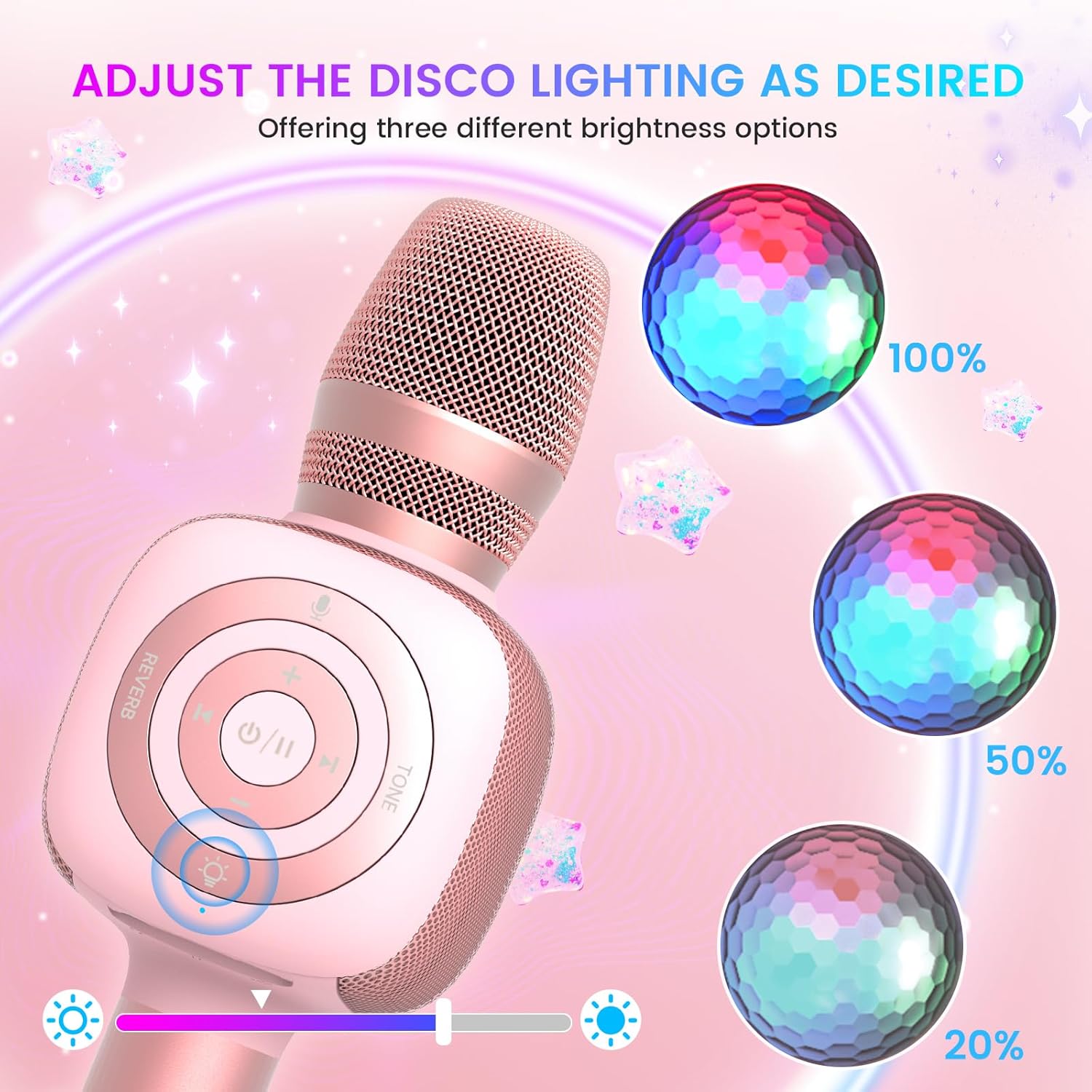
Image: The Star10 microphone's disco light feature, illustrating three adjustable brightness levels (100%, 50%, 20%) to suit different ambiance needs.
- Preme o Control de luces de discoteca button (light bulb icon) to cycle through three RGB color modes and brightness levels.
- Press again to turn the disco light off.
Tone Modes (Magic Mode):
Experiment with different voice effects for added fun.

Image: The Star10 microphone's "Magic Mode" feature, depicting icons for Male Voice, Female Voice, Cartoon Voice, and Monster Sound effects.
- Preme o Modo de ton button to cycle through various voice effects such as Male Voice, Female Voice, Cartoon Voice, and Monster Sound.
- Continue pressing to return to the original tone.
Twins Mode (Duet Mode):
Pair two Star10 microphones for a duet experience.

Image: Two individuals enjoying a duet, each holding a Star10 microphone, illustrating the "Twins Mode" functionality for shared singing experiences.
- Ensure both Star10 microphones are powered on.
- On one microphone, press and hold the Control de luces de discoteca button for 2 seconds until a prompt tone "LINK CONNECTED" is heard. This microphone is now in Twins Mode pairing.
- On your cellphone/device, perform Bluetooth pairing selection and choose either of the two microphones. Both microphones will now be connected and output audio.
- To exit Twins Mode, press and hold the Control de luces de discoteca button on the paired microphone for 2 seconds.
Mantemento
- Limpeza: Wipe the microphone with a soft, dry cloth. Do not use liquid cleaners or aerosols.
- Almacenamento: Garde o micrófono nun lugar fresco e seco, lonxe da luz solar directa e de temperaturas extremas.
- Coidado da batería: For optimal battery life, charge the microphone regularly, even if not in frequent use. Avoid fully discharging the battery for extended periods.
Resolución de problemas
| Problema | Causa posible | Solución |
|---|---|---|
| Microphone does not power on. | Batería baixa; o botón de acendido non se mantivo premido o tempo suficiente. | Charge the microphone fully; Press and hold the power button for 3-5 seconds. |
| Non se pode conectar por Bluetooth. | Microphone not in pairing mode; Device Bluetooth off; Interference. | Ensure microphone is on and in pairing mode; Enable Bluetooth on your device; Move closer to the microphone; Restart both devices. |
| Non se escoita son do altofalante. | Volume too low; Device volume too low; Incorrect mode. | Increase microphone volume; Increase device volume; Ensure correct mode (Bluetooth/TF Card). |
| Voice effects not working. | Presión incorrecta do botón. | Press the 'Tone Mode' button repeatedly to cycle through effects. |
| A luz da discoteca non funciona. | Light turned off. | Press the 'Disco Light Control' button to turn on/cycle modes. |
Especificacións
- Modelo: ESTRELA 10
- Marca: bopmen
- Factor de forma do micrófono: Portátil
- Tecnoloxía de conectividade: Bluetooth 5.2
- Fonte de enerxía: Alimentado por batería (inclúe 2 baterías de ións de litio)
- Duración da batería: Up to 10 hours (minimum 5 hours)
- Dimensións do produto: 18.7 x 16.54 x 12.2 polgadas
- Peso do artigo: 1.19 libras (540 gramos)
- Relación sinal-ruído: 52 dB
- Resposta en frecuencia: 10 kHz
- Dispositivos compatibles: Personal Computer, Smartphone, Karaoke Machine
- Característica especial: Mute Function, Disco Light, Voice Changer, Twins Mode
- Cor: Ouro rosa
- Usos recomendados: Interior/Exterior
Garantía e Soporte
Your bopmen Star10 Karaoke Microphone comes with a standard manufacturer's warranty. For detailed warranty information, please refer to the warranty card included in your package or visit the official bopmen websitio.
If you encounter any issues or have questions regarding your product, please do not hesitate to contact our professional customer service team. We are committed to providing support and assistance within 24 hours to ensure your satisfaction.
Información de contacto: Please refer to the contact details provided in your product packaging or on the official bopmen support page for the most up-to-date information.


