Introdución
This user manual provides detailed instructions for the operation and maintenance of your Jensen CD-660 Portable Stereo CD Player Boombox. Please read this manual thoroughly before using the device to ensure proper function and to maximize your listening experience. Keep this manual for future reference.
Instrucións de seguridade importantes
Para reducir o risco de descarga eléctrica, incendio ou lesións, siga sempre estas precaucións de seguridade básicas:
- Non expoña este aparello á choiva nin á humidade.
- Non bloquee ningunha abertura de ventilación.
- Non instale preto de fontes de calor como radiadores, rexistros de calor, cociñas ou outros aparellos (incluíndo amplificadores) que producen calor.
- Protexa o cable de alimentación para evitar que se pise ou se pinche.
- Use só anexos/accesorios especificados polo fabricante.
- Desenchufe este electrodoméstico durante tormentas eléctricas ou cando non o use durante longos períodos.
- Encargue toda a reparación a persoal de servizo cualificado.
Contido do paquete
Verifique que todos os elementos que se indican a continuación estean incluídos no seu paquete:
- Jensen CD-660 Portable Stereo CD Player Boombox
- Adaptador de CA (120 V)
- Manual do propietario
Produto rematadoview
Familiarize yourself with the various parts and controls of your Jensen CD-660 boombox.
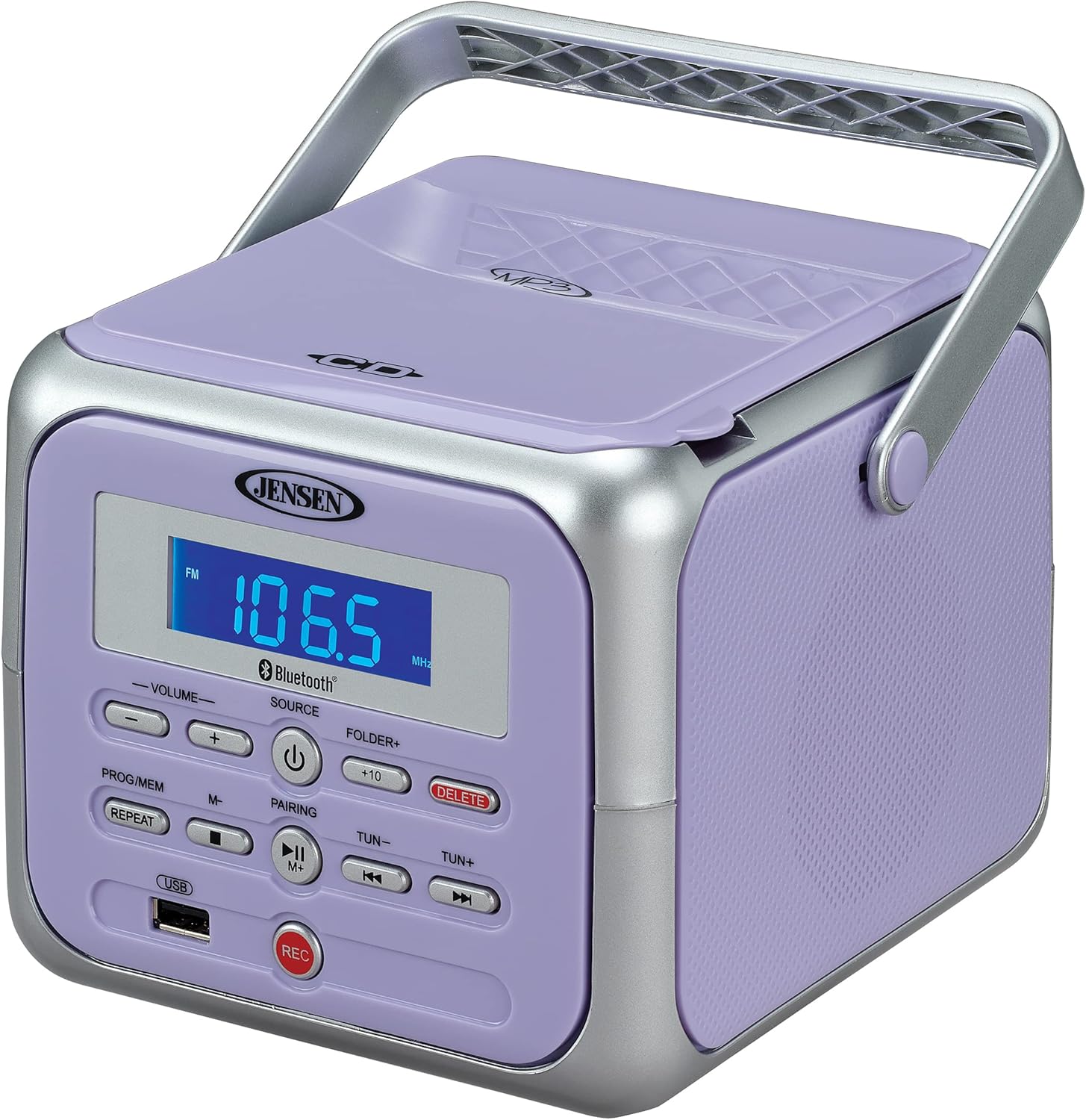
Figura 1: Fronte view of the Jensen CD-660 with the carrying handle extended. This image displays the main control panel, including the display screen, volume controls, source selection, and playback buttons.

Figura 2: Fronte view of the Jensen CD-660 with the carrying handle folded down. This perspective highlights the compact design and the arrangement of buttons and the LCD display.

Figura 3: Arriba view of the Jensen CD-660 with the CD compartment lid open, revealing the CD tray. This illustrates the top-loading mechanism for disc insertion.
Características do panel de control:
- Pantalla LCD: Shows current mode, track number, frequency, and other information.
- Botóns de VOLUME +/-: Axusta o nivel de saída de son.
- Botón SOURCE: Selects between CD, Bluetooth, FM Radio, and Aux-in modes.
- Botón POWER: Acende ou apaga a unidade.
- PROG/MEM Button: Programs CD tracks or stores FM radio presets.
- Botón REPEAT: Repite a pista actual ou todas as pistas.
- PAIRING Button: Inicia o modo de emparellamento Bluetooth.
- Botón REPRODUCIR/PAUSA: Inicia ou pon en pausa a reprodución.
- Botón STOP: Detén a reprodución.
- Botóns SALTAR/BUSCAR (◀◀ / ▶▶): Salta pistas ou busca dentro dunha pista.
- TUN +/- Buttons: Sintoniza a frecuencia de radio FM.
- FOLDER+ Button: Navigates to the next folder on a USB device.
- Botón +10: Skips 10 tracks forward on CD/USB.
- Botón DELETE: Elimina gravacións files desde USB.
- Botón REC: Initiates recording to a USB flash drive.
- Porto USB: Para reprodución e gravación desde unha unidade flash USB.
- Jack de entrada auxiliar: Conecta dispositivos de audio externos.
- Jack para auriculares: Para escoita privada.
Configuración
Alimentación da Unidade
The Jensen CD-660 can be powered by either the included AC adapter or batteries.
Funcionamento con alimentación CA:
- Plug the AC adapter into the AC IN jack located on the back of the unit.
- Plug the other end of the AC adapter into a standard 120V AC wall outlet.
Funcionamento da batería:
For portable use, the unit requires 6 x 'C' (UM-2) batteries (not included).
- Abra a tapa do compartimento das baterías na parte inferior da unidade.
- Insira 6 pilas de tamaño 'C', asegurándose de manter a polaridade correcta (+/-) como se indica no interior do compartimento.
- Pecha a tapa do compartimento da batería de forma segura.
Nota: Disconnect the AC adapter when operating on battery power. Remove batteries if the unit will not be used for an extended period.
Instrucións de funcionamento
Funcionamento xeral:
- Preme o POTENCIA botón para acender a unidade.
- Preme o FONTE button repeatedly to select your desired mode (CD, Bluetooth, FM, USB, AUX).
- Axuste o volume empregando o VOLUME +/- botóns.
Reprodución de CD:
The unit supports CD, CD-R/RW, MP3, and WMA disc formats.
- Abra a tapa do compartimento do CD.
- Coloque un CD coa etiqueta cara arriba no eixo.
- Pecha a tapa do compartimento do CD.
- Preme o FONTE para seleccionar o modo CD.
- Preme o REPRODUCIR/PAUSA botón para iniciar a reprodución.
- Usa o SALTAR / BUSCAR buttons (◀◀ / ▶▶) to navigate tracks.
- Preme o PARA botón para deter a reprodución.
Operación Bluetooth:
Transmite audio sen fíos desde o teu dispositivo con Bluetooth.
- Preme o FONTE button to select Bluetooth mode. The display will show "BT" and flash, indicating pairing mode.
- No teu dispositivo Bluetooth, activa o Bluetooth e busca os dispositivos dispoñibles.
- Select "JENSEN CD-660" from the list of devices.
- Once paired, the display will stop flashing and show "BT".
- Start playing audio on your connected device.
- Usa o REPRODUCIR/PAUSA e SALTAR / BUSCAR buttons on the boombox or your device to control playback.
Radio FM:
Listen to your favorite FM radio stations.
- Preme o FONTE botón para seleccionar o modo de radio FM.
- Extend the FM wire antenna for optimal reception.
- Preme o ATUNALIZACIÓN +/- botóns para sintonizar manualmente unha emisora.
- Manteña premido o ATUNALIZACIÓN +/- buttons for automatic scanning to the next available station.
Storing and Recalling Presets:
The unit can store up to 30 FM presets.
- Sintonice a emisora FM desexada.
- Preme o PROG / MEM button. The display will show a flashing preset number.
- Usa o SALTAR / BUSCAR buttons (◀◀ / ▶▶) to select the desired preset number.
- Preme o PROG / MEM de novo para confirmar e gardar a emisora.
- To recall a preset, press the PROG / MEM button repeatedly to cycle through stored stations.
Reprodución USB:
Play MP3, WAV, or FLAC audio files dunha unidade flash USB.
- Insira unha unidade flash USB no porto USB.
- Preme o FONTE botón para seleccionar o modo USB.
- The unit will automatically begin playing the first compatible audio file.
- Usa o SALTAR / BUSCAR buttons (◀◀ / ▶▶) to navigate tracks.
- Usa o CARPETA+ button to navigate between folders on the USB drive.
- O +10 button can be used to skip 10 tracks forward.
Gravación USB:
Record audio directly to a USB flash drive from CD, FM Radio, Aux-in, or Bluetooth sources.
- Insira unha unidade flash USB no porto USB.
- Select the desired audio source (CD, FM, AUX, or Bluetooth).
- Start playback of the audio you wish to record.
- Preme o REC para comezar a gravación. A pantalla indicará o estado da gravación.
- Preme o REC botón de novo para deter a gravación.
- Para eliminar un gravado file, navega ata file in USB playback mode and press the ELIMINAR botón.
Aux-in Connection:
Connect external audio devices like smartphones or tablets.
- Connect one end of a 3.5mm audio cable (not included) to the Aux-in jack on the boombox.
- Conecta o outro extremo do cable á toma de auriculares ou á saída de audio do teu dispositivo externo.
- Preme o FONTE button to select Aux-in mode.
- Comeza a reproducir audio no teu dispositivo externo.
- Axusta o volume tanto no boombox como no dispositivo externo para obter un son óptimo.
Mantemento
Limpeza da unidade:
- Limpe o exterior da unidade cun suave, damp pano. Non use produtos de limpeza ou disolventes abrasivos.
- Para a lente do CD, use un disco limpador de lentes de CD especializado.
Coidado da batería:
- Retire as pilas se non vai usar a unidade durante un período prolongado para evitar fugas.
- Non mesture pilas antigas e novas, nin tipos diferentes de pilas.
Resolución de problemas
If you encounter issues with your Jensen CD-660, refer to the following table for common problems and solutions.
| Problema | Causa posible | Solución |
|---|---|---|
| Sen poder | Adaptador de CA non conectado; Pilas esgotadas ou inseridas incorrectamente. | Ensure AC adapter is securely plugged in; Replace batteries or check polarity. |
| Sen son | Volume demasiado baixo; Fonte incorrecta seleccionada; Auriculares conectados. | Increase volume; Select correct source; Disconnect headphones. |
| Non se reproduce o CD | CD inserted incorrectly; Disc is dirty or scratched; CD compartment not closed. | Insert CD with label side up; Clean or replace disc; Close compartment securely. |
| Fallou o emparejamento por Bluetooth | Device too far; Bluetooth not enabled on external device; Boombox not in pairing mode. | Move device closer; Enable Bluetooth; Ensure boombox is in BT pairing mode. |
| Mala recepción FM | Antena non estendida; sinal débil. | Fully extend the FM wire antenna; Reposition the unit for better reception. |
| Problemas de reprodución por USB | Non é compatible file format; USB drive not properly inserted or corrupted. | Garantir files are MP3/WAV/FLAC; Reinsert USB drive; Try a different USB drive. |
Especificacións
| Característica | Detalle |
|---|---|
| Número de modelo | CD-660 |
| Fonte de enerxía | AC 120V (included adapter) or 6 x 'C' (UM-2) batteries (not included) |
| Conectividade | Bluetooth 5.1 (A2DP, AVRCP), USB, Aux-in |
| Compatibilidade con CD | CD, CD-R/RW, MP3, WMA |
| Reproducción USB | MP3, WAV, FLAC |
| Radio FM | Stereo Receiver with 30 Presets, PLL Digital Tuning |
| Dimensións (W x H x D) | 6.38" x 5.2" x 6.57" (16.2 cm x 13.2 cm x 16.7 cm) |
| Peso | Aproximadamente 2.46 libras (1.12 kg) |
Garantía e Soporte
This Jensen CD-660 Portable Stereo CD Player Boombox comes with a manufacturer's warranty. Please refer to the included Owner's Manual for specific details regarding warranty coverage, terms, and conditions. For technical support or service inquiries, please contact Jensen customer service directly. Contact information can typically be found in the Owner's Manual or on the official Jensen websitio.