1. Introdución
Thank you for choosing the BuTure VC70 Cordless Vacuum Cleaner. This manual provides important information on the safe operation, maintenance, and troubleshooting of your new appliance. Please read this manual thoroughly before first use and keep it for future reference.
2. Instrucións de seguridade
Siga sempre as precaucións de seguridade básicas ao usar electrodomésticos para reducir o risco de incendio, descarga eléctrica ou lesións.
- Non use ao aire libre nin en superficies húmidas.
- Non permita que se use como xoguete. É necesario prestar moita atención cando o usen ou preto dos nenos.
- Use só como se describe neste manual. Empregue só os accesorios recomendados polo fabricante.
- Non o use con cable ou enchufe danados. Se o aparello non funciona como debería, caeu, estrañouse, deixouse ao aire libre ou caeu á auga, devólveo a un centro de servizo.
- Non tire ou transporte co cable, non use o cable como asa, non peche unha porta sobre o cable nin tire do cable por bordos ou esquinas afiadas. Non pase o aparello sobre o cable. Manteña o cable lonxe de superficies quentes.
- Non desconecte tirando do cable. Para desenchufar, agarre o enchufe, non o cable.
- Non manipule o enchufe ou o aparello coas mans molladas.
- Non coloque ningún obxecto nas aberturas. Non use con ningunha abertura bloqueada; manteña libre de po, pelusa, cabelos e calquera cousa que poida reducir o fluxo de aire.
- Manteña o cabelo, a roupa solta, os dedos e todas as partes do corpo lonxe das aberturas e das partes móbiles.
- Non coller nada que arde ou fume, como cigarros, mistos ou cinzas quentes.
- Non o use para recoller líquidos inflamables ou combustibles, como a gasolina, nin o use en áreas onde poidan estar presentes.
- Non recolla materiais tóxicos, como lixivia con cloro, amoníaco ou desatascadores.
- Non use sen bolsa de po e/ou filtros colocados.
- Desactiva todos os controis antes de desconectar.
- Teña coidado extra ao limpar as escaleiras.
- Non o empregue para recoller obxectos duros ou afiados como vidro, cravos, parafusos, moedas, etc.
3. Contido do paquete
Carefully unpack your BuTure VC70 and check that all items are present and in good condition. If any items are missing or damaged, please contact customer support.

Figura 3.1: All components of the BuTure VC70 cordless vacuum cleaner, including the main unit, extension wand, floor brush, crevice tool, 2-in-1 brush, wall mount, charger, and spare filter.
- Main Vacuum Body (with dustbin and motor)
- Varita de extensión
- Cepillo de chan motorizado
- Ferramenta de fendas
- Ferramenta Pincel 2 en 1
- Soporte de montaxe en parede
- Adaptador de alimentación/cargador
- Filtro de recambio
- Manual de usuario (este documento)
4. Produto rematadoview
Familiarize yourself with the main parts of your BuTure VC70 vacuum cleaner.

Figura 4.1: The BuTure VC70 cordless vacuum cleaner shown as a stick vacuum, and in handheld configurations with different attachments, along with the wall mount and filters.
- Unidade principal: Contén o motor, o colector de po e o panel de control.
- Varita de extensión: Conecta a unidade principal ao cepillo de chan para a limpeza en posición vertical.
- Cepillo de chan motorizado: Features an integrated brush with soft and hard bristles for effective cleaning on various floor types.
- Basura: Recipiente transparente para recoller po e residuos.
- Sistema de filtración: Multi-layer system designed to capture fine dust and allergens.
- Pantalla táctil LED: Displays battery level, current mode, and maintenance reminders.
5. Configuración e montaxe
Siga estes pasos para montar o seu aspirador para o primeiro uso.
5.1 Carga inicial
Antes do primeiro uso, carga completamente a batería. A batería é extraíble para unha carga cómoda.
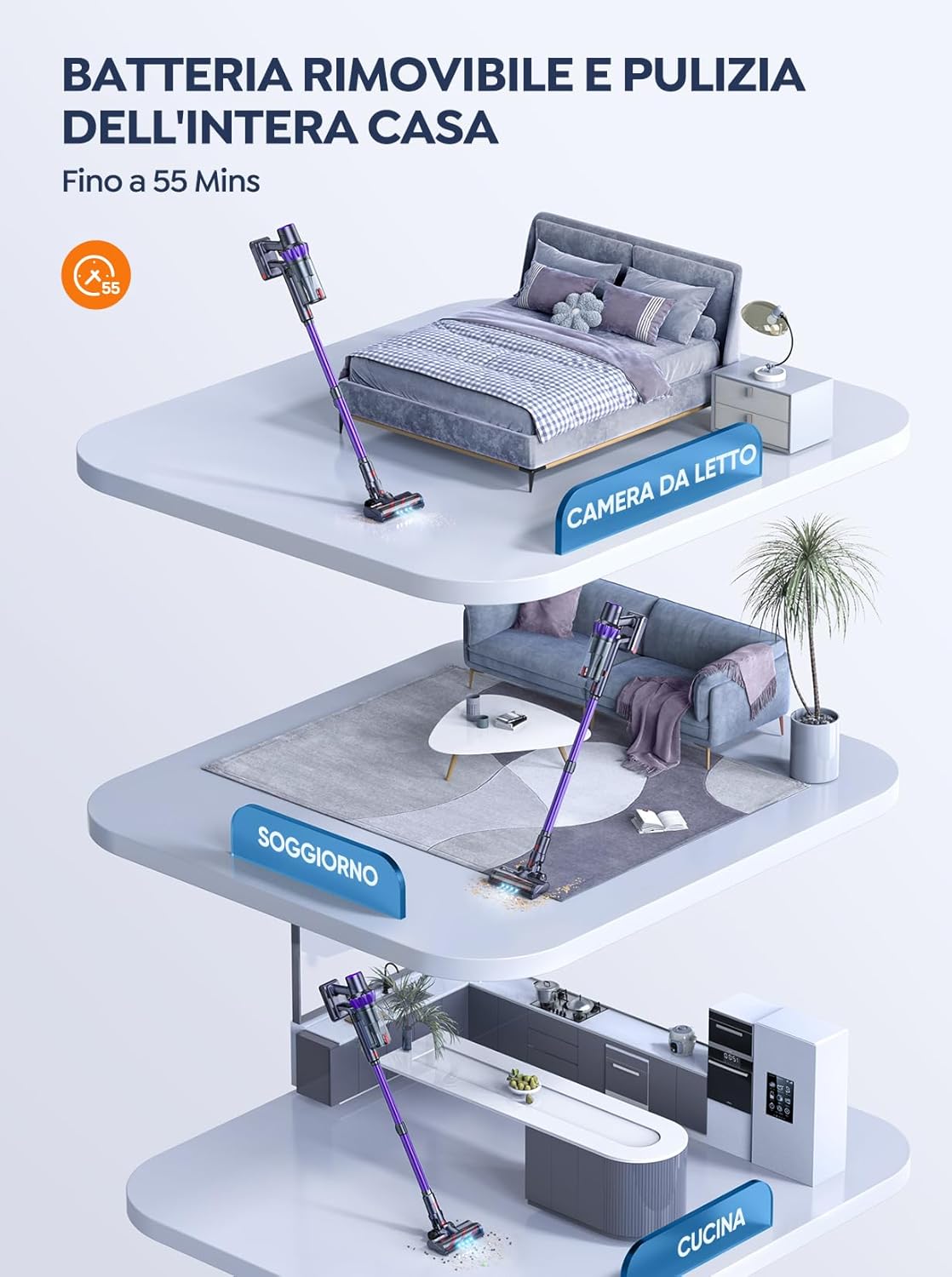
Figura 5.1: The removable battery allows for flexible charging options and extended cleaning time across multiple rooms.
- Connect the power adapter to the charging port on the main unit or directly to the battery if removed.
- Conecte o adaptador a unha toma de corrente.
- The LED screen will indicate charging status. A full charge typically takes 4-5 hours.
5.2 Montaxe do aspirador
- Conecte a variña de extensión: Insira o extremo superior da vara de extensión no corpo principal da aspiradora ata que encaixe no seu lugar.
- Fixar o cepillo para o chan: Insert the bottom end of the extension wand into the motorized floor brush until it clicks into place.
- Attach Accessories (for handheld use): For handheld cleaning, you can directly attach the crevice tool or 2-in-1 brush tool to the main vacuum body.
6. Funcionamento da aspiradora
Learn how to effectively use your BuTure VC70 for various cleaning tasks.
6.1 Acendido/apagado e selección de modo

Figura 6.1: The intelligent LED touch screen provides real-time information on battery status and selected cleaning mode.
- Para acender: Press the power button on the main unit. The vacuum will start in the default mode.
- Para cambiar de modo: Use the mode selection button on the LED touch screen to cycle through available suction modes (e.g., Eco, Standard, Max, Auto).
- Para apagar: Preme de novo o botón de acendido.
6.2 Intelligent Automatic Suction Mode
The BuTure VC70 features an intelligent automatic suction mode that adjusts power based on floor type.
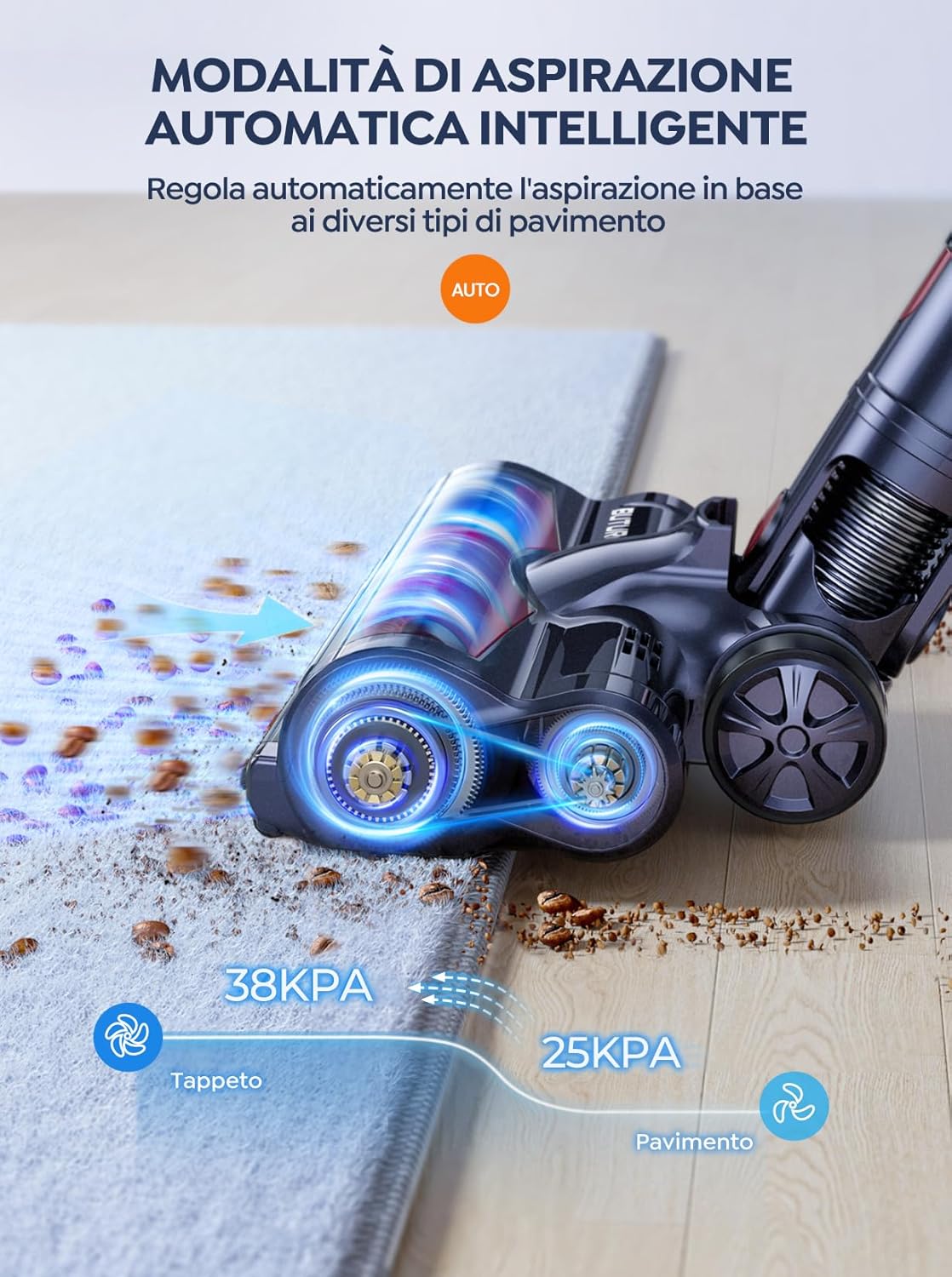
Figura 6.2: The vacuum automatically adjusts suction power, providing 38KPA for carpets and 25KPA for hard floors in Auto mode.
In Auto mode, the vacuum detects the floor type and automatically increases suction for carpets (up to 38KPA) and reduces it for hard floors (25KPA), optimizing cleaning efficiency and battery life.
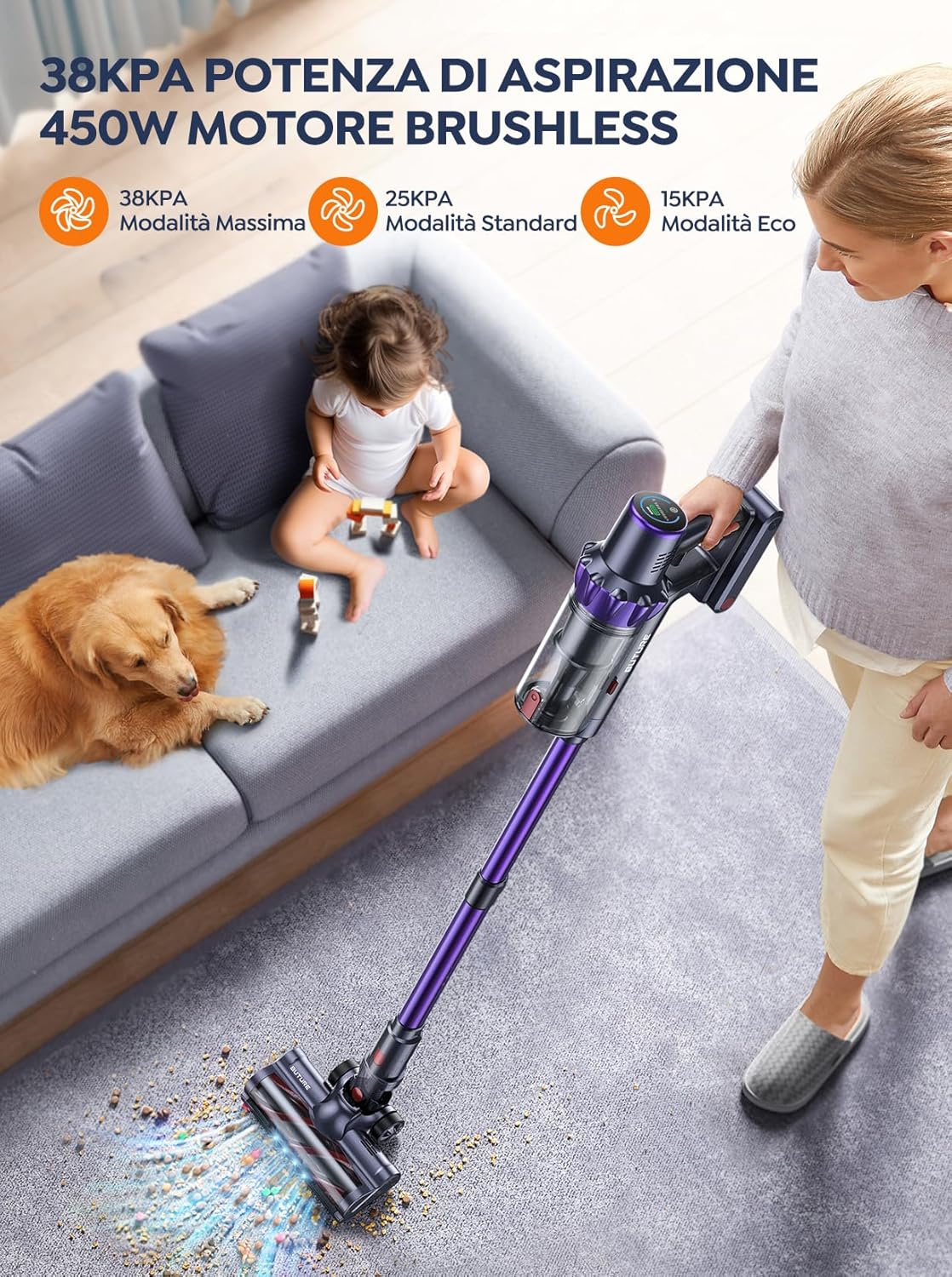
Figura 6.3: The 450W brushless motor delivers powerful suction, with modes including 38KPA Max, 25KPA Standard, and 15KPA Eco.
6.3 Usando anexos
- Ferramenta de fendas: Ideal para ocos estreitos, esquinas e bordos.
- Ferramenta de pincel 2 en 1: Use the brush for delicate surfaces like upholstery or curtains, and the nozzle for general dusting.
- Cepillo de chan motorizado: Designed for efficient cleaning of both hard floors and carpets. Its integrated bristles effectively pick up various debris.

Figura 6.4: The motorized floor brush features a combination of soft and hard bristles to effectively clean different types of debris from various floor surfaces.
7. Mantemento
Un mantemento regular garante un rendemento óptimo e prolonga a vida útil do teu aspirador.
7.1 Baleirar o colector de lixo
Baleirar o colector de po despois de cada uso ou cando se alcance a liña de enchido MÁX.
- Prema o botón de liberación do colector de po para separalo da unidade principal.
- Open the dustbin lid and empty contents into a trash can.
- Close the lid and reattach the dustbin to the main unit.
7.2 Limpeza dos filtros
The BuTure VC70 features an advanced multi-layer filtration system. Clean filters regularly to maintain suction power.

Figura 7.1: The advanced multi-layer filtration system captures 99.99% of dust and dirt, ensuring cleaner exhaust air.
- Retire o colector de po e localice os filtros que hai no seu interior.
- Gently tap the filters to remove loose dust.
- Rinse the filters under cold running water. Ensure they are completely dry before reinserting (allow 24-48 hours for air drying).
- Replace filters every 3-6 months depending on usage.
7.3 Limpeza do rolo de cepillo
Comprobe periodicamente o rolo do cepillo para ver se ten cabelo enredado ou residuos.
- Apague o aspirador e desmonte o cepillo motorizado para chans.
- Locate the brush roll access latch/button and open it.
- Remove the brush roll. Use scissors or a cleaning tool to cut and remove any tangled hair or fibers.
- Volva colocar o rolo do cepillo e asegure o pestillo de acceso.
8 Solución de problemas
Se tes problemas co teu aspirador, consulta a seguinte táboa para ver os problemas e as solucións máis habituais.
| Problema | Causa posible | Solución |
|---|---|---|
| O baleiro non se acende | A batería non está cargada A batería non está instalada correctamente | Cargue a batería completamente Asegúrate de que a batería estea ben encaixada no seu lugar |
| Baixo poder de succión | O lixo está cheo Os filtros están obstruídos O rolo de cepillo está enredado Hose/nozzle is blocked | Baleirar o colector de lixo Limpar ou substituír os filtros Limpar o rolo de pincel Check for and remove blockages |
| O rolo de pincel non xira | O rolo de cepillo está enredado Problema co motor do cepillo | Limpar o rolo de pincel Ponte en contacto co servizo de atención ao cliente se o problema persiste |
| Vacuum stops suddenly | Protección contra sobrecalentamento activada Batería baixa | Turn off and allow to cool for 30 minutes Cargue a batería |
9. Especificacións
Technical specifications for the BuTure VC70 Cordless Vacuum Cleaner.
| Característica | Especificación |
|---|---|
| Número de modelo | VC70 |
| Marca | BuTure |
| Potencia nominal | 450 vatios |
| Voltage | 100-240 voltios |
| Capacidade do lixo | 1.5 litros |
| Nivel de ruído | 68 dB |
| Peso do elemento | 1.81 quilogramos (aprox. 4 libras) |
| Tipo de batería | Ion de litio |
| Cor | Violeta |
10. Garantía e soporte
BuTure products are manufactured to the highest quality standards. For warranty information or technical support, please refer to the warranty card included with your purchase or visit the official BuTure website. Please have your model number (VC70) and purchase details ready when contacting support.