1. Introdución
This manual provides detailed instructions for the setup, operation, and maintenance of your Creative Sound Blaster Katana SE Multi-Channel Gaming Soundbar. Designed for an immersive audio experience, this soundbar features 180W peak power, a bi-amplified 4-driver design, Super X-Fi technology, and customizable RGB lighting. Please read this manual thoroughly before using your device to ensure optimal performance and safety.

Figure 1: Creative Sound Blaster Katana SE Gaming Soundbar
2. Información importante de seguridade
- Le estas instrucións.
- Conserve estas instrucións.
- Presta atención a todas as advertencias.
- Siga todas as instrucións.
- Non use este aparello preto da auga.
- Limpar só cun pano seco.
- Non bloquee ningunha abertura de ventilación. Instáleo segundo as instrucións do fabricante.
- Non instale preto de fontes de calor como radiadores, rexistros de calor, cociñas ou outros aparellos (incluíndo amplificadores) que producen calor.
- Protexa o cable de alimentación para evitar que se pise ou se pinche, especialmente nos enchufes, tomas de corrente e no punto de saída do aparello.
- Use só anexos/accesorios especificados polo fabricante.
- Desenchufe este aparello durante tormentas eléctricas ou cando non se use durante longos períodos de tempo.
3. Contido do paquete
Verifica que todos os elementos estean presentes no teu paquete:
- Creative Sound Blaster Katana SE Soundbar
- Subwoofer (wired)
- Control remoto
- Adaptador de alimentación
- Cable USB-C
- Cable óptico
4. Produto rematadoview
The Sound Blaster Katana SE is an all-in-one soundbar designed for powerful and immersive audio. It features a sleek design with integrated controls and a front-facing display.
4.1. Soundbar Components
- Controis do panel superior: Power, Volume Up/Down, Source, Mode, SXFI.
- Pantalla frontal: Shows current source (USB, AUX, OPTICAL, BT, TV), volume level, and selected sound mode.
- Front Headphone Jack: For connecting headphones directly.
- Micrófono incorporado: Para comunicación de voz.
- RGB Lighting Strip: Customizable lighting effects located at the bottom of the soundbar.
- Condutores: bi-amplified 4-driver design for clear and precise audio.

Figura 2: Fronte view of the Sound Blaster Katana SE with RGB lighting
4.2. Conexións do panel traseiro
The rear panel provides various ports for connecting to your devices:
- HDMI Out (ARC): For connecting to a TV with Audio Return Channel support.
- SXFI Out: Dedicated port for Super X-Fi enabled headphones.
- Entrada de audio USB: For digital audio connection to PC/Mac.
- Entrada auxiliar: Entrada de audio analóxica de 3.5 mm.
- Entrada óptica: Entrada de audio óptico dixital.
- Sub Saída: For connecting the wired subwoofer.
- Entrada de enerxía: Para o adaptador de corrente.

Figure 3: Rear panel with HDMI ARC, SXFI Out, USB Audio In, Aux In, Optical In, Sub Out, and Power Input.
4.3. Subwoofer
The included wired subwoofer enhances bass response for a more dynamic audio experience.

Figura 4: Interno view showing the soundbar's bi-amplified drivers and the subwoofer's design.
5. Configuración
Follow these steps to set up your Sound Blaster Katana SE:
- Colocación: Place the soundbar on a stable surface below your TV or monitor. Position the subwoofer on the floor near the soundbar for optimal bass.
- Conectar subwoofer: Connect the wired subwoofer cable to the 'Sub Out' port on the soundbar's rear panel.
- Conectar enerxía: Connect the power adapter to the soundbar's power input and then plug it into a wall outlet.
- Conectar a fonte de audio: Choose your preferred audio connection method (HDMI ARC, Optical, USB, Aux, or Bluetooth) and connect the appropriate cable.
Video 1: Official product video demonstrating the Sound Blaster Katana SE's features and connectivity options.
6. Opcións de conectividade
The Sound Blaster Katana SE offers a wide range of connectivity to suit various devices:
- HDMI Out (ARC): Conéctao ao porto HDMI ARC do teu televisor para obter audio e control de alta calidade.
- Entrada de audio USB: Ideal for connecting to PCs, Macs, or gaming consoles that support USB audio.
- Entrada auxiliar: Usa un cable de audio de 3.5 mm para conectar dispositivos cunha saída de audio analóxica.
- Entrada óptica: For digital audio connection from TVs, game consoles, or other media players.
- Bluetooth 5.0: Pair wirelessly with your mobile devices, tablets, or computers for convenient audio streaming.
- SXFI Out: Connect Super X-Fi certified headphones for a personalized holographic audio experience.

Figure 5: Soundbar showcasing versatile connectivity with gaming consoles and mobile devices.
7. Instrucións de funcionamento
7.1. Acendido/apagado
Press the Power button on the soundbar's top panel or the remote control to turn the device on or off.
7.2. Control de volume
Use the Volume Up (+) and Volume Down (-) buttons on the soundbar or remote to adjust the audio level. The current volume will be displayed on the front panel.
7.3. Selección da fonte
Press the 'Source' button on the soundbar or remote to cycle through available input sources (HDMI ARC, USB, Aux, Optical, Bluetooth).
7.4. Modos de son
The soundbar features optimized sound modes for different content types. Press the 'Mode' button on the soundbar or remote to switch between:
- Música: Mellorado para a reprodución musical.
- Películas: Optimizado para audio cinematográfico.
- Xogos: Tailored for immersive gaming soundscapes.
- Effects Off: Neutral audio profile.
7.5. Usando o mando a distancia
The included remote control provides full functionality for the soundbar, including power, volume, source, mode, SXFI, RGB lighting, and custom buttons.
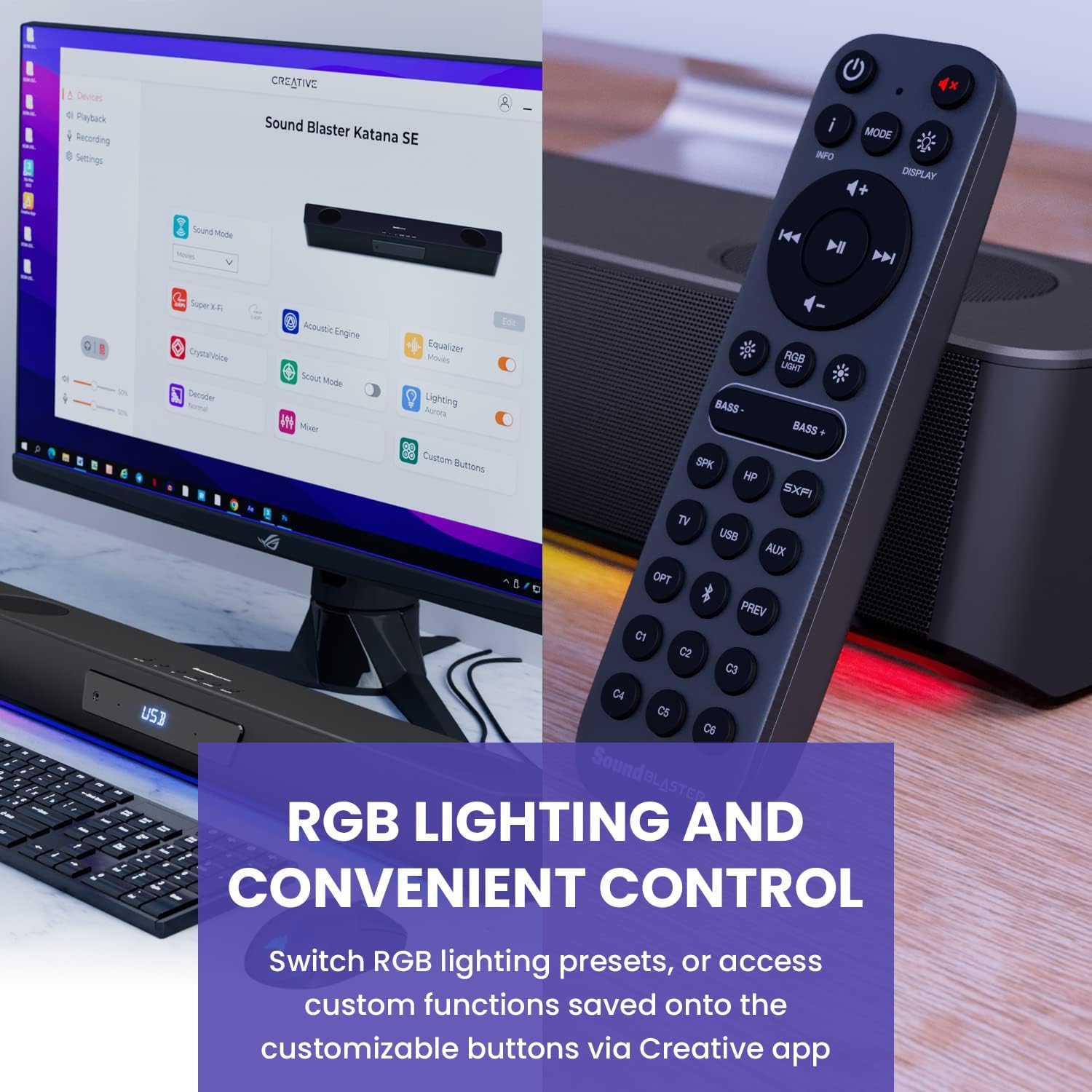
Figure 6: Remote control for the Sound Blaster Katana SE.
7.6. Creative App Customization
For advanced customization, download the Creative app on your PC or Mac. The app allows you to:
- Tune Audio Performance: Adjust EQ settings and activate Sound Blaster processing technologies.
- Personaliza a iluminación RGB: Select from various RGB presets or create your own custom lighting effects.
- Map Custom Functions: Assign specific commands to the six customizable buttons on the remote control.

Figure 7: Creative app interface showing sound mode, Super X-Fi, Acoustic Engine, Equalizer, CrystalVoice, Scout Mode, Lighting, Decoder, Mixer, and Custom Buttons.
8. Super X-Fi Technology
Super X-Fi technology personalizes your headphone audio experience for optimized and realistic listening. It recreates the soundstage of a multi-speaker system in your headphones.
- SXFI Battle Mode: Obtén unha vantaxe competitivatage in FPS games by accurately pinpointing enemy locations through enhanced audio cues.

Figure 8: Super X-Fi and SXFI Battle Mode for enhanced gaming audio.
9. Micrófono incorporado
The Sound Blaster Katana SE includes a built-in beamforming microphone, allowing you to participate in calls or in-game voice chat directly through the soundbar.
10. Iluminación RGB
The integrated RGB lighting strip can be customized to match your setup or mood. Use the remote control to cycle through presets or the Creative app for advanced color and effect adjustments.
11. Mantemento
To ensure the longevity and performance of your Sound Blaster Katana SE:
- Manteña o dispositivo limpo limpo cun pano suave e seco.
- Avoid using liquid cleaners or aerosols.
- Asegúrese de que as aberturas de ventilación non estean obstruídas.
- Non expoña o dispositivo a temperaturas ou humidades extremas.
12 Solución de problemas
Se tes problemas coa barra de son, consulta as seguintes solucións habituais:
- Sen son: Check all cable connections (power, audio source, subwoofer). Ensure the correct input source is selected on the soundbar. Verify the volume is not muted or too low.
- Son distorsionado: Try reducing the volume. Check audio cable integrity. Ensure the audio source is providing a clean signal.
- Problemas de conectividade Bluetooth: Ensure the soundbar is in Bluetooth pairing mode. Delete the soundbar from your device's Bluetooth list and re-pair. Move closer to the soundbar to reduce interference.
- O control remoto non funciona: Check battery levels and replace if necessary. Ensure there are no obstructions between the remote and the soundbar.
- As luces RGB non funcionan: Check settings in the Creative app. Ensure RGB lighting is enabled via the remote or app.
13. Especificacións
| Característica | Especificación |
|---|---|
| Nome do modelo | 51MF8415AA000 27585486 |
| Tipo de altofalante | Barra de son |
| Tipo de montaxe | Soporte de mesa |
| Característica especial | Bass Boost, Built In Microphone, Radio, Stereo Pairing, USB Port |
| Usos recomendados para o produto | For Gaming Consoles, For Computers |
| Dispositivos compatibles | Computadora de escritorio, portátil, reprodutor de MP3, proxector, teléfono intelixente, tableta, televisión |
| Número de unidades | 1.0 Conta |
| Configuración da canle de son envolvente | 5.1 |
| Cor | 180W Peak Power with Bluetooth 5.0 |
| Compoñentes incluídos | Mando a distancia |
| Dimensións do produto | 25.6" D x 4.3" W x 3.1" H |
| Peso do elemento | 5.9 libras |
| É Impermeable | FALSO |
| Tipo de garantía | Limitado |
| Número de elementos | 1 |
| Método de control | Mando a distancia |
| Tecnoloxía de comunicación sen fíos | Bluetooth |
| Tamaño do altofalante | 1 polgadas |
| Fonte de enerxía | Eléctrico con cable |
| Diámetro do tweeter | 1 polgadas |
| Nivel de resistencia á auga | Non resistente á auga |
| Tipo de paquete do cliente | FFP |
| Tipo de controlador de audio | Driver dinámico |
| Tecnoloxía de conectividade do subwoofer | Sen fíos |
| Número de niveis de potencia | 1 |
| Usos específicos do produto | Gaming Consoles, Computers |
| UPC | 054651195639 |
| Fabricante | Laboratorios creativos |
| Forma | prisma rectangular |
| Peso do elemento | 5.9 libras |
| ASIN | B0C5DFMB93 |
| Número de modelo do artigo | MF8415 |
| Data de primeira dispoñibilidade | 16 de maio de 2023 |
| Marca | Creativo |
| Potencia de saída máxima do altofalante | 100 vatios |
| Resposta en frecuencia | 20000 Hz |
| Tecnoloxía de conectividade | Bluetooth |
| Modo de saída de audio | Surround, estéreo |
14. Garantía e soporte
Your Creative Sound Blaster Katana SE comes with a Limited Warranty. For detailed warranty information, product registration, technical support, and customer service, please visit the official Creative websitio web ou consulte a tarxeta de garantía incluída no paquete.


