1. Introdución
Thank you for choosing the Maxcom FW36 Aurum SE Smartwatch. This manual provides detailed instructions to help you set up, operate, and maintain your device, ensuring optimal performance and longevity. Please read this manual carefully before using your smartwatch.

Figura 1: Fronte view of the Maxcom FW36 Aurum SE Smartwatch, displaying time and health metrics.
2. Configuración
2.1 Desembalaxe e inspección inicial
Upon opening the package, verify that all components are present: Maxcom FW36 Aurum SE Smartwatch, charging cable, and this user manual. Inspect the device for any visible damage.
2.2 Cargar o reloxo intelixente
Before first use, fully charge your smartwatch. Connect the charging cable to the charging port on the back of the watch and to a standard USB power adapter (not included). The battery icon on the screen will indicate charging status. A full charge typically takes approximately 2 hours.
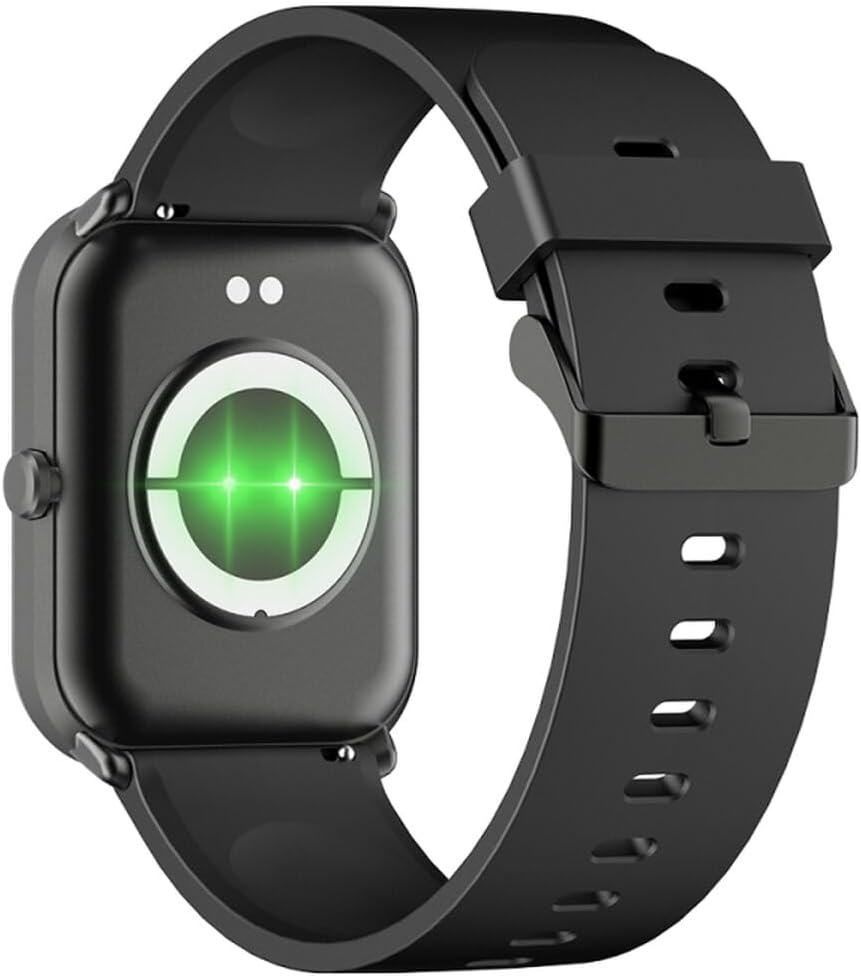
Figura 2: Traseira view of the smartwatch, highlighting the charging contacts and health sensors.
2.3 Encendido/apagado
- Encendido: Manteña premido o botón lateral durante uns segundos ata que a pantalla se ilumine.
- Apagado: From the watch face, swipe down to access quick settings, then tap the power icon, or navigate to "Settings" > "System" > "Power Off". Confirm your selection.
2.4 Instalación e emparellamento da aplicación
- Descarga a aplicación: Scan the QR code in the manual (if provided) or search for "GLORY FIT" in your smartphone's app store (Google Play Store for Android, Apple App Store for iOS).
- Rexistrarse/Iniciar sesión: Open the GLORY FIT app and follow the on-screen instructions to create an account or log in.
- Emparejamento:
- Asegúrate de que o Bluetooth estea activado no teu smartphone.
- Open the GLORY FIT app, go to "Device" or "My Device", and tap "Add Device".
- The app will search for nearby devices. Select "FW36 Aurum SE" from the list.
- Confirma a solicitude de emparellamento tanto no teu teléfono intelixente como no reloxo intelixente.
Once paired, the smartwatch will synchronize data with your phone, including time and date settings.
3. Instrucións de funcionamento
3.1 Navegación básica
- Pantalla táctil: Swipe left/right to navigate between main functions (e.g., activity, heart rate). Swipe up to view notifications. Swipe down to access quick settings.
- Botón lateral: Press once to return to the watch face or wake the screen. Press and hold for power options.

Figura 3: Lateral view of the smartwatch, illustrating the physical button and strap design.
3.2 Vixilancia da saúde
The Maxcom FW36 Aurum SE Smartwatch features several health monitoring functions:
- Monitor de frecuencia cardíaca: Swipe to the heart rate interface and wait for the measurement to complete. Ensure the watch is snug on your wrist.
- Sensor de osíxeno no sangue: Similar to heart rate, navigate to the SpO2 interface for measurement.
- Monitor de presión arterial: Access this function from the main menu or by swiping to its dedicated screen.
- Monitorización da calidade do sono: The watch automatically tracks your sleep patterns when worn during sleep. View detailed reports in the GLORY FIT app.
- Podómetro: Tracks your daily steps, distance, and calories burned automatically.
Importante: The health data provided by this device is for reference only and should not be used for medical diagnosis or treatment.
3.3 Modo multideportivo
Access the multi-sport mode from the main menu to select various activities such as running, walking, cycling, etc. The watch will track specific metrics relevant to your chosen activity.
3.4 Notificacións
Once paired with your smartphone and notification permissions are granted in the GLORY FIT app, your smartwatch will display incoming calls, messages, and app notifications. Swipe up from the watch face to view o teu historial de notificacións.
4. Mantemento
4.1 Limpeza
Regularly clean your smartwatch and strap with a soft, dry cloth. For stubborn dirt, use a slightly damp un pano e despois secar completamente. Evitar o uso de produtos químicos agresivos ou materiais abrasivos.
4.2 Resistencia á auga e ao po
The Maxcom FW36 Aurum SE Smartwatch is designed to be dust resistant and water resistant. This means it can withstand splashes, rain, and brief immersion in shallow water. However, it is not suitable for hot showers, saunas, diving, or high-speed water sports. Avoid pressing buttons underwater.
4.3 Coidado coa batería
To prolong battery life, avoid fully discharging the battery frequently. Charge the device regularly, even if not in use for extended periods. Store the device in a cool, dry place.
5 Solución de problemas
- O reloxo intelixente non se acende: Ensure the device is fully charged. Press and hold the side button for an extended period (10-15 seconds).
- Non se pode emparellar co teléfono intelixente:
- Ensure Bluetooth is enabled on your phone and the smartwatch is within range.
- Reinicia tanto o teu teléfono intelixente como o reloxo intelixente.
- Check if the GLORY FIT app has necessary permissions.
- Se xa estaba emparellado, tenta desemparellar e volver emparellar o dispositivo.
- Lecturas de saúde inexactas: Ensure the watch is worn snugly on your wrist, not too tight or too loose. Clean the sensors on the back of the watch. Avoid excessive movement during measurement.
- Notificacións non recibidas: Verify that notification permissions are enabled for the GLORY FIT app in your phone's settings. Ensure the app is running in the background.
6. Especificacións
| Modelo | FW36 Aurum SE |
| Marca | Maxcom |
| Sistema Operativo | Android |
| Mostrar | 1.69" (4.29 cm) Color Touchscreen, 240 x 280 pixels, Digital, Rounded Corners |
| Capacidade da batería | 220 mAh de iones de litio |
| Conectividade | Bluetooth |
| Sensores | Heart Rate Monitor, Blood Oxygen Sensor, Blood Pressure Monitor, Pedometer |
| Protección | Dust Resistant, Water Resistant |
| Aplicación compatible | GLORY FIT |
| Dimensions (W x T x D) | 44.6 mm x 1.04 cm x 35 mm |
| Funcionalidade GPS | Non dispoñible |
7. Garantía e soporte
The Maxcom FW36 Aurum SE Smartwatch comes with a garantía de dous anos contra defectos de fábrica. Conserve o comprobante de compra para reclamacións de garantía.
For technical support, troubleshooting assistance, or warranty inquiries, please contact Maxcom customer service through their official websitio web ou a información de contacto proporcionada coa documentación da compra.


