1. Introdución
Grazas pola compraasing the CANYON BSP-8 Bluetooth Speaker. This manual provides essential information for the safe and efficient use of your device. Please read it thoroughly before operation and retain it for future reference.
Características principais:
- 10W Audio Output: Ofrece un son claro e potente.
- Bluetooth 5.2: For stable and energy-efficient wireless connection up to 10 meters.
- Retroiluminación RGB: Integrated lighting for enhanced ambiance.
- True Wireless Stereo (TWS): Connect two BSP-8 speakers for a full stereo sound experience.
- Múltiples opcións de reprodución: Supports Bluetooth, AUX, USB, and MicroSD card inputs.
- Deseño portátil: Compact size with a convenient hanger for easy transport.
- Batería de longa duración: Ata 3 horas de xogo cunha soa carga.
2. Información de seguridade
- Non expoñas o altofalante a temperaturas extremas, luz solar directa ou humidade elevada.
- Evite deixar caer ou someter o altofalante a fortes impactos.
- Do not disassemble or attempt to repair the speaker yourself. Contact qualified service personnel.
- Manteña o altofalante lonxe da auga e outros líquidos. Non é impermeable.
- Use só o cable de carga fornecido ou un cable tipo C certificado para cargar.
- Desfágase da batería e do altofalante segundo a normativa local.
3. Contido do paquete
- CANYON BSP-8 Bluetooth Speaker
- Cable de carga USB tipo C
- Manual de usuario
4. Produto rematadoview
Familiarízate cos compoñentes e controis do altofalante.
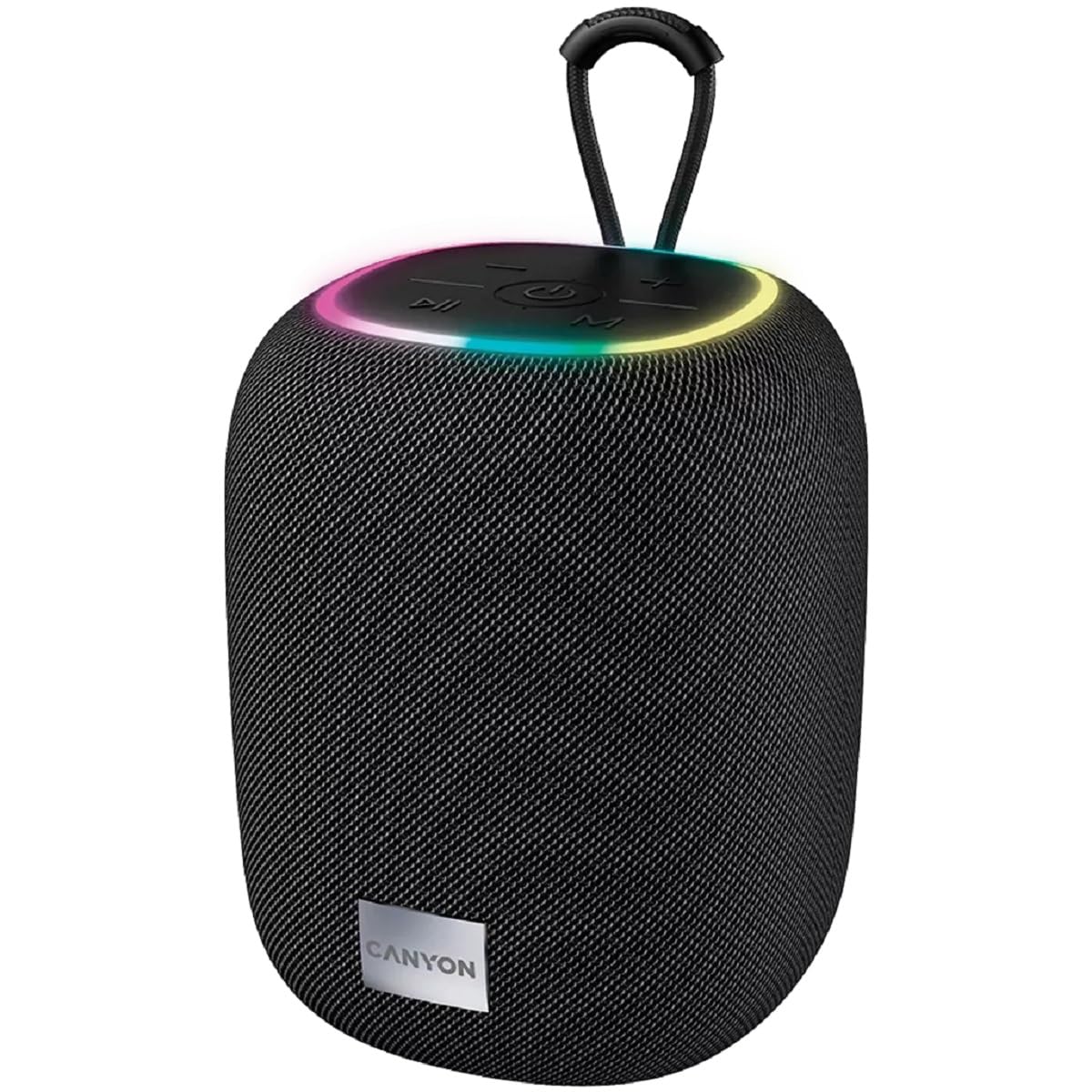
Imaxe 1: Arriba view of the CANYON BSP-8 speaker, showing the control buttons, RGB backlight, and integrated hanger.
Botóns de control (panel superior):
- Botón de encendido: Manter premido para activar/desactivar. Premer brevemente para reproducir/pausar.
- Botón para baixar o volume / pista anterior: Presión curta para baixar o volume. Presión longa para volver á pista anterior.
- Botón para subir o volume / seguinte canción: Presión curta para subir o volume. Presión longa para a seguinte canción.
- Botón de modo (M): Short press to switch between Bluetooth, AUX, USB, and MicroSD modes.

Imaxe 2: Traseira view of the CANYON BSP-8 speaker, illustrating the various input ports including AUX, USB, TF (MicroSD) card slot, and DC5V Type-C charging port.
Input Ports (Rear Panel):
- Porto AUX: Para conectar dispositivos de son externos mediante un cable de son de 3.5 mm.
- Porto USB: Para reproducir audio desde unha unidade flash USB.
- Ranura para tarxetas TF (MicroSD): Para reproducir audio desde unha tarxeta MicroSD.
- Porto de CC de 5 V (tipo C): Para cargar o altofalante.
5. Configuración
5.1 Carga do altofalante
- Connect the provided USB Type-C cable to the DC5V port on the speaker.
- Conecta o outro extremo do cable a un adaptador de corrente USB (recoméndase 5 V/1 A) ou ao porto USB dun ordenador.
- A luz indicadora de carga acenderase. Apagarase ou cambiará de cor unha vez que estea completamente cargada.
Note: For optimal battery life, fully charge the speaker before first use.

Image 3: Illustration showing the 1800 mAh battery capacity and up to 3 hours of playtime for the CANYON BSP-8 speaker.
5.2 Acendido/Apagado
- Para acender: Press and hold the Power button for approximately 3 seconds. You will hear an audible prompt.
- Para apagar: Press and hold the Power button for approximately 3 seconds. You will hear an audible prompt.
5.3 Emparejamento Bluetooth
- Acenda o altofalante. Entrará automaticamente no modo de emparellamento Bluetooth, o que se indicará cunha luz LED intermitente.
- Activa o Bluetooth no teu dispositivo móbil (teléfono intelixente, tableta, ordenador).
- Busca available Bluetooth devices and select "CANYON BSP-8" from the list.
- Once paired, the LED light will stop flashing, and you will hear a confirmation sound.
Note: The speaker will automatically reconnect to the last paired device if it is within range and Bluetooth is enabled.

Image 4: Illustration highlighting the stable and energy-efficient Bluetooth 5.2 connection with an operating range of up to 10 meters.
5.4 Emparellamento estéreo sen fíos verdadeiro (TWS)
To connect two CANYON BSP-8 speakers for a stereo sound experience:
- Ensure both BSP-8 speakers are powered on and not connected to any Bluetooth device.
- Nun altofalante (este será o altofalante principal), preme dúas veces o botón de acendido/apagado. Entrará no modo de emparellamento TWS.
- The two speakers will automatically search for and connect to each other. You will hear a confirmation sound once connected.
- Once TWS is established, connect your mobile device to the primary speaker via Bluetooth as described in section 5.3.
Note: TWS mode only works with two identical CANYON BSP-8 speakers.
6. Instrucións de funcionamento
6.1 Reproducir audio
- Modo Bluetooth: Despois de que o emparellamento se realice correctamente, o son do dispositivo conectado reproducirase a través do altofalante.
- Modo AUX: Connect a 3.5mm audio cable from your external audio device to the AUX port on the speaker. Press the 'M' button to switch to AUX mode.
- Modo USB: Insira unha unidade flash USB no porto USB. O altofalante cambiará automaticamente ao modo USB e comezará a reproducir audio. files. If not, press the 'M' button.
- Modo tarxeta MicroSD: Insert a MicroSD card into the TF card slot. The speaker will automatically switch to MicroSD mode and begin playing audio files. If not, press the 'M' button.
6.2 Control de reprodución
- Reproducir/Pausa: Prema brevemente o botón de acendido.
- Subir volume: Prema brevemente o botón para subir volume (+).
- Baixar volume: Prema brevemente o botón para baixar o volume (-).
- Próxima pista: Mantén premido o botón para subir o volume (+).
- Pista anterior: Mantén premido o botón para baixar o volume (-).
6.3 RGB Backlight
The speaker features an integrated RGB backlight on the top panel. The backlight activates automatically when the speaker is powered on. There are no specific controls for changing the RGB pattern or turning it off/on independently of the speaker's power state.


