Introdución
Grazas pola compraasing The Voice Legend Wireless Bluetooth Speaker. This portable speaker is designed to deliver clear audio with a vibrant LED light show, making it perfect for various settings. It features Bluetooth connectivity for seamless music streaming, FM radio, hands-free calling, and support for USB and Micro SD playback. Its durable and lightweight design ensures portability and ease of use.
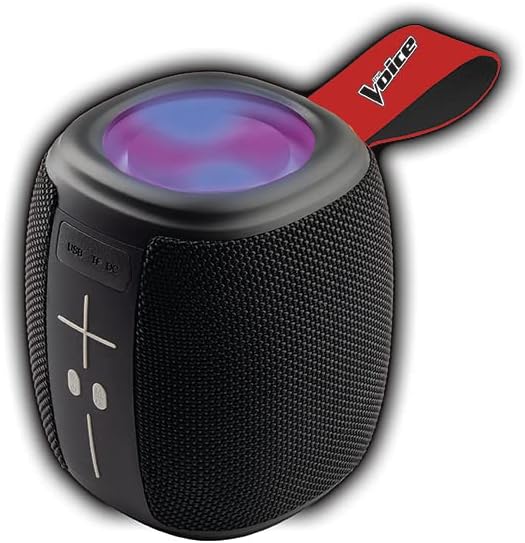
Image: The Voice Legend Wireless Bluetooth Speaker, showcasing its compact design and top-mounted LED light panel.
O que hai na caixa
Comprobe o contido do seu paquete para asegurarse de que estean presentes todos os elementos:
- 1x The Voice Legend Bluetooth Speaker
- 1x cable de carga USB-C
- 1 x manual de instrucións

Image: A visual representation of the package contents, including the speaker, USB-C charging cable, and the user manual.
Características do produto
- Conectividade sen fíos Bluetooth: Easily connect to your smartphone, tablet, or laptop from up to 30 feet away.
- Espectáculo de luces LED vibrantes: Features multiple color modes for a dynamic visual experience, suitable for parties or ambient lighting.
- Deseño portátil e lixeiro: Compact dimensions (4.49 x 4.49 x 5.16 inches) and light weight (1.4 pounds) with a handy carrying strap for easy transport.
- Radio FM: Sintoniza as túas emisoras de radio favoritas.
- Chamadas mans libres: Built-in microphone allows for clear speakerphone calls.
- Múltiples opcións de reprodución: Supports music playback via USB and Micro SD card slots.
- Batería recargable: Ofrece ata 4 horas de reprodución cunha soa carga.
- Oversize Controls: Easy-to-use large buttons for volume and playback control.
- Funcionalidade estéreo sen fíos verdadeiro (TWS): Connect two The Voice Legend speakers for an enhanced stereo sound experience.
- Impermeable: Designed to withstand splashes and light rain.
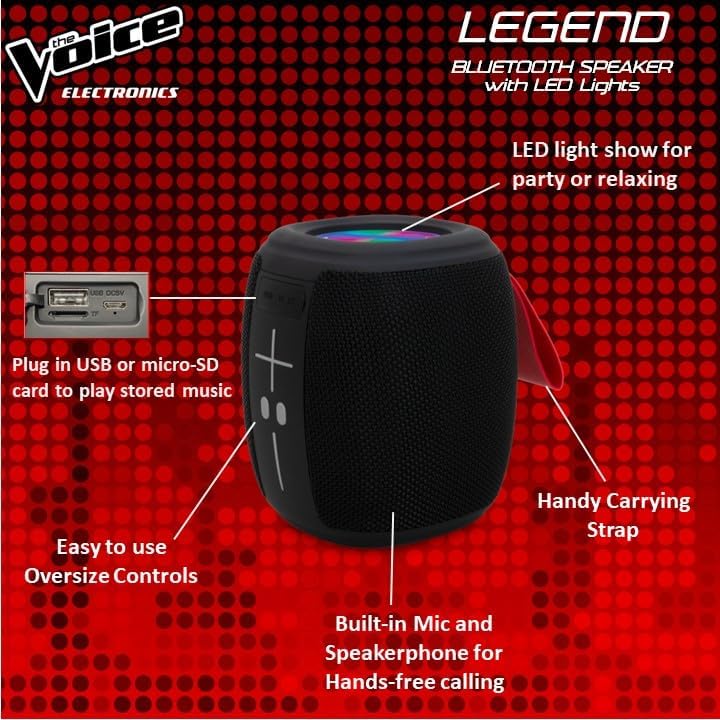
Imaxe: Detallada view of the speaker's side, pointing out the oversized controls, USB and Micro-SD card slots, built-in microphone for hands-free calling, and the handy carrying strap.
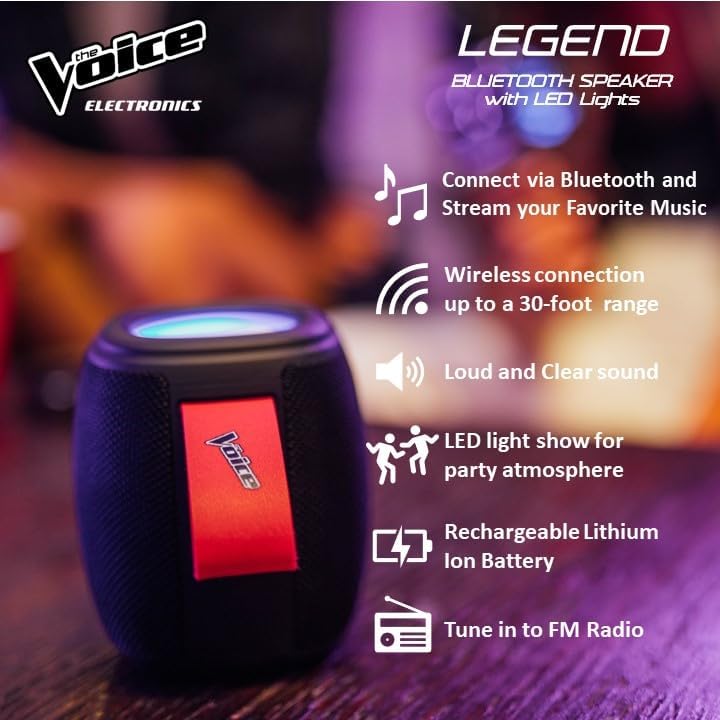
Image: Infographic showcasing key features like Bluetooth connectivity, 30-foot wireless range, loud and clear sound, LED light show, rechargeable lithium-ion battery, and FM radio tuning.

Image: Demonstrating the speaker's lightweight and durable nature, and how to activate the LED light show for different ambiances.
Configuración
1. Cargando o altofalante
Before first use, fully charge the speaker. Connect the provided USB-C charging cable to the speaker's DC 5V port and the other end to a USB power adapter (not included) or a computer USB port. The charging indicator light will show charging status and turn off when fully charged. A full charge provides approximately 4 hours of playtime.
2. Acendido/apagado
Press and hold the power button (usually marked with a circle or power symbol) for a few seconds to turn the speaker ON or OFF. A sound prompt will indicate the power status.
3. Emparellamento Bluetooth
- Ensure the speaker is powered ON and in Bluetooth pairing mode. A blue LED light will flash rapidly, indicating it's ready to pair.
- No teu dispositivo (teléfono intelixente, tableta, etc.), vai á configuración de Bluetooth.
- Busca "The Voice Legend" in the list of available devices.
- Select "The Voice Legend" to connect. Once connected, the blue LED light will stop flashing and remain solid, and you will hear a confirmation sound.
Video: An official product video demonstrating the features and ease of use of The Voice Legend Bluetooth Speaker, including its LED light show and portability.
Instrucións de funcionamento
1. Reprodución de música (modo Bluetooth)
- Once paired, open your music app on your device and start playing.
- Usa o + e - buttons on the speaker to adjust volume. Press and hold for volume control.
- Prema brevemente o + botón para saltar á seguinte pista.
- Prema brevemente o - botón para ir á pista anterior.
- Press the Play/Pause button (often marked with a play/pause symbol) to pause or resume playback.
2. Modo de radio FM
- Press the Mode button (often marked "M") to switch to FM Radio mode.
- O altofalante buscará e gardará automaticamente as emisoras de radio dispoñibles.
- Usa o + e - botóns para navegar entre as emisoras gardadas.
- For better reception, try repositioning the speaker.
3. USB / Micro SD Playback
- Insert a USB drive or Micro SD card (with pre-loaded MP3 audio files) na ranura correspondente.
- The speaker will automatically detect the media and begin playback.
- Use the playback controls (volume, next/previous track, play/pause) as in Bluetooth mode.
4. Chamadas mans libres
- When a call comes in while connected via Bluetooth, the music will pause.
- Prema o botón Reproducir/Pausa para responder a unha chamada entrante.
- Prema de novo o botón Reproducir/Pausa para finalizar a chamada.
- Manteña premido o botón Reproducir/Pausa para rexeitar unha chamada entrante.
5. Control de luz LED
The speaker features a dynamic LED light show. Press the dedicated light button (if available, or refer to specific button functions in the included manual) to cycle through different light modes or turn the lights off. There are typically 4 different color modes.
6. Emparellamento de auriculares estéreo sen fíos verdadeiros (TWS)
To achieve a true stereo sound experience, you can pair two The Voice Legend speakers together:
- Asegúrate de que ambos altofalantes estean acendidos e non conectados a ningún dispositivo Bluetooth.
- On one speaker (this will be your primary speaker), press and hold the TWS pairing button (refer to the included manual for exact button location, often a dedicated button or a long press on a multi-function button).
- O altofalante principal buscará o altofalante secundario. Unha vez conectado, escoitarás un son de confirmación.
- Now, connect your device to the primary speaker via Bluetooth as described in the "Bluetooth Pairing" section. Audio will play in stereo through both speakers.

Image: Two The Voice Legend speakers shown side-by-side, illustrating their True Wireless Functionality (TWS) for connecting and streaming stereo audio.
Mantemento
- Limpeza: Limpe o altofalante cun pano suave e seco. Non empregue produtos de limpeza abrasivos nin disolventes.
- Almacenamento: Garde o altofalante nun lugar fresco e seco, lonxe da luz solar directa e de temperaturas extremas.
- Coidado da batería: Para prolongar a duración da batería, evite descargala completamente con frecuencia. Cargue o altofalante regularmente, mesmo se non o usa durante períodos prolongados.
- Resistencia á auga: While waterproof, avoid submerging the speaker in water for prolonged periods. Ensure charging ports are dry before charging.
Resolución de problemas
| Problema | Causa posible | Solución |
|---|---|---|
| Speaker does not turn ON. | Batería baixa. | Cargue o altofalante completamente. |
| Non se pode sincronizar co dispositivo Bluetooth. | O altofalante non está en modo de emparellamento; o Bluetooth do dispositivo está desactivado; está demasiado lonxe do altofalante. | Ensure speaker is flashing blue LED. Turn device Bluetooth off/on. Move device closer (within 30 ft). |
| Sen son nin son distorsionado. | Volume demasiado baixo; altofalante non conectado; problema coa fonte de son. | Increase speaker and device volume. Re-pair Bluetooth. Check audio source. |
| FM Radio static/poor reception. | Debil sinal. | Recoloque o altofalante para atopar un sinal máis forte. |
| Cannot play from USB/Micro SD. | Incorrecto file format; card/drive not inserted correctly. | Garantir files are MP3. Reinsert card/drive. |
Especificacións
- Nome do modelo: The Voice Legend
- Tipo de altofalante: Altofalante sen fíos portátil
- Tecnoloxía de conectividade: Bluetooth
- Tecnoloxía de comunicación sen fíos: Bluetooth
- Alcance Bluetooth: Ata 30 pés (9.14 metros)
- Modo de saída de audio: Estéreo (con TWS)
- Potencia de saída máxima do altofalante: 3 vatios
- Duración da batería: Ata 4 horas
- Fonte de enerxía: Alimentado por batería
- Compoñentes incluídos: Rechargeable battery, Built-in microphone
- Impermeable: Si
- Método de control: Control de voz
- Dimensións do produto: 4.49 x 4.49 x 5.16 polgadas
- Peso do artigo: 1.4 libras
- UPC: 841133120667
- Fabricante: A Voz
Garantía e Soporte
The Voice Legend Wireless Bluetooth Speaker comes with a Garantía limitada. Please refer to the warranty card included in your package for specific terms and conditions, including coverage period and details on how to obtain service.
For technical support, troubleshooting assistance, or warranty claims, please contact The Voice customer service. Contact information can typically be found on the product packaging or on the official The Voice Electronics websitio.
Conserve o comprobante de compra para efectos da garantía.


