Introdución
Thank you for choosing The Voice Hollywood Wireless Headphones. These headphones are designed to provide a superior audio experience with the convenience of wireless connectivity. Featuring HD Ultra Max Sound, a comfortable adjustable headband, and a tri-fold design for portability, they are optimized for seamless integration with Siri and Google Assistant. This manual provides detailed instructions for setup, operation, maintenance, and troubleshooting to ensure optimal performance and longevity of your device.
Información de seguridade
- Non expoñas os auriculares a temperaturas extremas, humidade nin substancias corrosivas.
- Evite escoitar a volume alto durante períodos prolongados para evitar danos auditivos.
- Do not use the headphones while driving, cycling, or in situations where inability to hear ambient sounds could be dangerous.
- Manteña os auriculares lonxe dos nenos e das mascotas.
- Only use the provided charging cable and accessories.
- Non intentes desmontar nin modificar os auriculares. Isto anulará a garantía.
Contido do paquete
Verifique que todos os elementos estean presentes no seu paquete:
- The Voice Hollywood Wireless Headphones
- Cable de carga USB tipo C
- Cable de audio de 3.5 mm (AUX)

Figure 1: Included components and key features of the headphones.
Produto rematadoview
The Hollywood Wireless Headphones feature an ergonomic design for extended comfort and intuitive controls for ease of use. The over-ear cups provide a comfortable fit, and the adjustable headband ensures a secure fit for various head sizes. The tri-fold design allows for compact storage and portability.

Figura 2: Fronte view dos auriculares.

Figure 3: Headphones in folded position for portability.
Controis e portos
Refer to Figure 1 for a visual guide to the controls and ports. The main controls are located on the ear cups and include:
- Botón de encendido: Úsase para acender/apagar e iniciar o emparellamento Bluetooth.
- Botón para subir o volume/seguinte pista: Prema brevemente para subir o volume, preme longa para a seguinte pista.
- Botón para baixar o volume/pista anterior: Presión curta para baixar o volume, presión longa para a pista anterior.
- Botón multifunción (MFB): Reproducir/pausar, responder/finalizar chamadas, activar o asistente de voz.
- Porto USB tipo C: Para cargar os auriculares.
- Conector de audio de 3.5 mm: Para a conexión por cable usando o cable AUX.
- Micrófono incorporado: For hands-free calling and voice assistant commands.
Configuración
Cargando os auriculares
Before first use, fully charge your headphones. A full charge typically takes approximately 2-3 hours.
- Connect the small end of the USB Type-C charging cable to the charging port on the headphone ear cup.
- Conecta o extremo máis grande do cable USB a un adaptador de corrente USB (non incluído) ou ao porto USB dun ordenador.
- The LED indicator light will illuminate during charging and turn off or change color once fully charged.
Emparejamento Bluetooth
Emparella os teus auriculares co teu dispositivo con Bluetooth (por exemplo, un teléfono intelixente, unha tableta ou un ordenador).
- Asegúrese de que os auriculares estean apagados.
- Press and hold the Power button for approximately 5-7 seconds until the LED indicator light flashes blue and red alternately, indicating pairing mode.
- No teu dispositivo, activa o Bluetooth e busca novos dispositivos.
- Select "Hollywood" from the list of available devices.
- Once successfully paired, the LED indicator will flash blue slowly or turn solid blue.
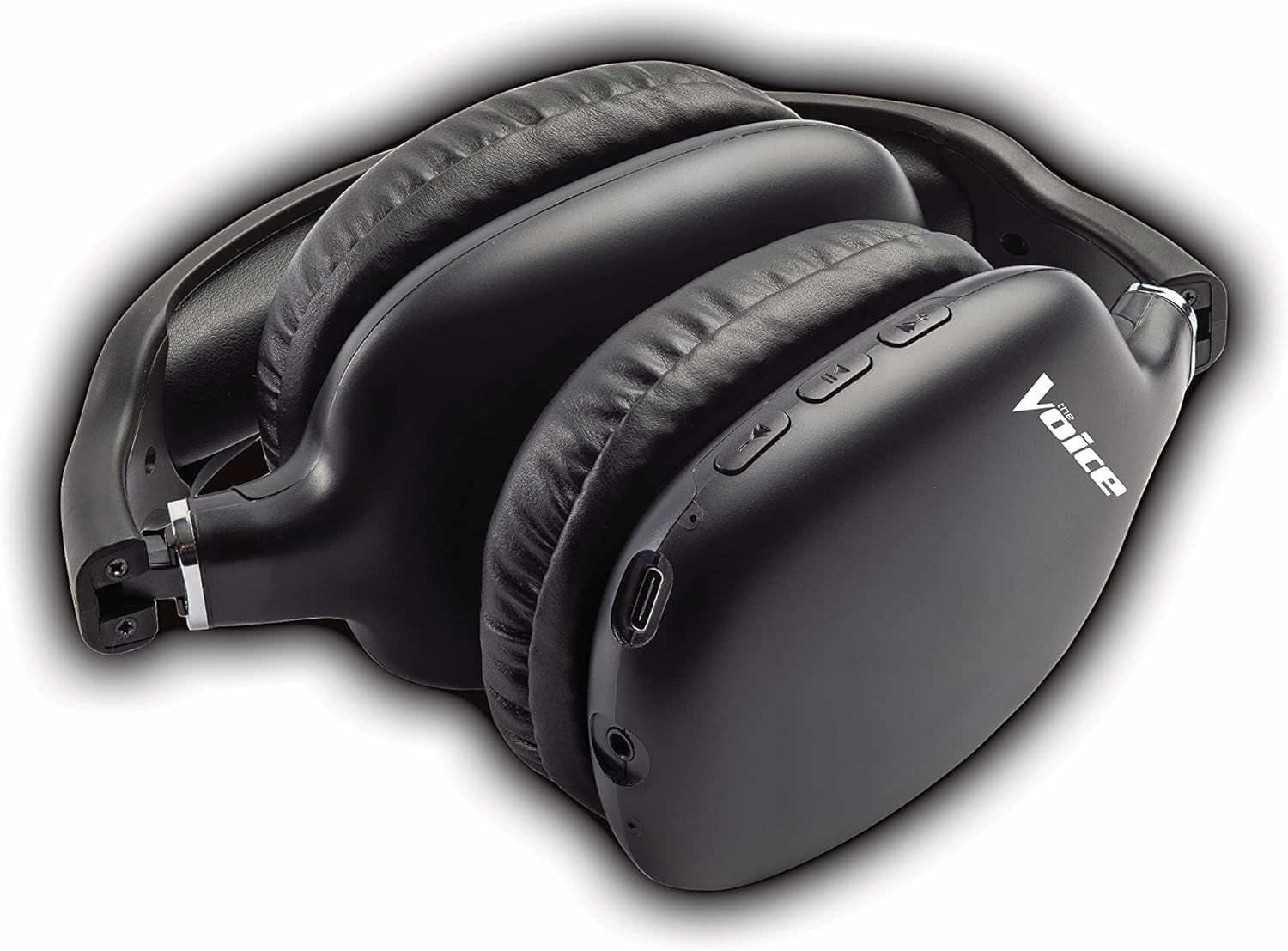
Figure 4: Headphones paired with a smartphone.
Conexión con cable (modo AUX)
You can use the headphones with non-Bluetooth devices or when the battery is depleted using the included 3.5mm audio cable.
- Plug one end of the 3.5mm audio cable into the audio jack on the headphone ear cup.
- Plug the other end into the 3.5mm audio output jack of your device.
- Os auriculares cambiarán automaticamente ao modo con fío.
Instrucións de funcionamento
Encendido/apagado
- Encendido: Manteña premido o botón de acendido/apagado durante aproximadamente 3 segundos ata que o indicador LED parpadee en azul.
- Apagado: Manteña premido o botón de acendido durante aproximadamente 3 segundos ata que o indicador LED se apague.
Reprodución de música
- Reproducir/Pausa: Short press the Multi-function Button (MFB).
- Próxima pista: Mantén premido o botón para subir volume.
- Pista anterior: Mantén premido o botón para baixar o volume.
- Subir volume: Prema brevemente o botón Subir volume.
- Baixar volume: Prema brevemente o botón para baixar o volume.
Xestión de chamadas
- Responder/Finalizar chamada: Short press the Multi-function Button (MFB).
- Rexeitar a chamada: Long press the Multi-function Button (MFB).
- Volver a marcar o último número: Prema dúas veces o botón multifunción (MFB).
Activación do Asistente de voz
- Activar Siri/Asistente de Google: Prema tres veces o botón multifunción (MFB).
Video 1: Demonstrates the adjustable and padded comfort, built-in mic, and connectivity to Google or Siri for The Voice Hollywood Wireless Headphones.

Figure 5: User enjoying audio with the headphones, highlighting comfort and usability.
Mantemento
Limpeza
Regular cleaning helps maintain the headphones' appearance and functionality.
- Wipe the ear cups and headband with a soft, dry, lint-free cloth.
- Para a sucidade persistente, d lixeiramenteampEnxágüe o pano con auga e xabón suave e logo séqueo inmediatamente.
- Non empregue produtos de limpeza abrasivos, alcol nin disolventes químicos.
Almacenamento
When not in use, store your headphones in a cool, dry place, away from direct sunlight and extreme temperatures. Utilize the tri-fold feature for compact storage.
Resolución de problemas
If you encounter issues with your headphones, refer to the table below for common problems and solutions.
| Problema | Causa posible | Solución |
|---|---|---|
| Os auriculares non se acenden | Batería baixa | Cargue os auriculares completamente. |
| Non se pode emparellar co dispositivo | Auriculares non en modo de emparellamento; Bluetooth do dispositivo desactivado; Demasiado lonxe do dispositivo | Asegúrate de que os auriculares estean en modo de emparellamento (vermello/azul intermitente). Activa/desactiva o Bluetooth do dispositivo. Achega os auriculares ao dispositivo (a menos de 10 metros). |
| Sen son | Volume too low; Not connected; Incorrect audio source | Increase volume on headphones and device. Ensure headphones are properly paired/connected. Check audio output settings on your device. |
| Distorsión do son | Interference; Device volume too high | Move away from other wireless devices. Lower the volume on your device. |
| O micrófono non funciona | Not connected; Device settings | Ensure headphones are properly paired. Check microphone input settings on your device. |
Especificacións
| Característica | Detalle |
|---|---|
| Nome do modelo | Hollywood |
| Tecnoloxía de conectividade | Wireless, Wired (Bluetooth) |
| Colocación do oído | Sobre orella |
| Factor de forma | Sobre orella |
| Tipo de control | Voice Control, Built-in buttons and microphone |
| Rango de frecuencias | 20 Hz - 20 kHz |
| Peso do elemento | 13.4 onzas |
| Dimensións (paquete) | 9.65 x 8.35 x 3.58 polgadas |
| Número de modelo | VHOL-6/2069 |
| UPC | 841133120698 |
Garantía e Soporte
The Voice Hollywood Wireless Headphones come with a standard manufacturer's warranty. For detailed warranty information, technical support, or service inquiries, please refer to the warranty card included in your product packaging or visit the official The Voice Electronics website. Do not attempt to repair the product yourself.


