Introdución
Thank you for choosing the Syncwire Bluetooth 5.3 FM Transmitter Car Adapter. This device allows you to stream music and calls wirelessly from your Bluetooth-enabled device to your car's FM radio, while also providing fast charging capabilities for your mobile devices. Please read this manual carefully to ensure proper use and optimal performance.
Información de seguridade
- Use according to manufacturer's instructions.
- Avoid interference with other wireless devices.
- Manipula o dispositivo con coidado para evitar danos.
- Follow temperature and humidity guidelines for storage and operation.
- Non desmonte nin intente reparar o dispositivo vostede mesmo.
Características do produto
- Tecnoloxía Bluetooth 5.3: Provides a fast, stable, and smart connection with minimal sound quality loss for music and calls.
- Dual USB Fast Charging: Equipped with a PD 36W USB-C port and a 12W USB-A port, allowing simultaneous charging of two devices. Features over-current, over-voltage, intelligent temperature, and short-circuit protection.
- Graves profundos de alta fidelidade: Enhance your audio experience with deep bass by pressing the dedicated 'B' button.
- Ambient LED Light: Features a colorful rainbow light design that can be easily turned on or off by double-pressing the 'B' button.
- Chamadas mans libres: Noise Suppression (CVC) technology and echo-cancellation ensure clear hands-free communication.
- USB Drive Support: Play music directly from a USB stick (up to 64GB).
Instrucións de configuración
- Inserir o transmisor: Plug the Syncwire FM Transmitter into your car's 12V/24V cigarette lighter socket. The LED display will light up, showing the current FM frequency.
- Select an Unused FM Frequency: Tune your car's FM radio to an empty frequency with no active broadcast. This will minimize interference and provide the clearest audio.
- Frecuencia do transmisor de coincidencia: On the Syncwire transmitter, long-press the multi-function knob (phone button) until the frequency display flashes. Use the left/right arrows (or rotate the knob) to adjust the transmitter's frequency to match the empty frequency on your car radio. Once matched, the display will stop flashing.
- Vincular con Bluetooth: Activa o Bluetooth no teu dispositivo móbil. Busca available devices and select "SW-XC727" to pair. Once connected, the display will show "bt" (Bluetooth) and you can start streaming audio.
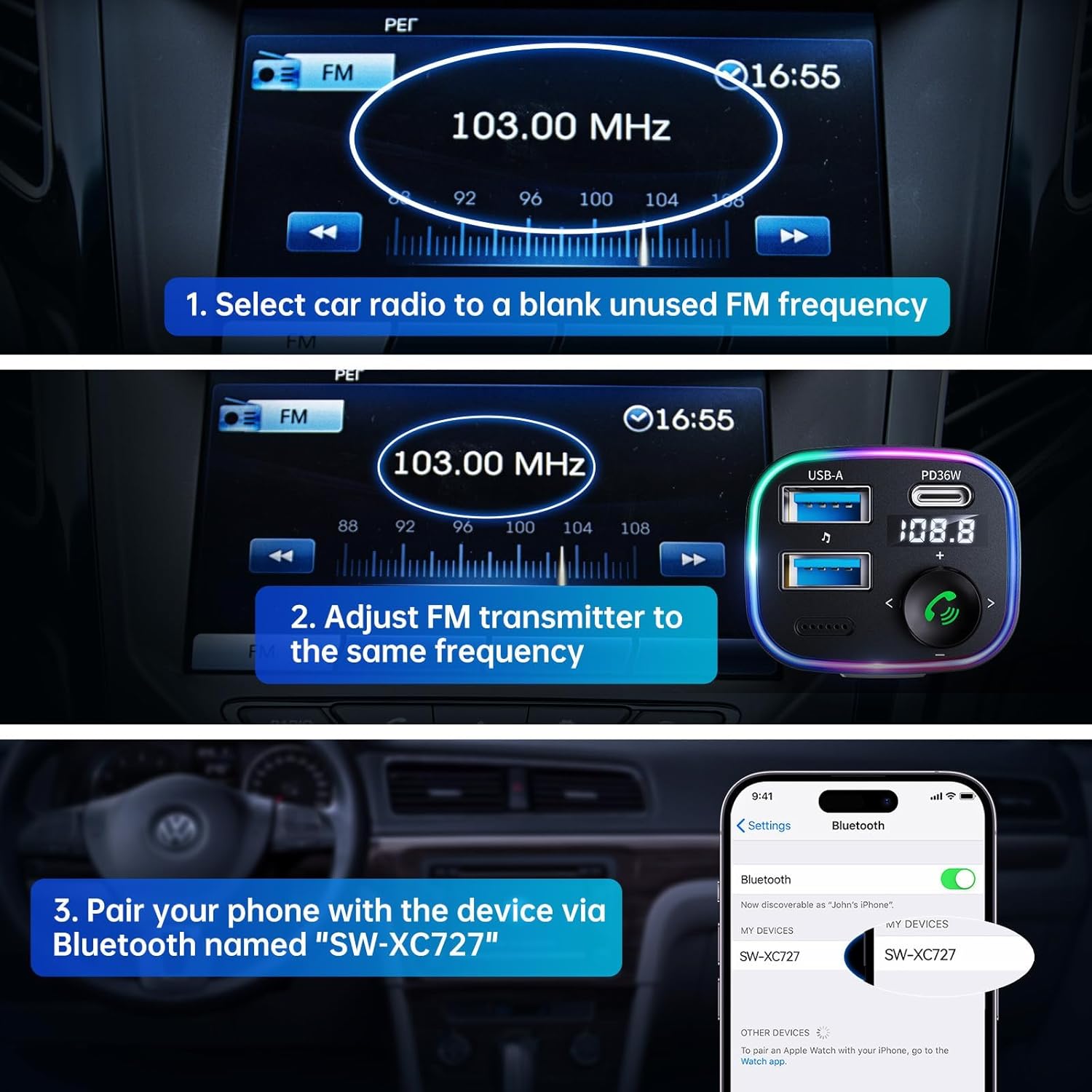
Image: Visual guide for connecting the Syncwire FM Transmitter to your car radio and phone.
Instrucións de funcionamento
Reprodución de música
- Transmisión Bluetooth: After successful Bluetooth pairing, play music from your phone. The audio will transmit to your car's speakers.
- Reprodución desde unha unidade USB: Insira unha unidade flash USB (ata 64 GB) que conteña ficheiros MP3/WMA/WAV/FLAC files into the designated USB-A port (with music note icon). The device will automatically detect and play music from the drive.
- Axustar o volume: Rotate the multi-function knob clockwise to increase volume, counter-clockwise to decrease.
- Seguimento / Seguimento anterior: Use the left (<) and right (>) arrow buttons to skip tracks.
- Boost de baixo: Press the 'B' button once to activate Hi-Fi Deep Bass mode (display shows 'b1'). Press again to deactivate (display shows 'b0').
Chamadas mans libres
- Responder/Finalizar chamada: Press the multi-function knob (phone button) once to answer an incoming call or end an ongoing call.
- Rexeitar a chamada: Long-press the multi-function knob to reject an incoming call.
- Volver marcar: Double-press the multi-function knob to redial the last number.
Dispositivos de carga
The adapter features two charging ports:
- Porto USB-C PD de 36 W: Para dispositivos compatibles con carga rápida.
- 12W USB-A Port: For standard charging of devices.

Image: Detail of the charging and USB drive ports on the Syncwire FM Transmitter.
Ambient LED Light Control
The device features a colorful LED light ring. To turn the lights on or off, double-press the 'B' button located on the side of the adapter.
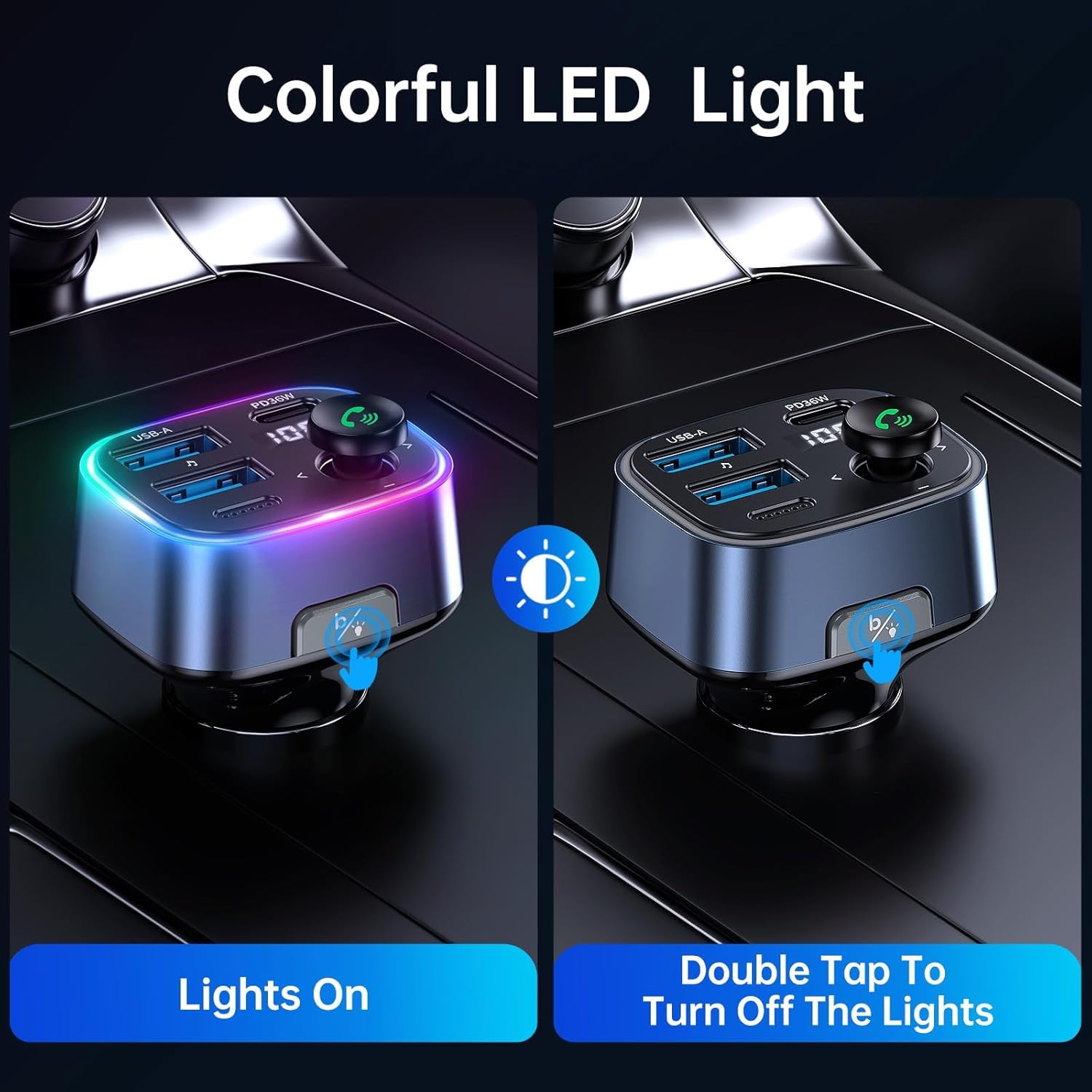
Image: Demonstrating how to control the ambient LED lights on the Syncwire FM Transmitter.
Mantemento
- Manteña o dispositivo limpo limpo cun pano suave e seco.
- Evite expoñer o dispositivo a temperaturas extremas, á luz solar directa ou á humidade.
- Non use produtos de limpeza ou disolventes abrasivos.
- Almacenar nun lugar fresco e seco cando non estea en uso.
Resolución de problemas
- Mala calidade de audio/estática:
- Ensure your car radio and the FM transmitter are tuned to the exact same unused frequency.
- Try a different FM frequency if the current one has interference.
- Adjust the volume on both your phone and car radio to an appropriate level.
- Problemas de conexión Bluetooth:
- Make sure Bluetooth is enabled on your phone and the transmitter is powered on.
- Esquece o dispositivo da configuración de Bluetooth do teu teléfono e tenta emparellalo de novo.
- Reinicia tanto o teléfono como o transmisor FM.
- A carga non funciona:
- Check if the transmitter is securely plugged into the car's power outlet.
- Asegúrate de que o cable de carga non estea danado e que estea conectado correctamente.
- Verify that your device is compatible with the charging ports (e.g., PD fast charging).
Especificacións
| Característica | Detalle |
|---|---|
| Número de modelo | SW-XC727 |
| Versión Bluetooth | 5.3 |
| Vol. De entradatage | 12V-24V (Vehicle Powered) |
| Saída USB-C | PD 36 W |
| Saída USB-A | 12 W |
| Produción total | 48 W |
| Formatos de audio admitidos | MP3, WMA, WAV, FLAC |
| USB Drive Capacity | Ata 64 GB |
| Material | Plástico |
| Dimensións | 4.45 x 3.35 x 1.42 polgadas |
| Peso | 2.57 onzas |
Garantía e Soporte
Syncwire ofrece unha 36 meses de garantía e soporte vitalicio for this product. If you encounter any issues or have questions, please contact Syncwire customer service for assistance. They are committed to finding a satisfying solution.
For support, please contact the seller, Syncwire Shop, through the platform where you purchased the product.


