Introdución
This manual provides instructions for the Alienware AW520H Wired Gaming Headset. It covers setup, operation, maintenance, and troubleshooting to ensure optimal performance and longevity of your device.
The Alienware AW520H headset is designed to deliver precision audio with Hi-Res certified drivers and Dolby Atmos spatial audio support, integrated into a comfortable and adjustable design.
O que hai na caixa
Verifica que todos os compoñentes estean presentes no paquete:
- Alienware AW520H Wired Gaming Headset
- Documentación (Manual do usuario, Información de garantía)
Produto rematadoview
Familiarize yourself with the key components and features of your Alienware AW520H headset.
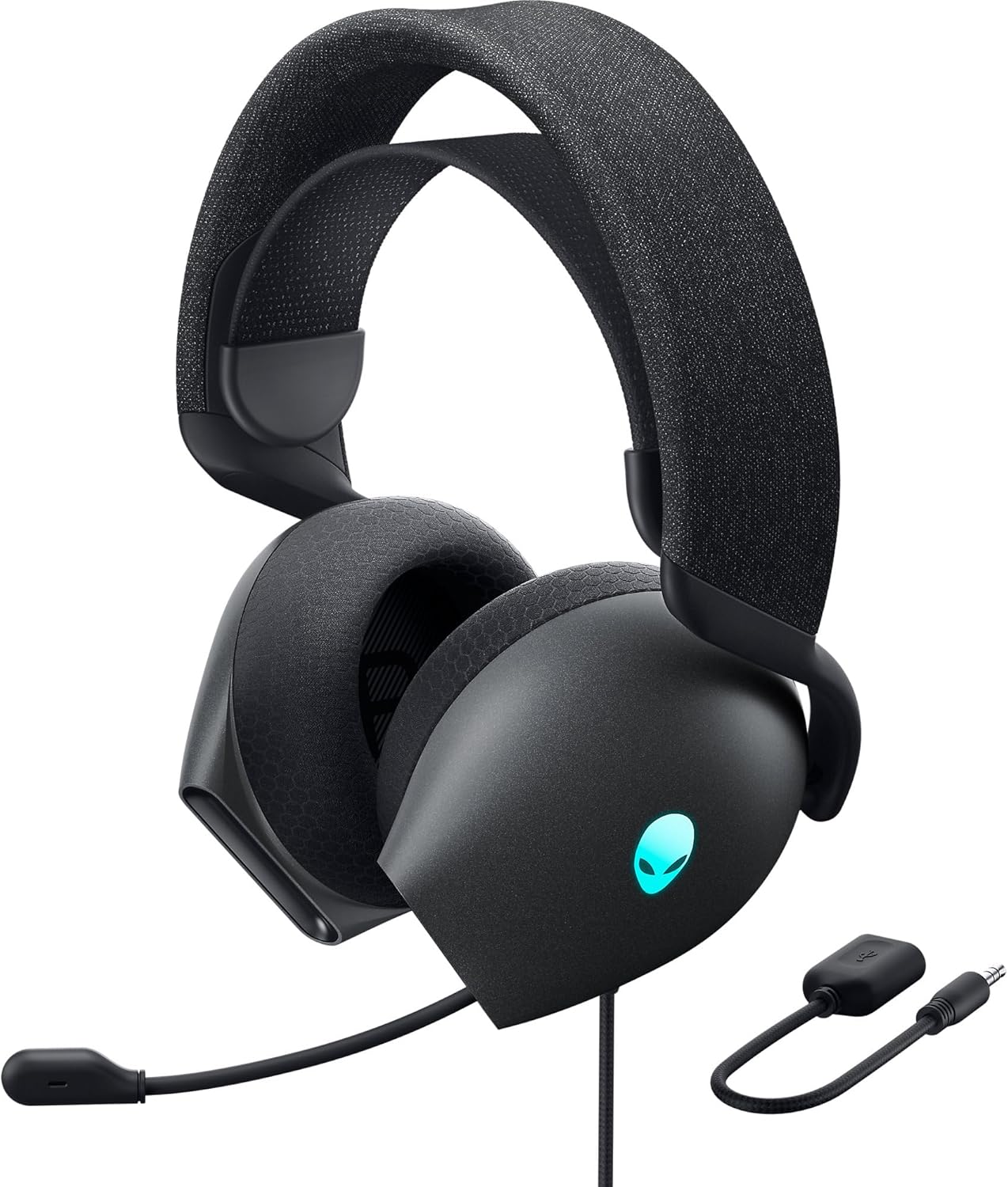

Características principais:
- Hi-Res Certified Drivers: Delivers clear and rich sound across a wide frequency range.
- Dolby Atmos Spatial Audio: Provides precise positional audio for an immersive experience.
- AI-Driven Noise Cancellation Microphone: Retractable boom mic focuses on your voice, reducing ambient noise.
- Deseño cómodo: Features soft memory foam ear pads with breathable fabric and an adjustable suspension headband for extended wear.
- AlienFX RGB Lighting: Customizable RGB lighting on the earcups, controllable via Alienware Command Center.
- Conectividade versátil: Supports both USB and 3.5mm connections for broad compatibility.
Configuración
Follow these steps to set up your Alienware AW520H headset.
1. Conexión dos auriculares
The AW520H offers flexible connectivity options:
- Conector de audio de 3.5 mm: Connect the 3.5mm cable directly to your PC, gaming console controller, or any other compatible device with a 3.5mm audio port. This provides basic audio and microphone functionality.
- Conexión USB: For full functionality, including Dolby Atmos spatial audio and AlienFX RGB lighting customization, connect the headset via USB to your PC. This typically involves using a 3.5mm to USB adapter if your PC does not have a combined audio jack.


2. Software Installation (Optional, for full features)
To unlock the full potential of your headset, including Dolby Atmos and AlienFX RGB lighting customization, install the Alienware Command Center software on your PC. This software allows for personalized audio profiles e efectos de iluminación.
- Download the latest version of Alienware Command Center from the official Alienware support websitio.
- Siga as instrucións en pantalla para completar a instalación.
- Connect your headset via USB to ensure it is recognized by the software.
Instrucións de funcionamento
Controis de audio
The headset features integrated controls for convenient audio management:
- Roda de volume: Located on the earcup, rotate the wheel to increase or decrease the audio volume.
- Botón de silencio do micrófono: Press the button on the earcup to mute or unmute the microphone.

Uso do micrófono
The AW520H features an AI-driven noise-canceling retractable boom microphone:
- Estender/Retraer: Gently pull the microphone boom out from the earcup to extend it for use. Push it back into the earcup to retract it when not needed.
- Posicionamento: Para unha claridade de voz óptima, coloque o micrófono a aproximadamente 1-2 cm da boca.
- Cancelación de ruído: The AI-driven noise cancellation automatically works to filter out ambient sounds, focusing on your voice.

Axuste para a comodidade
The headset is designed for comfort during long gaming sessions:
- Suspension Headband: Slide the suspension headband up or down to find the ideal fit for your head size.
- Rotación dos auriculares: The earcups can slightly pivot to conform to the shape of your ears.
- Memory Foam Ear Pads: The soft memory foam ear pads with breathable fabric provide cushioning and ventilation.

Iluminación RGB AlienFX
Customize the RGB lighting on your headset using the Alienware Command Center software:
- Abra o Centro de comandos de Alienware.
- Navigate to the lighting settings for your AW520H headset.
- Select desired colors, effects, and brightness levels.
- Ensure the headset is connected via USB for lighting customization.
Mantemento
Proper maintenance ensures the longevity and performance of your headset.
- Limpeza: Usa un pano suave e seco para limpar os auriculares e a diadema. Para a sucidade persistente, limpa lixeiramenteamp Pódese usar un pano, pero evite a humidade excesiva. Non empregue produtos químicos agresivos nin produtos de limpeza abrasivos.
- Almacenamento: Store the headset in a clean, dry place away from extreme temperatures and direct sunlight. Retract the microphone when not in use to protect it.
- Coidado do cable: Avoid sharp bends or kinks in the audio cable. Do not pull on the cable to disconnect the headset.
- Almofadas para oídos: The ear pads are made of breathable fabric and memory foam. While durable, they are not designed for frequent removal. If replacement is needed, consult Alienware support.
Resolución de problemas
If you encounter issues with your Alienware AW520H headset, refer to the following common solutions:
Sen son ou volume baixo
- Comproba as conexións: Ensure the 3.5mm cable or USB connection is securely plugged into both the headset and your device.
- Niveis de volume: Verify that the volume wheel on the headset is turned up. Check the audio output settings on your PC or console to ensure the headset is selected as the default output device and volume is not muted.
- Software/Controladores: If connected via USB, ensure Alienware Command Center is installed and updated. Check your operating system's sound settings for driver issues.
- Proba noutro dispositivo: Connect the headset to a different device (e.g., smartphone, another PC) to determine if the issue is with the headset or the original device.
O micrófono non funciona
- Marcar o botón Silenciar: Asegúrate de que o botón de silenciamento do micrófono dos auriculares non estea activado.
- Posición do micrófono: Verify the microphone boom is fully extended and positioned correctly.
- Configuración de entrada: Check your PC or console's sound input settings to ensure the headset microphone is selected as the default input device. Adjust microphone volume levels.
- Configuración da aplicación: Some applications (e.g., Discord, Zoom) have their own microphone settings. Verify the correct microphone is selected within these applications.
- Software/Controladores: If connected via USB, ensure Alienware Command Center is installed and updated.
AlienFX RGB Lighting Not Working
- Conexión USB: Ensure the headset is connected via USB to your PC. RGB lighting functionality requires a USB connection.
- Centro de mando de Alienware: Verify that Alienware Command Center is installed and running. Check the lighting settings within the software for the headset.
- Actualización de software: Ensure Alienware Command Center and headset firmware are up to date.
Especificacións
| Característica | Detalle |
|---|---|
| Nome do modelo | AW520H |
| Tecnoloxía de conectividade | Wired (USB, 3.5 mm Jack) |
| Tipo de controlador de audio | Driver dinámico |
| Resposta en frecuencia | 40 KHz (40,000 Hz) |
| Impedancia | 32 ohmios |
| Control de ruído | Active Noise Cancellation (AI-driven for mic) |
| Micrófono | Retractable, Unidirectional |
| Controis | Volume Control, Microphone Mute (On-headset) |
| Colocación do oído | Sobre orella |
| Factor de forma | Na Orella |
| Material | Memory foam, breathable fabric |
| Cor | Dark Side of the Moon |
| Dimensións do produto | 7.28 x 4.35 x 8.46 polgadas |
| Peso do elemento | 11.8 onzas |
| Fabricante | Dell |
| Dispositivos compatibles | Windows, wired devices |
Garantía e Soporte
For warranty information and technical support, please refer to the documentation included with your product or visit the official Alienware support websitio.
Fabricante: Dell
Número de modelo: AW520H
Data de primeira dispoñibilidade: 30 de xuño de 2023
For further assistance, please contact Alienware customer support through their official channels.


