1. Produto rematadoview
The ION Audio Highlander is a high-powered, all-weather portable Bluetooth speaker designed to deliver rich sound and deep bass even at high volumes. Its durable construction makes it suitable for various environments, ensuring your music can accompany you wherever you go.
Características principais:
- High-Power Audio: Delivers 120 Watts of speaker maximum output power for impactful sound.
- Boost de baixo: Enhances low frequencies for maximum impact.
- Bluetooth 5.0 activado: Allows wireless streaming and control of your music from compatible devices.
- Resistente á auga IPX5: Designed to withstand splashes and rain, making it safe for outdoor use.
- Rechargeable 50-Hour Battery: Provides extended playtime on a single charge.
- Asas e rodas integradas: Facilitates easy transportation.
2. Contido do paquete
Asegúrate de que todos os elementos que se indican a continuación estean presentes no teu paquete:
- ION Audio Highlander Portable Speaker
- Cable de alimentación
3. Guía de configuración
3.1 Carga da batería
Before first use, fully charge the Highlander speaker. The battery life is approximately 50 hours, but initial charging may take several hours.
- Connect the included power cable to the power input on the back of the Highlander speaker.
- Conecta o outro extremo do cable de alimentación a unha toma de corrente estándar.
- A luz indicadora de carga acenderase. A luz cambiará ou apagarase unha vez completada a carga.
3.2 Acendido/Apagado
To power the speaker on or off, locate the power button on the control panel.
- Para acender: Press and hold the Power button for a few seconds until the display illuminates.
- Para apagar: Press and hold the Power button again for a few seconds until the display turns off.
3.3 Emparejamento Bluetooth
Follow these steps to connect your Bluetooth device to the Highlander speaker:
- Ensure the Highlander speaker is powered on and in Bluetooth mode. The Bluetooth indicator on the display will flash, indicating it's ready to pair.
- On your Bluetooth device (smartphone, tablet, laptop), go to its Bluetooth settings.
- Busca available devices. Select "ION Highlander" from the list.
- Once paired, the Bluetooth indicator on the speaker will stop flashing and remain solid. You can now play audio through the speaker.
- To disconnect, turn off Bluetooth on your device or select "Forget This Device" in your device's Bluetooth settings.
4. Instrucións de funcionamento
4.1 Panel de control rematadoview
The top panel of the Highlander speaker features various controls for managing audio playback and settings.

- Botón de encendido: Activa ou desactiva o altofalante.
- Botón de volume: Axusta o nivel de volume xeral.
- Botón Bluetooth: Inicia o modo de emparellamento Bluetooth.
- Botón de aumento de baixo: Activates or deactivates the bass boost feature.
- Pantalla de visualización: Shows current mode, battery status, and other information.
4.2 Adjusting Volume and Bass Boost
- Volume: Rotate the main volume knob clockwise to increase volume and counter-clockwise to decrease it.
- Boost de baixo: Press the "Bass Boost" button to enhance the bass output. Press it again to return to normal audio.
4.3 Características de portabilidade
The Highlander is designed for easy transport:
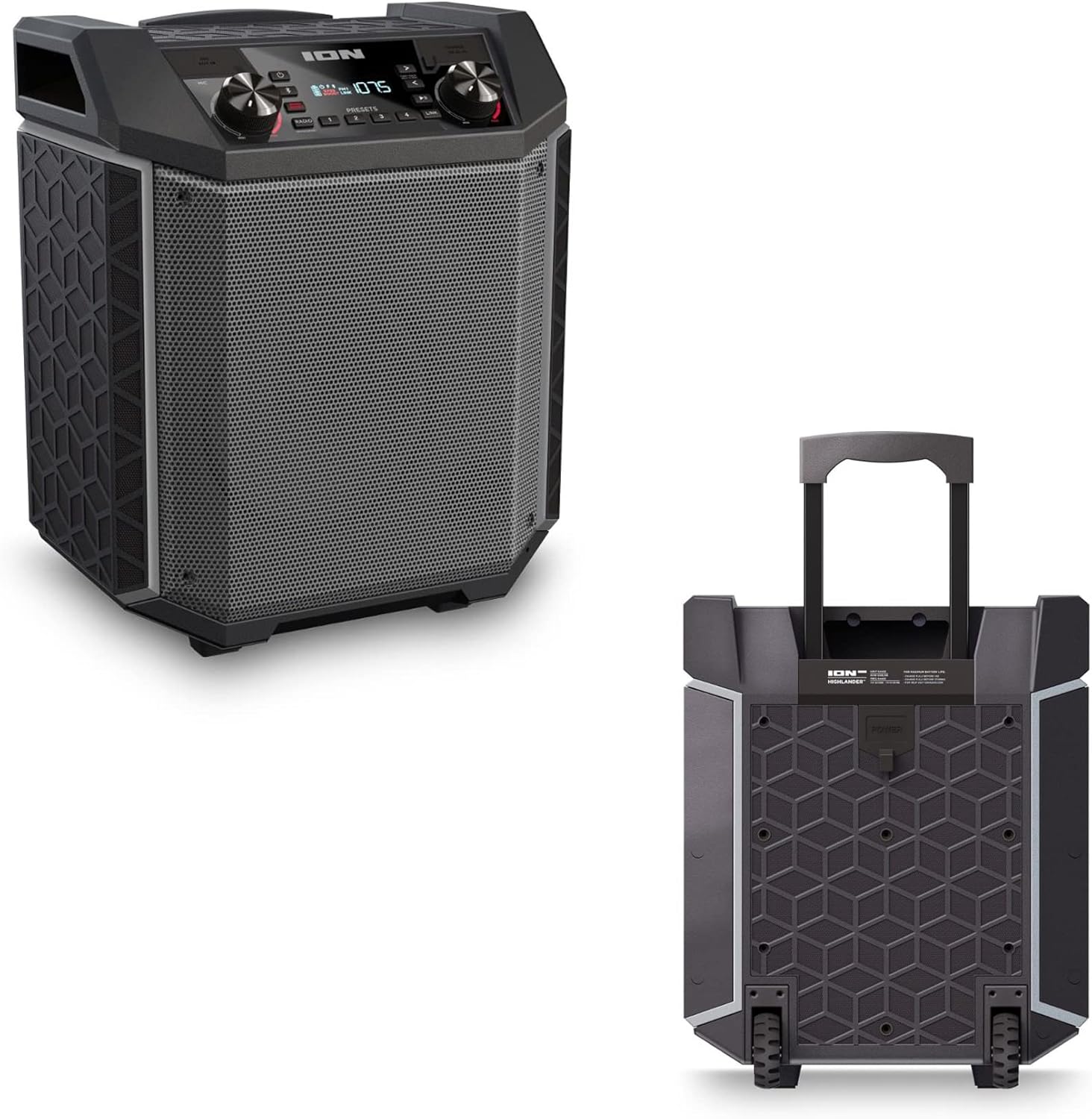

- Mango retráctil: Pull up the integrated handle to roll the speaker like luggage.
- Rodas: Use the built-in wheels for smooth movement across various surfaces.
4.4 Resistencia á auga (IPX5)
The Highlander speaker is IPX5 water-resistant, meaning it can withstand splashes of water from any direction. It is suitable for use by the pool or in light rain.

Importante: Do not submerge the speaker in water. Ensure all port covers are securely closed when exposed to water.
5. Mantemento
5.1 Limpeza
- Always power off the speaker and disconnect it from the power source before cleaning.
- Use un pano suave e seco para limpar as superficies exteriores.
- Para a sucidade teimosa, lixeiramente dampEnxágüe o pano con auga. Evite o uso de produtos químicos agresivos, solventes ou produtos de limpeza abrasivos.
- Non pulverice líquidos de limpeza directamente sobre o altofalante.
5.2 Almacenamento
- Garde o altofalante nun lugar fresco e seco, lonxe da luz solar directa e de temperaturas extremas.
- Se a gardas durante un período prolongado, asegúrate de que a batería estea parcialmente cargada (arredor do 50 %) para manter o seu bo estado. Cárgaa cada poucos meses se non a usas.
5.3 Coidado coa batería
- Evita descargar completamente a batería con frecuencia.
- Non expoña a batería a calor ou frío excesivos.
- If the battery performance significantly degrades, contact customer support for assistance.
6 Solución de problemas
If you encounter issues with your Highlander speaker, refer to the table below for common problems and solutions.
| Problema | Posible Solución |
|---|---|
| O altofalante non se acende. |
|
| Non se pode sincronizar co dispositivo Bluetooth. |
|
| Sen son ou volume baixo. |
|
| Distorsión do son. |
|
7. Especificacións
| Característica | Detalle |
|---|---|
| Nome do modelo | Highlander |
| Marca | ION |
| Tipo de altofalante | Ao aire libre |
| Tecnoloxía de conectividade | Bluetooth 5.0 |
| Fonte de enerxía | Alimentado por batería |
| Duración da batería | 50 horas |
| Nivel de resistencia á auga | IPX5 (resistente á auga) |
| Potencia de saída máxima do altofalante | 120 vatios |
| Dimensións do produto | 19.5" D x 19.5" W x 14" H |
| Peso do elemento | 23.2 libras |
| Material | Water-resistant plastic or rubber, with a black coating |
| Compoñentes incluídos | Cable de alimentación |
| UPC | 657768542732 |
8. Garantía e soporte
The ION Audio Highlander speaker comes with a Limited Warranty. For specific details regarding warranty coverage, duration, and terms, please refer to the warranty information provided with your purchase or visit the official ION Audio websitio.
For technical support, troubleshooting assistance beyond this manual, or warranty claims, please contact ION Audio customer support through their official channels. Keep your proof of purchase handy when contacting support.


