1. Introdución
Thank you for choosing the TEEHO Keyless Entry Door Lock with 2 Handles. This manual provides detailed instructions for installation, operation, and maintenance to ensure optimal performance and security. Please read this manual thoroughly before installation and keep it for future reference.
Contido do paquete
- 1 Electronic Keypad Deadbolt
- 1 Door Lever Handle Set (2 handles)
- 1 Keypad Deadbolt Lock
- 4 pilas AA
- Hardware de montaxe
- Manual de usuario
Características clave
- Entrada sen chave: Supports up to 20 user access codes (4-10 digits) and one-time codes.
- Smart-Locking: Adjustable auto-lock feature (10-99 seconds) and one-touch auto-lock.
- Seguridade mellorada: ANSI Grade 3 smart door lock cylinder, anti-peeping password function, mute mode, vacation mode, and backlit keypad.
- Deseño duradeiro: Constructed from durable alloy with an IP54 weather resistance rating.
- Fácil instalación: Deseñado para unha configuración sinxela.
2. Información de seguridade
Observe as seguintes precaucións de seguridade para evitar lesións ou danos ao produto:
- Non intente desmontar nin modificar a fechadura. Isto pode causar danos e anular a garantía.
- Use only the specified AA batteries. Do not mix old and new batteries or different types of batteries.
- Manteña todos os compoñentes fóra do alcance dos nenos.
- Protexa o teclado da humidade excesiva ou da exposición directa á auga.
- Ensure proper installation to prevent malfunction. If unsure, consult a qualified locksmith or installer.
3. Produto rematadoview
The TEEHO Keyless Entry Door Lock system combines a keypad deadbolt with a door lever for comprehensive security and convenience.
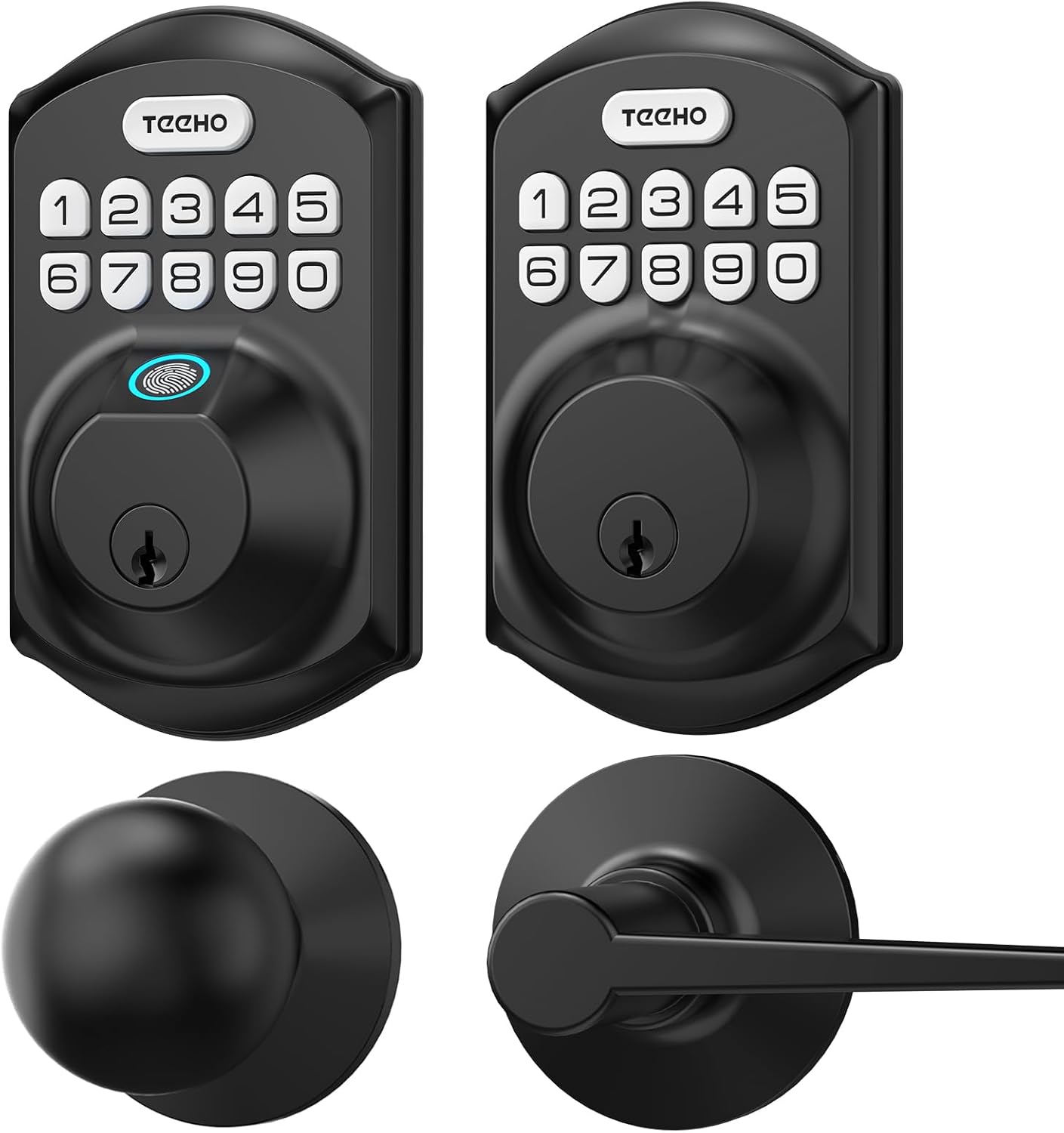
Imaxe 3.1: Acabadoview of the TEEHO Keyless Entry Door Lock components, including the electronic keypad deadbolt, a standard deadbolt, and two door lever handles, all in a matte black finish.

Imaxe 3.2: The TEEHO Keyless Entry Door Lock installed on a white door, featuring the electronic keypad deadbolt above a matching door lever. The interior view shows the corresponding hardware.
4. Configuración e instalación
The TEEHO Keyless Entry Door Lock is designed for easy installation. Follow these steps carefully.
4.1 Prepare the Door
- Ensure your door meets the required dimensions for installation (standard door thickness and backset).
- Remove any existing lock hardware.
4.2 Install the Deadbolt Latch
- Insert the deadbolt latch into the door edge. Ensure the “UP” marking is facing upwards.
- Fixe o pestillo con parafusos.
4.3 Install the Exterior Keypad Assembly
- Feed the cable through the hole in the door.
- Align the exterior keypad assembly with the deadbolt latch and secure it to the door.
4.4 Install the Interior Mounting Plate
- Attach the interior mounting plate to the door, ensuring the cable passes through the plate.
- Fixe a placa de montaxe con parafusos.
4.5 Connect Cables and Install Interior Assembly
- Conecte o cable do conxunto exterior ao conxunto interior.
- Mount the interior assembly onto the mounting plate and secure it with screws.
4.6 Instale as baterías
- Retire a tapa da batería do conxunto interior.
- Insert 4 AA batteries, observing polarity (+/-).
- Coloque a tapa da batería.

Imaxe 4.1: Un estoupou view of the TEEHO Keyless Entry Door Lock components, illustrating the internal mechanism and how the exterior keypad, interior assembly, and deadbolt latch fit together during installation.
4.7 Install Door Lever Handles
- Install the latch mechanism for the door lever into the door edge.
- Attach the exterior and interior door lever handles, securing them according to the provided instructions.
5. Instrucións de funcionamento
Learn how to use the various features of your TEEHO Keyless Entry Door Lock.
5.1 Desbloquear a porta
- Usando un código de usuario: Enter your 4-10 digit user code on the keypad, then press the “Lock” button (or checkmark/enter button if present). The lock will retract.
- Using a Physical Key: Introduza a chave física no burato da fechadura e xire para desbloqueala.

Imaxe 5.1: A person using the TEEHO Keyless Entry Door Lock, highlighting the keypad and a fingerprint sensor for quick unlocking. The image suggests a rapid identification and unlocking process.
5.2 Pechadura da porta
- Bloqueo automático: If enabled, the lock will automatically engage after a set period (10-99 seconds) once the door is closed.
- Bloqueo dun toque: Press and hold any key on the keypad for 2 seconds to instantly lock the door.
- Bloqueo manual: From the interior, turn the thumb-turn to lock the deadbolt.

Imaxe 5.2: A visual representation of the auto-lock and one-touch locking features of the TEEHO Keyless Entry Door Lock. It shows a timer icon indicating automatic locking after 10-99 seconds and a lock icon for the 2-second one-touch lock.
5.3 Contrasinal antiespionaxe
To prevent others from guessing your code, you can enter random digits before or after your actual code. The lock will still recognize the correct sequence within the longer entry.

Imaxe 5.3: An illustration of the anti-peep tactile keypad feature. It demonstrates how random digits can be added before or after the actual password to obscure it from onlookers, enhancing security.
5.4 Modo de silencio
The lock can be set to mute mode to disable keypad tones for quiet operation.
5.5 Modo vacacións
Activate vacation mode for enhanced security when you are away for an extended period. This mode typically disables all user codes until manually deactivated.
6. Códigos de programación
The lock supports up to 20 user codes and one-time codes.

Imaxe 6.1: An infographic detailing the access options for the TEEHO Keyless Entry Door Lock, showing support for up to 20 user codes, one-time PIN codes, and two physical keys for unlocking.
6.1 Adding User Codes
- Press the “Program” button (usually located on the interior assembly).
- Enter the default master code (refer to quick start guide or factory settings).
- Follow the voice prompts or indicator lights to enter a new 4-10 digit user code.
- Confirm the new code.
6.2 Eliminación de códigos de usuario
- Press the “Program” button.
- Introduza o código mestre.
- Follow the prompts to select the option for deleting user codes.
- Enter the specific user code to be deleted or choose to delete all user codes.
6.3 Setting One-Time Codes
One-time codes are ideal for temporary access (e.g., for delivery personnel or service providers). Once used, the code is automatically deleted.
- Press the “Program” button.
- Introduza o código mestre.
- Follow the prompts to select the one-time code option.
- Enter the desired one-time code.
7. Mantemento
7.1 Substitución da batería
The lock is powered by 4 AA batteries, providing over 1 year of use under normal conditions. Replace batteries when the low battery indicator appears or when the lock becomes unresponsive.
- Retire a tapa da batería do conxunto interior.
- Retire as pilas antigas.
- Insira 4 pilas AA novas, asegurando a polaridade correcta.
- Coloque a tapa da batería.
7.2 Limpeza
Limpar o exterior da fechadura cun pano suave eamp pano. Evite produtos de limpeza abrasivos ou solventes que poidan danar o acabado ou os compoñentes electrónicos.
8 Solución de problemas
| Problema | Causa posible | Solución |
|---|---|---|
| O peche non responde á entrada do teclado. | Pilas baixas; código incorrecto; avaría do teclado. | Replace batteries; re-enter code carefully; contact support if issue persists. |
| A función de bloqueo automático non funciona. | Feature disabled; incorrect time setting. | Ensure auto-lock is enabled and set to desired time in programming. |
| Lock is difficult to turn or operate. | Misalignment during installation; worn components. | Check installation alignment; lubricate moving parts if necessary; contact support for severe issues. |
| Keypad backlight not working. | Batteries low; setting disabled. | Replace batteries; check programming settings for backlight. |
9. Especificacións
- Marca: TEEHO
- Modelo: Keyless Entry Door Lock with 2 Handles
- Tipo de bloqueo: Keypad Deadbolt with Door Lever
- Característica especial: Keyless Entry, Auto-Lock, One-Time Code, Anti-Peep Password, Mute Mode, Vacation Mode, Backlit Keypad
- Security Rating: ANSI Grao 3
- Resistencia á intemperie: IP54
- Fonte de enerxía: 4 AA Batteries (approx. 1 year lifespan)
- Códigos de acceso: Up to 20 user codes (4-10 digits)
- Método de control: Touch Keypad, Mechanical Key
10. Garantía e soporte
TEEHO products are manufactured to high-quality standards. For warranty information, technical support, or assistance with your product, please refer to the warranty card included in your package or visit the official TEEHO websitio. Teña á man o modelo do produto e a data de compra cando contacte co servizo de asistencia.


