Introdución
Welcome to the user manual for your Protmex S42 Wireless Earbuds. These earbuds are designed to provide a superior audio experience with advanced features such as Bluetooth 5.3 connectivity, Environmental Noise Cancellation (ENC) for clear calls, IPX7 water resistance, and an extended battery life of up to 56 hours with the charging case. Please read this manual carefully to ensure proper use and maintenance of your device.
Contido do paquete
Comprobe o contido do paquete para asegurarse de que estean presentes todos os elementos:
- 2 x Protmex S42 Wireless Earbuds (Left and Right)
- 1 x estuche de carga
- 3 x Pairs of Eartips (Small, Medium, Large)
- 1 x cable de carga USB-C
- 1 x Manual de usuario
Produto rematadoview
Familiarize yourself with the components and key features of your Protmex S42 Wireless Earbuds.

Protmex S42 Wireless Earbuds in their charging case, displaying the LED battery indicator for both earbuds and the case.

Digital LED display on the charging case showing battery levels for the case and individual earbuds, indicating the 300mAh battery capacity.
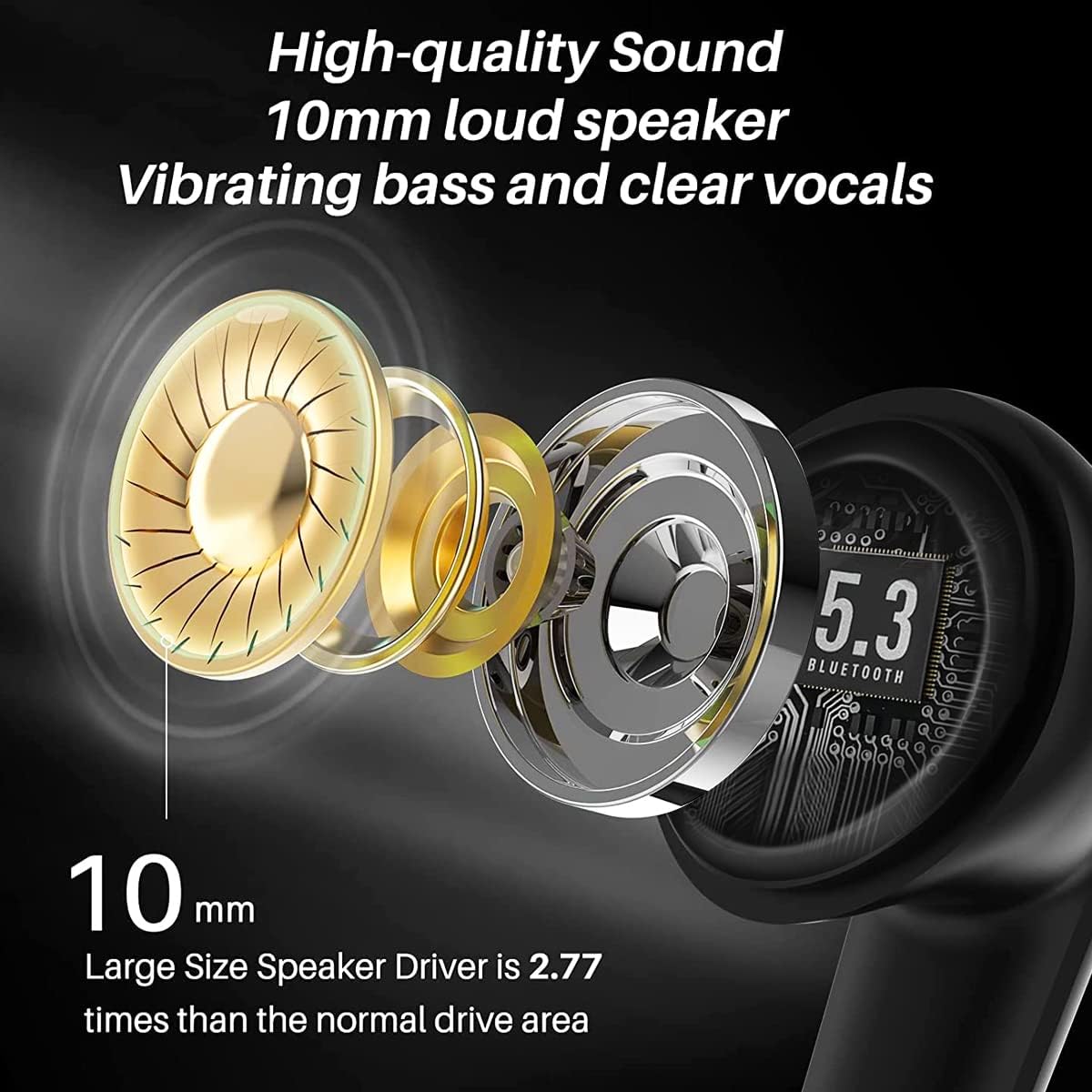
Diagram illustrating the 10mm speaker driver for high-quality sound and deep bass, highlighting the advanced audio technology.

Acabadoview of earbud features including digital power display, smart-touch control, charging case, and stable connection.

Image of a woman wearing the earbuds, highlighting their secure and comfortable fit, sound quality, and lightweight design.
Configuración
Carga inicial
Before first use, fully charge the earbuds and the charging case. Connect the USB-C charging cable to the charging port on the case and a 5V power adapter. The LED display on the case will show the charging progress. Earbuds fully charge in approximately 1 hour, providing 8 hours of playtime, and the case provides multiple charges for a total of 56 hours.

Diagram illustrating how to charge the earbuds and charging case using a USB-C cable and a 5V adapter. Ensure a 5V adapter is used to prevent damage.
Emparejamento Bluetooth
- Abre a caixa de carga. Os auriculares acenderanse automaticamente e entrarán no modo de emparellamento.
- Activa o Bluetooth no teu dispositivo (teléfono intelixente, tableta, portátil).
- Busca "S42" na lista de dispositivos Bluetooth dispoñibles e seleccióneo para conectarse.
- Unha vez conectados, escoitarás un ton de confirmación e os auriculares estarán listos para usar.
The advanced Bluetooth 5.3 chip ensures a stable connection up to 15 meters.

Image showing the earbuds connecting via Bluetooth 5.3 to a smartphone, indicating stable and fast connection.
Usando os auriculares
Para unha calidade de son e unha comodidade óptimas, escolle as almofadas que mellor se axusten ás túas orellas. Insire con coidado os auriculares no conduto auditivo e xira lixeiramente para suxeitalos.

Illustrations demonstrating the correct way to wear the earbuds and select the appropriate ear tip size for a secure fit.

Image of a person wearing the Protmex S42 earbuds, highlighting their comfortable and secure fit and crystal clear sound.
Instrucións de funcionamento
The Protmex S42 earbuds feature intuitive smart touch controls. The following table outlines the various functions:

Diagram illustrating the various smart touch controls on the earbuds for music playback, calls, and voice assistant activation.

Visual guide to touch control gestures for power, calls, music playback, and volume adjustment.
| Acción | Función |
|---|---|
| Long press 3s (L/R) | Encendido/apagado |
| Long press 2s (L/R) | Rexeitar a chamada |
| Toque un só (L/R) | Responder/Finalizar chamada |
| Toca dúas veces (L/R) | Reproducir/Pausa música |
| Toca dúas veces (R) | Próxima pista |
| Toca dúas veces (L) | Pista anterior |
| Toca tres veces (L/R) | Activar o Asistente de voz (Siri, Asistente de Google) |
| Manteña R | Subir volume |
| Manteña L | Baixar o volume |
Mantemento e coidados
- Limpeza: Regularly clean the charging contacts on both the earbuds and the case, as well as the ear tips, using a dry, soft cloth or cotton swab. Avoid using liquids directly on the earbuds.
- Resistencia á auga: The earbuds are IPX7 waterproof, meaning they can withstand splashes, sweat, and rain. Do not submerge them in water for extended periods or use them while swimming. The charging case is not waterproof.
- Almacenamento: Cando non estean en uso, garde os auriculares no seu estoxo de carga para protexelos e mantelos cargados. Garde nun lugar fresco e seco, lonxe de temperaturas extremas.
- Coidado da batería: Para prolongar a duración da batería, evita descargar completamente os auriculares e a funda con frecuencia. Cárgaos regularmente, mesmo se non os usas constantemente.
Resolución de problemas
If you encounter any issues with your Protmex S42 earbuds, please refer to the following common solutions:
| Problema | Solución |
|---|---|
| Os auriculares non se emparellan/conectan |
|
| Sen son nin baixo volume |
|
| Problemas de carga |
|
| Os controis táctiles non responden |
|

Diagrams providing solutions for common issues such as low volume or charging problems, including cleaning contacts and using a 5V adapter.
Especificacións
| Característica | Detalle |
|---|---|
| Número de modelo | S42 |
| Marca | Protmex |
| Versión Bluetooth | 5.3 |
| Duración da batería dos auriculares | Ata 8 horas |
| Tempo de reprodución total (con estuche) | Ata 56 horas |
| Tempo de carga (auriculares) | Approx. 1 hour (10 min charge for 1 hour playtime) |
| Clasificación de resistencia á auga | IPX7 |
| Micrófonos | 4 (with ENC Noise Cancellation) |
| Tamaño do controlador de altofalante | 10 mm |
| Peso dos auriculares | Aprox. 3.97 gramos |
| Conectividade | Bluetooth sen fíos |
| Compatibilidade | iOS, Android, Tablets, Laptops (Bluetooth-enabled devices) |
| Material | Plástico |

Image showing the compact size of the charging case, easily fitting into a pocket, with dimensions for reference.
Garantía e Soporte
For any questions, technical support, or warranty inquiries, please contact Protmex customer service through the platform where you purchased the product. Please have your model number (S42) and purchase details ready when contacting support.


