1. Introdución
This manual provides detailed instructions for the setup, operation, maintenance, and troubleshooting of your Xprinter XP-233B Thermal Barcode Printer. The XP-233B is designed for efficient thermal printing of barcodes and labels, utilizing heat-sensitive paper without the need for ink or ribbons.
2. Instrucións de seguridade
- Ensure the printer is connected to a power source with the correct voltage as specified on the power adapter.
- Non expoña a impresora á auga nin a humidade excesiva.
- Evite colocar a impresora baixo a luz solar directa ou preto de fontes de calor.
- Keep the printer away from dust and debris to prevent damage to internal components.
- Non intente desmontar nin reparar a impresora vostede mesmo. Póñase en contacto co persoal de servizo cualificado para obter axuda.
- Use only recommended thermal label rolls to ensure optimal print quality and printer longevity.
3. Contido do paquete
Verifica que todos os elementos estean presentes no paquete:
- Xprinter XP-233B Thermal Barcode Printer
- Adaptador de alimentación
- Cable USB
- Guía de inicio rápido (se se inclúe)
- Driver CD (if included, drivers can also be downloaded online)
4. Produto rematadoview
Familiarize yourself with the main components of the XP-233B printer.

Figura 4.1: Parte dianteira view of the Xprinter XP-233B, showing the power switch, control panel, and label output slot.

Figura 4.2: Traseira view of the Xprinter XP-233B, highlighting the USB, Ethernet, and power input ports.
Funcións do panel de control:
- Botón FEED: Press to feed a blank label. Hold to perform a self-test print.
- Botón PAUSA: Pausa ou reanuda a impresión.
- Botón CANCELAR: Cancela o traballo de impresión actual.
- Indicadores LED: Display printer status (e.g., Power, Error, Paper Out). Refer to troubleshooting for specific light patterns.
5. Configuración
5.1 Conectar a impresora
- Connect the power adapter to the printer's power input port and then plug it into a wall outlet.
- Connect the USB cable from the printer to your computer. For Ethernet connectivity, connect an Ethernet cable from the printer to your network router or switch.
- Acenda a impresora usando o interruptor de alimentación situado no lateral.
5.2 Cargar etiquetas
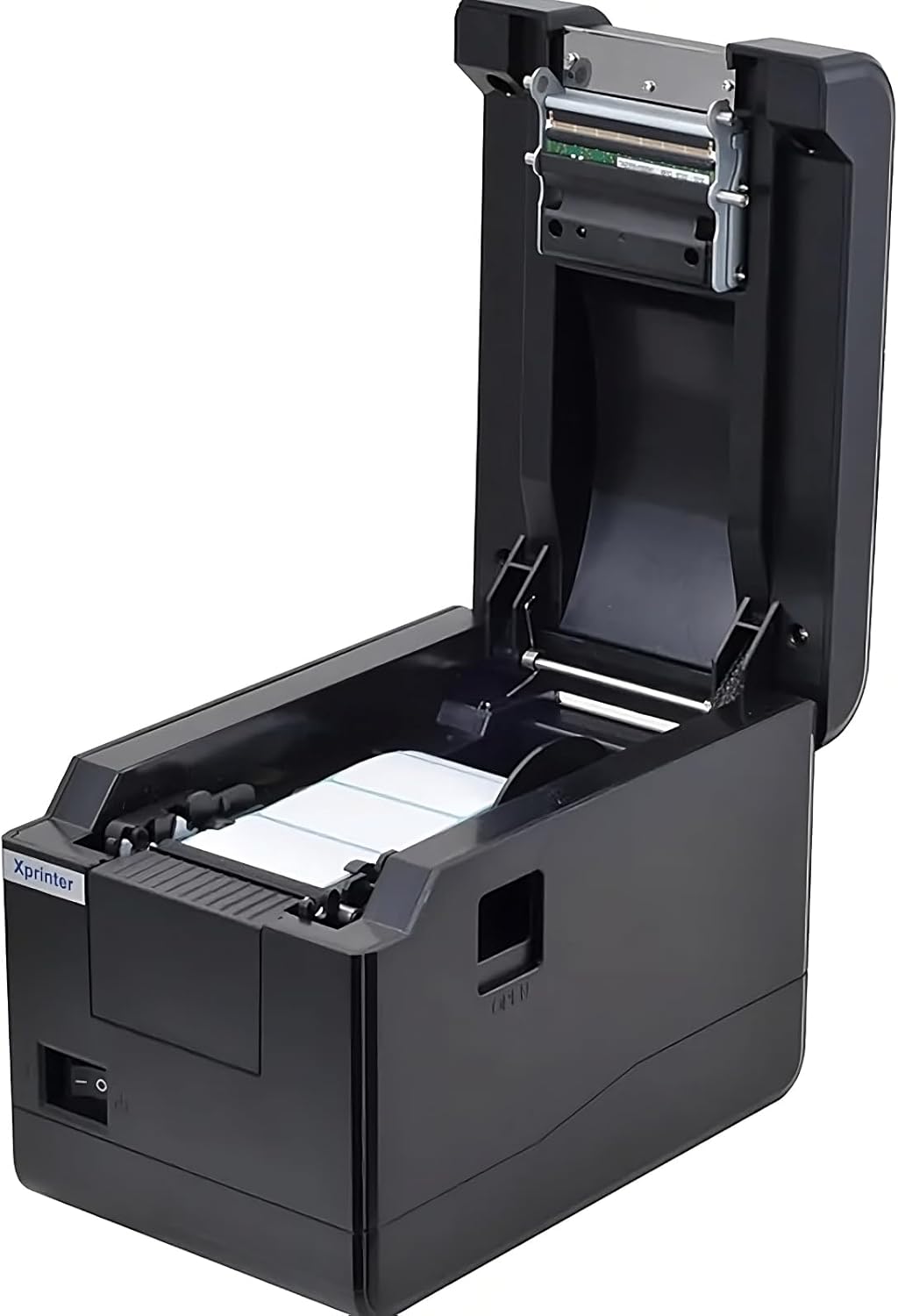
Figura 5.1: Arriba abaixo view of the Xprinter XP-233B with the cover open, illustrating the label loading area.
- Press the 'OPEN' button on the side of the printer to open the top cover.
- Place the thermal label roll into the label compartment, ensuring the labels feed from the bottom of the roll and the printable side faces upwards.
- Adjust the movable label guides to fit the width of your label roll snugly, without pinching the labels.
- Pull a few labels past the print head and out through the front slot.
- Peche a tapa superior firmemente ata que encaixe no seu lugar.
- The printer will automatically calibrate and feed a few labels to detect the label gap.
5.3 Instalación do controlador
Install the printer drivers on your computer. Drivers can typically be found on the included CD or downloaded from the official Xprinter websitio. Siga as instrucións que aparecen na pantalla para a instalación.
6. Funcionamento da impresora
6.1 Impresión básica
Once the printer is set up and drivers are installed, you can print labels from your application (e.g., label design software, shipping software). Ensure the correct printer model (Xprinter XP-233B) is selected in your application's print settings.
6.2 Impresión de autoproba
To perform a self-test print:
- Ensure the printer is powered on and labels are loaded.
- Manteña premido o ALIMENTAR button for approximately 3-5 seconds until the printer starts printing.
- The self-test print will display printer information and a test pattern, confirming basic functionality.
7. Mantemento
7.1 Limpeza do cabezal de impresión
Regular cleaning of the print head ensures optimal print quality and extends the printer's lifespan. Clean the print head when print quality degrades or after every few rolls of labels.
- Apague a impresora e desconecte o cable de alimentación.
- Abre a tapa superior.
- Gently wipe the print head surface with a cotton swab lightly dampenriquecido con alcohol isopropílico (70 % ou superior).
- Allow the print head to dry completely (approximately 2-3 minutes) before closing the cover and turning on the printer.
7.2 Limpeza do exterior
Limpe o exterior da impresora cun pano suave eamp pano. Non use produtos químicos agresivos ou produtos de limpeza abrasivos.
8 Solución de problemas
| Problema | Causa posible | Solución |
|---|---|---|
| A impresora non se acende | Power cord loose; power outlet faulty; power adapter damaged. | Check power connections; try a different outlet; replace power adapter if necessary. |
| No labels feeding | Labels incorrectly loaded; paper out; label guides too tight. | Reload labels correctly; replace label roll; adjust label guides. |
| Mala calidade de impresión (descoloridos, liñas) | Print head dirty; low-quality labels; print head damaged. | Clean print head (refer to Section 7.1); use recommended thermal labels; contact support if print head is damaged. |
| Printer not responding to print commands | Incorrect driver installed; USB/Ethernet cable loose; printer paused. | Reinstall drivers; check cable connections; press PAUSA botón para retomar. |
| Labels skipping or misaligning | Incorrect label sensor calibration; label guides not set correctly. | Perform a self-test print to recalibrate; adjust label guides. |
9. Especificacións
| Característica | Especificación |
|---|---|
| Nome do modelo | Xprinter - Thermal barcode printer |
| Número de modelo do artigo | XP-233B |
| Tecnoloxía de impresión | Térmica |
| Tecnoloxía de conectividade | Ethernet, USB |
| Saída da impresora | Monocromo |
| Medios impresos | Etiquetas |
| Capacidade máxima de follas | 100 (typical for roll capacity, actual sheet capacity depends on label size) |
| Dimensións do produto (P x A x A) | 26.8 x 18 x 17.2 cm |
| Peso do elemento | 1.2 kg |
| Cor | Negro |
10. Información da garantía
Xprinter products typically come with a limited manufacturer's warranty. Please refer to the warranty card included with your product or visit the official Xprinter website for specific warranty terms and conditions, including coverage duration and service procedures. Keep your purchase receipt as proof of purchase for warranty claims.
11. Atención ao cliente
For technical assistance, driver downloads, or further inquiries regarding your Xprinter XP-233B, please visit the official Xprinter support website or contact their customer service department. Contact information can usually be found on the Xprinter websitio web ou na documentación que se inclúe coa impresora.


