Introdución
This manual provides detailed instructions for the safe and efficient operation of your CAIWEI X99+ 4K Smart Projector. Please read this manual thoroughly before using the projector and retain it for future reference.
Información de seguridade
Para garantir un funcionamento seguro e evitar danos, observe as seguintes precaucións:
- Do not place the projector in boxes or cabinets with poor ventilation properties. Ensure adequate airflow around the device to prevent overheating.
- Avoid direct exposure of the projector lens to sunlight.
- Non bloquee as aberturas de ventilación.
- Empregue só o adaptador de corrente subministrado co proxector.
- Manteña o proxector lonxe da auga ou outros líquidos.
- Non intente desmontar nin reparar o proxector vostede mesmo. Póñase en contacto co persoal de servizo cualificado para obter axuda.
Contido do paquete
Verifica que todos os elementos estean presentes no paquete:
- CAIWEI X99+ Smart Projector
- Control remoto
- Cable HDMI
- Power Cable (UK-plug)
- Cabo AV
- Bolsa do proxector
- Manual de usuario (este documento)
Produto rematadoview
The CAIWEI X99+ is a smart projector designed for versatile entertainment and presentation needs. It features a native 1080P resolution with 4K support, 800 ANSI lumens brightness, and an integrated Android 9.0 operating system.

Figure 1: CAIWEI X99+ Smart Projector front view, mostrarasino seu deseño compacto e as súas características principais.
Características principais:
- Tecnoloxía de visualización: Native 1920x1080P resolution, 4K support, 800 ANSI lumens, 15500:1 contrast ratio.
- Sistema operativo intelixente: Android 9.0 with access to over 6000 authorized apps (Netflix, YouTube, Prime Video, etc.).
- Memoria: 2 GB de RAM + 16 GB de memoria.
- Conectividade sen fíos: Dual 2.4G/5G WiFi, Airplay/DLNA/Miracast support, Bluetooth 5.0.
- Audio: Integrated 10W high-power stereo speakers, Dolby Audio support, 3.5mm audio output.
- Mellora da imaxe: HDR10 processing, MEMC technology for smoother motion.
- Axustes: 4D and ±50° vertical/horizontal electronic keystone correction, 40% digital image zoom.
- Durabilidade: Fully sealed optical engine for dust protection and extended lifespan.

Figure 2: Visual representation of the projector's color accuracy, brightness, and image quality in various lighting conditions.
Configuración
1 Colocación
Position the projector on a stable, flat surface or mount it to the ceiling using the four screw holes. Ensure the projector is placed at an appropriate distance from the projection surface to achieve the desired screen size. Maintain adequate ventilation around the unit.
2. Conexión de alimentación
- Conecte o cable de alimentación ao porto de entrada de alimentación do proxector.
- Conecte o outro extremo do cable de alimentación a unha toma de corrente axeitada.
- Preme o botón de acendido do proxector ou do control remoto para acender o dispositivo.
3. Initial Focus and Keystone Adjustment
Upon initial power-on, the projected image may appear blurry or distorted. Adjust these settings for optimal clarity:
- Foco: Xire o anel de enfoque da lente do proxector ata que a imaxe sexa nítida e clara.
- Corrección Keystone: Use the remote control to access the keystone correction settings. The projector supports 4D keystone correction and ±50° vertical/horizontal electronic correction to square the image if the projector is not perfectly perpendicular to the screen.
- Zoom dixital: Adjust the image size without moving the projector using the digital zoom function (40% zoom out/in).
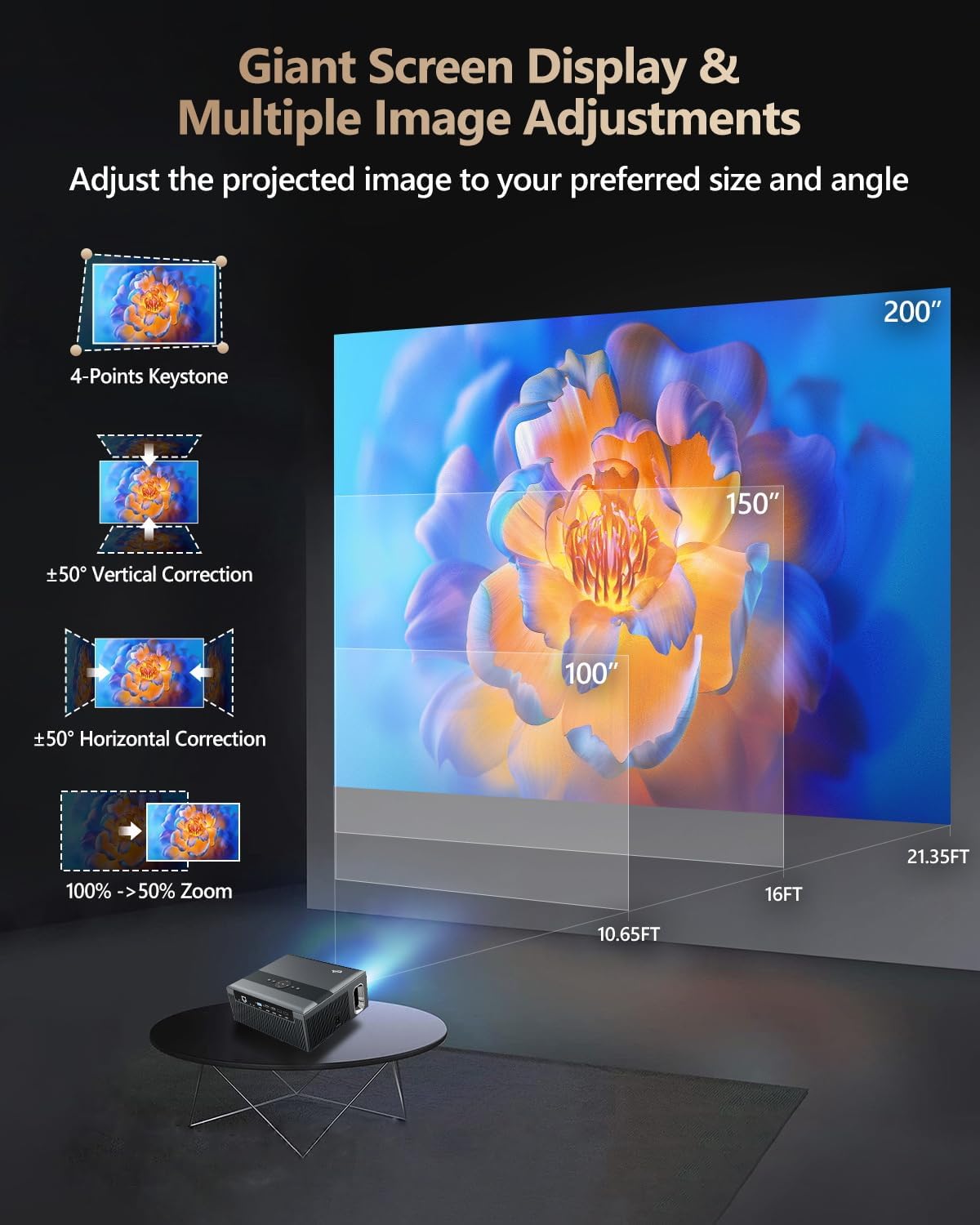
Figure 3: Image adjustment options including keystone correction and digital zoom.
4. Conexión de rede
Connect the projector to the internet for access to streaming apps and online content.
- Wi-Fi: Navigate to the network settings in the Android OS. Select your desired 2.4G or 5G Wi-Fi network and enter the password.
- LAN (Ethernet): Connect an Ethernet cable from your router to the RJ45 port on the projector for a wired internet connection.
5. Emparellamento Bluetooth
Pair Bluetooth devices such as external speakers, headphones, mice, keyboards, or gamepads.
- Asegúrese de que o dispositivo Bluetooth estea en modo de sincronización.
- On the projector, go to Bluetooth settings within the Android OS.
- Select the desired device from the list and confirm pairing.

Figure 4: Wireless connectivity for streaming and audio.
Instrucións de funcionamento
1. Android TV OS Navigation
Use the remote control to navigate the Android 9.0 interface. The home screen provides access to installed applications, settings, and input sources.

Figure 5: Android TV 9.0 interface with pre-installed and accessible applications.
2. Instalación e uso da aplicación
The projector comes with pre-installed apps like Netflix, YouTube, and Prime Video. You can download additional authorized applications from the app store within the Android OS.
- Select an app icon from the home screen to launch it.
- Follow on-screen prompts for login or content selection.
3. Screen Mirroring (Airplay/DLNA/Miracast)
Synchronize your smartphone, tablet, or laptop screen wirelessly to the projector.
- Asegúrate de que o dispositivo e o proxector estean conectados á mesma rede Wi-Fi.
- Select the appropriate mirroring function (Airplay for iOS, Miracast for Android/Windows, DLNA for compatible devices) on the projector's interface.
- Initiate screen mirroring from your source device.
4. Conectando Dispositivos Externos
The projector offers multiple ports for connecting various external devices.

Figure 6: Available input and output ports for external devices.
- HDMI: Connect Blu-ray/DVD players, TV sticks, game consoles (PS5), PCs, or laptops using an HDMI cable. Select the corresponding HDMI input from the projector's source menu.
- USB: Insert USB flash drives or hard drives into the USB ports to play media files directamente.
- VGA: Connect older PCs or laptops using a VGA cable.
- DE: Use the AV cable to connect devices with composite video and stereo audio outputs.
5. Saída de audio
The projector features built-in 10W stereo speakers. For alternative audio experiences:
- Bluetooth: Pair with external Bluetooth speakers or headphones as described in the Setup section.
- Saída de audio de 3.5 mm: Connect wired headphones or external speakers using a 3.5mm audio cable.

Figure 7: Projector's integrated audio system.
Mantemento
1. Limpeza
- Lente: Usa un pano suave e sen fiapos deseñado especificamente para lentes ópticas. Non empregues produtos de limpeza abrasivos.
- Exterior: Limpe o exterior do proxector cun pano suave e seco. Para manchas difíciles, límpeo lixeiramente.ampen o pano con auga.
- Aberturas de ventilación: Periodically check and gently clean the ventilation openings to ensure unobstructed airflow.
2. Protección contra o po
The CAIWEI X99+ features a fully sealed optical engine and an air purifier filter, which significantly reduces dust accumulation and light decay, contributing to a longer service life.

Figure 8: Dust-proof design of the CAIWEI X99+ projector.
3. Almacenamento
When not in use for extended periods, store the projector in a cool, dry place, preferably in its original packaging or the provided projector bag, to protect it from dust and physical damage.
Resolución de problemas
Se tes problemas co teu proxector, consulta os seguintes problemas e solucións comúns:
| Problema | Causa posible | Solución |
|---|---|---|
| Sen imaxe ou mensaxe "Sen sinal" | Incorrect input source selected; loose cable connection; device not powered on. |
|
| Imaxe borrosa | Focus not adjusted; keystone correction needed. |
|
| Sen son | Volume too low; incorrect audio output selected; external device audio issue. |
|
| Problemas de conexión wifi | Contrasinal incorrecto; fóra de alcance; problemas co enrutador. |
|
| O control remoto non funciona | Pilas gastadas; obstrución; problema de emparellamento. |
|
Especificacións
| Marca | CAIWEI |
| Modelo | X99+ |
| Resolución de visualización | Native 1920 x 1080 (Supports 4K) |
| Brillo | 800 ANSI Lumens (12000 LED Lumens) |
| Relación de contraste | 15500:1 |
| Sistema Operativo | Android 9.0 |
| Memoria | 2 GB de RAM + 16 GB de ROM |
| Tecnoloxía de conectividade | Bluetooth 5.0, Dual-band Wi-Fi (2.4G/5G), USB, HDMI, VGA, AV, LAN (RJ45) |
| Características especiais | Built-In Wi-Fi, Portable, Wireless, HDR10, MEMC, Dolby Audio, Sealed Optical Engine, 4D Keystone Correction, Digital Zoom |
| Audio | 10W High Power Stereo Speakers, 3.5mm Audio Output |
| Dimensións do produto | 10.55 x 9.25 x 4.92 polgadas |
| Peso do elemento | 7.48 libras |
Garantía e Soporte
For warranty information and technical support, please refer to the warranty card included with your product or visit the official CAIWEI websitio. Póñase en contacto co servizo de atención ao cliente para obter axuda con calquera problema que non se trate neste manual.
Fabricante: CAIWEI
Websitio: CAIWEI Official Store on Amazon


