Introdución
This manual provides essential information for the setup, operation, and maintenance of your Casio LK-S450 Premium Keyboard Pack. This pack includes the portable keyboard, a dedicated stand, an AC adapter, and headphones. The LK-S450 features 61 full-size, touch-responsive keys with Casio’s Key Lighting system, an easy-to-read LCD display, and intuitive controls designed to enhance your musical experience.
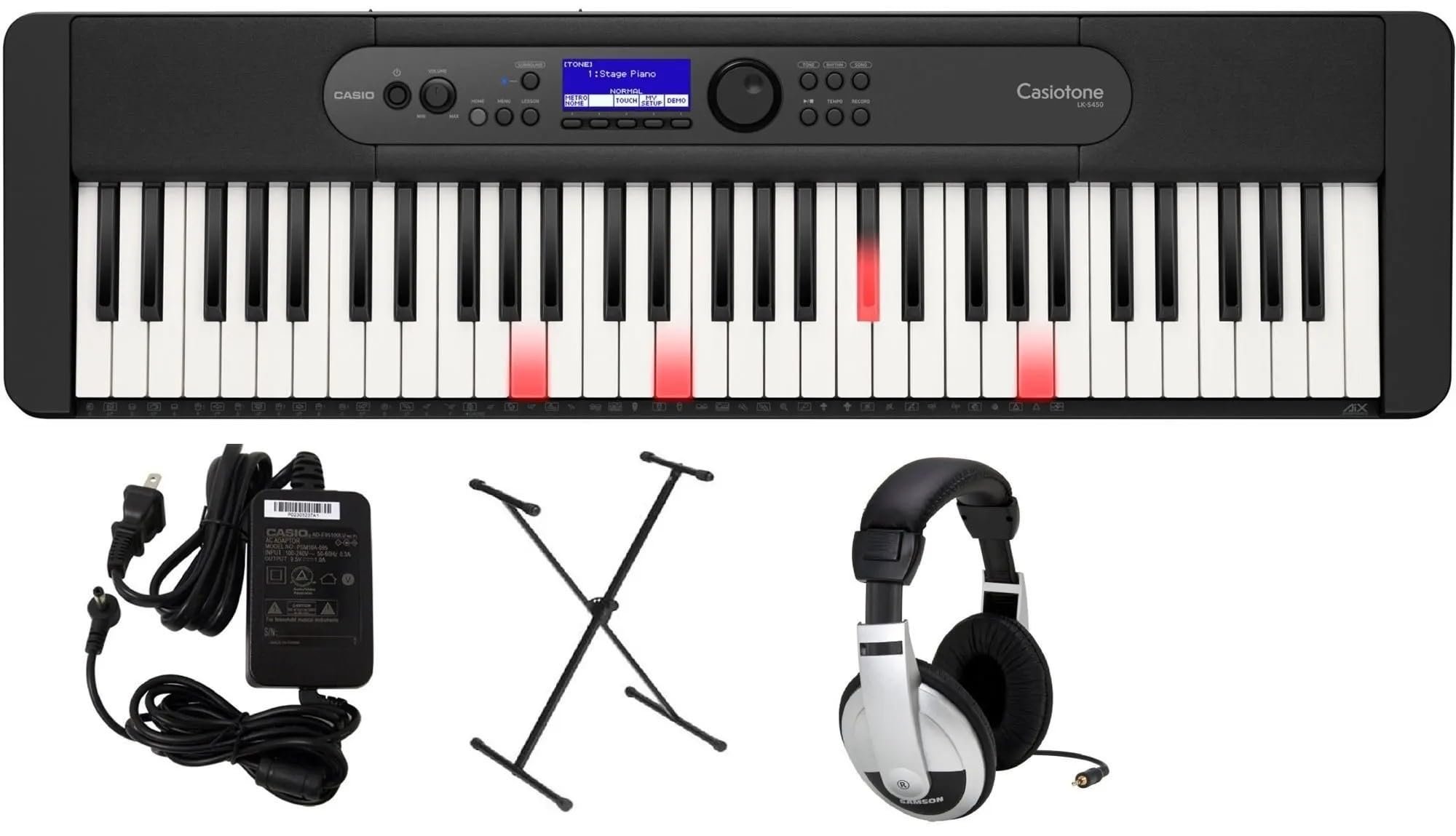
Image: Casio LK-S450 Portable Keyboard with lighted keys, showcasing the full keyboard layout and control panel.
Contido do paquete
Verifique que todos os elementos que se indican a continuación estean incluídos no seu paquete:
- Casio LK-S450 Portable Keyboard
- Soporte para teclado
- Adaptador de CA
- Auriculares
- Music Rest (often included with keyboard)
Instrucións de configuración
- Montar o soporte do teclado: Follow the instructions provided with the stand to ensure it is securely assembled. Adjust the height to a comfortable playing position.
- Coloca o teclado: Carefully place the Casio LK-S450 keyboard onto the assembled stand, ensuring it is stable and centered.
- Conecte o adaptador de CA: Insert the AC adapter plug into the DC 9.5V jack on the rear panel of the keyboard. Plug the other end into a standard wall outlet.
- Conectar auriculares (opcional): For private practice, plug the included headphones into the 3.5mm Headphones Jack located on the rear panel.
- Encendido: Press and hold the Power button on the keyboard's control panel until the LCD display illuminates.

Image: A black X-style keyboard stand, ready for keyboard placement.

Imaxe: Traseira view of the Casio LK-S450 keyboard, highlighting the USB ports, audio jacks, and power input.

Image: A pair of over-ear headphones with silver and black components.
Instrucións de funcionamento
Encendido/apagado
To turn on the keyboard, press and hold the Poder button. To turn off, press and hold the Poder botón de novo ata que a pantalla se apague.
Axuste do volume
Usa o Volume + e Volume - buttons on the control panel to adjust the overall sound output level.
Selección de tons e ritmos
The LK-S450 features a wide variety of tones and rhythms. Use the rotary dial and corresponding buttons on the control panel to browse and select different instrument sounds (tones) and accompaniment patterns (rhythms). The LCD display will show your current selection.

Imaxe: Arriba view of the Casio LK-S450 keyboard, highlighting the central control panel with its LCD screen, function buttons, and rotary dial for navigation.
Key Lighting System
The integrated Key Lighting system assists in learning by illuminating the keys to be played. Refer to the on-screen prompts and the user manual for specific lesson modes and how to utilize this feature effectively.
Conectividade
The MicroUSB port allows you to connect your LK-S450 to a PC, Mac, iOS, or Android device. This enables MIDI communication for use with music software like Casio Music Space, without requiring additional drivers or complex installation.
Mantemento
- Limpeza: Usa un pano suave e seco para limpar a superficie do teclado. Para a sucidade persistente, limpa lixeiramenteampen the cloth with water and a mild, non-abrasive cleaner. Avoid excessive moisture.
- Almacenamento: Garde o teclado nun lugar fresco e seco, lonxe da luz solar directa, de temperaturas extremas e de alta humidade.
- Manexo: Avoid dropping the keyboard or subjecting it to strong impacts. Do not place heavy objects on the keys or control panel.
Resolución de problemas
- Sen son: Check if the power is on and the volume is turned up. Ensure headphones are not plugged in if you intend to use the speakers.
- As teclas non responden: Verify the keyboard is powered on. If specific keys are unresponsive, contact customer support.
- Problemas de conectividade: Ensure the MicroUSB cable is securely connected to both the keyboard and your device. Check device settings and software for proper MIDI input recognition.
- Son distorsionado: Lower the volume. If using external speakers, check their connections and settings.
Especificacións
- Nome do modelo: LKS450
- Número de chaves: 61, touch-responsive
- Dimensións (teclado): 3.31" de profundidade x 10.16" de ancho x 3.31" de alto (258 mm x 84 mm x 84 mm)
- Peso do artigo: Approximately 21.9 pounds (including accessories in pack)
- Fonte de enerxía: Corded Electric (AC Adapter included)
- Tecnoloxía de conectividade: USB (MicroUSB port to host, USB Type A to device)
- Conector para auriculares: Conector de 3.5 mm
- Software compatible: Casio Music Space
- Compatibilidade do sistema operativo: Windows, macOS, iOS, Android
- Característica especial: Key Lighting System, Portable
Garantía e Soporte
Your Casio LK-S450 Premium Keyboard Pack comes with a manufacturer's warranty. Please refer to the warranty card included in your package for specific terms and conditions. For technical support, service, or additional information, please visit the official Casio websitio web ou póñase en contacto co seu departamento de atención ao cliente. Garde o recibo da compra como proba de compra para reclamacións de garantía.
Soporte en liña: Visita a tenda Casio en Amazon


