Instrucións de seguridade importantes
Please read these instructions carefully before operating the unit and retain them for future reference.
- Non expoña este aparello a goteos ou salpicaduras de auga.
- Non coloque obxectos cheos de líquidos, como vasos, sobre o aparello.
- Asegúrese de que haxa unha ventilación axeitada. Non bloquee ningunha das aberturas de ventilación.
- Non instale preto de fontes de calor como radiadores, rexistros de calor, cociñas ou outros aparellos (incluíndo amplificadores) que producen calor.
- Use só anexos/accesorios especificados polo fabricante.
- Desenchufe este electrodoméstico durante tormentas eléctricas ou cando non o use durante longos períodos.
- Remita todo o servizo a persoal de servizo cualificado. O mantemento é necesario cando o aparello sufriu algún dano.
Produto rematadoview
The Muse M17CB is a compact dual PLL FM/MW digital alarm clock radio designed for reliable timekeeping and audio playback. It features a clear 0.9-inch white LED display with a dimmer function and a 24-hour time format. Users can set two independent alarms, choosing to wake up to either the radio or a buzzer. The digital tuner allows for 6 preset stations (3 FM and 3 MW) for quick access to your favorite broadcasts. Additional functions include SNAP, SLEEP, and SNOOZE for enhanced user convenience.
Fronte View

Descrición da imaxe: This image displays the front of the Muse M17CB alarm clock radio. It features a prominent 0.9-inch white LED display showing "12:00". Above the display are various control buttons and two rotary knobs. The buttons include P.1, P.2, P.3, DIM., O/SOURCE, and a large SNOOZE button. The left rotary knob is for VOLUME, and the right is for TUNING/SET. A small "muse" logo tag is visible on the left side.
Controis do panel superior

Descrición da imaxe: Esta imaxe ofrece unha vista de arriba abaixo view of the Muse M17CB alarm clock radio, highlighting the control panel. It shows two large rotary knobs for Volume and Tuning/Set, along with several push buttons: P.1, P.2, P.3 (for radio presets), DIM. (dimmer), O/SOURCE (power/source selection), and a large circular SNOOZE button. The layout is clear and intuitive.
Conexións do panel traseiro

Descrición da imaxe: This image shows the rear panel of the Muse M17CB alarm clock radio. It clearly displays the "AC~" power input socket, the "FM ANT." wire antenna, and an "AUX IN" 3.5mm jack for connecting external audio devices. A speaker grille is also visible on the right side.
Configuración
Conexión de alimentación
- Unpack the Muse M17CB unit and all accessories.
- Connect the AC power cord to the "AC~" input on the rear of the unit.
- Conecte o outro extremo do cable de alimentación a unha toma de corrente estándar.
- O visor LED acenderase, indicando que a unidade está a recibir enerxía.
Configuración da antena
- For optimal FM reception, fully extend the FM wire antenna located at the back of the unit.
- Adjust the position of the antenna for the best possible signal reception.
Instrucións de funcionamento
Axuste da hora
- Asegúrese de que a unidade estea acendida.
- Manteña premido o TUNING/SET knob for approximately 2 seconds until the hour digits flash on the display.
- Xire o TUNING/SET botón para axustar a hora.
- Preme o TUNING/SET knob once to confirm the hour; the minute digits will flash.
- Xire o TUNING/SET knob to adjust the minutes.
- Preme o TUNING/SET knob again to confirm the minutes and exit time setting mode.
- A hora móstrase en formato de 24 horas.
Setting the Alarm (Alarm 1 and Alarm 2)
A unidade dispón de dúas alarmas independentes (Alarma 1 e Alarma 2).
- Preme o P.1 botón (para a alarma 1) ou P.2 button (for Alarm 2) once. The alarm icon and hour digits will flash.
- Xire o TUNING/SET knob to adjust the alarm hour.
- Preme o TUNING/SET knob to confirm the hour; the minute digits will flash.
- Xire o TUNING/SET knob to adjust the alarm minutes.
- Preme o TUNING/SET knob to confirm the minutes. The alarm source (radio or buzzer) will flash.
- Xire o TUNING/SET knob to select either Radio or Zumbador as the alarm sound.
- Preme o TUNING/SET knob to confirm the alarm source. The alarm volume will flash (if radio is selected).
- Xire o VOLUME knob to set the desired alarm volume (for radio alarm).
- Preme o TUNING/SET knob to save the alarm settings. The corresponding alarm icon will appear on the display, indicating the alarm is active.
Para desactivar unha alarma, prema o botón correspondente P.1 or P.2 botón ata que a icona da alarma desapareza da pantalla.
Radio Operation (FM/MW)
- Preme o O/SOURCE button to turn on the radio. Press it repeatedly to cycle between FM, MW, and AUX modes.
- Xire o TUNING/SET knob to manually tune to a desired frequency.
- Para buscar emisoras automaticamente, manteña premido o botón TUNING/SET knob for 2 seconds. The radio will scan and stop at the next available station.
Setting and Recalling Presets (P.1, P.2, P.3)
- To Store a Preset: Tune to the desired station. Press and hold one of the preset buttons (P.1, P.2, ou P.3) for 2 seconds until the display confirms the preset is saved.
- Para recuperar un preselección: Briefly press the desired preset button (P.1, P.2, ou P.3) to tune to the stored station.
Función Dimmer
Preme o DIM. button repeatedly to adjust the brightness of the LED display to your preference (e.g., High, Medium, Low, Off).
Función de repetición
Cando soe unha alarma, prema o botón grande AMORTAR botón para silenciar temporalmente a alarma. A alarma volverá soar despois de aproximadamente 9 minutos.
Función sono
A función de sono permíteche adormecerte coa radio, que se apagará automaticamente despois dun período de tempo determinado.
- Mentres soa a radio, prema o botón P.3 button (often doubles as SLEEP function) repeatedly to cycle through available sleep timer durations (e.g., 90, 60, 30, 15 minutes, or OFF).
- A radio apagarase automaticamente despois da duración seleccionada.
SNAP Function
The specific operation of the SNAP function is not detailed in the provided product description. Please refer to the full printed manual included with your device for instructions on using the SNAP feature.
Entrada auxiliar (AUX IN)
Conecte un dispositivo de son externo (por exemplo, un reprodutor de MP3, un teléfono intelixente) ao AUX IN jack on the rear of the unit using a 3.5mm audio cable. Press the O/SOURCE button repeatedly until "AUX" appears on the display to switch to auxiliary input mode. Audio from the connected device will play through the alarm clock's speaker.
Mantemento
- Limpeza: Usa un pano suave e seco para limpar o exterior da unidade. Non empregues produtos de limpeza abrasivos, ceras nin disolventes.
- Almacenamento: Se a unidade non se usa durante un período prolongado, desconéctea da toma de corrente e gárdea nun lugar fresco e seco.
- Evitar a humidade: Manteña a unidade lonxe da auga e da humidade elevada.
Resolución de problemas
| Problema | Causa posible | Solución |
|---|---|---|
| Sen alimentación / Pantalla apagada | Cable de alimentación non conectado correctamente. | Ensure the AC power cord is securely plugged into the unit and a working wall outlet. |
| Mala recepción de radio | A antena FM non está estendida ou colocada correctamente. | Fully extend and adjust the position of the FM wire antenna for better reception. Try moving the unit to a different location. |
| A alarma non soa | A alarma non está activada ou está configurada incorrectamente. | Verify that the alarm icon is displayed. Recheck alarm time and source settings. Ensure alarm volume is not set to minimum if radio alarm is selected. |
| Pantalla demasiado brillante/escura | É preciso axustar o axuste do regulador de intensidade. | Preme o DIM. button repeatedly to cycle through brightness levels. |
Especificacións
- Modelo: M17CB
- Visualización: 0.9-inch White LED with Dimmer
- Formato horario: 24 horas
- Sintonizador: Digital FM/MW PLL
- Presets: 6 (3 FM + 3 MW)
- Alarmas: Dual Alarm (Radio or Buzzer)
- Funcións: SNAP, SLEEP, SNOOZE
- Fonte de enerxía: Alimentación CA
- Dimensións: 13 cm (longo) x 11 cm (ancho) x 6.5 cm (altura)
- Cor: Turquesa
- Material: Resin or Plastic
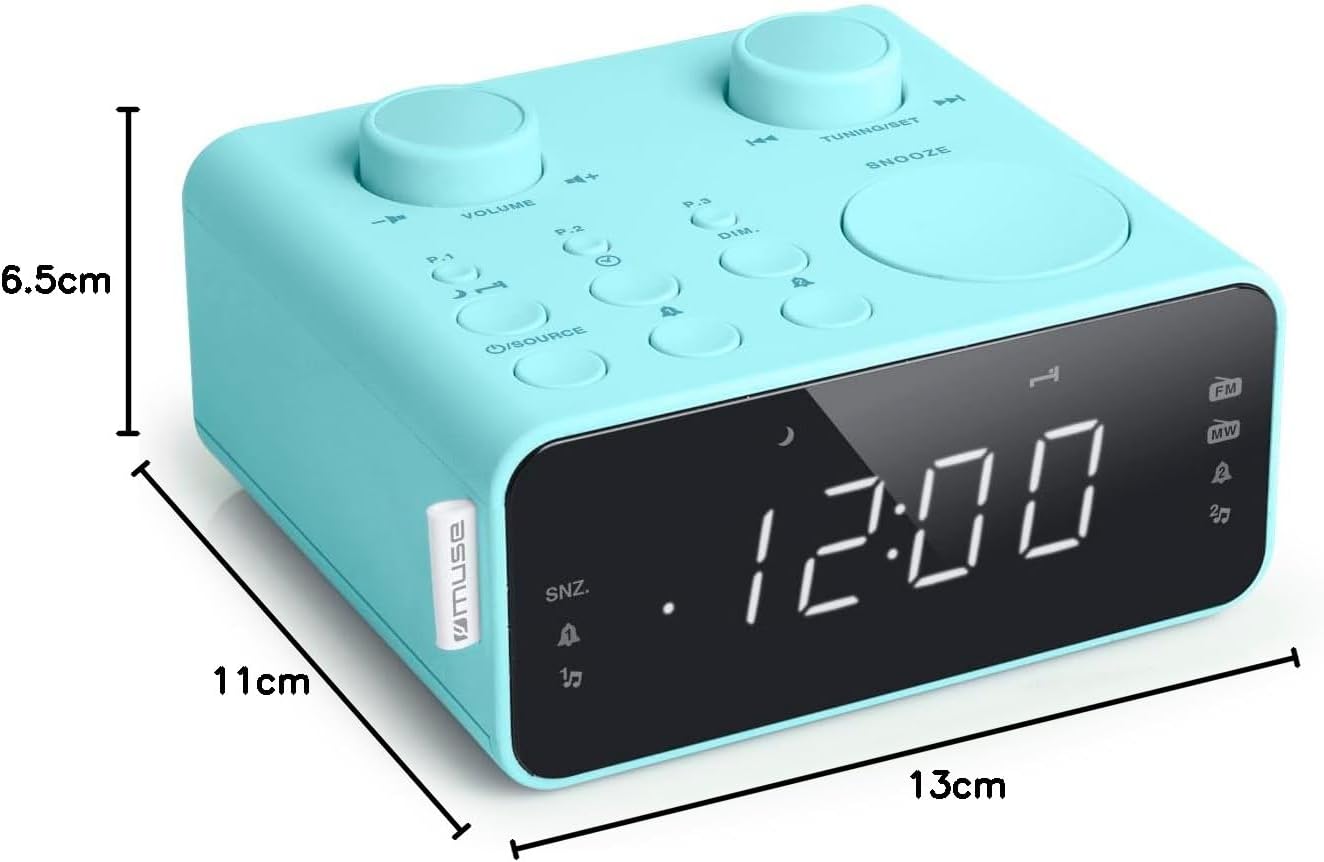
Descrición da imaxe: This image illustrates the dimensions of the Muse M17CB alarm clock radio. It shows the unit with measurements indicating a length of 13cm, a width of 11cm, and a height of 6.5cm.
Garantía e Soporte
For warranty information and technical support, please refer to the warranty card included with your product or visit the official Muse websitio. Garde o recibo da compra como xustificante da mesma.
The product includes a user manual (as indicated by "Pièces incluses: Manuel du propriétaire").


