1. Información importante de seguridade
Please read this manual carefully before using the Midea M9 Robot Vacuum Cleaner and retain it for future reference. Adhere to all safety warnings and instructions to prevent injury or damage.
- Este aparello pode ser usado por nenos a partir de 8 anos e persoas con capacidades físicas, sensoriais ou mentais reducidas ou con falta de experiencia e coñecementos se recibiron supervisión ou instrucións sobre o uso do aparello de forma segura e comprenden os perigos que implica. .
- Os nenos deben ser supervisados para asegurarse de que non xogan co aparello.
- A limpeza e o mantemento do usuario non deben ser feitos por nenos sen supervisión.
- Empregue só o adaptador de corrente orixinal subministrado polo fabricante.
- Do not use the robot vacuum in wet environments or near water.
- Ensure the charging base is placed on a level surface against a wall, with clear space around it.
- Remove any loose cables, small objects, or fragile items from the cleaning area before operation.
2. Contido do paquete
Verify that all items are present in the package. If any components are missing or damaged, contact customer support.
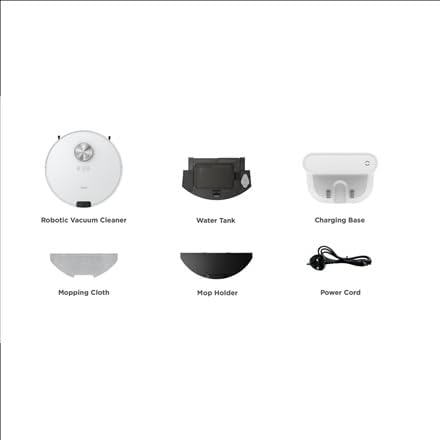
Imaxe: Acabadoview of the Midea M9 Robot Vacuum Cleaner's package contents. This image displays the main robotic vacuum cleaner unit, a water tank, a charging base, a mopping cloth, a mop holder, and a power cord.
- Aspiradora robótica
- Depósito de auga
- Base de carga
- Fregando o pano
- Titular de fregona
- Cable de alimentación
3. Produto rematadoview
3.1 Arriba View
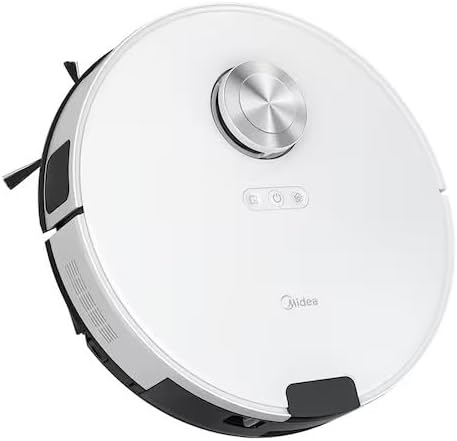
Imaxe: Arriba view of the Midea M9 Robot Vacuum Cleaner. This image shows the circular design of the robot, with a central LiDAR navigation sensor tower, power button, and other control indicators on its surface.
The top of the Midea M9 features the LiDAR navigation sensor, which allows the robot to map your home and navigate efficiently. It also includes control buttons for starting/pausing cleaning and returning to the charging base.
3.2 Abaixo View

Imaxe: Abaixo view of the Midea M9 Robot Vacuum Cleaner. This image displays the two side brushes, the main rolling brush, the driving wheels, and the mopping pad attachment area.
The underside of the robot houses the main rolling brush, two side brushes for edge cleaning, driving wheels, and cliff sensors to prevent falls. The mopping pad attachment area is also visible.
4. Configuración
4.1 Colocación da base de carga
- Coloque a base de carga contra unha parede sobre unha superficie dura e nivelada.
- Asegúrate de que haxa polo menos 0.5 metros (1.6 pés) de espazo libre a ambos os dous lados da base de carga e 1.5 metros (4.9 pés) diante dela.
- Connect the power cord to the charging base and plug it into a power outlet.
4.2 Carga inicial
- Place the robot vacuum onto the charging base, ensuring the charging contacts align.
- Allow the robot to charge completely before its first use. This typically takes 4-6 hours. The indicator light on the robot will change to indicate a full charge.
4.3 Conexión á aplicación (opcional)
- Download the Midea Smart app from your mobile device's app store.
- Follow the in-app instructions to connect your Midea M9 Robot Vacuum Cleaner to your home Wi-Fi network. This enables advanced features like remote control, scheduling, and cleaning mode selection.
5. Instrucións de funcionamento
5.1 Iniciar/deter a limpeza
- Comezar: Press the power button on the robot or use the Midea Smart app. The robot will begin cleaning in Auto mode.
- Para pausar: Press the power button again during cleaning.
- Para parar/volver á base: Press and hold the power button for a few seconds, or use the 'Return to Base' function in the app.
5.2 Modos de limpeza
The Midea M9 offers various cleaning modes:
- Modo automático: O robot navega e limpa toda a túa casa de forma intelixente.
- Modo puntual: Cleans a specific area more intensely. Place the robot in the center of the dirty area and activate Spot mode via the app.
- Modo de borde: The robot cleans along walls and furniture edges. Activate via the app.
5.3 Función de fregado
- Fill the water tank with clean water. Do not use detergents or cleaning solutions not approved by Midea.
- Attach the mopping cloth to the mop holder, then slide the mop holder with the cloth onto the water tank.
- Insert the assembled water tank and mop holder into the robot.
- The robot will automatically switch to mopping mode or combined vacuuming and mopping.
6. Mantemento
Un mantemento regular garante un rendemento óptimo e prolonga a vida útil do teu robot aspirador.
6.1 Limpeza do cubo de lixo e do depósito de auga
- Baleirar o colector de lixo despois de cada uso.
- Rinse the dustbin and filter with water as needed, ensuring they are completely dry before reinstallation.
- Empty and clean the water tank after each mopping session to prevent mold and odors.
6.2 Limpeza con cepillos
- Cepillo principal: Remove the main brush cover and lift out the brush. Use the cleaning tool to remove hair and debris. Clean weekly.
- Cepillos laterais: Check for tangled hair or debris. Remove and clean as needed. Replace if worn or damaged. Clean monthly.
6.3 Limpeza do sensor
- Wipe the cliff sensors, wall sensors, and charging contacts with a clean, dry cloth monthly to ensure proper function.
7 Solución de problemas
Se tes algún problema, consulta os seguintes problemas e solucións comúns:
| Problema | Causa posible | Solución |
|---|---|---|
| O robot non carga | Charging contacts are dirty; Power adapter not connected; Robot not properly aligned with base. | Clean charging contacts; Ensure power adapter is plugged in; Realign robot on charging base. |
| O robot quédase atascado con frecuencia | Loose cables or small objects on the floor; Robot stuck on high thresholds. | Clear obstacles from cleaning path; Use virtual walls or no-go zones in the app. |
| Mal rendemento da limpeza | Cubo do lixo cheo; cepillos enredados; filtro obstruído. | Baleirar o colector de po; limpar os cepillos principais e laterais; limpar ou substituír o filtro. |
| O robot non pode conectarse á wifi | Incorrect Wi-Fi password; Router too far; Only supports 2.4GHz Wi-Fi. | Verify password; Move robot closer to router; Ensure router is set to 2.4GHz. |
8. Especificacións
| Característica | Detalle |
|---|---|
| Marca | Midea |
| Nome do modelo | Midea M9 |
| Dimensións (L x W x H) | 32 x 32 x 10 cm |
| Peso | 4 quilogramos |
| Características especiais | Smart mapping, Portable |
| Recomendación de superficie | Alfombra |
9. Garantía e soporte
For warranty information and technical support, please refer to the warranty card included with your product or visit the official Midea websitio. Garde o recibo da compra como xustificante da mesma.


