1. Introdución
This manual provides comprehensive instructions for the setup, operation, and maintenance of your Xprinter XP-Q801K Thermal Receipt Printer. This printer is designed for efficient and reliable receipt printing in various business environments, featuring high-speed direct thermal printing and a USB interface for easy connectivity.

Figura 1: Fronte view of the Xprinter XP-Q801K Thermal Receipt Printer, showing the paper output slot and control buttons.
2. Configuración
2.1 Desembalaxe
Carefully remove the printer and all accessories from the packaging. Verify that all components are present:
- Xprinter XP-Q801K Thermal Receipt Printer
- Adaptador de alimentación
- Cable USB
- Paper Roll (starter)
- Manual de usuario (este documento)
2.2 Conectar a impresora
Before connecting, ensure the printer is powered off. Locate the ports on the rear of the printer.
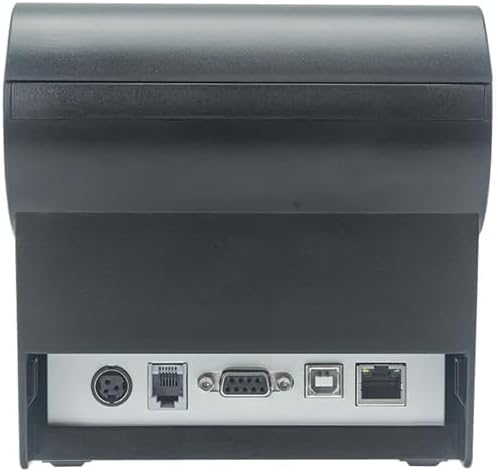
Figura 2: Traseira view of the printer, highlighting the power, USB, and other interface ports.
- Conectar enerxía: Insert the power adapter cable into the printer's power input port (DC 24V/2.5A) and plug the adapter into a suitable electrical outlet (AC 100-240V, 50-60Hz).
- Conectar USB: Connect one end of the provided USB cable to the USB port on the printer and the other end to an available USB port on your computer.
- Caixa de diñeiro (opcional): If using a cash drawer, connect its cable to the cash drawer port (DC 24V/1A) on the printer.
2.3 Loading the Paper Roll
The printer uses 80mm wide thermal paper rolls.
- Open the paper cover by pushing the cover open button (usually located on the side or front).
- Insert the thermal paper roll with the printing surface facing the print head. Ensure the roll is seated correctly in the paper compartment.
- Tire dunha pequena cantidade de papel para sacalo do cortador.
- Peche a tapa de papel firmemente ata que encaixe no seu lugar.
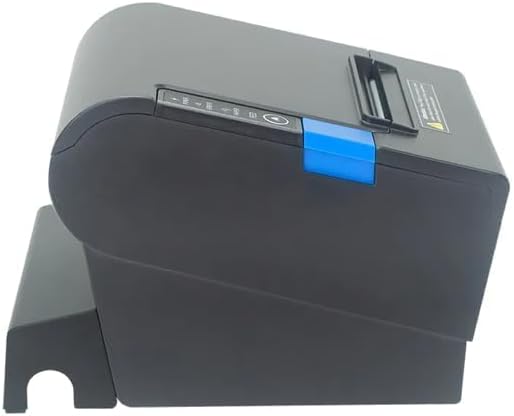
Figura 3: Lateral view of the printer, illustrating the paper cover mechanism.
2.4 Instalación do controlador
The printer requires a driver to communicate with your computer. Drivers are typically available for Windows, Linux, Android, and Mac operating systems.
- For Windows users, the printer often supports plug-and-play installation or requires a specific Windows driver.
- For Linux, Android, and Mac, SDKs (Software Development Kits) are usually provided for integration.
Consulte o fabricante website or the included driver CD/USB drive for the latest drivers and installation instructions specific to your operating system.
3. Funcionamento da impresora
3.1 Acendido/Apagado
Locate the power switch on the side or rear of the printer. Flip the switch to the 'ON' position to power on the printer. The 'POWER' indicator light will illuminate. Flip to 'OFF' to power down.
3.2 Indicator Lights and Buttons
The front panel typically features several indicator lights and buttons:
- POTENCIA: Indica que a impresora está acendida.
- ERRO: Illuminates or flashes to indicate an error condition (e.g., paper out, print head overheating, cutter error).
- PAPEL: Indicates that the paper roll is low or out.
- Botón FEED: Press to manually feed paper. Hold to perform a self-test print (if supported by model).
3.3 Impresión básica
Once the printer is connected and drivers are installed, you can print receipts from your POS software or application. Ensure the printer is selected as the default or active printer in your system settings.
The printer supports various print speeds up to 300 mm/s and automatic paper cutting after each print job.
4. Mantemento
Un mantemento regular garante un rendemento óptimo e prolonga a vida útil da súa impresora.
4.1 Limpeza do cabezal de impresión
The print head should be cleaned regularly, especially if print quality degrades.
- Apague a impresora e desconecte o cable de alimentación.
- Abra a tapa do papel.
- Use un hisopo de algodón lixeiramenteampened with isopropyl alcohol (ethanol) to gently wipe the thermal elements of the print head.
- Deixe que o cabezal de impresión seque completamente antes de pechar a tapa e volver conectar a alimentación.
4.2 Cleaning the Cutter
Paper dust can accumulate around the cutter blade, affecting its performance.
- Apague a impresora e desconecte o cable de alimentación.
- Carefully remove any visible paper dust or debris from around the cutter blade using a soft brush or compressed air.
- Do not use liquids on the cutter.
4.3 Limpeza xeral
Limpe o exterior da impresora cun pano suave eamp pano. Evite o uso de produtos químicos agresivos ou produtos de limpeza abrasivos.
5 Solución de problemas
Esta sección aborda problemas comúns que podes atopar coa túa impresora.
| Problema | Causa posible | Solución |
|---|---|---|
| A impresora non se acende. | Cable de alimentación non conectado; Toma de corrente avariada; Interruptor apagado. | Ensure power cable is securely connected. Test power outlet. Turn power switch to 'ON'. |
| No printing. | Paper out; Paper loaded incorrectly; Driver not installed or incorrect; USB cable loose; Printer not selected. | Load new paper roll. Re-load paper correctly. Install/reinstall correct driver. Check USB connection. Select printer in software. |
| ERROR light is on/flashing. | Paper out; Paper jam; Print head overheating; Cutter error. | Load paper. Clear paper jam. Allow printer to cool down. Check cutter for obstructions. |
| Mala calidade de impresión. | Dirty print head; Low quality paper; Old paper roll. | Clean the print head (see Section 4.1). Use high-quality thermal paper. Replace old paper rolls. |
Se o problema persiste despois de intentar estas solucións, póñase en contacto co servizo de atención ao cliente.
6. Especificacións
| Característica | Detalle |
|---|---|
| Método de impresión | Térmica directa |
| Ancho do papel | 80 mm |
| Velocidade de impresión | 230 mm/s, 260 mm/s, 300 mm/s |
| Interface | USB |
| Espazo entre liñas | 3.75 mm (adjustable by commands) |
| Character Size (ANK) | Font A: 1.5 × 3.0 mm (12 × 24 dots) Font B: 1.1 × 2.1 mm (9 × 17 dots) |
| Character Size (Chinese/Traditional Chinese) | 3.0 × 3.0 mm (24 × 24 dots) |
| Tipos de códigos de barras | UPC-A / UPC-E / JAN13 (EAN13) / JAN8 (EAN8) / CODE39 / ITF / CODABAR / CODE93 / CODE128 |
| Código de barras 2D | QR Code / PDF417 |
| NV Flash Memory | 256 KB |
| Potencia de entrada | CA 100-240V, 50-60Hz |
| Potencia de saída | DC 24V/2.5A |
| Saída da caixa de diñeiro | DC 24V/1A |
| Peso | 1.0 kg |
| Dimensións (D × W × H) | 194.5 × 145 × 146.4 mm |
| Temperatura de funcionamento | 0 ~ 45 °C |
| Humidade de funcionamento | 10~80% RH |
| Vida de cortador | 1.5 millóns de recortes |
| Vida do cabezal de impresión | 150 km |
| Compatibilidade con SO | Windows, Linux, Android, Mac |


