Instrucións de seguridade importantes
Read all instructions before using this appliance. To reduce the risk of fire, electrical shock, or injury when using your air conditioner, follow these basic precautions:
- Este aparello debe estar correctamente conectado a terra.
- Never unplug the air conditioner by pulling on the power cord. Always grasp the plug firmly and pull straight out from the receptacle.
- Non beliscar, dobrar ou anudar o cable de alimentación.
- Non faga funcionar o aire acondicionado cun cable de alimentación ou unha ficha danados.
- Do not use an extension cord or an adapter plug with this unit.
- Always turn off the air conditioner and unplug it before cleaning or servicing.
- Do not block the air intake or exhaust openings.
- Use only for its intended purpose as described in this manual.
- Manter os materiais de embalaxe fóra do alcance dos nenos.
Produto rematadoview
The RCA 12000 BTU Wi-Fi Air Conditioner is designed to cool rooms up to 550 sq. ft. It features Wi-Fi connectivity, allowing remote control via a smart device. The unit includes multiple operating modes, a digital display, and a 24-hour timer for personalized comfort.
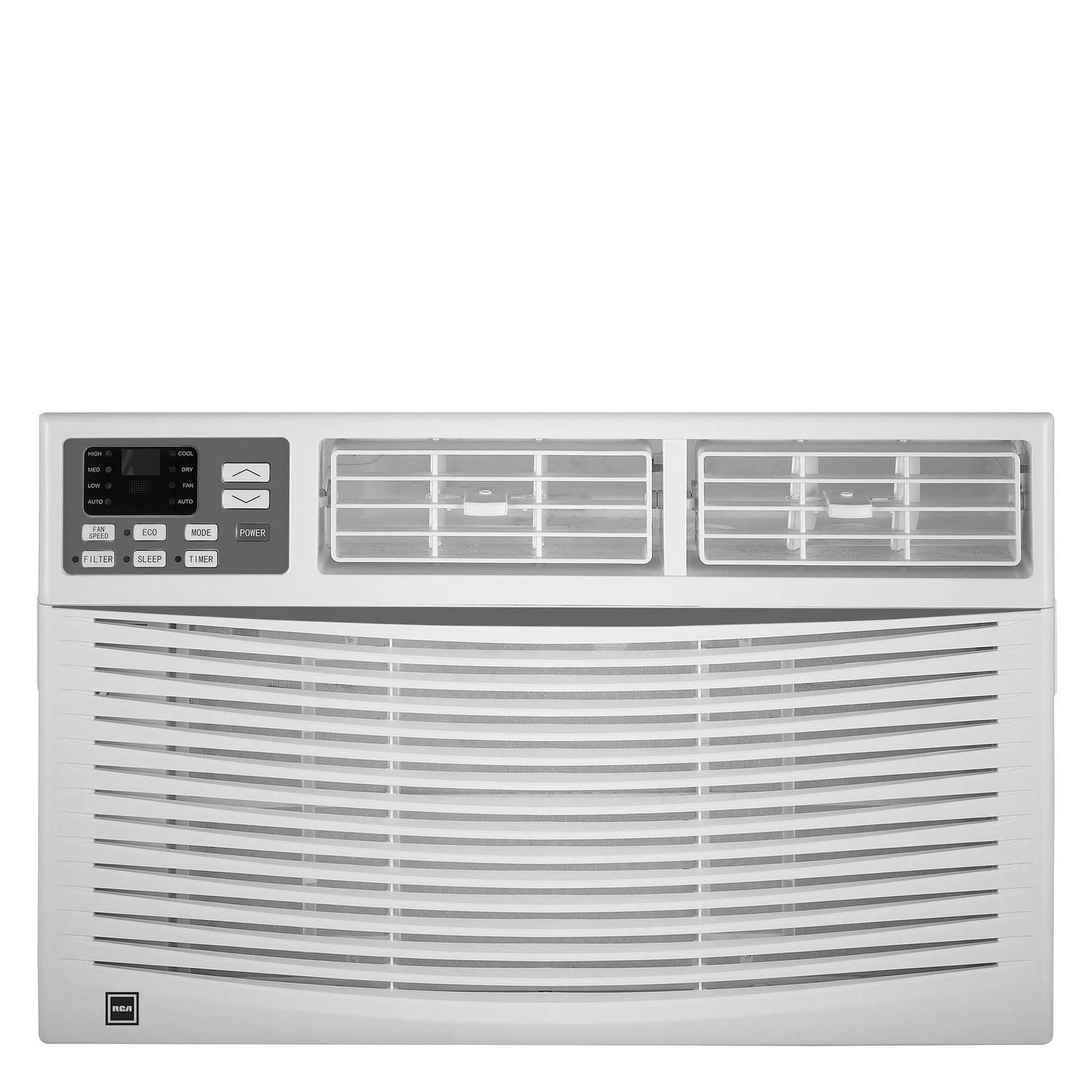
Imaxe: Fronte view of the RCA 12000 BTU Wi-Fi Air Conditioner, showing the control panel and air vents.
Características principais:
- 12,000 BTU cooling capacity, suitable for areas up to 550 sq. ft.
- Integrated Wi-Fi for remote control via smart devices.
- Three fan modes for customized airflow.
- Digital display for easy temperature and setting adjustments.
- Temporizador programable de 24 horas.
- Eco mode for energy-efficient operation.
- Filter check reminder for timely maintenance.
- Auto restart function after power outages.
- Includes window installation kit and remote control.
Contido do paquete
Verify that all parts are included in the package before installation:
- RCA 12000 BTU Wi-Fi Air Conditioner Unit
- Mando a distancia con pilas
- Window Installation Kit (side panels, top rail, sash lock, foam seals)
- Manual do propietario
An image showing all included components laid out would typically be found here.
Instalación e Configuración
Instalación da fiestra:
This air conditioner is designed for installation in standard double-hung windows with a minimum height of 16 inches and a width between 26 and 36 inches.
- Preparar a xanela: Ensure the window opening is clean and clear of obstructions.
- Coloque o carril superior: Secure the top rail to the air conditioner unit using the provided screws.
- Instalar os paneis laterais: Slide the accordion side panels into the side panel frames on the unit.
- Colocar a unidade na xanela: Carefully lift the unit and place it in the window opening, ensuring the bottom rail rests against the window sill.
- Unidade segura: Extend the side panels to fill the window opening and secure them with screws. Install the sash lock to prevent the window from being opened from the outside. Apply foam seals to ensure an airtight fit.
- Drenaxe: Asegúrese de que a unidade estea lixeiramente inclinada cara a fóra para permitir unha correcta drenaxe do condensado.
An image illustrating the step-by-step window installation process would be beneficial here.
Configuración Wi-Fi:
To enable remote control functionality, connect your air conditioner to your home Wi-Fi network.
- Descarga a aplicación: Download the RCA Home app from your smartphone's app store (iOS or Android).
- Crear conta: Abre a aplicación e crea unha nova conta de usuario ou inicia sesión se xa tes unha.
- Engadir dispositivo: Follow the in-app instructions to add a new device. This typically involves putting the air conditioner into pairing mode (refer to the unit's control panel or remote for specific instructions, often a Wi-Fi button press).
- Conectar a wifi: Select your home Wi-Fi network and enter the password when prompted by the app.
- Confirmación: Once connected, the Wi-Fi indicator on the air conditioner's display will illuminate steadily, and the app will confirm successful pairing.
An image showing the Wi-Fi indicator on the unit's display and a screenshot of the app's pairing screen would be helpful.
Instrucións de funcionamento
Panel de control e control remoto:
The air conditioner can be operated using the control panel on the unit or the included remote control. The remote control offers full functionality from a distance.
An image of the remote control with button labels would be useful here.
Operación básica:
- Encendido/apagado: Preme o POTENCIA botón para acender ou apagar a unidade.
- Selección de modo: Preme o MODO button to cycle through available modes: Cool, Fan, and Eco.
- Axuste de temperatura: Usa o UP (▲) e ABAIXO (▼) arrows to set the desired temperature. The temperature range is typically 62°F to 86°F (17°C to 30°C).
- Velocidade do ventilador: Preme o VELOCIDADE DO FAN button to select Low, Medium, or High fan speed.
Funcións avanzadas:
- Temporizador: Preme o TEMPORIZADOR button to set a delay for the unit to turn on or off. Use the UP/ABAIXO arrows to adjust the time in 1-hour increments, up to 24 hours.
- Modo Eco: When activated, the unit will cycle the compressor on and off to maintain the set temperature, saving energy. The fan may continue to run during compressor off cycles.
- Modo de suspensión: (If available) This mode gradually increases the temperature over several hours to provide comfortable sleeping conditions while saving energy.
- Control Wi-Fi: Use the RCA Home app on your smart device to remotely turn the unit on/off, change temperatures, control modes, create custom schedules, and adapt fan speeds.
Mantemento
Un mantemento regular garante un rendemento óptimo e prolonga a vida útil do seu aire acondicionado.
Limpeza do filtro de aire:
The air filter should be cleaned every two weeks or when the 'Filter Check' indicator illuminates.
- Apagar a unidade: Always turn off and unplug the air conditioner before cleaning.
- Eliminar filtro: Open the front panel and carefully slide out the air filter.
- Limpar o filtro: Lave o filtro con auga morna e xabón. Enxágüe ben. Para filtros moi sucios, pódese usar un aspirador para eliminar a sucidade solta antes de lavalos.
- Filtro seco: Deixa que o filtro seque completamente ao aire antes de volvelo colocar. Non o expoñas á luz solar directa nin a calor intensa.
- Reinstalar o filtro: Deslice o filtro seco de volta na súa ranura e peche o panel frontal.
An image demonstrating how to remove and clean the air filter would be helpful.
Limpeza xeral:
- Exterior: Limpar o armario cun pano suaveamp cloth. Do not use harsh chemicals, abrasive cleaners, or waxes.
- Bobinas: Periodically check the condenser coils (located at the back of the unit) for dirt and debris. If necessary, gently brush them clean.
Resolución de problemas
Antes de contactar co servizo de atención ao cliente, consulte a seguinte táboa para ver os problemas e as solucións máis habituais:
| Problema | Causa posible | Solución |
|---|---|---|
| O aire acondicionado non arranca. | Sen electricidade; disyuntor saltado; unidade desconectada. | Check power cord connection; reset circuit breaker; ensure unit is plugged into a working outlet. |
| A unidade non arrefría eficazmente. | Dirty air filter; blocked air intake/exhaust; room too large; windows/doors open. | Clean air filter; clear obstructions; ensure room size is within capacity; close all windows and doors. |
| Auga pingando no interior. | Unit not tilted properly; clogged drain pan. | Ensure unit is slightly tilted outwards for drainage; clear any blockages in the drain pan. |
| Problemas coa conexión wifi. | Contrasinal wifi incorrecto; enrutador demasiado lonxe; aplicación non actualizada. | Verify Wi-Fi password; move unit closer to router or use a Wi-Fi extender; update RCA Home app. |
Especificacións
| Característica | Detalle |
|---|---|
| Marca | RCA |
| Número de modelo | RACE1206WF |
| Capacidade de refrixeración | 12,000 BTU |
| Área de cobertura | Ata 550 pés cadrados. |
| Taxa de deshumidificación | 2 pintas por hora |
| Altura mínima da xanela | 16 polgadas |
| Window Width Range | 26 - 36 polgadas |
| Dimensións (LxPxH) | 22" x 24" x 17" (aproximadamente) |
| Peso do elemento | 78 libras |
| Conectividade | Wi-Fi |
Información da garantía
This RCA air conditioner comes with a Garantía limitada do fabricante de 1 anos. Please refer to the warranty card included with your product for full terms and conditions, or visit the official RCA websitio para máis detalles.
Atención ao cliente
For technical assistance, troubleshooting beyond this manual, or warranty claims, please contact RCA Customer Support. Contact information can typically be found on the manufacturer's websitio web ou na tarxeta de garantía que se inclúe co produto.


