1. Introdución
This manual provides detailed instructions for the proper use and maintenance of your Tzone Temperature Humidity Data Logger, Model TempU07B. This device is designed for accurate and reliable monitoring and recording of temperature and humidity data in various industrial and cold chain applications, including freezers, refrigerators, greenhouses, and laboratories. Please read this manual thoroughly before operating the device.

Image 1.1: The Tzone TempU07B Temperature Humidity Data Logger, featuring an external temperature and humidity probe, an LCD display, and a detachable magnetic mounting bracket.
2. Características do produto
- Grao industrial: Designed for robust performance in demanding environments, featuring an IP65 waterproof rating.
- Sonda externa: Equipped with a 1.5-meter external temperature and humidity probe for measuring data in hard-to-reach or enclosed spaces.
- High Data Capacity: Stores up to 34,560 groups of temperature and humidity data.
- Xeración automática de informes: Generates PDF and CSV reports automatically upon connection to a computer via USB, requiring no special software for basic report viewing.
- Amplio rango de medición: Temperature range of -40 ℉ to 185 ℉ (-40 ℃ to 85 ℃) and humidity range of 5% to 95% RH.
- Certificación de calidade: Complies with FDA CFR Part 21 requirements.
- Parámetros configurables: Allows setting of alarm ranges, logging intervals, startup modes, and calibration via dedicated Windows software.
- Pantalla LCD dixital: Shows real-time, maximum (MAX), and minimum (MIN) temperature and humidity values.
- Aforro de enerxía: LCD screen automatically turns off after 1 minute of inactivity to conserve battery life.
- Montaxe conveniente: Features a wall-mounted bracket with a magnet for easy installation and space-saving placement.
3. Contido do paquete
Comprobe o contido do paquete ao recibilo para asegurarse de que estea presente con todos os elementos:
- 1 x Tzone Temperature and Humidity Data Logger (Model TempU07B)
- 1 x Manual de usuario (este documento)
- 1 pila CR2032 (preinstalada ou incluída por separado)
- 1 x Magnetic Wall-Mounted Bracket
4. Especificacións

Image 4.1: Key specifications of the TempU07B data logger.
| Parámetro | Valor |
|---|---|
| Número de modelo | TempU07B |
| Rango de medición de temperatura | -40 ℉ to 185 ℉ (-40 ℃ to 85 ℃) |
| Rango de medición de humidade | 5% a 95% RH |
| Precisión da temperatura | ±0.3 ℃ (0-60 ℃) |
| Precisión da humidade | ±3% RH (10%-90%) |
| Capacidade de datos | 34,560 grupos |
| Formato de informe | PDF & CSV (automatic generation) |
| Conectividade | USB |
| Tipo de batería | 1 x CR2032 (incluído) |
| Duración da batería | Approx. 2 years (at 25 ℃) |
| Clasificación impermeable | IP65 |
| Dimensións | Approx. 100mm x 43mm (main unit) |
| Compoñentes incluídos | Data Logger, User Manual |
5. Disposición do dispositivo

Imaxe 5.1: Acabadoview of the TempU07B data logger's components and approximate dimensions.
The Tzone TempU07B features a clear LCD display, two control buttons (START and STOP), a USB port for data transfer, and an integrated external probe for temperature and humidity sensing. The device also comes with a magnetic bracket for flexible placement.
6. Configuración inicial
6.1 Instalación da batería
The device typically comes with a CR2032 battery pre-installed. If not, or if replacement is needed, carefully open the battery compartment and insert a new CR2032 battery, ensuring correct polarity.
6.2 Montaxe do dispositivo
The TempU07B includes a magnetic wall-mounted bracket for convenient placement.
- Attach the bracket to a suitable surface using screws or its magnetic backing.
- Securely place the data logger into the bracket. The magnetic design ensures it stays in place.
6.3 Probe Placement

Image 6.1: The external probe allows for monitoring conditions inside a freezer or refrigerator without opening the door.
Position the 1.5-meter external probe in the area where temperature and humidity need to be monitored. Ensure the probe tip is not obstructed and is exposed to the environment you wish to measure. The main unit can remain outside the monitored area, allowing for easy viewing de datos.
7. Funcionamento básico
7.1 Iniciar e deter o rexistro
- To Start Logging: Preme o INICIO button to wake the unit. Then, press and hold the INICIO button until the logging indicator appears on the LCD.
- To Stop Logging: Manteña premido o PARA button until the logging indicator disappears. Alternatively, logging can be stopped automatically if a pre-set stop time is configured via the software.
7.2 Información da pantalla LCD

Image 7.1: Explanation of LCD display icons and values.
The LCD screen displays various information:
- Real-time Values: Current temperature and humidity.
- MAX/MIN Values: Preme o INICIO button briefly to cycle through real-time, maximum, and minimum recorded values.
- Indicadores de alarma: Icons will appear if temperature or humidity exceeds pre-set alarm thresholds (H1/H2 for high, L1/L2 for low).
- Logging Status: An icon indicates if the device is actively recording data.
- Indicador de batería: Mostra o nivel actual da batería.
The screen will automatically turn off after 1 minute of no operation to save battery life. Press any button to reactivate the display.
8. Advanced Settings & Data Management
8.1 Automatic Report Generation
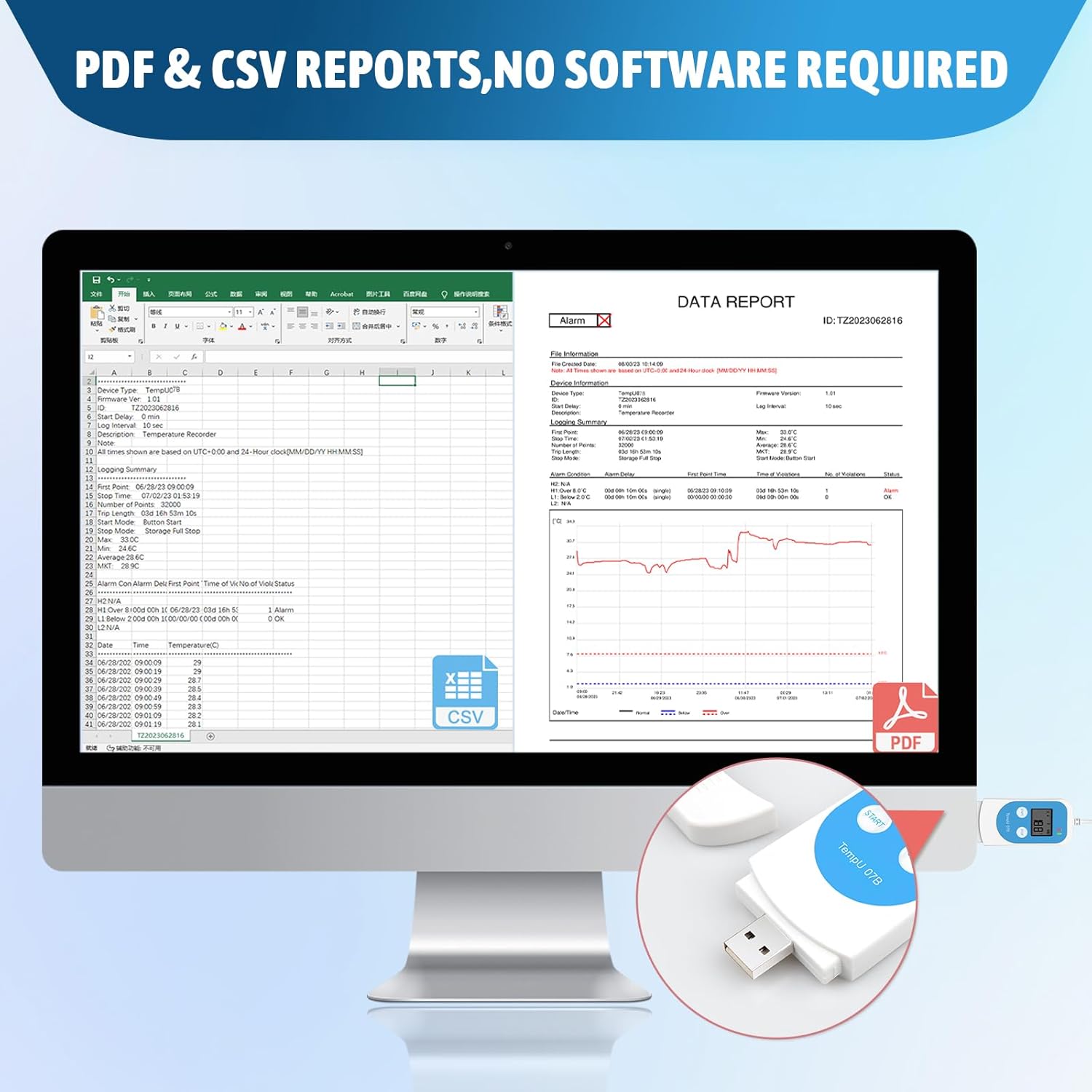
Imaxe 8.1: Ex.ample of automatically generated PDF and CSV reports.
After logging is complete, connect the data logger to a computer's USB port. The device will automatically generate PDF and CSV reports containing the recorded data. No special software installation is required to view these basic reports.
8.2 Using the Data Management Software (Windows Only)

Image 8.2: Workflow for setting parameters using the Tzone software.
For advanced configuration and detailed data analysis, download the free data management software from the official Tzone website (typically www.tzonedigital.com). This software is compatible with Windows operating systems.
- Descargar e instalar: Obtain the software from the Tzone websitio e siga as instrucións de instalación.
- Conectar dispositivo: Plug the data logger into your computer's USB port.
- Configurar parámetros: Use the software to set various parameters, including:
- Temperature and humidity alarm ranges (high and low)
- Intervalo de rexistro
- Startup mode (manual, timed)
- Axustes de calibración
- Password protection for reports
- Gardar configuración: After configuring, save the parameters to the device. You can also save parameter templates for future use.
- Análise de datos: The software supports data graph comparison across multiple loggers, aiding in comprehensive data analysis.
9. Mantemento
9.1 Limpeza
The device is designed to be freezer safe and can be wiped clean. Use a soft, damp cloth to clean the exterior of the data logger. Do not use abrasive cleaners or immerse the device in water.
9.2 Substitución da batería
When the battery indicator shows low power, replace the CR2032 battery. Ensure the device is not actively logging data before replacing the battery. Dispose of old batteries according to local regulations.
10 Solución de problemas
- Device not starting/displaying: Check battery level. Replace if necessary.
- No data report generated: Ensure the device has completed logging. Connect securely to a USB port. Try a different USB port or computer.
- Cannot change settings: Parameter changes require the dedicated Windows software. Ensure the software is correctly installed and the device is connected.
- Lecturas inexactas: Ensure the probe is correctly positioned and not obstructed. Consider recalibrating using the software if discrepancies persist.
- Magnet detached from bracket: Reattach the magnet to the bracket using a suitable adhesive if it has come loose.
11. Soporte e garantía
For technical support, warranty information, or further inquiries, please refer to the official Tzone website or contact Tzone customer service. Keep your purchase receipt for warranty claims.


