1. Introdución
The SMARTGEN HES7120-PV Hybrid Energy Controller is designed for solar energy control systems that integrate with inverters. This controller manages the operation of circuit breakers and the starting/stopping of inverters, as well as output power. It supports various operational modes, including fixed power, busbar control power, and inverter control power, adaptable to specific system requirements.
The HES7120-PV features a 132x64 LCD display with backlight, offering multi-language support (Chinese, English, and others) for convenient on-site commissioning. It incorporates digitization, intelligence, and networked technology, ensuring reliable operation. Utilizing 32-bit microprocessor technology, the controller provides precise measurement, adjustable fixed values, timing functions, and threshold settings for various parameters. Most settings can be adjusted directly from the front panel, with full parameter access available via PC through USB or network interfaces. Its compact design, straightforward connectivity, and high reliability make it suitable for a wide range of hybrid energy control applications.
2. Características clave
- Visualización: 132x64 LCD with backlight, supporting selectable language interfaces (Chinese, English, and other languages) for convenient on-site debugging and commissioning.
- Comunicación: Network communication interface enables "4 remote functions" (remote control, remote measuring, remote communication, and remote regulation) via MODBUS protocol.
- Compatibilidade do sistema: Suitable for 3-phase 4-wire, 3-phase 3-wire, single phase 2-wire, and 2-phase 3-wire power systems with voltage 120/240V and frequency 50/60Hz.
- Seguimento: Samples and displays 3-phase voltage, 3-phase current, frequency, and power parameters for both busbar and PV power generators.
- PV Channel Display: Allows for voltage, current, and power display of up to 4 solar panel channels.
3. Produto rematadoview
3.1 Panel frontal

This image displays the front panel of the HES7120-PV controller. It features a central LCD screen for displaying operational data, alarms, and status. To the right of the screen are navigation buttons (up, down, left, right, OK/Enter) for menu interaction. Below the screen are control buttons for 'Close', 'Open', 'Bus', 'PV', 'Auto', 'Manual', 'Start', and 'Stop', indicating various operational controls and mode selections.
3.2 En ángulo View

This image provides an angled perspective of the HES7120-PV controller, showcasing its depth and the side-mounted terminal blocks. This view helps in understanding the physical dimensions and how the wiring connections are integrated into the unit's design.
3.3 Laterais View
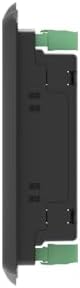
O lado view of the HES7120-PV controller highlights its slim profile and the green terminal blocks used for electrical connections. This perspective is useful for planning installation space and understanding the mounting requirements.
3.4 Panel traseiro e conexións

This image displays the rear panel of the HES7120-PV controller, detailing all the wiring terminals and communication ports. It includes clearly labeled sections for digital outputs, digital inputs, flexible inputs, PV AC voltage, Bus AC voltage, Ethernet, and USB ports. An inner diagram is also visible, providing a schematic representation of internal connections. This panel is critical for all electrical and data connections to the solar energy system and inverter.
4. Instalación
4.1 Montaxe
The HES7120-PV controller is designed for panel mounting. Ensure adequate space for ventilation and access to wiring terminals. Mount the controller in a dry, protected environment, away from direct sunlight, excessive heat, or moisture. Refer to the physical dimensions for precise cutout requirements.
4.2 Esquemas de cableado
Proper wiring is crucial for the safe and correct operation of the HES7120-PV controller. Always ensure power is disconnected before making any connections. Refer to the detailed diagrams below for specific application types.

This comprehensive image illustrates several wiring and application diagrams for the HES7120-PV controller:
- HES7120-PV Typical Application (Current Transformer): Shows the wiring for a system utilizing current transformers for measurement, connecting to the load, switch, and inverter.
- HES7120-PV Typical Application (Power Transmitter): Details connections for systems using power transmitters, including the load, switch, and inverter.
- Single Phase 2-Wire Connection Diagram: Illustrates the wiring configuration for a single-phase, two-wire electrical system.
- 2-Phase 3-Wire Connection Diagram: Shows the wiring setup for a two-phase, three-wire electrical system.
- HES7120-PV Application Diagram: A broader system diagram showing the controller's integration with PV arrays, inverters, the grid, and loads, highlighting the overall energy flow and control points.
Carefully follow the appropriate diagram for your specific system configuration. Incorrect wiring can lead to equipment damage or system malfunction.
5. Funcionamento
5.1 Encendido inicial
After completing all wiring, apply power to the controller. The LCD screen will illuminate, and the controller will perform a self-test. Ensure all initial readings appear normal. If any alarms are displayed, refer to the Troubleshooting section.
5.2 Navegando pola interface
Use the navigation buttons (up, down, left, right, OK/Enter) located on the right side of the front panel to browse through menus and adjust settings. The LCD will display various parameters, status information, and configuration options. Refer to the on-screen prompts for specific menu navigation.
5.3 Modos de funcionamento
The HES7120-PV supports several operating modes, configurable based on your system's needs:
- Fixed Power Mode: The controller maintains a constant power output as configured.
- Busbar Control Power Mode: The controller regulates power based on the busbar conditions.
- Inverter Control Power Mode: The controller manages power output in coordination with the connected inverter.
Select the desired mode using the front panel buttons or through the configuration menu. The 'Auto' and 'Manual' buttons allow for switching between automatic and manual control of the system components.
6. Mantemento
6.1 Comprobacións de rutina
- Inspeccione periodicamente todas as conexións do cableado para comprobar se están ben apertadas e se presentan signos de corrosión.
- Monitor the LCD for any persistent alarm messages or unusual readings.
- Ensure the controller's ventilation openings are clear of dust and debris.
6.2 Limpeza
Clean the exterior of the controller with a soft, dry cloth. Do not use abrasive cleaners or solvents. Ensure no liquids enter the device.
7 Solución de problemas
Esta sección ofrece orientación para problemas comúns. Para problemas complexos, póñase en contacto co servizo de asistencia técnica.
- Sen alimentación ao controlador:
- Check the main power supply to the controller.
- Verify all power wiring connections are secure.
- Inspect any fuses or circuit breakers in the power path.
- Lecturas incorrectas na pantalla LCD:
- Ensure all measurement wiring (voltage, current transformers) is correctly connected according to the diagrams.
- Verify that the system parameters (e.g., CT ratios, voltage settings) are correctly configured in the controller's menu.
- Inverter Not Starting/Stopping:
- Check the control wiring between the HES7120-PV and the inverter.
- Confirm the operating mode and start/stop conditions are correctly set in the controller.
- Review inverter status and error codes.
- Communication Issues (USB/Ethernet):
- Verifique as conexións dos cables.
- Ensure correct drivers are installed on the PC for USB communication.
- Check network settings (IP address, subnet mask) for Ethernet communication.
8. Especificacións técnicas
| Especificación | Valor |
|---|---|
| Marca | XENIO INTELIXENTE |
| Modelo | HES7120-PV |
| Peso do elemento | 0.67 quilogramos |
| ASIN | B0CHB4QLJ7 |
| Data de primeira dispoñibilidade | 3 de outubro de 2023 |
| Fabricante | XENIO INTELIXENTE |
9. Garantía e soporte
For warranty information, technical support, or service inquiries regarding your SMARTGEN HES7120-PV Hybrid Energy Controller, please contact your authorized dealer or the manufacturer directly. Retain your proof of purchase for warranty claims.
You can find more information and contact details on the SmartGen-America websitio web ou a través do seu punto de venda.


