1. Introdución
The Zebronics Astra 30 is a portable Bluetooth speaker designed for a versatile audio experience. It features 14W output, dual 52mm drivers, dual passive radiators for enhanced bass, and multiple connectivity options including Bluetooth v5.3, FM radio, AUX, USB, and mSD card support. This manual provides instructions for setting up, operating, and maintaining your speaker.
2. Contido do paquete
Comprobe se o paquete contén os seguintes elementos:
- Speaker - 1 unit
- Cable de carga - 1 unidade
- User manual - 1 unit
3. Produto rematadoview
Familiarízate cos compoñentes e controis do altofalante.

Imaxe 3.1: Fronte view of the Zebronics Astra 30 speaker, showcasino seu elegante deseño negro e a grella do altofalante.
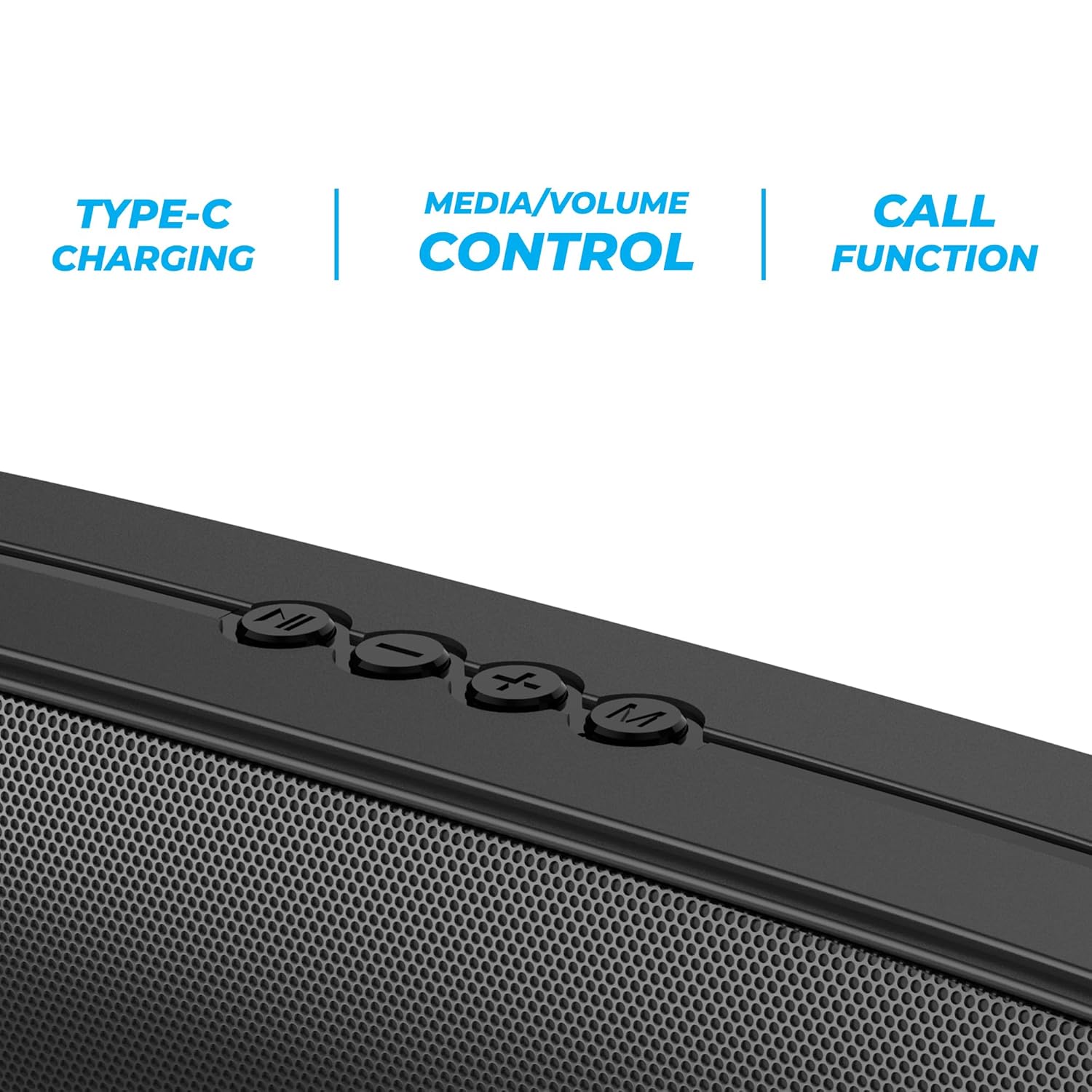
Imaxe 3.2: Close-up of the control panel buttons on the top of the speaker, including power, volume, and mode controls.

Imaxe 3.3: Traseira view of the speaker showing the multi-connectivity ports: USB, Micro SD slot, AUX input, and Type-C charging port.
4. Configuración
4.1 Carga do altofalante
Before initial use, fully charge the speaker. The Zebronics Astra 30 features a built-in rechargeable battery with Type-C charging.
- Conecta o cable de carga tipo C fornecido ao porto de carga do altofalante.
- Conecta o outro extremo do cable a un adaptador de corrente USB (non incluído) ou ao porto USB dun ordenador.
- The charging indicator will illuminate during charging and turn off once fully charged.
A full charge takes approximately 4 hours and provides up to 12 hours of playback time at 50% volume.

Imaxe 4.1: Illustration indicating the speaker's 12-hour playback capability on a single charge.
4.2 Acendido/Apagado
To power on or off the speaker, press and hold the power button located on the control panel until you hear an audible prompt or see the indicator light change.
5. Instrucións de funcionamento
5.1 Emparejamento Bluetooth
The Zebronics Astra 30 uses Bluetooth v5.3 for wireless audio streaming.
- Acenda o altofalante. Entrará automaticamente no modo de emparellamento Bluetooth, o que se indicará cun LED intermitente.
- Activa o Bluetooth no teu teléfono intelixente, tableta ou outro dispositivo.
- Busca "ZEB-ASTRA 30" in the list of available Bluetooth devices.
- Select "ZEB-ASTRA 30" to connect. Once paired, the speaker will confirm with an audible tone, and the LED will stop flashing.
- Se se lle solicita un contrasinal, introduza "0000".
Función estéreo sen fíos verdadeiro 5.2 (TWS)
Connect two Zebronics Astra 30 speakers for a true wireless stereo experience.
- Ensure both ZEB-ASTRA 30 speakers are powered on and not connected to any Bluetooth device.
- On one of the speakers (this will be the primary speaker), press and hold the TWS button (often combined with the Mode button) until you hear a pairing tone.
- Os dous altofalantes conectaranse automaticamente entre si. Unha vez conectados, escoitarás un ton de confirmación.
- Now, connect your device to the primary speaker via Bluetooth as described in Section 5.1. Audio will play in stereo through both speakers.

Imaxe 5.1: Visual representation of two Zebronics Astra 30 speakers connected via TWS for stereo sound.
Modo de radio FM 5.3
Para usar a radio FM integrada:
- Acende o altofalante.
- Prema o botón "M" (Modo) para cambiar ao modo de radio FM.
- To auto-scan and save available FM stations, press and hold the Play/Pause button. The speaker will scan and store stations automatically.
- Use the Previous/Next track buttons to navigate between saved stations.
- For optimal reception, ensure the charging cable is connected as an antenna.
5.4 Modo de entrada AUX
Connect external audio devices using the AUX input:
- Acende o altofalante.
- Prema o botón "M" (Modo) para cambiar ao modo AUX.
- Conecta un extremo dun cable de audio de 3.5 mm (non incluído) ao porto AUX do altofalante.
- Conecta o outro extremo á saída de audio do teu dispositivo (por exemplo, teléfono intelixente, reprodutor MP3).
- Agora o audio reproducirase a través do altofalante desde o dispositivo conectado.
5.5 USB and Micro SD Card Playback
Reproducir audio files directly from a USB pen drive or Micro SD card:
- Acende o altofalante.
- Insert a USB pen drive (up to 32GB) or a Micro SD card into the respective slot.
- O altofalante detectará automaticamente o dispositivo de almacenamento e comezará a reproducir audio files. If not, press the 'M' (Mode) button to switch to USB or SD card mode.
- Use os botóns Reproducir/Pausa e Pista anterior/seguinte para controlar a reprodución.
5.6 Función de chamada
Cando se conecta mediante Bluetooth a un teléfono intelixente, o altofalante pódese usar para chamadas de mans libres.
- Responder/Finalizar chamada: Preme o botón Reproducir/Pausa unha vez.
- Rexeitar a chamada: Manteña premido o botón Reproducir/Pausa.
- Volver a marcar o último número: Prema dúas veces o botón Reproducir/Pausa.
5.7 Volume and Media Control
The speaker features integrated controls for audio playback:
- Subir volume: Prema o botón "+".
- Baixar volume: Prema o botón '-'.
- Próxima pista: Manteña premido o botón "+".
- Pista anterior: Manteña premido o botón '-'.
- Reproducir/Pausa: Preme o botón Reproducir/Pausa.
6. Mantemento
- Limpa o altofalante cun pano suave e seco. Non empregues produtos químicos agresivos nin produtos de limpeza abrasivos.
- Keep the speaker away from extreme temperatures, direct sunlight, and moisture.
- Evite deixar caer ou someter o altofalante a fortes impactos.
- Garde o altofalante nun lugar fresco e seco cando non o use durante períodos prolongados.
- The speaker is rated as waterproof. However, avoid submerging it in water for prolonged periods. Ensure the port cover is securely closed to maintain water resistance.
7 Solución de problemas
| Problema | Posible Solución |
|---|---|
| O altofalante non se acende. | Asegúrate de que a batería estea cargada. Conecta o altofalante a unha fonte de alimentación mediante o cable tipo C. |
| Non se pode emparellar por Bluetooth. |
|
| Sen son ou volume baixo. |
|
| A recepción da radio FM é deficiente. | Ensure the Type-C charging cable is connected to act as an antenna. Try repositioning the speaker. |
| Fallou o emparellamento de TWS. |
|
8. Especificacións
| Característica | Detalle |
|---|---|
| Nome do modelo | ZEB-ASTRA 30 |
| Potencia de saída | 14 vatios |
| Tamaño do controlador | Dobre de 52 mm |
| Versión Bluetooth | v5.3 |
| Opcións de conectividade | Bluetooth, FM, AUX, USB, Micro SD |
| USB/Micro SD Max Capacity | 32 GB |
| Duración da batería | Ata 12 horas (ao 50 % do volume) |
| Tempo de carga | 4 horas |
| Tipo de carga | Tipo-C |
| Resistencia á auga | Impermeable |
| Dimensións do produto (P x A x A) | 5.7 x 35.4 x 6.5 centímetros |
| Peso do elemento | 645 gramos |
| Impedancia | 3 ohmios |
| Relación sinal-ruído | 75 dB |

Imaxe 8.1: Graphic highlighting the 14W RMS output and dual 52mm drivers of the Zebronics Astra 30 speaker.
9. Garantía e soporte
The Zebronics Astra 30 speaker comes with a 1 ano de garantía limitada desde a data de compra. Conserve o recibo de compra para reclamacións de garantía.
For technical support, service, or warranty inquiries, please contact Zebronics customer service. Contact details can typically be found on the official Zebronics websitio web ou na embalaxe do produto.
Fabricante: Zebronics India Private Limited
Address: 13/7, Smith Road, Royapettah, Chennai-600002


