1. Introdución
Thank you for choosing the ARROWMAX SES PRO Electric Precision Screwdriver. This cordless tool is designed for precision tasks, featuring smart motion control and a comprehensive set of 34 magnetic bits. It is ideal for electronics, laptops, glasses, and other delicate applications. This manual provides essential information for safe operation, setup, maintenance, and troubleshooting to ensure optimal performance and longevity of your device.
2. Información de seguridade
Please read all safety warnings and instructions carefully before using this product. Failure to follow these instructions may result in electric shock, fire, and/or serious injury.
- Manter a zona de traballo limpa e ben iluminada. As zonas desordenadas ou escuras invitan a accidentes.
- Non utilice ferramentas eléctricas en atmosferas explosivas, como en presenza de líquidos, gases ou po inflamables. As ferramentas eléctricas crean faíscas que poden acender o po ou os fumes.
- Manteña os nenos e os espectadores afastados mentres manexa unha ferramenta eléctrica. As distraccións poden facer que perdas o control.
- Evite o arranque accidental. Asegúrese de que o interruptor estea na posición de apagado antes de conectar a batería, coller ou transportar a ferramenta.
- Non excedas. Manteña un equilibrio e unha posición adecuada en todo momento. Isto permite un mellor control da ferramenta eléctrica en situacións inesperadas.
- Vístete correctamente. Non use roupa solta nin xoias. Manteña o cabelo e a roupa lonxe das pezas móbiles. A roupa solta, as xoias ou o cabelo longo poden quedar atrapados nas partes móbiles.
- Use equipos de protección individual. Use sempre protección ocular. Os equipos de protección, como máscaras antipolvo, zapatos de seguridade antideslizantes, casco ou protección auditiva que se utilicen nas condicións adecuadas, reducirán as lesións persoais.
- Guarde as ferramentas eléctricas inactivas fóra do alcance dos nenos e non permita que persoas que non estean familiarizadas coa ferramenta eléctrica ou con estas instrucións a utilicen.
- Manter as ferramentas eléctricas. Comprobe a falta de aliñación ou a unión das pezas móbiles, a rotura de pezas e calquera outra condición que poida afectar o funcionamento da ferramenta eléctrica. Se está danada, repare a ferramenta eléctrica antes de usala.
- Utilizar a ferramenta eléctrica, os accesorios e as brocas, etc. de acordo con estas instrucións, tendo en conta as condicións de traballo e os traballos a realizar. O uso da ferramenta eléctrica para operacións diferentes ás previstas pode dar lugar a unha situación de perigo.
- Recarga só co cargador especificado polo fabricante. Un cargador axeitado para un tipo de batería pode xerar un risco de incendio cando se usa con outro paquete de batería.
- Non use a ferramenta se o interruptor non a acende e apaga. Calquera ferramenta eléctrica que non se poida controlar co interruptor é perigosa e debe ser reparada.
- Desconecte a batería da ferramenta eléctrica antes de facer calquera axuste, cambiar accesorios ou almacenar ferramentas eléctricas. Estas medidas preventivas de seguridade reducen o risco de arrancar accidentalmente a ferramenta eléctrica.
3. Contido do paquete
The ARROWMAX SES PRO Electric Precision Screwdriver package typically includes the following items:
- 1 x ARROWMAX SES PRO Electric Precision Screwdriver
- 1 x Magnetic Storage Case
- 34 x Magnetic Precision Bits (S2 Steel, 4mm)
- 1 x cable de carga USB-A a USB-C

Image: The ARROWMAX SES PRO Electric Precision Screwdriver, its magnetic bit case, and the included 34 precision bits.
4. Produto rematadoview e Compoñentes
Familiarize yourself with the main components of your ARROWMAX SES PRO screwdriver:

Image: Labeled diagram of the ARROWMAX SES PRO screwdriver's key components.
- Porto de carga tipo C: Located at the top for recharging the internal battery.
- Pantalla de estado LED: An OLED screen showing battery level, torque setting, and operational status.
- Botón de encendido: Used to turn the device on/off and adjust torque settings.
- Corpo de aliaxe de aluminio: Durable and lightweight construction.
- Luces LED: Ilumina a área de traballo para unha mellor visibilidade.
- Bit Installation Port: Where precision bits are inserted.
5. Configuración
5.1 Carga do destornillador
- Locate the USB-C charging port at the top of the screwdriver.
- Connect the provided USB-A to USB-C charging cable to the screwdriver and a compatible USB-A power adapter (not included).
- The LED Status Display will indicate the charging progress. A full charge allows for tightening approximately 900 screws.
- Nota importante: This electric screwdriver only supports USB-A to USB-C charging and is not compatible with USB-C PD (Power Delivery) chargers.

Imaxe: Máis deview of charging port, battery, torque adjustment, and OLED display.
5.2 Installing Precision Bits
- Select the appropriate precision bit from the magnetic storage case. The case features a pop-up design for easy access.
- Insert the bit firmly into the Bit Installation Port at the tip of the screwdriver. The magnetic holder will secure the bit in place.
- To remove a bit, simply pull it out.
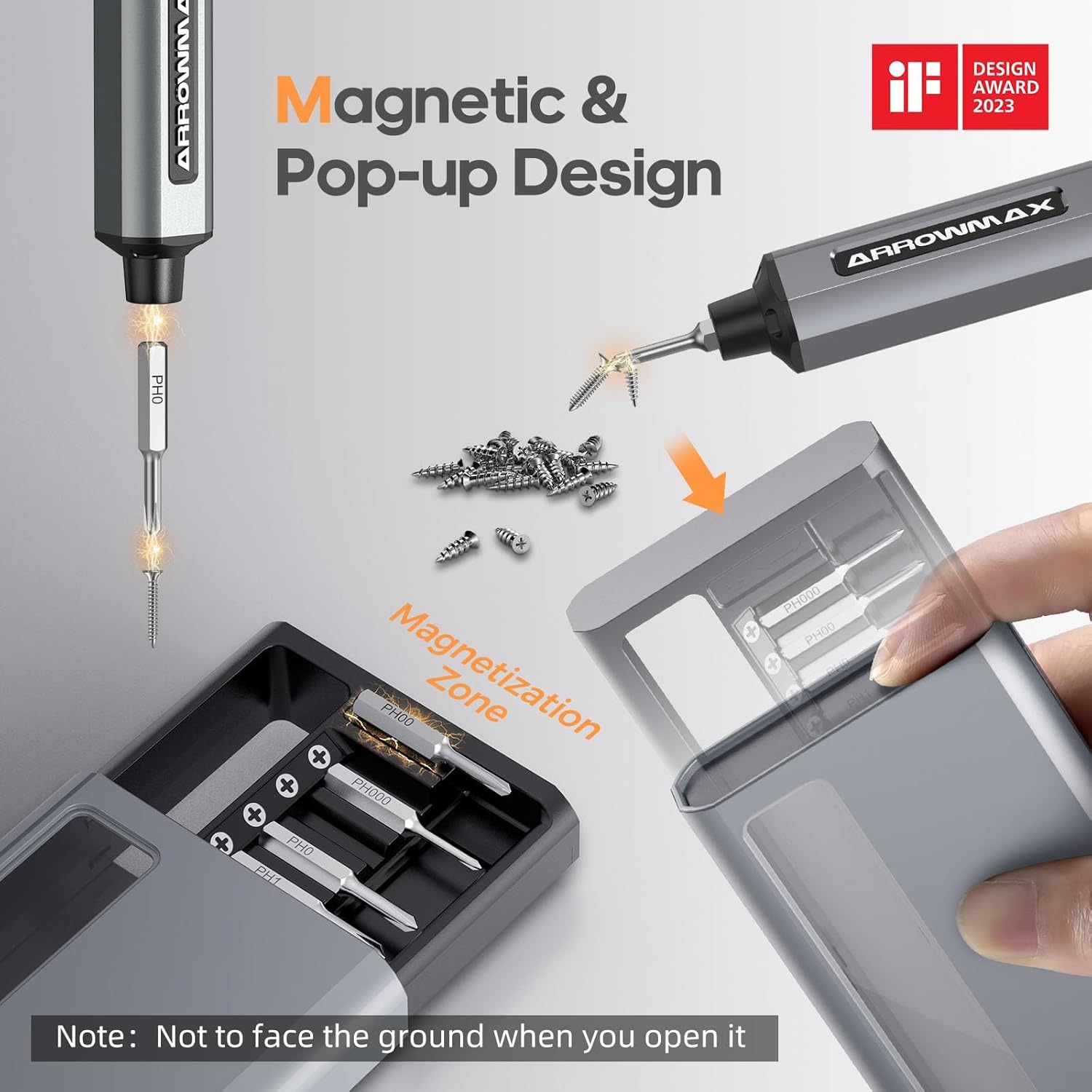
Image: Magnetic pop-up bit case design and bit magnetization zone.
6. Instrucións de funcionamento
6.1 Acendido/Apagado
Press and hold the Power Button for a few seconds to turn the screwdriver on or off. The OLED screen will illuminate upon activation.
6.2 Axuste dos par de torsión
The SES PRO offers 5 adjustable torque levels, including an auto-sensing mode, to suit various tasks. The electric torque ranges from 0.049 N.m to 0.30-0.35 N.m, with a manual torque of 3 N.m.
- With the screwdriver powered on, press the Power Button three times continuously to cycle through the torque settings.
- The OLED screen will display the current torque level (e.g., 1, 2, 3, 4, A for Auto-Sensing).
- Select a lower torque for delicate items like glasses or small electronics, and higher torque for more robust applications.
- For screws that are too tight for the electric motor, the screwdriver can be used in manual mode by applying direct force.
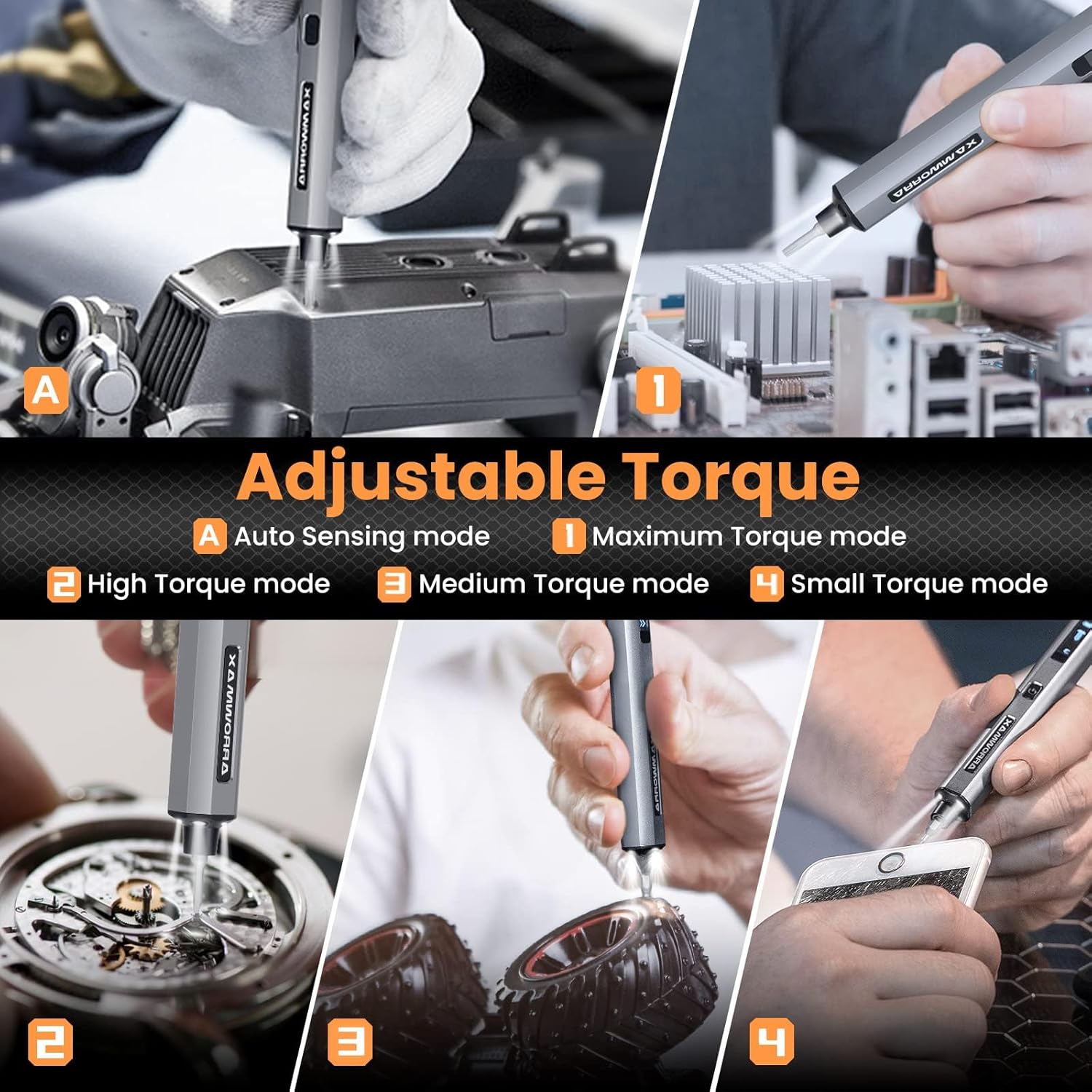
Image: Adjustable torque settings for various applications.
6.3 Body Sensory Dual-Mode (Forward/Reverse)
The SES PRO features a body sensory dual-mode for intuitive control of rotation direction.
- To drive a screw in (tighten), gently rotate your wrist in a clockwise direction while holding the screwdriver.
- To remove a screw (loosen), gently rotate your wrist in a counter-clockwise direction.
- The screwdriver's internal gyroscope detects your wrist movement and activates the motor accordingly.
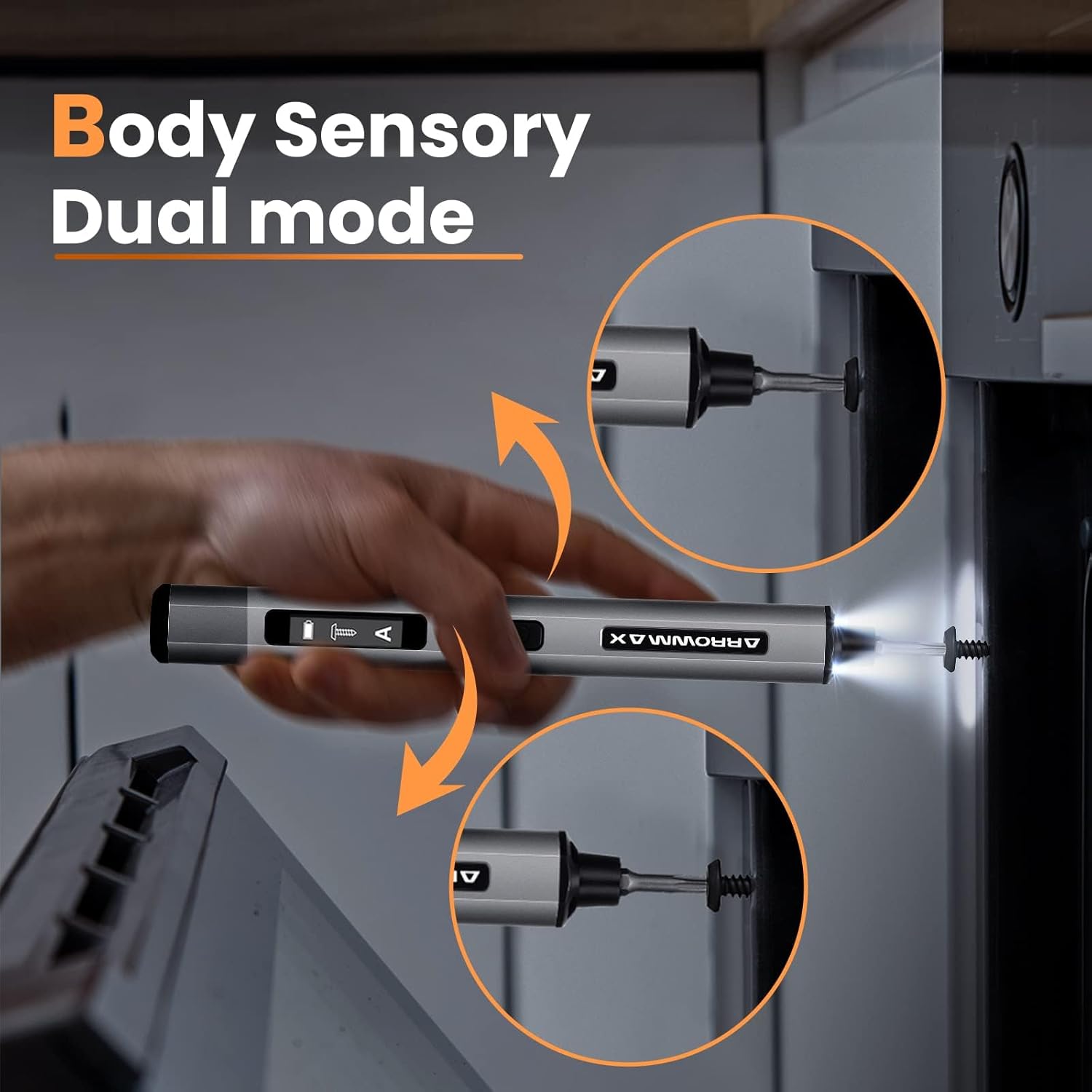
Image: Body sensory dual-mode in action for forward and reverse operation.
6.4 LED Work Lights
The integrated LED lights at the tip of the screwdriver automatically illuminate when the motor is active, providing clear visibility of your work area.
7. Mantemento
7.1 Limpeza
- Wipe the screwdriver body with a soft, dry cloth. Do not use abrasive cleaners or solvents.
- Ensure the bit installation port is free of debris.
7.2 Coidado coa batería
- Para prolongar a duración da batería, evite descargala completamente con frecuencia.
- Store the screwdriver in a cool, dry place when not in use.
- Recargue a batería periodicamente se a garda durante períodos prolongados para evitar unha descarga profunda.

Image: The SES PRO's long-lasting battery capacity.
7.3 Bit Care
- Keep the precision bits clean and free of rust.
- Store bits securely in the magnetic case to prevent loss and damage.
8 Solución de problemas
If you encounter issues with your ARROWMAX SES PRO screwdriver, refer to the following common problems and solutions:
| Problema | Causa posible | Solución |
|---|---|---|
| Screwdriver does not turn on or respond. | Low battery; device is off. | Charge the screwdriver using the provided USB-A to USB-C cable. Ensure the power button is pressed to turn it on. |
| Screwdriver does not charge. | Incorrect charger type; faulty cable/adapter. | Ensure you are using a USB-A to USB-C cable and a standard USB-A power adapter. USB-C PD chargers are not supported. Try a different cable or adapter. |
| Motor lacks power or cannot loosen/tighten screws. | Low battery; incorrect torque setting; screw is too tight for electric mode. | Charge the screwdriver. Increase the torque setting. For very tight screws, manually loosen or tighten them first, then use the electric mode. |
| Directional control (forward/reverse) is inconsistent. | Improper wrist movement; gyroscope calibration issue. | Ensure clear and deliberate wrist movements. If issues persist, try restarting the device. |
| Bits fall out or are not held securely. | Bit installation port is dirty; bit is not fully inserted. | Clean the bit installation port. Ensure the bit is pushed in firmly until it clicks or feels secure. |
9. Especificacións
Key technical specifications for the ARROWMAX SES PRO Electric Precision Screwdriver:
| Característica | Especificación |
|---|---|
| Marca | ARROWMAX |
| Modelo | SES PRO (AM-199913-G) |
| Velocidade | 200 RPM |
| Fonte de enerxía | Alimentado por batería |
| Voltage | 3.7 voltios (DC) |
| Torque eléctrico | 0.049 N.m - 0.30-0.35 N.m (Adjustable) |
| Par de torsión manual | 3 Nm |
| Tipo de batería | Ión de litio (500 mAh) |
| Porto de carga | USB-C (USB-A to USB-C charging only) |
| Peso do elemento | 13.7 onzas |
| Dimensións do paquete | 7.48 x 3.43 x 1.73 polgadas |
| Características especiais | OLED Screen, Smart Motion Control, Ergonomic Design, LED Lights |
10. Garantía e soporte
The manufacturer's warranty information for this product is not explicitly provided in the available data. For details regarding warranty coverage, duration, and terms, please refer to the documentation included with your purchase or contact the retailer where the product was acquired.
For technical support, product inquiries, or assistance with troubleshooting that is not covered in this manual, please visit the official ARROWMAX website or contact their customer service department. Contact information can typically be found on the product packaging or the manufacturer's official online channels.


