1. Introdución
This manual provides detailed instructions for the installation, operation, and maintenance of your MUSETEX G08S Mid Tower PC Case. Please read this manual thoroughly before beginning assembly to ensure proper setup and optimal performance.
2. Características do produto
- Pre-installed PWM ARGB Fans: Equipped with 7 addressable RGB fans for efficient cooling and customizable lighting.
- Double Tempered Glass Panels: Proporciona unha clara view of internal components and enhances durability.
- Interior amplo: Supports ATX, Micro ATX, and Mini ITX motherboards, GPUs up to 390mm, and CPU coolers up to 176mm.
- Soporte de radiador: Accommodates 360mm, 280mm, or 240mm radiators on the top.
- Opcións de almacenamento flexibles: Space for 4 storage drives (HDD/SSD).
- Convenient I/O Panel: Features two USB 3.0 ports and HD Audio with anti-interference shielding.
- Fluxo de aire mellorado: Designed with multiple air intake and exhaust channels.
- Fácil mantemento: Includes magnetic top dust filter and pull-out bottom dust filter.
3. Contido do paquete
Ao desembalar, comproba que estean presentes todos os compoñentes:
- MUSETEX G08S PC Case
- 7 x Pre-installed PWM ARGB Fans
- Accessory Box (screws, zip ties, user manual)

Image: The MUSETEX G08S PC Case, showcasincos seus paneis de vidro temperado e os ventiladores ARGB preinstalados.
4. Configuración e instalación
4.1. Preparación do caso
Carefully remove the tempered glass side panels. The front panel can also be removed for fan installation or cleaning. Refer to the diagram below for component placement and dimensions.

Image: Diagram illustrating the internal layout and maximum dimensions for components like CPU cooler (176mm), GPU (390mm), and PSU (230mm).
4.2. Instalación da placa base
The G08S case supports ATX, Micro ATX, and Mini ITX motherboards. Install the necessary standoffs for your motherboard size before securing the motherboard with screws.
4.3. Instalación da unidade de almacenamento
The case provides mounting points for up to 4 storage drives (HDDs/SSDs). Utilize the dedicated drive cage located at the bottom of the case and the SSD mounting brackets behind the motherboard tray.

Image: Illustration of the HDD/SSD mounting locations, including the drive cage and rear SSD brackets.
4.4. Instalación da tarxeta gráfica (GPU)
The case supports GPUs up to 390mm (15.35 inches) in length. Both horizontal and vertical GPU mounting options are available. Ensure proper clearance and secure the GPU firmly.

Imaxe: Unha interna view of the PC case showing a graphics card installed, highlighting the available space.
4.5. Cooling System Installation (Fans & Radiators)
The G08S comes with 7 pre-installed PWM ARGB fans. Additional fan and radiator configurations are supported:
- Arriba: 3 x 120mm or 2 x 140mm fans; 360mm, 280mm, or 240mm radiator.
- Fronte: 3 x 120mm fans (pre-installed).
- Traseira: 1 x 120mm or 1 x 140mm fan (pre-installed 120mm).
Ensure your motherboard has a 5V3PIN RGB interface for ARGB lighting synchronization.

Image: A diagram detailing the various fan and radiator mounting positions and sizes supported by the case.

Image: An illustration demonstrating the connection of ARGB fans to a motherboard's 5V3PIN RGB header.
4.6. Conexións do panel de E/S
Connect the front I/O panel cables to your motherboard. This includes USB 3.0 headers, HD Audio, power switch, and reset switch connectors.
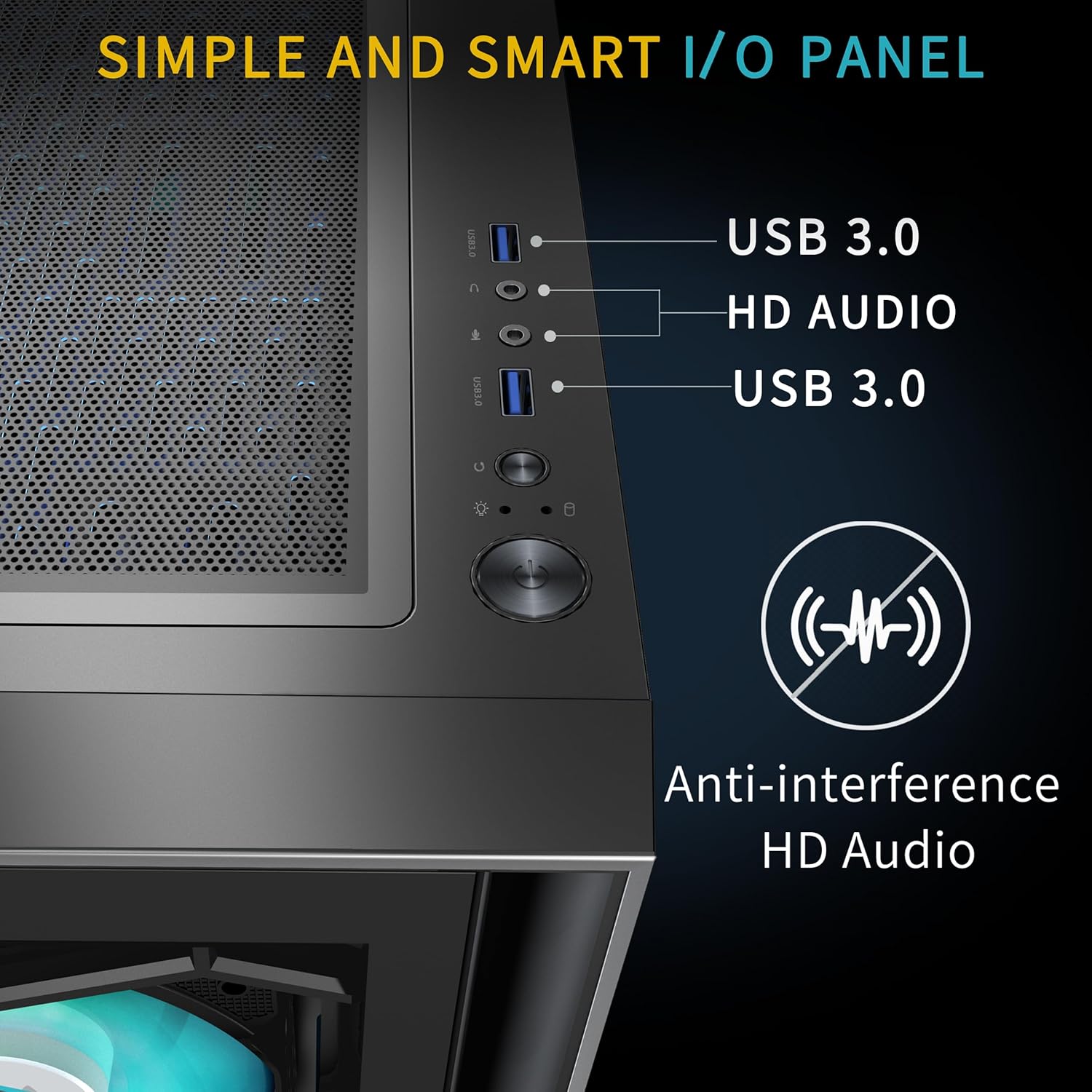
Imaxe: Unha detallada view of the top I/O panel, featuring two USB 3.0 ports and HD Audio jacks, designed with anti-interference shielding.
5. Instrucións de funcionamento
5.1. Control da velocidade do ventilador (PWM)
The pre-installed fans are PWM (Pulse Width Modulation) controlled, allowing their speed to be adjusted automatically by the motherboard based on system temperature, or manually through motherboard software. This ensures optimal cooling and reduced noise levels.

Image: A graph illustrating the adjustable speed capabilities of PWM fans compared to other fan types, showing manual and auto speed control.
5.2. Control de iluminación ARGB
The Addressable RGB (ARGB) fans offer 16.8 million colors and various lighting effects. If your motherboard supports 5V3PIN ARGB synchronization (e.g., ASUS Aura Sync, MSI Mystic Light Sync, GIGABYTE RGB Fusion, ASRock Polychrome RGB), you can control the lighting directly through your motherboard's software. Otherwise, a built-in controller may be used (refer to the accessory box for details).

Image: A visual representation of a software interface used to customize ARGB lighting colors and effects, compatible with various motherboard RGB sync technologies.
6. Mantemento
6.1. Limpeza do filtro de po
To maintain optimal airflow and prevent dust buildup, regularly clean the dust filters:
- The top panel features a magnetic dust filter that can be easily removed and cleaned.
- The bottom panel has a pull-out dust filter for the power supply intake, which can also be removed for cleaning.

Imaxe: Primeiro plano views of the magnetic dust filter on the top and the removable pull-out dust filter at the bottom of the case.
6.2. Tempered Glass Cleaning
Use a soft, lint-free cloth and a mild glass cleaner (or water) to clean the tempered glass panels. Avoid abrasive materials that could scratch the surface.
7 Solución de problemas
- Fans not spinning or RGB not lighting up:
- Check all fan power cables and ARGB cables are securely connected to the fan hub/controller and the motherboard.
- Ensure the motherboard's 5V3PIN ARGB header is correctly connected if using motherboard sync.
- Verify that the power supply is providing adequate power.
- Front I/O ports not working:
- Confirm that the USB 3.0 and HD Audio cables from the front panel are correctly plugged into the corresponding headers on your motherboard.
- O sistema non se acende:
- Double-check the power switch cable connection to the motherboard.
- Ensure the power supply is switched on and receiving power.
8. Especificacións
| Característica | Especificación |
|---|---|
| Nome do modelo | G08S |
| Marca | MUSETEX |
| Tipo de caso | Torre media |
| Compatibilidade da placa base | ATX, Micro ATX, Mini ITX |
| Material | Vidro Templado |
| Ventiladores preinstalados | 7 x PWM ARGB Fans |
| Lonxitude máxima da GPU | 390 mm (15.35 polgadas) |
| Altura máxima do refrigerador da CPU | 176 mm |
| Soporte do radiador (superior) | 360 mm / 280 mm / 240 mm |
| Compartimentos de unidades de almacenamento | 4 (HDD/SSD) |
| Portos de E / S dianteiros | 2 x USB 3.0, HD Audio |
| Peso do elemento | 21.9 libras |
| Dimensións do paquete | 20.85 x 19.35 x 10.5 polgadas |
9. Garantía e soporte
MUSETEX offers customer support for any issues encountered with your PC case. For assistance, please contact MUSETEX directly through their official channels. Details on warranty coverage are typically provided with your purchase documentation or on the manufacturer's websitio.
To contact support, locate the "Sold by MUSETEX" link on the product page where you made your purchase and use the provided contact options.

Image: A visual guide indicating where to find the "Sold by MUSETEX" link on an Amazon product page for customer support.


