1. Introdución
Este manual proporciona información esencial para a instalación, o funcionamento e o mantemento seguros e eficientes da súa fonte de alimentación (PSU) KOLINK Regulator Series de 850 W. Lea este manual detidamente antes da instalación e gárdeo para futuras consultas. Esta fonte de alimentación está deseñada para proporcionar alimentación estable e fiable ao seu sistema informático, cumprindo os estándares ATX 3.0 e PCIe 5.0.
Información de seguridade
- Desconecte sempre o cable de alimentación da toma de corrente antes de instalar, retirar ou limpar a fonte de alimentación.
- Non abra a fonte de alimentación casing. Alto volumetagHai elementos no interior que poden provocar unha descarga eléctrica.
- Asegúrate de que a fonte de alimentación estea instalada nunha zona ben ventilada.
- Emprega só os cables modulares que se inclúen con esta fonte de alimentación. O uso de cables incompatibles pode danar o sistema.
- Este produto está deseñado só para uso en interiores.
2. Contido do paquete
Verifique que todos os elementos enumerados a continuación estean presentes na embalaxe do produto:
- Fonte de alimentación da serie reguladora KOLINK de 850 W
- Conxunto de cables modulares (inclúe cables ATX de 24 pines, CPU de 4+4 pines, PCIe de 6+2 pines, 12VHPWR, SATA e periféricos)
- Cable de alimentación de CA
- Parafusos de montaxe
- Manual de usuario (este documento)
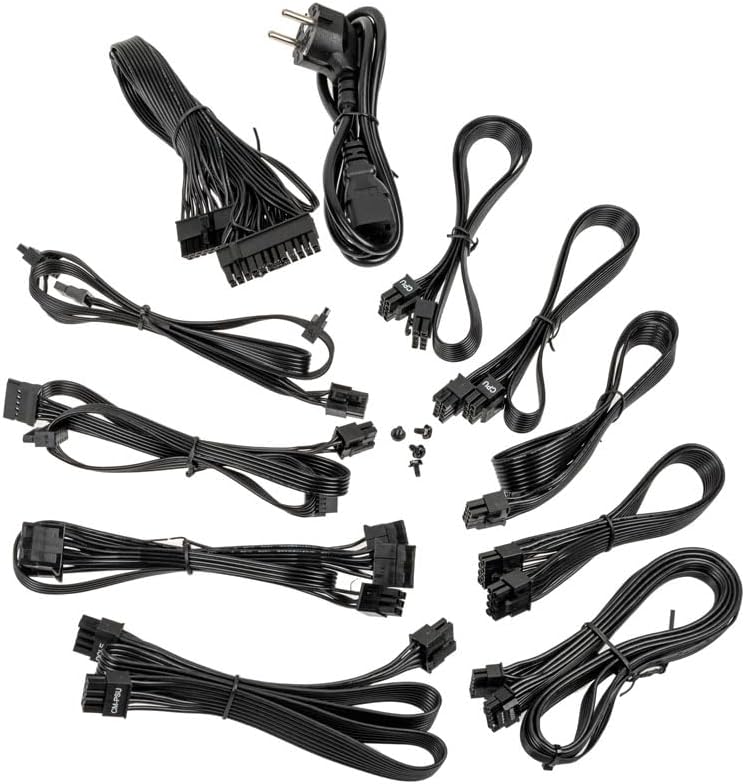
Imaxe: Unha colección de todos os cables modulares subministrados coa fonte de alimentación Kolink Regulator, incluíndo cables de alimentación ATX de 24 pines, CPU, PCIe, 12VHPWR e SATA.
3. Características clave
A fonte de alimentación KOLINK Regulator Series de 850 W incorpora funcións avanzadas para un rendemento e unha fiabilidade óptimos:
- Preparado para ATX 3.0 e PCIe 5.0: Deseñado para cumprir co último estándar ATX 3.0 con compatibilidade nativa con PCIe 5.0, incluíndo un cable de 12 VHPWR e 600 W para tarxetas gráficas modernas.
- Certificado 80 PLUS Gold: Alcanza ata un 90 % de eficiencia a media carga, o que reduce o consumo de enerxía e a xeración de calor.
- Deseño totalmente modular: Permite a xestión personalizada dos cables conectando só os cables necesarios, mellorando o fluxo de aire e a estética.
- Condensadores 100 % xaponeses: Utiliza condensadores xaponeses de alta calidade para unha maior durabilidade, estabilidade e fiabilidade a longo prazo.
- Modo semi-sen ventilador conmutable: Inclúe un ventilador de 120 mm con rodamentos dinámicos de fluidos (FDB) que pode funcionar en modo semi-sen ventilador, reducindo a velocidade do ventilador ou deténdoo por completo con cargas máis baixas para un funcionamento máis silencioso.
- Circuitos de protección múltiple: As proteccións integradas protexen os seus compoñentes contra sobrecargastage, baixo voltage, condicións de sobrepotencia, curtocircuíto e sobretemperatura.
- Factor de forma compacto: Deseñado para adaptarse a unha ampla gama de carcasas de PC grazas ás súas dimensións optimizadas.

Imaxe: Primeiro plano dos portos de conexión por cable totalmente modulares da fonte de alimentación Kolink Regulator, etiquetados para placa base, SATA, CPU/PCIe e 12VHPWR.

Imaxe: Unha detallada view do ventilador de rodamentos dinámicos fluidos de 120 mm dentro da fonte de alimentación Kolink Regulator, destacando o seu funcionamento semi-sen ventilador conmutable para un rendemento máis silencioso a baixas cargas.

Imaxe: Unha perspectiva interna da fonte de alimentación Kolink Regulator, que destaca os condensadores 100 % xaponeses de alta calidade empregados para mellorar a fiabilidade e o rendemento.

Imaxe: A fonte de alimentación Kolink Regulator, que ilustra os seus robustos circuítos de protección múltiple deseñados para protexer os compoñentes conectados.
4. Configuración e instalación
Lista de verificación previa á instalación
- Asegúrate de que a carcasa do teu ordenador sexa compatible coas fontes de alimentación ATX.
- Verifica que a túa placa base e outros compoñentes requiren 850 W ou menos de potencia.
- Reúne as ferramentas necesarias: destornillador, bridas (para a xestión de cables).
Pasos de instalación
- Prepara o teu sistema: Desconecta o ordenador da toma de corrente. Abre a carcasa do ordenador para acceder á zona de montaxe da fonte de alimentación. Se vas substituír unha fonte de alimentación antiga, primeiro retíraa.
- Montar a fonte de alimentación: Deslice con coidado a fonte de alimentación reguladora KOLINK no compartimento designado para a fonte de alimentación da caixa do seu ordenador. Asegúrese de que o ventilador estea orientado correctamente (normalmente cara abaixo ou cara a dentro, dependendo do deseño da caixa). Fixe a fonte de alimentación cos parafusos de montaxe proporcionados desde a parte traseira da caixa.
- Conectar cables modulares: Identifica os cables necesarios para os teus compoñentes. Conecta primeiro os cables modulares aos portos correspondentes da fonte de alimentación e, a seguir, diríxeos aos teus compoñentes. Consulta as etiquetas da fonte de alimentación para a identificación correcta dos portos.
- Potencia da placa base: Conecta o cable ATX de 24 pinos á placa base.
- Potencia da CPU: Conecta o(s) cable(s) da CPU de 4+4 pinos ao(s) conector(s) de alimentación da CPU da túa placa base.
- Alimentación PCIe: Para as tarxetas gráficas, usa os cables PCIe de 6+2 pines. Para as GPU modernas que requiren 12VHPWR, usa o cable dedicado de 12VHPWR de 600 W. Asegúrate de que todos os conectores estean ben asentados.
- Potencia SATA: Conecta os cables de alimentación SATA aos teus SSD, HDD e unidades ópticas.
- Potencia periférica: Use cables periféricos (Molex) para calquera outro compoñente que os requira.
- Xestión de cables Pasa os cables con coidado para mellorar a circulación do aire e a estética. Usa bridas ou correas para cables para suxeitalos.
- Pechar caso: Unha vez que todas as conexións estean seguras e verificadas, peche a carcasa do ordenador.

Imaxe: Un ángulo view da fonte de alimentación reguladora Kolink de 850 W, mostraasing é negro casing e reixa do ventilador, lista para a instalación.
5. Instrucións de funcionamento
- Conectar alimentación de CA: Conecta o cable de alimentación CA fornecido á entrada de corrente da fonte de alimentación e despois a unha toma de corrente ou a un protector contra sobretensións.
- Acendido da fonte de alimentación: Localiza o interruptor de acendido na parte traseira da fonte de alimentación (xunto á entrada de CA) e gírao á posición "I" (aceso).
- Acender o ordenador: Preme o botón de acendido da caixa do teu ordenador para iniciar o sistema.
Funcionamento en modo semi-sen ventilador
A fonte de alimentación KOLINK Regulator ten un modo semi-sen ventilador. Isto significa que o ventilador FDB de 120 mm permanecerá apagado ou xirará a RPM moi baixas durante as cargas baixas do sistema para minimizar o ruído. A medida que a carga do sistema aumenta e a temperatura interna sobe, o ventilador activarase automaticamente e axustará a súa velocidade para manter unha refrixeración óptima. Esta operación é normal e contribúe a unha experiencia informática máis silenciosa.
6. Mantemento
Un mantemento axeitado garante a lonxevidade e o rendemento óptimo da túa fonte de alimentación.
- Manteña limpas as ventilacións: Asegúrate de que as saídas de aire de entrada e saída da fonte de alimentación non estean obstruídas por po, cables ou outros obxectos. Un bo fluxo de aire é fundamental para a refrixeración.
- Limpeza do po: Limpe periodicamente o po do exterior da fonte de alimentación e da grella do ventilador con aire comprimido. Non abra a fonte de alimentación casing.
- Condicións ambientais: Fai funcionar a fonte de alimentación dentro dos rangos de temperatura e humidade recomendados. Evita condicións extremas.
7 Solución de problemas
Se tes problemas coa túa fonte de alimentación reguladora KOLINK, consulta os seguintes problemas e solucións comúns:
| Problema | Causa posible | Solución |
|---|---|---|
| O sistema non se acende. | Interruptor da fonte de alimentación apagado, cable de CA solto, toma de corrente avariada. | Asegúrate de que o interruptor da fonte de alimentación estea en "Activado". Comproba a conexión do cable de alimentación CA. Proba a toma de corrente con outro dispositivo. Verifica que todos os cables modulares estean conectados correctamente. |
| O sistema acéndese pero apágase inesperadamente. | Sobrecarga, sobrequecemento, conexións soltas, avaría nos compoñentes. | Asegurar a auga total do sistematagA potencia e non supera os 850 W. Comprobe se o fluxo de aire é axeitado. Verifique que todos os cables modulares estean completamente asentados. Se o problema persiste, probe os compoñentes individualmente. |
| O ventilador da fonte de alimentación non xira. | Modo semi-sen ventilador activo, baixa carga do sistema. | Este é un funcionamento normal no modo semi-sen ventilador. O ventilador activarase con cargas máis elevadas. Se o ventilador non xira nin sequera con cargas pesadas, póñase en contacto co servizo de asistencia. |
| Ruído inusual procedente da fonte de alimentación. | Parafusos soltos, obstrución do ventilador, chirrido da bobina. | Comproba os parafusos de montaxe da fonte de alimentación. Asegúrate de que non haxa cables nin residuos obstruíndo o ventilador. Un pequeno chirrido da bobina pode ser normal; se é excesivo, ponte en contacto co soporte. |
Se os pasos de resolución de problemas non resolven o problema, póñase en contacto co servizo de atención ao cliente de KOLINK.
8. Especificacións
Especificacións técnicas detalladas da fonte de alimentación KOLINK Regulator Series de 850 W:
| Característica | Especificación |
|---|---|
| Número de modelo | KL-R850FG |
| Potencia de saídatage | 850 vatios |
| Valoración de eficiencia | 80 PLUS Ouro |
| Factor de forma | ATX |
| Deseño de fontes de alimentación | Totalmente modular |
| Método de arrefriamento | Aire (ventilador FDB de 120 mm con modo semi-sen ventilador) |
| Capacitores | Capacitores 100% xaponeses |
| Tipo de conector | 12VHPWR, ATX de 24 pines, CPU de 4+4 pines, PCIe de 6+2 pines, SATA, Periférico |
| Dimensións do produto (L x W x H) | 11.61 x 8.46 x 4.33 polgadas |
| Peso do elemento | 5.5 libras |
| Dispositivos compatibles | PC para xogos con placa base ATX e tarxeta gráfica de gama alta |

Imaxe: O panel traseiro da fonte de alimentación Kolink Regulator, onde se mostra a etiqueta das especificacións eléctricas, a entrada de alimentación e o interruptor de acendido/apagado.
9. Garantía e soporte
Información da garantía
Os produtos KOLINK fabrícanse cos máis altos estándares de calidade. Esta fonte de alimentación está cuberta por unha garantía do fabricante contra defectos de materiais e man de obra. O período de garantía específico pode variar segundo a rexión e o vendedor. Garda o comprobante de compra para reclamacións de garantía.
Atención ao cliente
Para asistencia técnica, consultas sobre garantía ou máis información, visite o sitio web oficial de KOLINK websitio web ou póñase en contacto co seu distribuidor local. A miúdo pode atopar recursos de asistencia, preguntas frecuentes e datos de contacto na páxina web do fabricante. websitio: www.kolink.eu


