1. Introdución
This manual provides detailed instructions for the installation, operation, and maintenance of your Shanrya 12.3-inch Car Stereo Radio Navigation GPS Player. Please read this manual thoroughly before using the product to ensure proper function and to prevent damage. This device is designed to enhance your driving experience with advanced navigation, entertainment, and connectivity features.
2. Información de seguridade
- Instalación profesional recomendada: Due to the complexity of car electrical systems, professional installation is strongly advised to avoid damage to the unit or your vehicle.
- Seguridade na condución: Non manexes o dispositivo dun xeito que te distraia da condución. Prioriza sempre a seguridade viaria.
- Fonte de alimentación: Ensure the unit is connected to the correct vehicle power supply (12V DC). Incorrect voltage pode causar danos.
- Temperatura: Evite expoñer a unidade a temperaturas extremas ou á luz solar directa durante períodos prolongados.
- Humidade: Manteña a unidade lonxe da auga e da humidade excesiva.
- Limpeza: Use un pano suave e seco para a limpeza. Non use produtos de limpeza ou disolventes abrasivos.
3. Contido do paquete
Verifica que todos os elementos estean presentes no paquete:
- 1 x Main Head Unit (12.3-inch display)
- 1 x Air Vent Assembly
- 1 x Antena GPS
- 1 x Power Harness
- 2 x cables USB
- 1 x micrófono externo
- 1 x RCA Cable Set
- 1 x Manual de usuario (este documento)
- Other necessary installation accessories (brackets, trim tools, etc.)
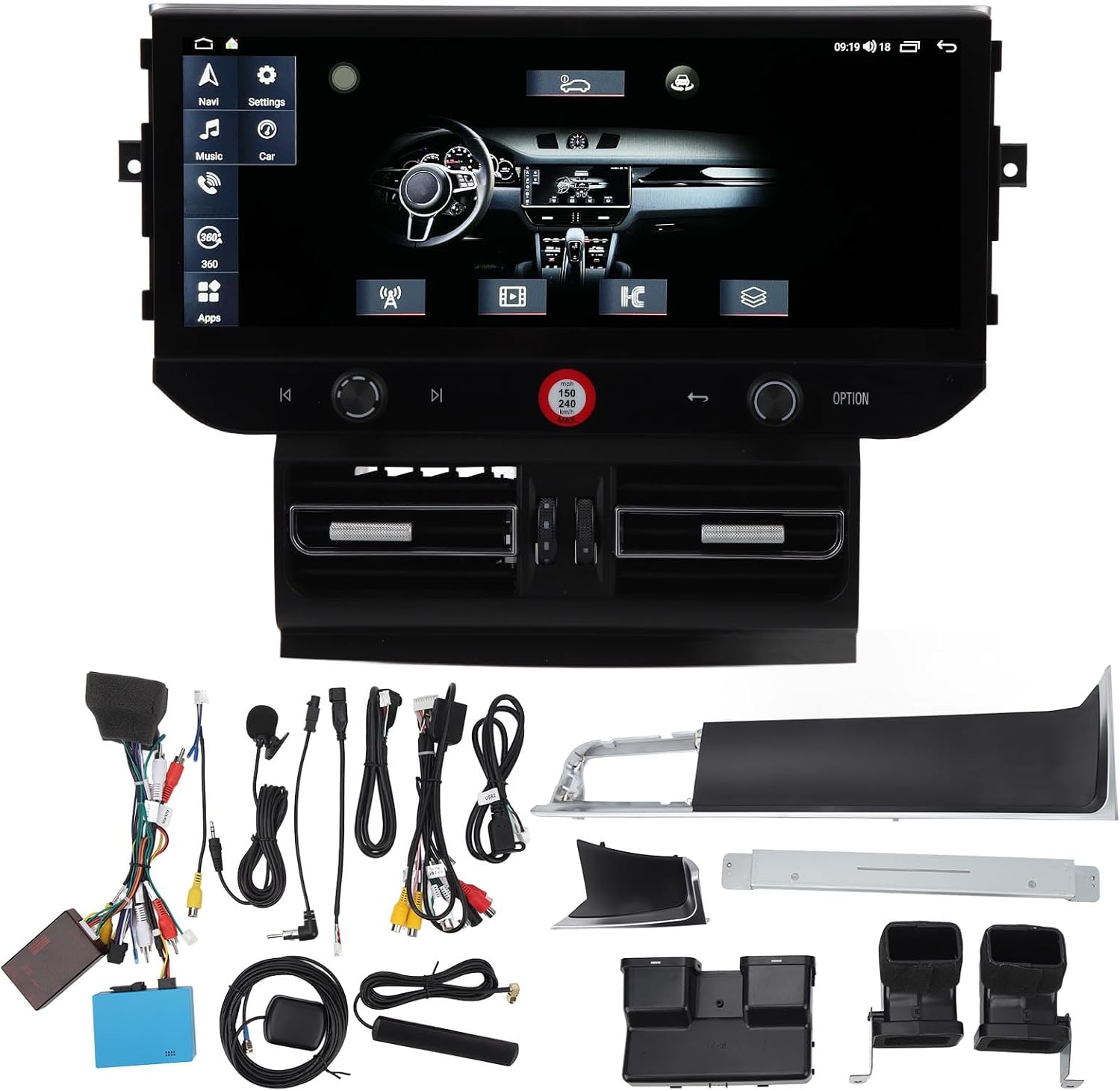
Imaxe 3.1: All components of the Shanrya car stereo system, including the main head unit, wiring harnesses, GPS antenna, USB cables, and other accessories.
4. Produto rematadoview
Familiarize yourself with the main components and their functions.
4.1 Main Head Unit

Imaxe 4.1.1: Fronte view of the Shanrya 12.3-inch car stereo head unit, showing the large display and integrated controls.
- Pantalla táctil de 12.3 polgadas: High-resolution display for navigation, media, and applications.
- Mandos de control: Located on the lower bezel for volume, tuning, and menu navigation.
- Botóns físicos: For quick access to functions like navigation, music, car settings, and apps.
4.2 Air Vent Assembly

Imaxe 4.2.1: Close-up of the integrated air vents and controls located directly below the main screen.
- Integrated Air Vents: Designed to seamlessly replace the original vehicle air vents.
- Climate Controls: May include integrated controls for vehicle climate functions, depending on the specific vehicle model.
5. Guía de instalación (configuración)
Esta sección ofrece unha visión xeralview of the installation process. Due to variations in vehicle models and electrical systems, professional installation is highly recommended.
5.1 Comprobacións previas á instalación
- Asegúrate de que o contacto do vehículo estea apagado e a batería desconectada.
- Confirm compatibility with your vehicle model (Macan LHD 2014-2016).
- Gather all necessary tools (trim removal tools, screwdrivers, wire cutters, etc.).
5.2 Removal of Original Unit
- Carefully remove the existing car stereo and air vent assembly using appropriate trim removal tools.
- Disconnect all wiring harnesses from the original unit.
5.3 Conexións de cableado
- Connect the provided power harness to the vehicle's wiring. Ensure all connections are secure.
- Conecte a antena GPS e diríxaa a unha localización con claras view do ceo (por exemplo, o taboleiro de instrumentos).
- Connect USB cables and route them to a convenient location for external devices.
- Conecta o micrófono externo para facer chamadas mans libres.
- Connect any other auxiliary inputs/outputs as required (e.g., reverse camera, external ampmáis vivo).
5.4 Mounting the New Unit
- Integrate the new air vent assembly and main head unit into the dashboard opening.
- Fixe a unidade usando os soportes e os parafusos de montaxe proporcionados.
- Ensure all cables are neatly tucked away and not pinched.

Imaxe 5.4.1: The Shanrya car stereo unit seamlessly installed in a Macan dashboard, demonstrating its fit and appearance.
5.5 Despois da instalación
- Volve conectar a batería do vehículo.
- Turn on the ignition and test all functions of the unit (power, audio, navigation, Bluetooth, etc.).
- Axuste a configuración segundo sexa necesario.
6. Instrucións de funcionamento
6.1 Acendido/apagado e volume
- Encendido: The unit typically powers on automatically with the vehicle's ignition.
- Apagado: The unit powers off with the vehicle's ignition. A long press on the power button (if available) may put it into standby.
- Control de volume: Use the dedicated knob or touchscreen controls to adjust the audio volume.
6.2 Navegación
- Tap the 'Navi' icon on the main screen to access the navigation application.
- Introduza o seu destino usando o teclado en pantalla.
- Follow the voice prompts and visual directions for your route.
Conectividade Bluetooth 6.3 5.0
- Vaia a "Configuración" > "Bluetooth".
- Activa o Bluetooth no teu dispositivo móbil e busca os dispositivos dispoñibles.
- Select the car stereo from the list and pair. Confirm the pairing code if prompted.
- Unha vez conectado, podes facer/recibir chamadas e transmitir audio.

Imaxe 6.3.1: A user interacting with the car stereo's touchscreen, demonstrating the on-screen dialer for Bluetooth calls.
CarPlay sen fíos 6.4 / Android Auto
- Ensure your iPhone or Android device has CarPlay/Android Auto enabled.
- Connect your device via Bluetooth or USB (for initial setup or wired connection).
- The unit should automatically detect and launch CarPlay/Android Auto.
- Access phone contacts, navigation, music, and voice assistants directly from the car stereo screen.

Imaxe 6.4.1: The car stereo display showing the CarPlay interface, allowing access to mobile phone features.
6.5 Radio and Media Playback
- Radio: Select the 'Radio' application to access FM/AM stations. Use the scan function or manual tuning.
- Music/Video: Play media from USB drives, Bluetooth streaming, or internal storage via the 'Music' or 'Video' applications.
7. Características e funcións
- Pantalla de alta definición de 12.3 polgadas: Provides a clear and expansive view para todas as funcións.
- Navegación GPS integrada: Supports various navigation apps for accurate routing.
- Bluetooth 5.0: For stable and fast wireless connection to mobile devices for calls and audio streaming.
- CarPlay sen fíos e Android Auto: Seamless integration with smartphones for enhanced functionality.
- Panoramic Image Support: May refer to support for 360-degree camera systems (if installed separately).
- Reprodución multimedia: Supports various audio and video formats from multiple sources.
- Steering Wheel Control Integration: Compatible with existing steering wheel controls for convenience.
8. Mantemento
- Limpeza da pantalla: Use a soft, lint-free cloth specifically designed for electronics screens. Do not spray cleaners directly onto the screen.
- Actualizacións de software: Periodically check for software updates from the manufacturer or seller to ensure optimal performance and access to new features. Updates are typically performed via USB.
- Coidado xeral: Avoid placing heavy objects on the unit or exposing it to sharp objects that could scratch the screen.
9 Solución de problemas
Se tes algún problema, consulta os seguintes problemas e solucións comúns:
| Problema | Causa posible | Solución |
|---|---|---|
| Sen Poder | Cableado solto, fusible fundido, problema coa batería do vehículo. | Comprobe todas as conexións de alimentación. Inspeccione os fusibles do vehículo. Asegúrese de que a batería do vehículo estea cargada. |
| Sen son | Volume demasiado baixo, fonte de son incorrecta, problema co cableado do altofalante. | Aumenta o volume. Selecciona a fonte de son correcta. Comproba as conexións dos altofalantes. |
| O GPS non funciona | GPS antenna not connected or poorly positioned, no satellite signal. | Asegúrese de que a antena GPS estea conectada de forma segura e teña unha visión clara view do ceo. |
| Problemas de sincronización de Bluetooth | Bluetooth not enabled, device not discoverable, incorrect pairing code. | Ensure Bluetooth is on for both devices. Make device discoverable. Re-enter pairing code. |
| Pantalla táctil non responde | Software glitch, screen damage. | Restart the unit (if possible). If issue persists, contact support. |
Se estas solucións non resolven o problema, póñase en contacto co servizo de atención ao cliente.
10. Especificacións
- Tamaño da pantalla: 12.3 polgadas
- Tipo de visualización: Pantalla táctil
- Conectividade: Bluetooth 5.0, USB
- Navegación: GPS integrado
- Integración de teléfonos intelixentes: Wireless CarPlay, Android Auto
- Compatibilidade: Macan LHD 2014-2016
- Fonte de alimentación: 12V DC (Vehicle specific)
- Memoria/Almacenamento: (6+128G) - 6GB RAM, 128GB Internal Storage
11. Garantía e soporte
For warranty information and technical support, please refer to the documentation provided at the time of purchase or contact your seller directly. Keep your purchase receipt as proof of purchase.


