Introdución
Thank you for choosing the Heyday Active Noise Cancelling Bluetooth Wireless Over-Ear Headphones. These headphones are designed to provide a superior audio experience with the added benefit of active noise cancellation, allowing you to focus on your audio without distractions. They feature a comfortable over-ear design, long battery life, and versatile connectivity options for both wireless and wired use.
O que hai na caixa
- Heyday Active Noise Cancelling Bluetooth Wireless Over-Ear Headphones
- Cable de carga USB-A a USB-C
- 4-foot Audio Cable (3.5mm)
- Maletín de transporte

Image: Heyday headphones shown with the included USB-A to USB-C charging cable and the 4-foot 3.5mm audio cable.
Configuración
1. Carga dos auriculares
Before first use, fully charge your headphones. A full charge provides up to 35 hours of playback with Active Noise Cancellation (ANC) on, or 75 hours with ANC off.
- Connect the small end of the USB-A to USB-C charging cable to the USB-C port on the headphones.
- Connect the large end of the USB-A cable to a compatible USB power source (e.g., computer USB port, USB wall adapter).
- The LED indicator on the headphones will illuminate to show charging status. It will change or turn off when fully charged.
2. Emparellamento Bluetooth
Emparella os teus auriculares co teu dispositivo con Bluetooth para obter audio sen fíos.
- Asegúrese de que os auriculares estean apagados.
- Manteña premido o botón de acendido/apagado dos auriculares ata que o indicador LED parpadee, indicando o modo de emparellamento.
- No teu dispositivo (teléfono intelixente, tableta, ordenador), vai á configuración de Bluetooth e activa Bluetooth.
- Select "Heyday Headphones" (or similar name) from the list of available devices.
- Once connected, the LED indicator on the headphones will stop flashing and remain solid, or turn off, depending on the model.
3. Conexión con cable (opcional)
Use the included 3.5mm audio cable for a wired connection to devices without Bluetooth or when the battery is depleted.
- Plug one end of the 3.5mm audio cable into the audio input jack on the headphones.
- Plug the other end of the 3.5mm audio cable into the audio output jack of your device.
- The headphones will automatically switch to wired mode. Bluetooth functionality will be disabled.
Instrucións de funcionamento

Imaxe: Fronte view of the Heyday Active Noise Cancelling Bluetooth Wireless Over-Ear Headphones.
Encendido/apagado
- Encendido: Manteña premido o botón de acendido durante aproximadamente 3 segundos ata que o indicador LED se acenda.
- Apagado: Manteña premido o botón de acendido durante aproximadamente 3 segundos ata que o indicador LED se apague.
Active Noise Cancellation (ANC) & Ambient Mode
These headphones feature Active Noise Cancellation (ANC) to reduce ambient noise and an Ambient Mode to allow some external sounds in.
- Locate the ANC/Ambient Mode button on the headphones.
- Press the button once to cycle through modes: ANC On, Ambient Mode, ANC Off.
- The LED indicator may change color or pattern to indicate the active mode.
Funcións de chamada
O micrófono incorporado permite realizar chamadas mans libres cando se conecta a través de Bluetooth.
- Responder/Finalizar chamada: Prema o botón multifunción unha vez.
- Rexeitar a chamada: Manteña premido o botón multifunción durante 2 segundos.
- Activar o asistente de voz: Prema dúas veces o botón multifunción.
Reprodución multimedia
Control your music directly from the headphones.
- Reproducir/Pausa: Prema o botón multifunción unha vez.
- Subir volume: Preme o botón Subir volume.
- Baixar volume: Prema o botón para baixar o volume.
- Próxima pista: Manteña premido o botón Subir volume.
- Pista anterior: Manteña premido o botón para baixar o volume.
Mantemento
Limpeza
Regular cleaning helps maintain the headphones' appearance and hygiene.
- Limpe os auriculares e a diadema cun pano suave, seco e sen fiapos.
- Para a sucidade persistente, d lixeiramenteampEnxágüe o pano con auga. Non empregue produtos químicos agresivos nin produtos de limpeza abrasivos.
- Evite a entrada de humidade en calquera abertura.
Almacenamento
Proper storage protects your headphones from damage.
- When not in use, store the headphones in the included carrying case to protect them from dust, scratches, and impacts.
- Almacenar nun lugar fresco e seco lonxe da luz solar directa e de temperaturas extremas.
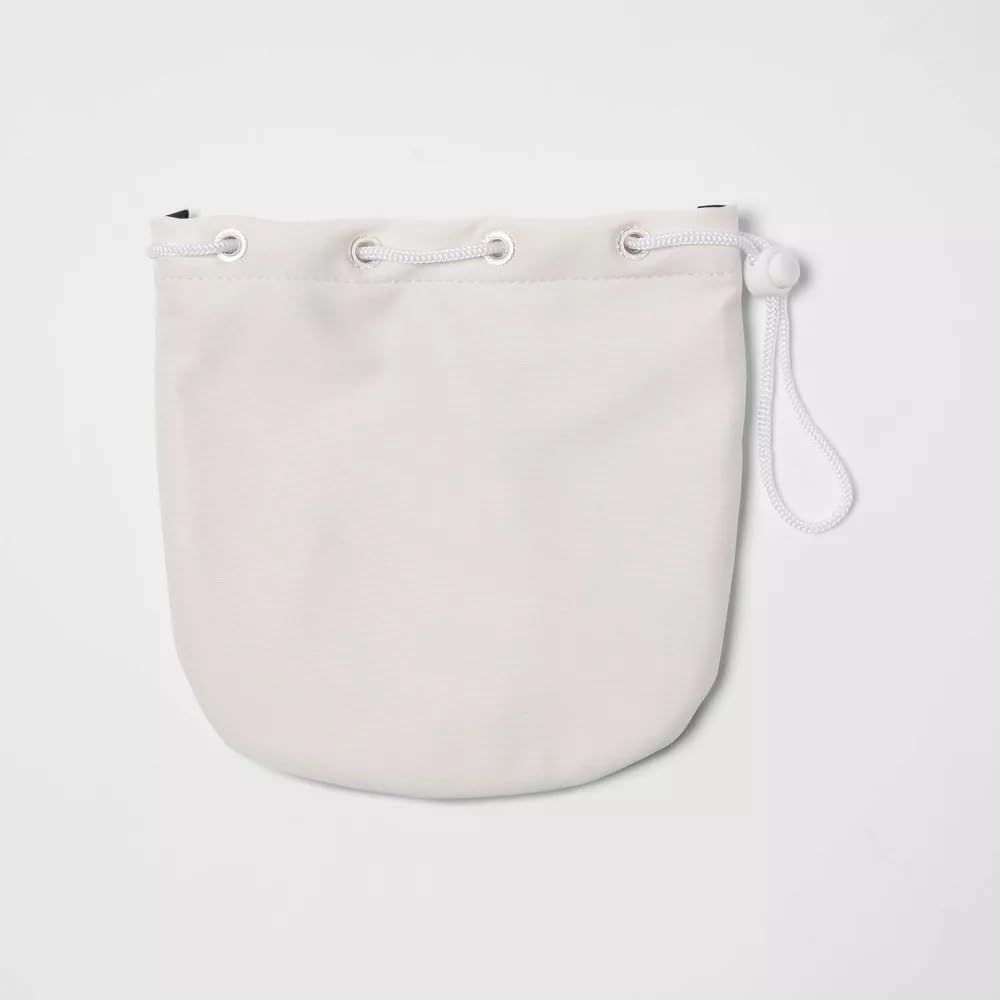
Image: The white drawstring carrying case provided with the Heyday headphones.
Coidado da batería
Para maximizar a duración da batería:
- Evite descargar completamente a batería con frecuencia.
- Cargue os auriculares regularmente, mesmo se non os usa durante períodos prolongados.
- Do not expose the headphones to extreme heat or cold, as this can degrade battery performance.
Resolución de problemas
| Problema | Causa posible | Solución |
|---|---|---|
| Os auriculares non se acenden. | A batería está esgotada. | Carga os auriculares co cable USB-C incluído. |
| Non se pode sincronizar co dispositivo Bluetooth. | Auriculares sen modo de emparellamento; Bluetooth do dispositivo desactivado; Fóra de alcance. | Ensure headphones are in pairing mode (flashing LED). Turn device Bluetooth off and on. Move headphones closer to device (within 33 feet). |
| No sound when connected via Bluetooth. | Volume too low; Incorrect audio output selected on device. | Increase headphone and device volume. Check device's audio output settings to ensure headphones are selected. |
| O ANC non funciona eficazmente. | ANC mode not activated; Very high-frequency noise. | Ensure ANC mode is active. ANC is most effective on low-frequency, constant noise. |
| O micrófono non funciona durante as chamadas. | Microphone muted on device; Headphones not selected as input device. | Check device call settings. Ensure headphones are selected as the microphone input. |
Especificacións
| Característica | Detalle |
|---|---|
| Nome do modelo | heyday Active Noise Cancelling Bluetooth Wireless Over-Ear Headphones |
| Número de modelo | 81579567 |
| Tecnoloxía de conectividade | Sen fíos (Bluetooth), con cable (conector de 3.5 mm) |
| Tecnoloxía de comunicación sen fíos | Bluetooth 5.0 |
| Alcance Bluetooth | 33 pés (10 metros) |
| Control de ruído | Cancelación activa de ruído (ANC) |
| Duración da batería (ANC activado) | Ata 35 horas |
| Duración da batería (ANC desactivado) | Ata 75 horas |
| Tipo de control | Media Control, Touch Control |
| Micrófono incorporado | Si |
| Colocación do oído | Sobre orella |
| Material | Elastómero termoplástico (TPE) |
| Cor | White (Stone White Gold) |
| Peso do elemento | 1.7 libras (aprox. 0.77 kg) |
| UPC | 191907664126 |
Información de seguridade
- Non expoñas os auriculares a temperaturas extremas, humidade nin líquidos.
- Evite deixar caer os auriculares nin someterlos a impactos fortes.
- Non intentes desmontar nin modificar os auriculares. Isto anulará a garantía e pode causar danos.
- Escoita a niveis de volume moderados para evitar danos auditivos. A exposición prolongada a sons altos pode causar perda de audición permanente.
- Do not use headphones while driving, cycling, or in situations where you need to hear surrounding sounds for safety.
- Manter fóra do alcance dos nenos.
Garantía e Soporte
Heyday products are designed for reliability and performance. For information regarding warranty coverage, technical support, or service inquiries, please refer to the warranty card included with your purchase or visit the official Heyday support website. Please have your model number (81579567) and proof of purchase ready when contacting support.