1. Introdución
Thank you for choosing the Havit H2038U RGB Wired Gaming Headset. This manual provides essential information for setting up, operating, and maintaining your headset. Please read it carefully to ensure optimal performance and longevity of your product.
Información importante de seguridade:
- Evita escoitar música durante moito tempo a volumes altos para evitar danos auditivos.
- Non expoñas os auriculares a temperaturas extremas, humidade nin substancias corrosivas.
- Keep the headset away from water and liquids.
- Non intentes desmontar nin modificar os auriculares. Isto anulará a garantía.
2. Produto rematadoview
2.1 Contido do paquete
- Havit H2038U RGB Wired Gaming Headset
- Micrófono desmontable
- Manual de usuario (este documento)
2.2 Compoñentes dos auriculares
The Havit H2038U headset features a comfortable over-ear design with soft earcups and an adjustable headband. It includes a detachable microphone for clear communication and integrated RGB lighting for an enhanced gaming experience.

Figura 2.1: Fronte view of the Havit H2038U RGB Wired Gaming Headset. This image displays the white over-ear headphones with RGB lighting elements on the earcups and the adjustable headband.
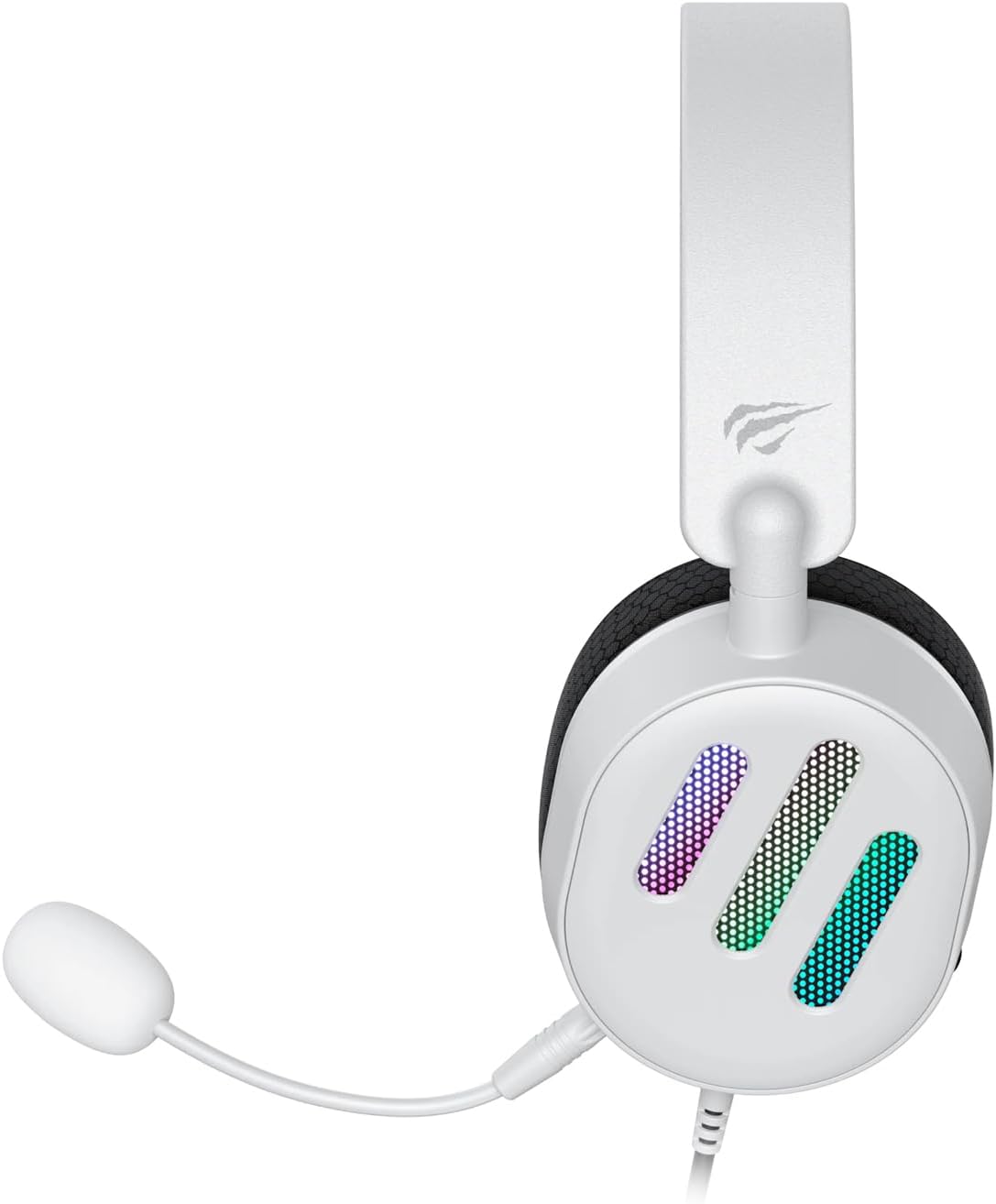
Figura 2.2: Lado view of the Havit H2038U RGB Wired Gaming Headset, showing the detachable microphone connected to the left earcup. The volume control wheel is also visible on the earcup.

Figura 2.3: Arriba view of the Havit H2038U RGB Wired Gaming Headset, highlighting the adjustable headband and the soft, breathable earcups.
3. Configuración
The Havit H2038U headset utilizes a dual-connection system for full functionality: a 3.5mm jack for audio and a USB connection for RGB lighting and virtual 7.1 surround sound.

Figura 3.1: Primeiro plano view illustrating the detachable microphone connection (3.5mm jack) and the USB connection for the Havit H2038U headset. This image also indicates 360-degree sound direction and 7.1 USB connectivity.
- Conecta o micrófono: Insert the detachable microphone into the 3.5mm microphone jack located on the left earcup until it clicks into place. Ensure it is securely connected.
- Connect for Audio: Plug the 3.5mm audio jack from the headset into the corresponding audio output port on your computer, gaming console, or mobile device.
- Connect for RGB Lighting and 7.1 Surround Sound: Plug the USB connector from the headset into an available USB port on your computer or gaming console. This connection powers the RGB lighting and enables the virtual 7.1 surround sound feature.
- Axustar o axuste dos auriculares: Adjust the headband to ensure a comfortable and secure fit over your ears. The earcups should fully enclose your ears for optimal sound isolation.
- System Configuration (for PC):
- Saída de audio: Go to your operating system's sound settings and ensure the Havit H2038U is selected as the default playback device.
- Entrada de micrófono: In the sound settings, select the Havit H2038U as the default recording device.
- Son envolvente 7.1: If applicable, install any necessary drivers from the Havit official website to enable and configure the virtual 7.1 surround sound feature.
4. Instrucións de funcionamento
4.1 Control de volume
The headset features an integrated volume control wheel, typically located on the left earcup or inline on the cable. Rotate the wheel to increase or decrease the audio volume.
4.2 Uso do micrófono
The detachable microphone can be positioned for optimal voice pickup. Adjust its flexible arm to bring the microphone close to your mouth, ensuring clear communication. For privacy, you may mute the microphone using software settings on your device if no physical mute button is present on the headset.
Iluminación RGB de 4.3
The RGB lighting on the earcups is powered via the USB connection. Once connected, the lighting will activate automatically. Specific control options for lighting patterns or colors may be available through dedicated software, if provided by Havit.

Figura 4.1: The Havit H2038U RGB Wired Gaming Headset displayed with its active RGB lighting feature, showcasing the illuminated earcups.
Son envolvente virtual 4.4 7.1
When connected via USB, the headset supports virtual 7.1 surround sound. This feature enhances spatial audio awareness in games and media. Ensure relevant drivers are installed and configured through your system's sound settings or Havit's software for optimal experience.

Figura 4.2: An illustrative image demonstrating the virtual 7.1 surround sound capability of the Havit H2038U headset, enhancing immersive audio experiences.
5. Mantemento
5.1 Limpeza
- Use a soft, dry cloth to wipe the exterior surfaces of the headset.
- Para os auriculares, limpe suavemente cun pano lixeiramente damp pano e deixar secar completamente ao aire antes de usalo.
- Non empregue produtos químicos agresivos, solventes nin produtos de limpeza abrasivos.
5.2 Almacenamento
When not in use, store the headset in a clean, dry place, away from direct sunlight and extreme temperatures. Avoid tangling the cables to prevent damage.
6 Solución de problemas
| Problema | Causa posible | Solución |
|---|---|---|
| Non hai audio dos auriculares | 3.5mm jack not fully inserted; incorrect audio output selected; volume too low. | Ensure 3.5mm jack is fully connected. Check system sound settings to select Havit H2038U as default playback device. Increase volume using the headset's control wheel and system volume. |
| O micrófono non funciona | Microphone not fully inserted; incorrect input device selected; microphone muted. | Ensure microphone is securely attached. Check system sound settings to select Havit H2038U as default recording device. Unmute microphone in software settings. |
| A iluminación RGB non funciona | USB cable not connected; faulty USB port. | Asegúrate de que o cable USB estea conectado correctamente a un porto USB que funcione. Proba cun porto USB diferente. |
| 7.1 Surround Sound not active | USB cable not connected; drivers not installed/configured. | Ensure the USB cable is connected. Install and configure necessary drivers from the Havit official websitio. |
7. Especificacións
| Característica | Especificación |
|---|---|
| Modelo | H2038U |
| Tecnoloxía de conectividade | Wired (3.5mm Jack + USB) |
| Factor de forma dos auriculares | Sobre orella |
| Impedancia | 24 ohmios |
| Resposta en frecuencia | 20 Hz - 20 kHz |
| Sensibilidade | 114 dB |
| Tipo de control | Volume Control, Push Button |
| Material | Plástico |
| Peso do elemento | 550 g |
| Dimensións do produto | 11.2 x 21.9 x 28.5 cm |
| Cor | Branco |
| Características especiais | RGB Lighting, Detachable Microphone, Virtual 7.1 Surround Sound |
8. Garantía e soporte
Havit products are designed for reliability and performance. For information regarding warranty coverage, technical support, or service, please refer to the warranty card included with your product or visit the official Havit websitio. Garde o recibo da compra como xustificante de compra para reclamacións de garantía.
Información de contacto:
- Havit oficial Websitio: www.havit.com (Consulte as zonas rexionais) websitios para apoio específico)


