1. Introdución
Thank you for choosing the FOREVER MATB-100 Wireless Power Bank. This device is designed to provide convenient and efficient charging for your mobile devices, featuring both wired and wireless charging capabilities. Please read this manual carefully before using the product to ensure safe and optimal performance.
2. Características clave
- Carga versátil: Supports simultaneous charging of three devices via wireless induction, USB-A, and USB-C ports.
- Indicador LED: A practical LED display accurately shows the current battery level of the power bank.
- Smart Magnetic Grip: Features a special magnetic grip to stabilize your phone with the power bank, allowing hands-free use during charging.
- Alta capacidade: Equipped with a 10,000 mAh battery, providing multiple recharges for your devices.
- Carga rápida: Supports Power Delivery (PD) and Quick Charge (QC) technologies for rapid charging.
- Soporte integrado: Allows the power bank to function as a stand for your phone while charging.
3. Produto rematadoview
Familiarize yourself with the components of your FOREVER MATB-100 Wireless Power Bank.

Imaxe 3.1: Fronte e traseiro view of the FOREVER MATB-100 Wireless Power Bank, highlighting the wireless charging pad and the integrated kickstand.

Imaxe 3.2: Lado view of the power bank, illustrating the USB-A output port, USB-C input/output port, and the LED battery level indicators.

Imaxe 3.3: The power bank magnetically attached to the back of a smartphone, demonstrating the secure magnetic grip feature.

Imaxe 3.4: Diagram showing the dimensions of the power bank: approximately 10.8 cm in length and 6.8 cm in width.
Compoñentes:
- Wireless Charging Pad (with magnetic alignment)
- Indicador LED de nivel de batería
- Botón de encendido
- Porto de saída USB-A
- Porto de entrada/saída USB-C
- Soporte integrado
4. Configuración e carga inicial
4.1 Carga da batería externa
Before first use, fully charge your FOREVER MATB-100 Power Bank.
- Conecta o cable USB-C fornecido ao porto USB-C do cargador portátil.
- Connect the other end of the USB-C cable to a compatible USB wall adapter (not included). For optimal charging speed, use a Power Delivery (PD) compatible adapter.
- The LED indicators will illuminate to show the charging progress. When all LEDs are solid, the power bank is fully charged.
Nota: The power bank can be charged using the USB-C port. It is recommended to fully charge the power bank every three months if not in regular use to maintain battery health.
5. Instrucións de funcionamento
5.1 Comprobación do nivel da batería
Press the power button once to check the remaining battery level. The LED indicators will light up, with each LED representing approximately 25% of the battery capacity.
5.2 Carga sen fíos
The MATB-100 supports wireless charging for compatible devices, including MagSafe-enabled iPhones and other Qi-compatible smartphones.
- Asegúrate de que o banco de enerxía estea suficientemente cargado.
- Place your wireless charging compatible device onto the wireless charging pad of the power bank. For MagSafe-enabled devices, the power bank will magnetically align.
- The device should begin charging automatically. If not, press the power button on the power bank to activate wireless charging.
- The LED indicators on the power bank may show charging status.
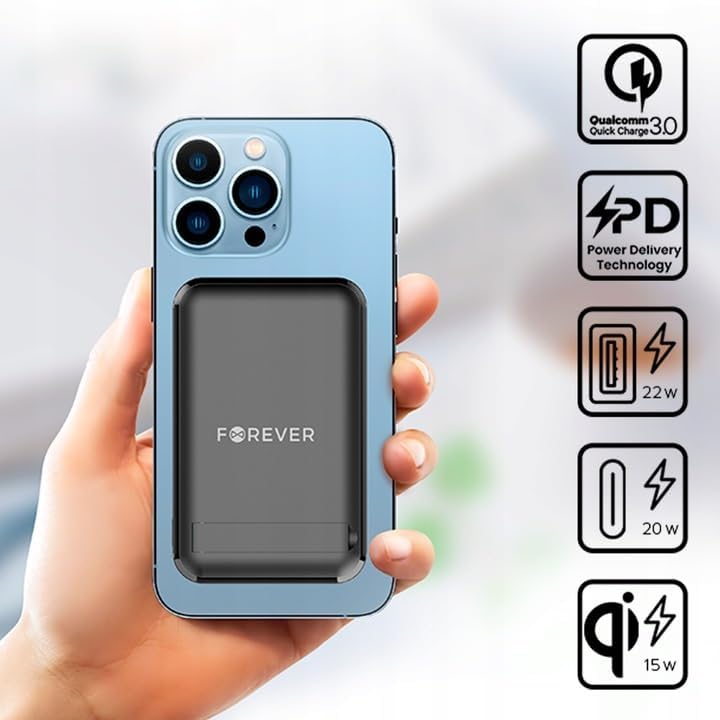
Imaxe 5.1: A smartphone attached to the power bank, illustrating wireless charging in progress and icons representing Quick Charge, Power Delivery, and various wattage saídas.
Consello: Use the integrated kickstand to prop up your phone while it charges wirelessly, allowing for comfortable viewing.
5.3 Wired Charging (USB-A and USB-C)
The power bank can charge devices via its USB-A and USB-C ports.
- Asegúrate de que o banco de enerxía estea suficientemente cargado.
- Connect one end of a compatible charging cable to your device and the other end to either the USB-A or USB-C output port on the power bank.
- The device should begin charging automatically. If not, press the power button on the power bank.

Imaxe 5.2: A smartphone connected to the power bank via a USB-C cable, demonstrating wired charging.
Nota: The USB-C port functions as both an input for charging the power bank and an output for charging other devices. The USB-A port is an output only.
5.4 Carga simultánea
The FOREVER MATB-100 can charge up to three devices simultaneously (one wirelessly, one via USB-A, and one via USB-C). The total output power will be distributed among the connected devices.
6. Coidados e mantemento
- Manteña a batería externa seca. A humidade pode danar os circuítos internos.
- Non expoña a temperaturas extremas (quentes ou frías).
- Evite deixar caer ou someter o banco de enerxía a fortes impactos.
- Limpa a superficie cun pano suave e seco. Non empregues produtos químicos agresivos nin produtos de limpeza abrasivos.
- Almacenar nun lugar fresco e seco lonxe da luz solar directa.
- If not used for extended periods, charge the power bank at least once every three months to prolong battery life.
7 Solución de problemas
7.1 O banco de enerxía non carga
- Asegúrate de que o cable USB-C estea conectado correctamente tanto ao banco de enerxía como ao adaptador de parede.
- Verify that the wall adapter is functioning correctly and plugged into a live power outlet.
- Try using a different USB-C cable and/or wall adapter.
7.2 O dispositivo non se carga desde o banco de enerxía
- Check the power bank's battery level. If it's low, recharge the power bank.
- Preme o botón de acendido/apagado do banco de enerxía para activar a carga.
- For wired charging, ensure the cable is securely connected to both the power bank and your device. Try a different cable or port.
- For wireless charging, ensure your device is properly aligned on the charging pad and is wireless charging compatible. Remove any thick cases that might interfere.
- Ensure there are no metallic objects between the power bank and your device during wireless charging.
7.3 Carga lenta
- Ensure you are using a high-quality, compatible charging cable.
- For wired charging, ensure your device supports Quick Charge (QC) or Power Delivery (PD) if you expect fast charging speeds.
- For wireless charging, ensure your device supports fast wireless charging and is correctly aligned.
- Charging multiple devices simultaneously may reduce the charging speed for each individual device.
8. Especificacións
| Nome do modelo | MATB-100 |
| Marca | PARA SEMPRE |
| Capacidade da batería | 10000 mAh (Miliamphoras antes) |
| Composición da batería | Ion de litio |
| Tipo de conector | USB tipo A, USB tipo C |
| Característica especial | Wireless Charging, Magnetic Grip, Integrated Kickstand |
| Voltage | 5 voltios (saída) |
| Número de portos | 2 (USB-A, USB-C) + Wireless Charging |
| Dispositivos compatibles | Smartphones (including MagSafe compatible), Tablets, Headphones, Smartwatches |
| Dimensións (L x W x H) | 10.8 cm x 6.8 cm x 2 cm (aproximadamente) |
| Saída sen fíos máxima | 15 W |
| Saída máxima de USB-A | 22.5W (Quick Charge) |
| Max USB-C Output | 20 W (Entrega de potencia) |
9. Información de seguridade
- Non desmonte, abra nin triture a batería.
- Non expoñas o cargador portátil á calor nin ao lume. Evita gardalo baixo a luz solar directa.
- Do not short-circuit the power bank. Do not store battery packs haphazardly in a box or drawer where they may short-circuit each other or be short-circuited by conductive materials.
- Non someta o banco de enerxía a choques mecánicos.
- In the event of a battery leak, do not allow the liquid to come into contact with the skin or eyes. If contact has been made, wash the affected area with copious amounts of water and seek medical advice.
- Manteña o banco de enerxía fóra do alcance dos nenos.
- Supervise os nenos cando usen o banco de enerxía.
- Non utilice ningún cargador que non sexa o especificamente proporcionado para o seu uso co equipo.
- Dispose of the power bank properly according to local regulations. Do not dispose of with household waste.
10. Garantía e soporte
For warranty information and technical support, please refer to the documentation provided with your purchase or contact the FOREVER customer service department. Keep your proof of purchase for warranty claims.
For further assistance, you may visit the official FOREVER websitio ou póñase en contacto co seu comerciante.


