Powerwave Wireless Controller Purple Rush
Manual de usuario
1. Introdución
Grazas pola compraasing the Powerwave Wireless Controller. This controller is designed to enhance your gaming experience on PlayStation 4 consoles, offering advanced features such as motion sensing, dual motor vibration, and a built-in speaker. Please read this manual carefully to ensure proper use and maintenance of your device.
This controller is compatible with PS4, PS4 Slim, and PS4 Pro models. Please note that PlayStation Lightbar, PSVR, turbo functionality, and PS5 compatibility are not supported.
2. Contido do paquete
- 1 x Powerwave Wireless Controller (Purple Rush)
- 1 x cable de carga USB
- 1 x Manual de usuario (este documento)

Image: The Powerwave Wireless Controller shown within its retail packaging, highlighting the product and its box.
3. Características do controlador
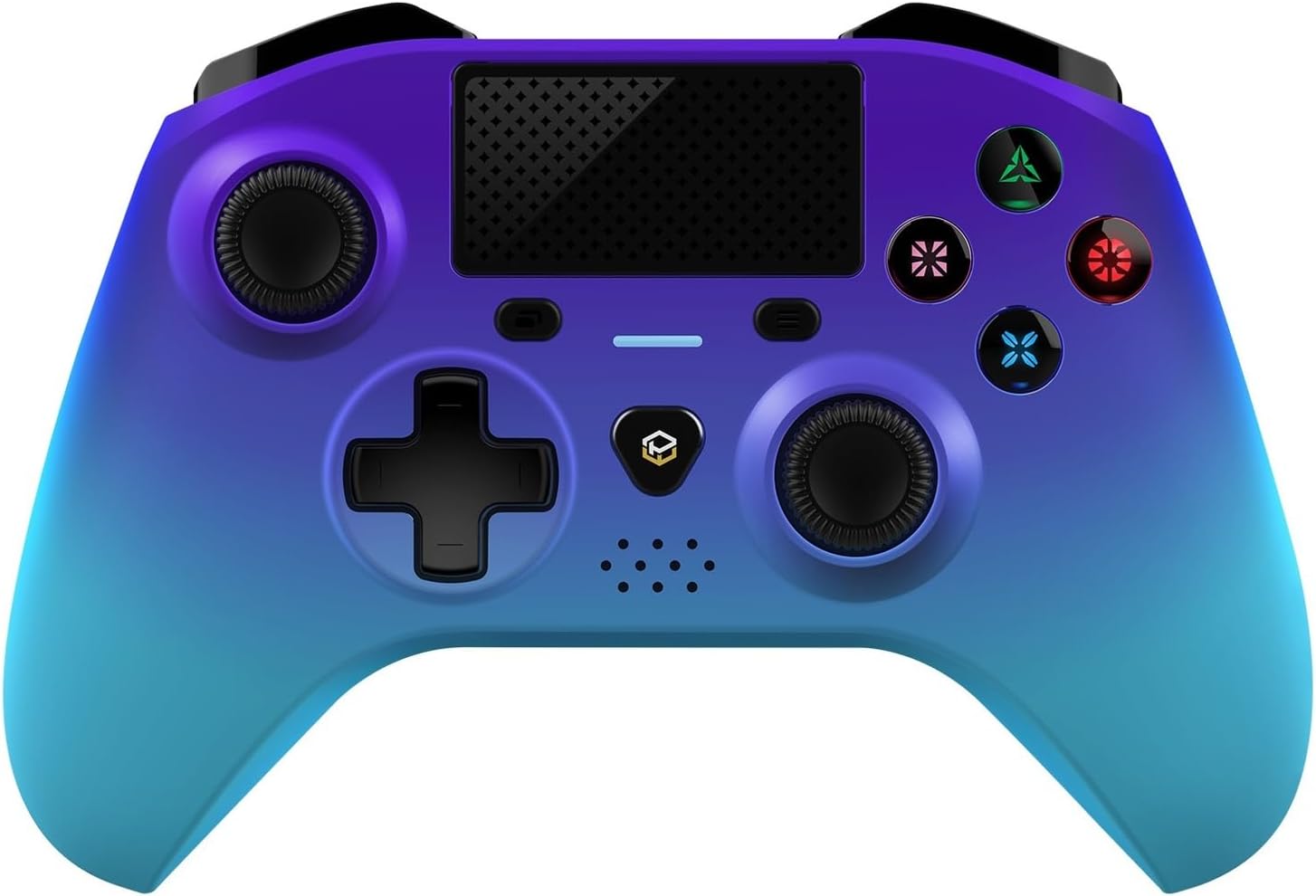
Imaxe: Unha parte frontal detallada view of the Powerwave Wireless Controller in Purple Rush color, showcasing its buttons, joysticks, touchpad, and LED display.
- Conectividade sen fíos Bluetooth: For seamless gaming without cables.
- LED Display Buttons: Illuminated buttons for enhanced visibility.
- Batería recargable: Built-in lithium polymer battery for extended playtime.
- Tecnoloxía de detección de movemento: Integrated sensors for intuitive control in compatible games.
- Vibración de dobre motor: Ofrece retroalimentación háptica inmersiva durante o xogo.
- Touchpad: Interactive surface for unique gameplay mechanics.
- Altavoz incorporado: Enhances audio experience directly from the controller.
- 3.5mm Stereo Audio Jack: For connecting headphones or headsets.
4. Guía de configuración
4.1 Carga do controlador
- Connect the small end of the supplied USB charging cable to the micro-USB port on the front of the controller.
- Connect the larger end of the USB cable to an available USB port on your PlayStation 4 console or a compatible USB wall adapter (5V/1A recommended).
- The controller's LED indicator will show charging status. It will typically turn off or change color once fully charged.
4.2 Pairing with PlayStation 4
- Asegúrate de que a túa consola PlayStation 4 estea acendida.
- Connect the controller to the PS4 console using the supplied USB charging cable.
- Preme o Botón PS (the button with the PlayStation logo) in the center of the controller.
- The controller will automatically pair with the console. Once paired, you can disconnect the USB cable for wireless play.
- To pair additional controllers, repeat the steps above.
Note: If the controller does not pair, ensure it is fully charged and try connecting it to a different USB port on the console.
5. Funcionamento do controlador
5.1 Controis básicos
The Powerwave Wireless Controller features standard PlayStation layout buttons, including:
- Pad direccional (D-Pad): Para entrada direccional.
- Botóns de acción (triángulo, círculo, cruz, cadrado): Para accións dentro do xogo.
- Manetas analóxicas esquerda e dereita: Para movementos precisos e control da cámara.
- L1/R1 and L2/R2 Buttons: Botóns de ombreiro e de gatillo.
- Botón COMPARTIR: For sharing gameplay moments.
- Botón OPCIÓNS: For accessing in-game menus.
- Botón PS: For accessing the PS4 home screen and power options.
- Touchpad: Functions as a clickable button and multi-touch surface.
5.2 Funcións avanzadas
- Detección de movemento: Tilt and move the controller to interact with games that support motion controls.
- Feedback de vibración: Experience realistic vibrations during gameplay, such as impacts or explosions.
- Saída de audio: Connect a 3.5mm headset to the audio jack for in-game sound and voice chat. Adjust volume through the PS4 system settings.
6. Mantemento e coidados
- Limpeza: Use un pano suave e seco para limpar o controlador. Para a sucidade persistente, dóreo lixeiramente.ampEnxágüe o pano con auga. Non empregue produtos químicos agresivos nin produtos de limpeza abrasivos.
- Almacenamento: Garde o controlador nun lugar fresco e seco, lonxe da luz solar directa e de temperaturas extremas.
- Coidado da batería: Para prolongar a duración da batería, evite descargar completamente o controlador con frecuencia. Cárgueo regularmente, mesmo se non o usa durante períodos prolongados.
- Evita gotas: Protect the controller from physical shocks and drops, which can damage internal components.
7 Solución de problemas
| Problema | Posible Solución |
|---|---|
| O controlador non se acende. | Ensure the controller is fully charged. Connect it to the PS4 via USB cable and try pressing the PS button. |
| O mando non se emparella coa PS4. |
|
| Input lag or disconnection during wireless play. |
|
| Vibration or motion sensing not working. | Check in-game settings and PS4 system settings to ensure these features are enabled. Some games may not support these features. |
8. Especificacións
| Característica | Detalle |
|---|---|
| Conectividade | Bluetooth sen fíos |
| Compatibilidade | PlayStation 4, PS4 Slim, PS4 Pro |
| Tipo de batería | 1 batería de polímero de litio (incluída) |
| Dimensións (aprox.) | 17.5 x 15.6 x 6.9 cm |
| Peso (aprox.) | 987 gramos |
| Porto de audio | Conector de audio estéreo de 3.5 mm |
| Model Identifier (ASIN) | B0CKPF5X2N |
9. Garantía e soporte
For warranty information and customer support, please refer to the documentation provided with your purchase or visit the official Powerwave websitio. Garda o comprobante de compra para reclamacións de garantía.
Para obter máis axuda, tamén podes contactar co vendedor onde compraches o produto.
No official seller videos were found for this product.


