Introdución
Thank you for choosing the VENTION 3FT 8K HDMI 2.1 Cable. This cable is designed to provide high-speed audio and video transmission, supporting advanced features such as 8K@60Hz, 4K@120Hz, Dynamic HDR, eARC, and HDCP 2.2 & 2.3. This manual provides essential information for proper setup, operation, maintenance, and troubleshooting to ensure optimal performance.
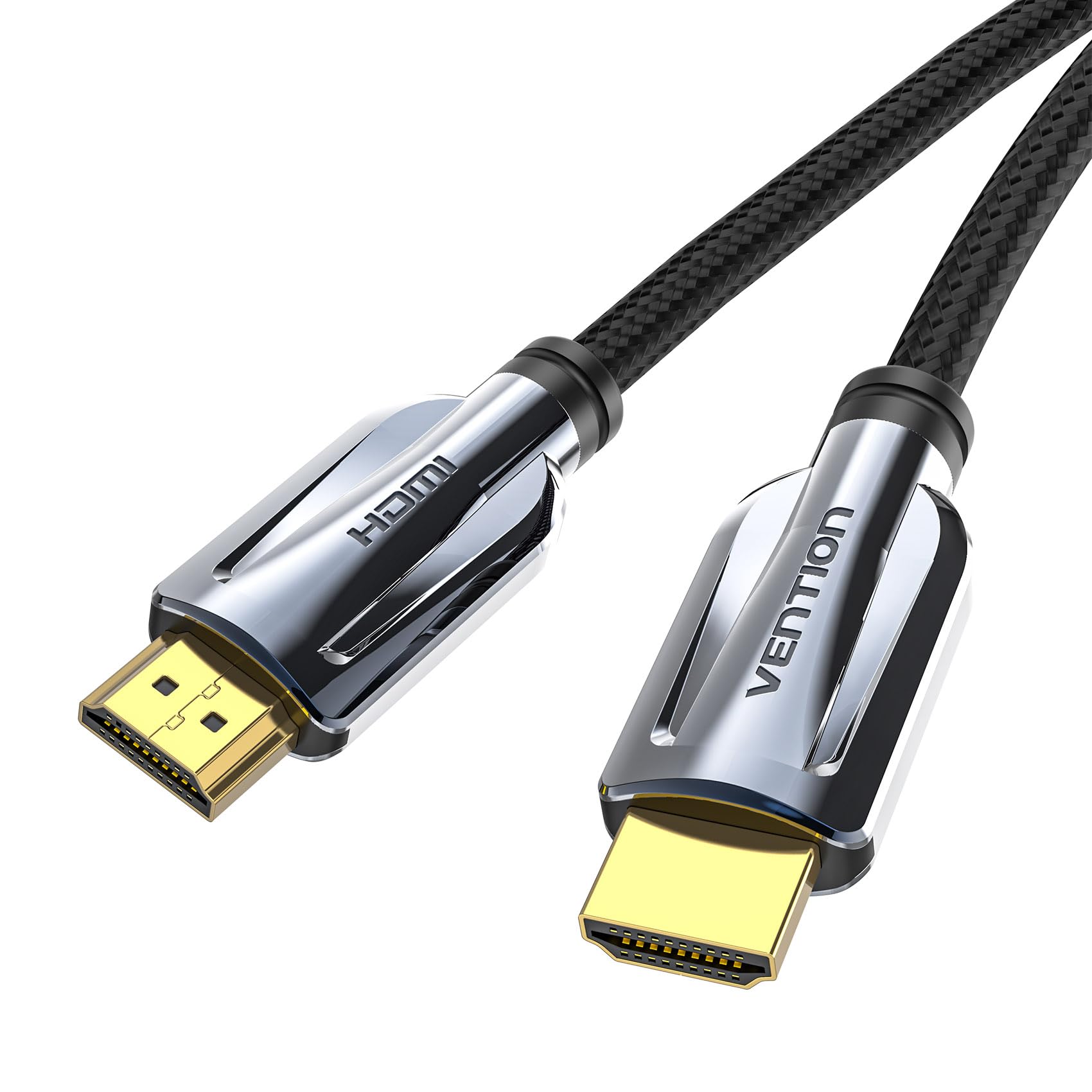
Image: VENTION 3FT 8K HDMI 2.1 Cable. This image displays the cable itself, highlighting its braided design and metallic connectors.

Image: Ultra 8K@60HZ HDMI Cable Features. This graphic illustrates the cable's capabilities including 48Gbps bandwidth, Dolby Atmos, Dolby Vision, Dynamic HDR, eARC, HDCP 2.2 & 2.3, and DTS:X support.
Instrucións de configuración
Follow these steps to connect your VENTION HDMI 2.1 cable:
- Identificar portos: Locate the HDMI output port on your source device (e.g., gaming console, Blu-ray player, PC) and the HDMI input port on your display device (e.g., TV, monitor, projector). Ensure both devices support HDMI 2.1 for full functionality.
- Cable de conexión: Gently insert one end of the VENTION HDMI cable into the HDMI output port of your source device.
- Conectar á pantalla: Insert the other end of the HDMI cable into the HDMI input port of your display device.
- Conexión segura: Ensure both ends are firmly seated in their respective ports. The cable is plug-and-play and does not require additional software or drivers.

Image: Stable Support for High Refresh Rates. This image shows a gaming setup, illustrating the cable's ability to support stable 8K@60Hz, 4K@144Hz, and 2K@240Hz resolutions, preventing flickering or black screens.
This HDMI 2.1 cable is backward compatible with HDMI 2.0b/2.0a/1.4/1.3/1.2/1.1 standards, allowing use with a wide range of devices.
Instrucións de funcionamento
Once connected, the VENTION HDMI 2.1 cable operates automatically. Your devices should detect the connection and negotiate the best possible audio and video settings.
- Transmisión de alta velocidade: The cable supports a bandwidth of 48Gbps, enabling resolutions up to 8K@60Hz and 4K@120Hz.
- HDR dinámico: Enjoy enhanced contrast, brightness, and color depth with Dynamic HDR support.
- eARC (Canle de retorno de audio mellorado): Transmit full-resolution audio signals, including object-based audio formats like Dolby Atmos and DTS:X, from your TV to a compatible soundbar or AV receiver.
- HDCP 2.2 & 2.3: Ensures compatibility with protected content from streaming services and Blu-ray players.

Image: Ultra Fine Contrast in 8K. This graphic compares 1080P, 4K, and 8K resolutions, highlighting the superior detail and contrast provided by 8K, along with support for Dolby, 3D, 120Hz, and HDR.

Image: HDMI 2.1 vs HDMI 2.0 Bandwidth Comparison. This image visually compares the 48Gbps bandwidth of HDMI 2.1 with the 18Gbps of HDMI 2.0, emphasizing the capability for pure 8K viewpracer.
Mantemento
To ensure the longevity and optimal performance of your VENTION HDMI 2.1 cable, follow these maintenance guidelines:
- Manipular con coidado: Avoid excessive bending, twisting, or pulling of the cable, especially near the connectors. The nylon braided jacket provides durability, but extreme stress can still cause damage.
- Manter limpo: Periodically wipe the cable and connectors with a soft, dry cloth to remove dust and debris. Do not use liquid cleaners directly on the connectors.
- Almacenar correctamente: When not in use, coil the cable loosely. Avoid tight coiling or kinking, which can damage the internal wires.
- Protexer os conectores: Keep the gold-plated connectors free from dirt and moisture. If necessary, use a small brush to gently clean any debris from the connector pins.

Image: Robust Nylon Braided Cable Design. This image highlights the durable nylon braided jacket and the 'ULTRA Certified Cable' logo, indicating superior protection and flexibility.

Image: Cable Construction Details. This graphic details the cable's features: gold-plated & aluminum alloy case for minimal interference, multiple shielding (aluminum foil + metal braiding) to prevent interference, and high toughness cotton braided exterior for durability.
Resolución de problemas
If you encounter issues with your VENTION HDMI 2.1 cable, refer to the following common problems and solutions:
| Problema | Causa posible | Solución |
|---|---|---|
| Sen sinal de vídeo nin de son | Loose connection, incorrect input selection, incompatible device settings. |
|
| Flickering screen or intermittent signal | Cable damage, signal interference, resolution/refresh rate mismatch. |
|
| Sen son ou mala calidade de son | Incorrect audio settings, eARC not enabled, incompatible audio receiver. |
|
| 8K@60Hz or 4K@120Hz not achieved | Source/display limitations, cable quality, incorrect settings. |
|
Especificacións
Key technical specifications for the VENTION 3FT 8K HDMI 2.1 Cable (Model AAL):
| Característica | Detalle |
|---|---|
| Marca | VENCIÓN |
| Número de modelo | AAL |
| Tipo de cable | HDMI 2.1 |
| Lonxitude | 3 pés (aprox. 0.91 metros) |
| Taxa de transferencia de datos | 48 gigabits por segundo (Gbps) |
| Resolucións admitidas | 8K@60Hz, 4K@120Hz, 4K@144Hz, 2K@240Hz |
| Funcións admitidas | Dynamic HDR, eARC, HDCP 2.2 & 2.3, 3D, Dolby Atmos, DTS:X |
| Tipo de conector | HDMI macho a macho |
| Material do conector | Gold-plated, Zinc Alloy Casing |
| Chaqueta de cable | Nylon Braided (Cotton Mesh) |
| Material condutor | Premium Tinned Copper |
| Blindaxe | Aluminum Foil + Metal Braided Mesh |
| Dispositivos compatibles | Televisions, Monitors, Projectors, PS5, PS4, Apple TV, Roku TV, Laptops, Desktops |
| Cor | Gris |
| Peso do elemento | 4.2 onzas |
Garantía e Soporte
VENTION products are manufactured to high-quality standards. For specific warranty information, please refer to the warranty card included with your product or visit the official VENTION website. If you require technical assistance or have questions regarding your HDMI cable, please contact VENTION customer support through their official channels.
Conserve o comprobante de compra para calquera reclamación de garantía.


