1. Produto rematadoview
The Monport YW220 Fume Extractor is designed to effectively remove harmful fumes, dust, and odors from various working environments. It features a robust 3-layer filtration system, strong suction power, and a user-friendly remote control for efficient air purification. This manual provides detailed instructions for setup, operation, maintenance, and troubleshooting to ensure optimal performance and longevity of your device.

Figure 1.1: Monport YW220 Fume Extractor with its main components including the main unit, extraction tube, and filters.
2. Información de seguridade
Please read all safety warnings and instructions carefully before operating the fume extractor. Failure to follow these instructions may result in electric shock, fire, or serious injury.
- Asegúrate de que a fonte de alimentación coincida coas especificacións que aparecen na etiqueta do produto.
- Non utilice a unidade cun cable de alimentación ou un enchufe danados.
- Manteña a entrada e a saída de aire libres de obstrucións para garantir un fluxo de aire axeitado.
- Non expoña a unidade á auga nin a humidade excesiva.
- Always unplug the unit before performing any maintenance or filter replacement.
- Use only genuine Monport replacement filters to maintain performance and warranty.
3. Contido do paquete
Verifique que todos os elementos que se indican a continuación estean incluídos no seu paquete:
- Fume Extractor Unit (1)
- Extraction Tube (1)
- Square Silicone Cover (1)
- Cable de alimentación (1)
- English Manual (1)
- Control remoto (1)
- Adaptador (1)
- Primary Filtration Cotton (5 sheets)
- H13 Filter Element (1)
- High Iodine Activated Carbon Filter (1)

Figura 3.1: detallada view of all components included in the product packaging.
4. Instrucións de configuración
Follow these steps to set up your Monport YW220 Fume Extractor:
- Desembalaxe: Retire con coidado todos os compoñentes da embalaxe. Garde a embalaxe para o seu almacenamento ou transporte futuros.
- Instalación do filtro:
- Unlock the metal lock on the side of the unit to open the filter compartment.
- Insert the High Iodine Activated Carbon Filter at the bottom.
- Place the H13 Filter Element on top of the activated carbon filter.
- Finally, place a sheet of Primary Filtration Cotton on the very top.
- Close the filter compartment and secure the metal lock.

Figure 4.1: Proper layering of the 3-layer filtration system: Primary Filtration Cotton, H13 Filter Element, and High Iodine Activated Carbon Filter.
- Attach Extraction Tube: Connect the extraction tube to the air inlet on top of the unit. Ensure it is securely fastened. The 82mm air inlet is compatible with the provided 82mm bamboo tube and 100mm smoke pipes using the adapter.
- Attach Square Silicone Cover: If needed for specific applications, attach the square silicone cover to the end of the extraction tube.
- Conexión de alimentación: Plug the power cord into the unit and then into a suitable power outlet.
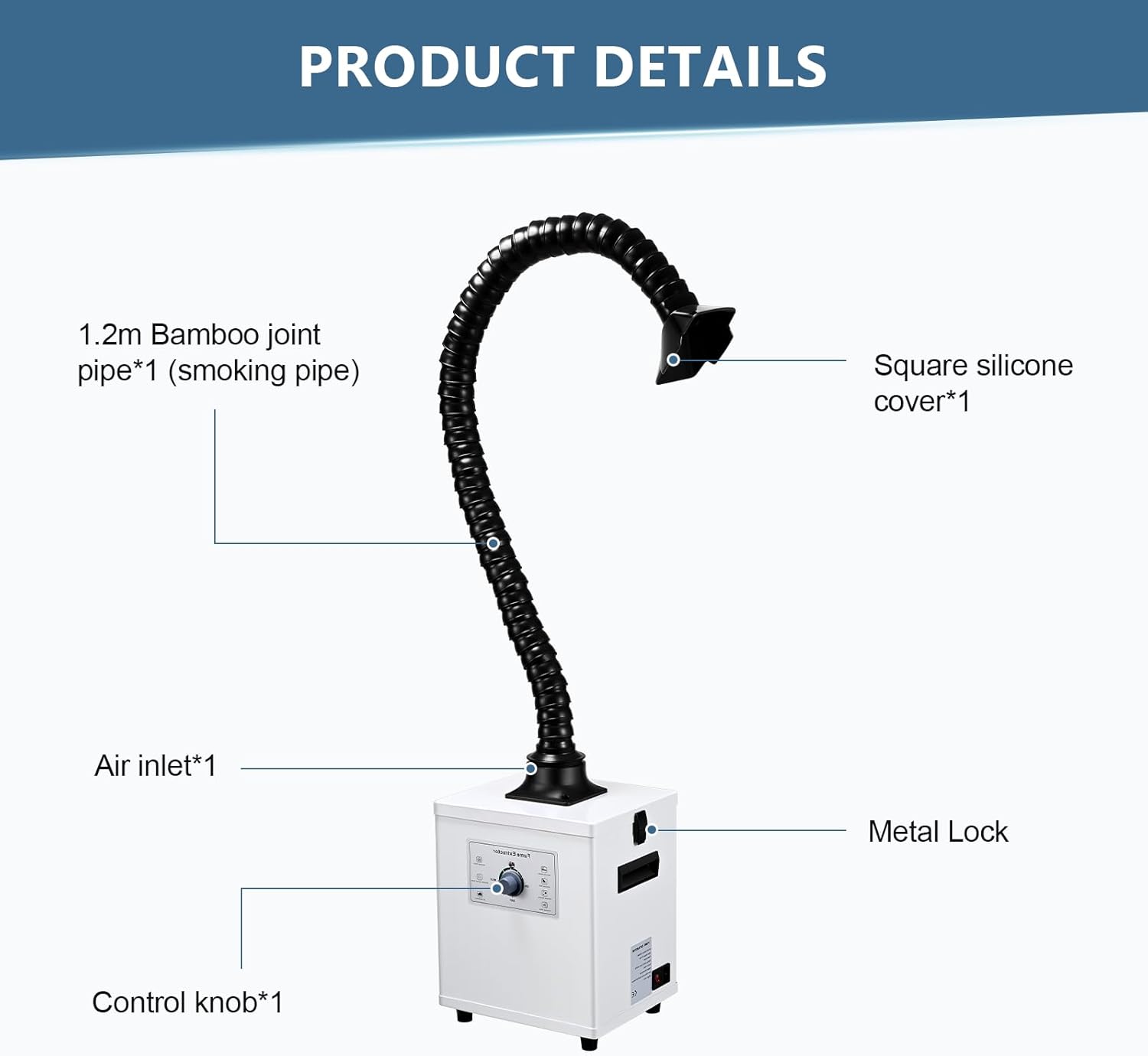
Figure 4.2: Key components of the fume extractor, including the 1.2m bamboo joint pipe (smoking pipe), square silicone cover, air inlet, and metal lock.
5. Instrucións de funcionamento
The Monport YW220 Fume Extractor can be operated via the control knob on the unit or the included remote control.
5.1. Using the Control Knob
- Encendido/apagado: Turn the knob clockwise to the 'ON' position to power on the unit. Turn it counter-clockwise to 'OFF' to power off.
- Axustar a velocidade do vento: Continue turning the knob clockwise past 'ON' to increase the wind speed. Turn it counter-clockwise to decrease the speed.

Figure 5.1: The control panel features a simple knob design for smooth adjustment of wind speed and handles for easy access.
5.2. Usando o mando a distancia
The remote control offers enhanced functionality:
- Interruptor de alimentación: Preme o botón de acendido para acender ou apagar a unidade.
- Multi-level Wind Speed Adjustment: Use the dedicated buttons to precisely adjust the fan speed.
- Configuración da hora: Set a specific operating time for the extractor.
- Bloqueo de seguridade: Activate the safety lock feature to prevent accidental changes to settings.
5.3. Filter Clogging Alarm
The unit is equipped with an automatic detection system for filter clogging. When a significant pressure difference is detected across the filter layers, the machine will emit an audible and visual alarm signal, indicating that the filter element requires inspection or replacement.

Figure 5.2: Foam cotton on the inside of the cover prevents smoke leakage, enhances air purification, and reduces noise, aided by a built-in sealing rubber strip.
6. Mantemento
Regular maintenance ensures the longevity and efficiency of your fume extractor.
6.1. Substitución do filtro
The 3-layer filtration system requires periodic replacement. The frequency depends on usage and the type of fumes being extracted. Replace filters when the filter clogging alarm activates or when you notice a decrease in suction efficiency.
- Desenchufe a unidade da toma de corrente.
- Unlock the metal lock and open the filter compartment.
- Carefully remove the used Primary Filtration Cotton, H13 Filter Element, and High Iodine Activated Carbon Filter. Dispose of them according to local regulations.
- Install new filters in the correct order: Activated Carbon Filter at the bottom, followed by the H13 Filter Element, and then a new sheet of Primary Filtration Cotton on top.
- Close the filter compartment and secure the metal lock.
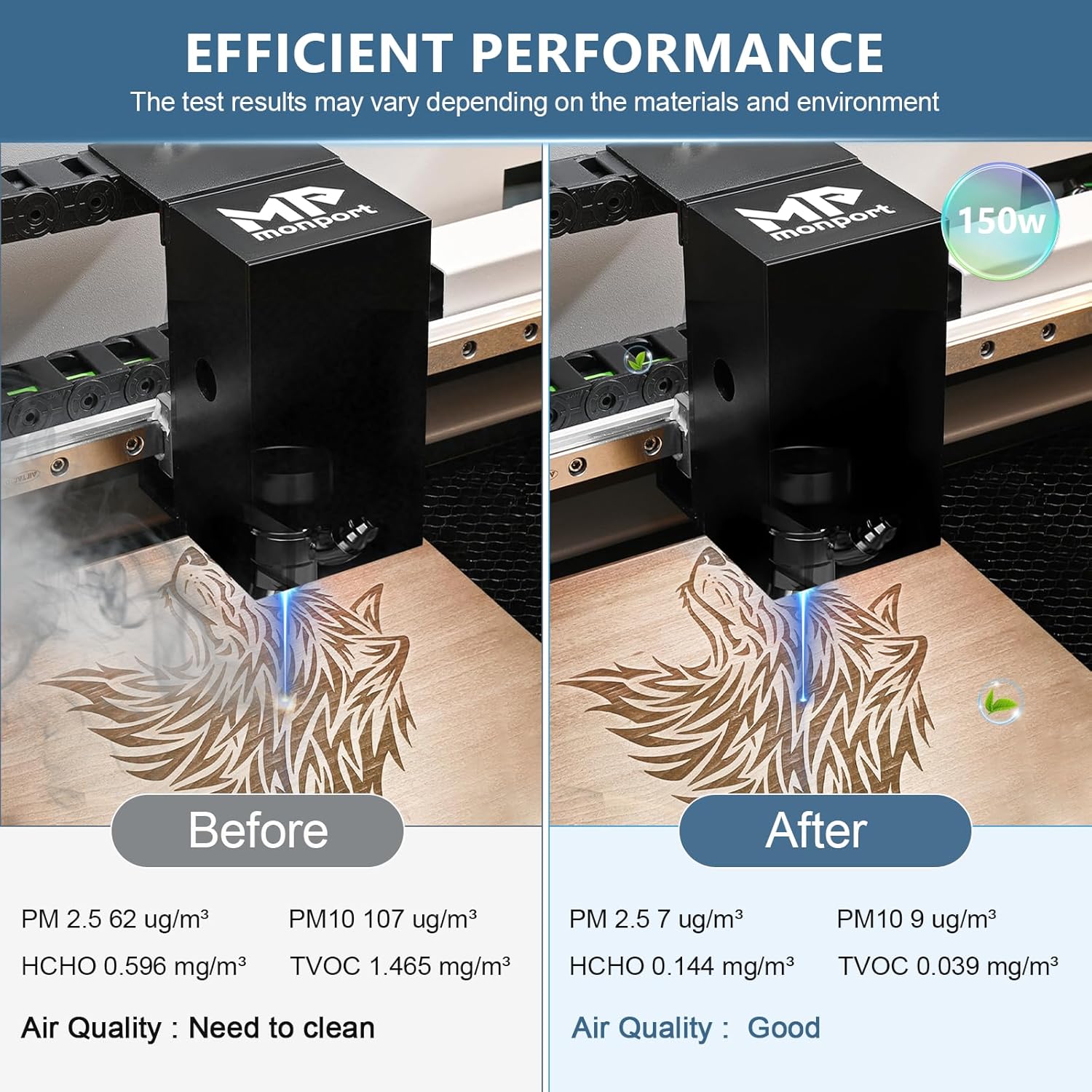
Figure 6.1: The high iodine value columnar carbon filter provides superior adsorption capacity and a longer service life compared to ordinary coal-based carbon.
6.2. Limpeza da unidade
- Limpe o exterior da unidade cun suave, damp pano. Non use produtos de limpeza ou disolventes abrasivos.
- Ensure the air inlet and outlet are free from dust and debris.
7 Solución de problemas
Consulta a táboa seguinte para ver os problemas comúns e as súas solucións:
| Problema | Causa posible | Solución |
|---|---|---|
| A unidade non se acende | No power supply; Power cord loose; Unit switch off | Check power outlet; Ensure power cord is securely plugged in; Turn unit switch to 'ON' |
| Baixo poder de succión | Filters clogged; Extraction tube blocked; Fan speed too low | Replace filters; Clear any blockages in the tube; Increase fan speed |
| Filter clogging alarm activates | Filters are saturated and need replacement | Replace all three filter layers |
| Ruído inusual durante o funcionamento | Loose components; Obstruction in fan; Unit not on a stable surface | Check for loose parts; Inspect fan for obstructions (unplug first); Place unit on a flat, stable surface |
8. Especificacións
Detailed technical specifications for the Monport YW220 Fume Extractor:
- Potencia: 220 W
- Max. Airflow Speed: 310 m³/h
- Filter Layers: 3 (Primary Filtration Cotton, H13 Filter Element, High Iodine Activated Carbon Filter)
- Diámetro de entrada de aire: 82 mm
- Extraction Tube: 1.4m length, φ75mm diameter
- Filter Effect: 0.3μm, 99.97% purification rate
- Máx. Nivel de ruído: <55 dB
- Highest Negative Pressure: 2200 Pa
- Método de control: Remote with display, and manual knob
- Dimensións (unidade): Approximately 11.8in (30cm) x 9.5in (24.2cm) x 13.5in (34.3cm)
8.1. Aplicacións compatibles
This fume extractor is suitable for a wide range of applications, including:
- Estacións de soldadura
- Engraving Machines (recommended for Monport CO2 engraving machines and optical fiber marking machines below 50W)
- CNC Machine Tools
- Ferramentas de Soldadura
- Compatible with most diode engraving machines and optical fiber marking machines on the market.

Figure 8.1: The fume extractor is suitable for diverse work environments, effectively managing fumes from laser engraving, soldering, and other industrial processes.

Figure 8.2: Demonstrates the efficient performance of the fume extractor, showing significant improvement in air quality (reduction in PM2.5, PM10, HCHO, TVOC) after use.
9. Garantía e soporte
For warranty information, technical support, or to purchase replacement parts and filters, please contact Monport customer service. Refer to the contact information provided in your purchase documentation or visit the official Monport websitio.
Protection plans are available for extended coverage. Please refer to your retailer for details on available protection plans.


