Introdución
Welcome to the user manual for your new ECHO RAINBOW PRO Smartwatch. This device is designed to seamlessly integrate into your daily life, offering advanced health monitoring, sports tracking, and smart connectivity features. With its elegant rose metal finish and interchangeable straps, it combines style with functionality. This manual provides essential information on setting up, operating, maintaining, and troubleshooting your smartwatch to ensure optimal performance and a satisfying user experience.
Información de seguridade
- Non intente desmontar, reparar nin modificar o dispositivo. Isto podería causar danos, incendios ou descargas eléctricas.
- Manteña o dispositivo lonxe de temperaturas extremas, luz solar directa e humidade elevada.
- Evite expoñer o dispositivo a impactos ou vibracións fortes.
- Use só o cable de carga incluído e un adaptador de corrente compatible.
- Consult a medical professional before starting any new exercise regimen or if you have pre-existing health conditions, especially if relying on the health monitoring features. The health data provided by this device is for reference only and should not be used for medical diagnosis or treatment.
- If you experience skin irritation or discomfort while wearing the watch, discontinue use and consult a doctor.
Contido do paquete
Marque a caixa para os seguintes elementos:
- ECHO RAINBOW PRO Smartwatch (with metal strap attached)
- 1 x Silicone Strap (interchangeable)
- Cable de carga
- Manual de usuario (este documento)

Image: The ECHO RAINBOW PRO Smartwatch in rose metal, shown with its pre-attached metal strap and a separate light pink silicone strap, highlighting the interchangeable design.

Image: The ECHO RAINBOW PRO Smartwatch body displayed alongside its detached light pink silicone strap and rose metal mesh strap, illustrating the modular design.

Image: The retail packaging for the ECHO RAINBOW PRO Smartwatch, showing the watch and its accessories through a clear window, with product features listed on the box.
Produto rematadoview
Familiarize yourself with the components of your ECHO RAINBOW PRO Smartwatch.
- Visualización: High-resolution touchscreen for interactive use.
- Botón lateral/coroa: Úsase para acender/apagar, activar/desactivar a pantalla e navegar polos menús.
- Sensores: Located on the back of the watch for health monitoring (heart rate, SpO2, blood pressure, ECG).
- Strap Attachment Points: Allows for easy changing of straps.
- Contactos de carga: Magnetic contacts on the back for charging.

Imaxe: Unha detallada view of the ECHO RAINBOW PRO Smartwatch's display, showcasing a watch face with a mechanical gear design, current time, date, temperature, and health metrics.

Imaxe: Un profesional secundariofile view of the ECHO RAINBOW PRO Smartwatch, highlighting its slim design and the functional side button/crown.
Configuración
1. Carga do reloxo intelixente
Antes do primeiro uso, carga completamente o teu reloxo intelixente.
- Conecta o cable de carga magnético aos contactos de carga da parte traseira do reloxo.
- Plug the USB end of the cable into a USB power adapter (not included) or a computer's USB port.
- The watch display will show a charging indicator. A full charge typically takes about 2 hours.
2. Colocación/cambio de correas
Your ECHO RAINBOW PRO Smartwatch comes with interchangeable straps, allowing you to customize its look.
- To remove a strap, locate the quick-release pin on the underside of the strap near the watch body.
- Desliza o pasador cara a dentro para separar a correa do reloxo.
- To attach a new strap, insert one end of the pin into the watch lug.
- Slide the quick-release pin inwards and align the other end with the opposite lug hole. Release the pin to secure the strap. Gently pull on the strap to ensure it is properly locked in place.

Image: Two ECHO RAINBOW PRO Smartwatches are shown side-by-side, one fitted with the rose metal mesh strap and the other with the light pink silicone strap, demonstrating the versatility of interchangeable bands.
3. Emparellamento co teu teléfono intelixente
To unlock the full potential of your smartwatch, pair it with your smartphone via the dedicated app.
- Descarga a aplicación: Busca the "ECHO Fit" app (or similar, check packaging for exact name) on your smartphone's app store (Google Play Store for Android, Apple App Store for iOS). Install the app.
- Activar Bluetooth: Asegúrate de que o Bluetooth estea activado no teu smartphone.
- Abre a aplicación: Launch the ECHO Fit app and follow the on-screen instructions to create an account or log in.
- Engadir dispositivo: In the app, navigate to the "Device" or "Add Device" section. The app will search for nearby smartwatches.
- Selecciona o teu reloxo: Select "ECHO RAINBOW PRO" from the list of found devices. A pairing request may appear on your watch and phone. Confirm the pairing on both devices.
- Configuración completa: Once paired, the app will guide you through initial settings such as personal information, notification preferences, and health goals.
Funcionamento do reloxo intelixente
Navegación básica
- Activar pantalla: Press the side button or raise your wrist.
- Xestos na pantalla táctil:
- Swipe Up/Down: Scroll through menus or notifications.
- Swipe Left/Right: Access quick widgets or different functions.
- Tap: Select an item or confirm an action.
- Press and Hold: Customize watch faces (from home screen).
- Side Button Function:
- Short Press: Return to home screen, or go back in a menu.
- Long Press: Power on/off, or access a shortcut menu (e.g., restart).
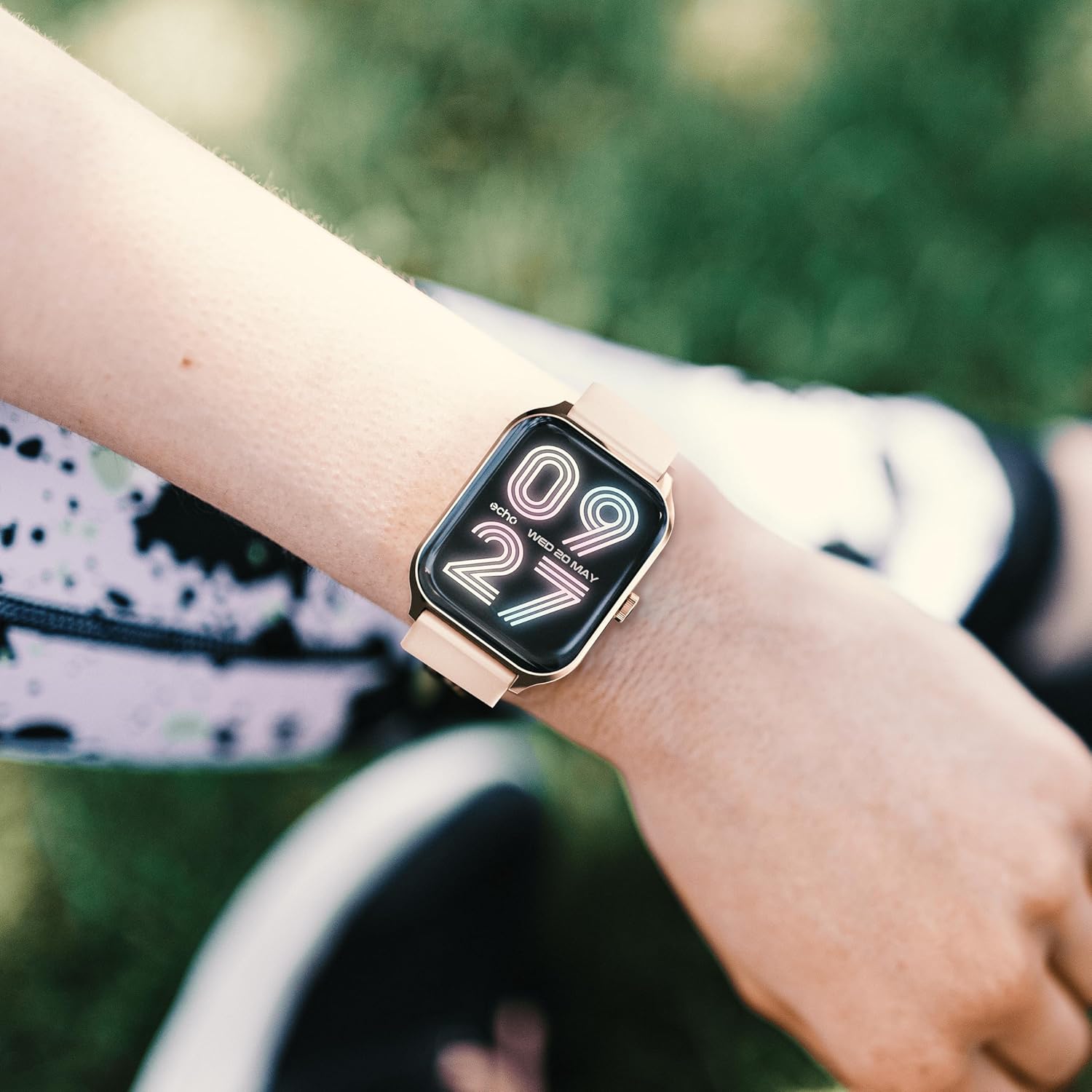
Image: The ECHO RAINBOW PRO Smartwatch worn on a wrist, displaying a digital watch face with the current time and date.

Image: A close-up of the ECHO RAINBOW PRO Smartwatch's screen, showing a clear digital time display along with battery status, step count, and temperature.
Vixilancia da Saúde
Your smartwatch is equipped with advanced sensors to help you monitor your health.
- Frecuencia cardíaca: Access the heart rate function on your watch or through the app. Ensure the watch is snug on your wrist for accurate readings.
- Presión arterial: Follow the instructions on the watch screen or app for taking a blood pressure measurement.
- Oxíxeno no sangue (SpO2): Measure your blood oxygen saturation levels. Remain still during the measurement.
- ECG (electrocardiograma): Use the ECG function as directed by the app to record your heart's electrical activity.
Importante: The health data provided by this device is for reference only and should not be used for medical diagnosis or treatment. Always consult a qualified medical professional for any health concerns.
Activity and Sports Modes
Track your daily activity and specific workouts.
- Podómetro: The watch automatically tracks your steps, distance, and calories burned throughout the day.
- Modos deportivos: Select from various sports modes (e.g., running, cycling, walking) to track specific workout data like duration, heart rate zones, and calories.
- Obxectivos personalizados: Set daily activity goals within the companion app to stay motivated.
Monitorización do sono
Wear your smartwatch to bed to monitor your sleep patterns. The app will provide detailed analysis of your sleep stages (deep, light, REM) and sleep quality.
Seguimento do ciclo menstrual
For female users, the app offers menstrual cycle tracking. Input your cycle data into the app to receive predictions and insights.
Conectividade intelixente
Mantéñase conectado sen mirar o teléfono constantemente.
- Notificacións: Receive call, message, and app notifications directly on your wrist. Customize notification settings in the app.
- Control do teléfono intelixente: Control certain smartphone functions, such as music playback or camera shutter, directly from your watch.
Duración da batería
The ECHO RAINBOW PRO Smartwatch offers an extended battery life, typically requiring a recharge only every 5 days, depending on usage. To maximize battery life:
- Reduce o brillo da pantalla.
- Disable continuous heart rate monitoring (if continuous monitoring is enabled).
- Desactiva as notificacións innecesarias.
Mantemento
Limpeza do teu reloxo intelixente
- Wipe the watch screen and body with a soft, lint-free cloth. If necessary, damphumedece lixeiramente o pano con auga.
- For the metal strap, use a soft brush to gently clean between links. For the silicone strap, wash with mild soap and water, then rinse thoroughly.
- Asegúrate de que o reloxo estea completamente seco antes de cargalo ou usalo.
- Evita usar produtos químicos agresivos, produtos de limpeza abrasivos ou solventes, xa que poden danar o acabado do reloxo.
Resistencia á auga
The ECHO RAINBOW PRO Smartwatch is designed to be resistant to splashes and sweat. It is suitable for daily use and light exercise. However, it is not recommended for swimming, showering, or diving. Prolonged exposure to water or use in high-pressure water environments may cause damage.
Resolución de problemas
| Problema | Posible causa/solución |
|---|---|
| O reloxo non se acende. | Battery might be depleted. Charge the watch for at least 30 minutes. If it still doesn't turn on, try a different charging port or adapter. |
| Non se pode emparellar co teléfono intelixente. |
|
| Lecturas de saúde inexactas. |
|
| Notificacións non recibidas. |
|
| Batería de curta duración. |
|
Especificacións
| Característica | Detalle |
|---|---|
| Número de modelo | e40c8026-5752-4c6b-9f6c-f5735f7e9eaf |
| Tipo de batería | 1 batería de ións de litio (incluída) |
| Duración típica da batería | Ata 5 días (dependendo do uso) |
| Dimensións do paquete | 18.1 x 10.6 x 3.5 cm |
| Peso do elemento | 20 grams (watch body only, approximate) |
| Fabricante | Samsung (as per product data) |
| País de Orixe | China |
| Conectividade | Bluetooth (compatible with all smartphones) |
| Sensores de saúde | ECG, Blood Pressure, Blood Oxygen (SpO2), Heart Rate, Sleep Tracker, Pedometer |
| Correas incluídas | 1 Metal Strap, 1 Silicone Strap |
Garantía e Soporte
For warranty information and customer support, please refer to the warranty card included in your product packaging or visit the official ECHO websitio.
If you encounter any issues not covered in this manual, please contact our customer service team for assistance.
- Soporte en liña: www.echo.com/support (exampligazón, consulte a documentación real do produto)
- Soporte por correo electrónico: support@echo.com (exampo correo electrónico)


