Introdución
Thank you for choosing the MINIX Portable Monitor. This 16-inch Full HD 1200P IPS touch screen display is designed for enhanced productivity and entertainment on the go. Its ultra-slim design and versatile connectivity make it an ideal companion for laptops, PCs, gaming consoles, and mobile devices. This manual provides essential information for setting up, operating, maintaining, and troubleshooting your new portable monitor.
Información de seguridade
- Do not expose the monitor to rain or moisture to prevent fire or electric shock hazards.
- Evite colocar o monitor á luz solar directa ou preto de fontes de calor.
- Use only the power adapter and cables provided or recommended by MINIX.
- Non intente desmontar nin reparar o monitor vostede mesmo. Encargue calquera mantemento a persoal cualificado.
- Manteña o monitor lonxe de campos magnéticos fortes.
- Clean the screen with a soft, lint-free cloth. Do not use liquid cleaners or aerosol sprays directly on the screen.
O que hai na caixa
Verifica que todos os elementos estean presentes no teu paquete:
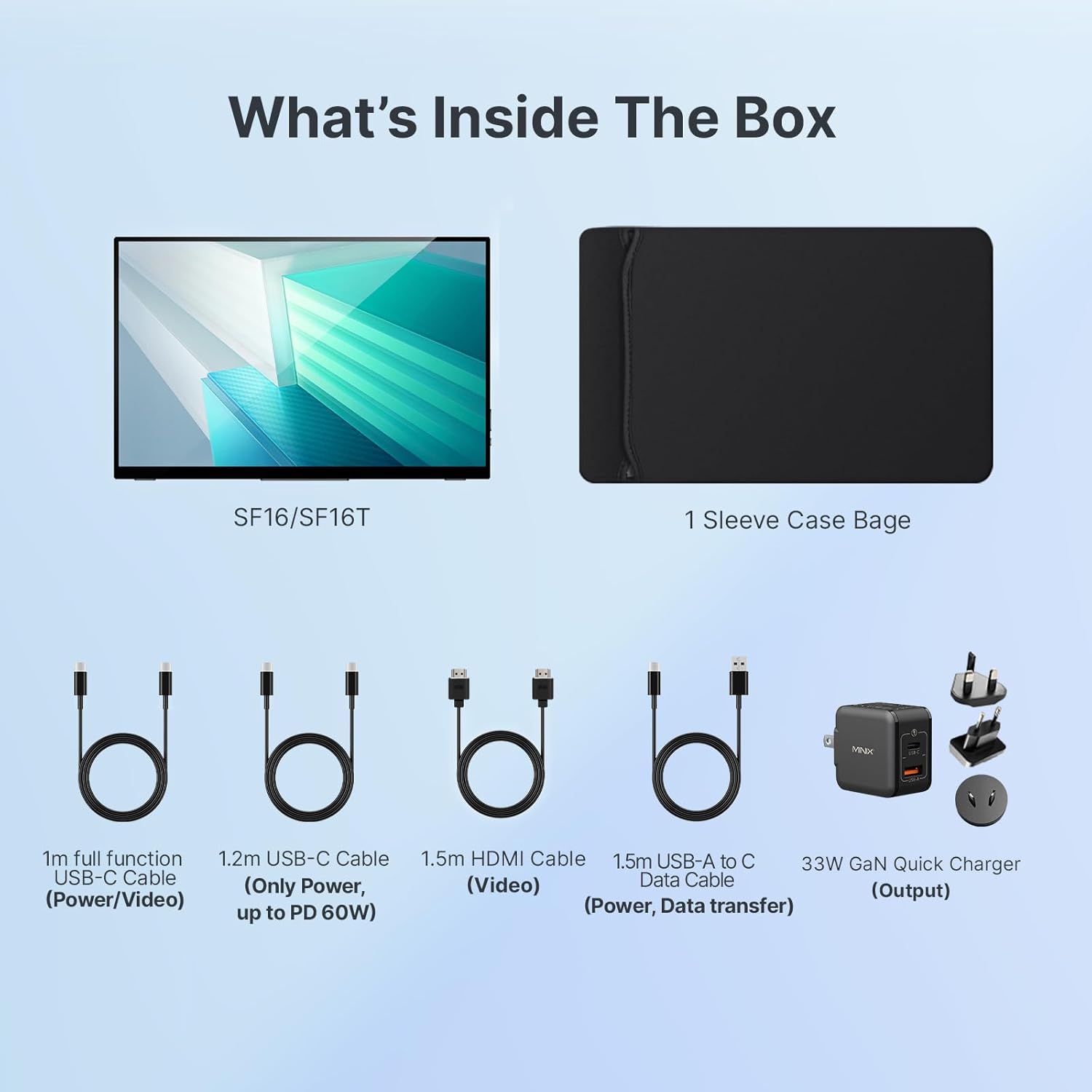
Figura 1: Contido do paquete
- MINIX Portable Monitor (SF16/SF16T)
- Bolsa de funda de manga
- 1m Full Function USB-C to USB-C Cable (Power/Video)
- 1.2m USB-C to USB-C Cable (Power, up to PD 60W)
- 1.5m HDMI to HDMI Cable (Video)
- 1.5m USB-A to C Data Cable (Power, Support Touch for SF16T)
- 33W GaN Quick Charger (Output)
Produto rematadoview
Familiarize yourself with the ports and controls on your MINIX Portable Monitor.

Figura 2: Portos e controis do monitor
- Porto USB 2.0: Connects to a keyboard or mouse.
- Botón de encendido: Acende/apaga o monitor.
- Brightness/Up Key: Adjusts screen brightness or navigates menu up.
- Volume/Down Key: Adjusts volume or navigates menu down.
- Standard HDMI Port: Connects to devices via HDMI for video input.
- Conector de audio de 3.5 mm: Para conectar auriculares ou altofalantes externos.
- Type-C (Full Function) Ports: Two full-featured USB-C ports for power, video, and touch data transfer.

Figure 3: Ultra-Slim Design
Configuración
Conexión inicial
The MINIX Portable Monitor offers flexible connectivity options. Ensure your device supports USB 3.1 Type C DP Alt-Mode for full functionality via a single USB-C cable.
- Fonte de alimentación: Connect the provided 33W GaN Quick Charger to one of the monitor's USB-C ports (or use a power bank with sufficient output).
- Video & Data Connection:
- USB-C (Single Cable Solution): If your laptop or device has a full-featured USB-C port (supporting DisplayPort Alternate Mode and Power Delivery), connect it to one of the monitor's full-function USB-C ports using the 1m full function USB-C cable. This single cable can provide power, video, and touch functionality.
- HDMI + USB-C (for Power/Touch): If your device only has an HDMI output, connect the monitor via the HDMI port using the 1.5m HDMI cable for video. Then, connect a USB-C port on the monitor to a USB-A or USB-C port on your device using the 1.5m USB-A to C data cable for power and touch functionality (if applicable).
- Encendido: Press the Power Button on the monitor to turn it on.

Figura 4: Diagrama de conectividade
Using the Built-in Stand
The monitor features a built-in kickstand for easy adjustment of viewing angles. Simply extend the stand from the back of the monitor and adjust it to your desired angle between -10° and -35°.
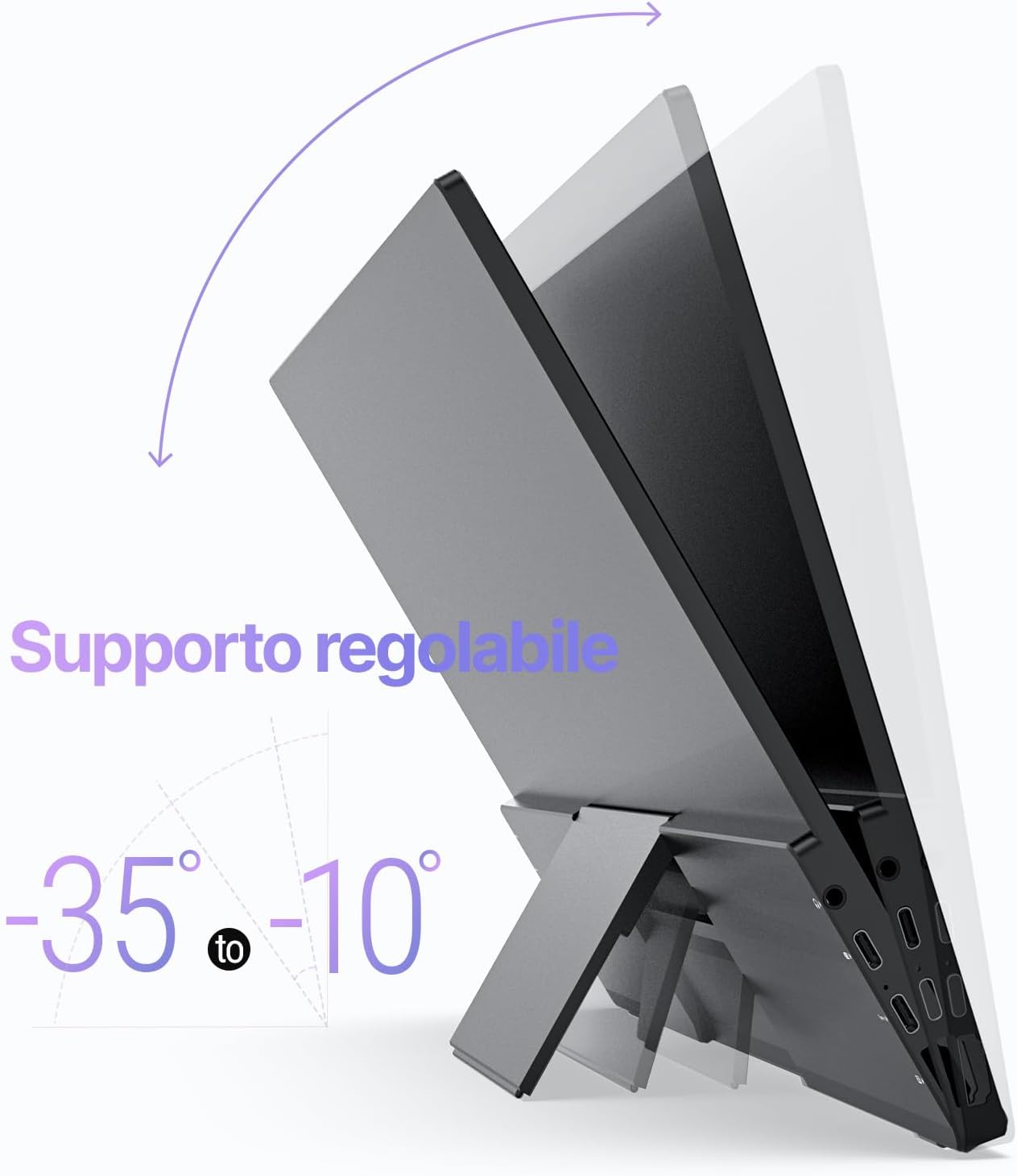
Figure 5: Adjustable Stand
En funcionamento
Configuración de visualización
Use the Brightness/Up and Volume/Down keys on the side of the monitor to access and navigate the On-Screen Display (OSD) menu. Here you can adjust various settings such as brightness, contrast, color temperature, and input source.
Touch Screen Functionality (SF16T Model)
The SF16T model supports ten-point multi-touch and gesture controls across various operating systems including macOS, Windows 10/11, Android, and Linux. Ensure the USB-C connection is properly established for touch functionality.

Figure 6: Multi-Touch Support
Vídeo Demostración
Watch this official video from MINIX Technology Limited for a visual guide on setting up and using your portable monitor, highlighting its key features like the built-in stand, multi-touch support, and USB-C connectivity.
Video 1: MINIX 16" Portable Touch Monitor Overview
Mantemento
- Limpeza da pantalla: Limpe a pantalla con suavidade cun pano suave, seco e sen pelusa. Para marcas difíciles, d lixeiramenteampen the cloth with water or a screen-specific cleaning solution (apply to cloth, not directly to screen).
- Limpeza do Casing: Use a soft, dry cloth to wipe the exterior casing. Evitar produtos de limpeza ou solventes abrasivos.
- Almacenamento: When not in use, store the monitor in its provided sleeve case to protect it from dust and scratches. Keep it in a cool, dry place.
- Manexo: Sujete sempre o monitor polos bordos. Evite exercer presión sobre a pantalla.
Resolución de problemas
| Problema | Causa posible | Solución |
|---|---|---|
| Sen visualización/Mensaxe "Sen sinal" | Fonte de entrada incorrecta seleccionada; Conexión do cable solta; Alimentación insuficiente; O dispositivo non emite sinal. |
|
| Touch screen not responding (SF16T) | USB-C data cable not connected or not full-featured; Driver issue; OS incompatibility. |
|
| Pantalla parpadeante | Cable issue; Interference; Refresh rate mismatch. |
|
| No audio from monitor speakers | Volume demasiado baixo; Saída de son non configurada para monitor; Problema co cable. |
|
Especificacións
| Característica | Detalle |
|---|---|
| Número de modelo | SF16 |
| Tamaño da pantalla | 16 polgadas |
| Resolución | 1920 x 1200 píxeles (FHD 1200P) |
| Relación de aspecto | 16:10 |
| Tipo de panel | IPS |
| Brillo | 300 Candelas (Nits) |
| Pantalla táctil | Yes (SF16T model, 10-point touch) |
| Conectividade | 2x Full-featured USB-C, 1x Standard HDMI, 1x USB 2.0, 1x 3.5mm Audio Jack |
| Dimensións (L x W x H) | 4.84 x 15.59 x 10.79 polgadas |
| Peso do elemento | 4.16 libras |
| Superficie da pantalla | Brillante |
| Características do coidado dos ollos | Filtro de luz azul sen parpadeos |
Garantía e Soporte
MINIX Technology Limited provides a limited warranty for this product. Please refer to the warranty card included in your package for specific terms and conditions. For technical support, troubleshooting assistance, or warranty claims, please contact MINIX customer service through their official websitio web ou o vendedor onde compraches o produto.
You can visit the official MINIX Store on Amazon for more information and support: MINIX Store


