1. Introdución
Grazas pola compraasing the Skyworth SS531 510W Wireless Subwoofer Soundbar. This manual provides essential information for the safe and efficient use of your new sound system. Please read it thoroughly before operating the device and retain it for future reference.
The Skyworth SS531 is designed to enhance your audio experience with powerful sound, deep bass from its 510W wireless subwoofer, and a 3.1-channel sound array for an immersive soundstage. It offers versatile connectivity options including HDMI ARC, optical, and Bluetooth.
2. Información de seguridade
- Lea atentamente todas as instrucións antes do uso.
- Non expoñas o dispositivo á choiva, á humidade nin a temperaturas extremas.
- Ensure proper ventilation around the soundbar and subwoofer.
- Non bloquee ningunha abertura de ventilación.
- Use só accesorios/accesorios especificados polo fabricante.
- Desconecte o enchufe de alimentación durante tormentas eléctricas ou cando non o use durante períodos prolongados.
- Encargue toda a reparación a persoal de servizo cualificado.
3. Contido do paquete
Verifica que todos os elementos estean presentes no paquete:
- 1 x Skyworth SS531 Soundbar
- 1 x subwoofer sen fíos
- Cable(s) de alimentación
- Mando a distancia (con pilas)
- Manual de usuario (este documento)
- Kit de montaxe na parede (se procede)
4. Produto rematadoview
Barra de son e subwoofer
The Skyworth SS531 system consists of a main soundbar unit and a wireless subwoofer. The soundbar houses the main speakers and control interface, while the subwoofer provides deep bass frequencies wirelessly.

Imaxe: Fronte view of the Skyworth SS531 Soundbar and Wireless Subwoofer. The soundbar is a long, slender black unit, and the subwoofer is a rectangular black tower.

Imaxe: En ángulo view of the Skyworth SS531 Soundbar and Wireless Subwoofer, showing the sleek design of both components.
Panel de control
The control panel is located on the side of the soundbar, providing easy access to essential functions.
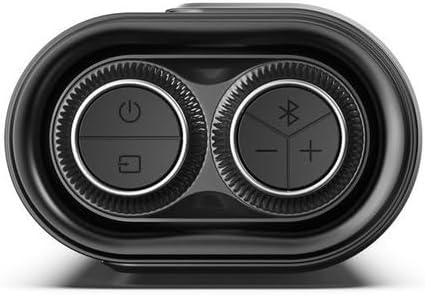
Image: Close-up of the Skyworth SS531 Soundbar control panel. It features circular buttons for Power, Input Selection, Bluetooth pairing, Volume Up, and Volume Down.
- Botón de encendido: Activa ou desactiva a barra de son.
- Botón de entrada/fonte: Cycles through available input sources (HDMI ARC, Optical, Bluetooth, AUX, USB).
- Botón Bluetooth: Inicia o modo de emparellamento Bluetooth.
- Botóns subir / baixar volume: Axusta o nivel de volume principal.
5. Configuración
5.1 Colocación da barra de son e do subwoofer
- Coloca a barra de son no centro, debaixo do televisor. Asegúrate de que estea sobre unha superficie estable e plana ou fixada firmemente na parede.
- Position the wireless subwoofer on the floor, preferably in the front corner of the room or near the soundbar, for optimal bass performance.
5.2 Conectando a enerxía
- Connect the power cable to the AC IN port on the soundbar.
- Connect the other end of the power cable to a wall outlet.
- Connect the power cable to the AC IN port on the wireless subwoofer.
- Connect the other end of the subwoofer power cable to a wall outlet.
- The soundbar and subwoofer will automatically pair when both are powered on. An indicator light on the subwoofer will confirm successful pairing.
5.3 Conexión ao televisor
Escolla un dos seguintes métodos de conexión:
HDMI ARC (recomendado)
- Conecta un extremo dun cable HDMI (non incluído) ao porto HDMI ARC do teu televisor.
- Conecta o outro extremo do cable HDMI ao porto HDMI ARC da barra de son.
- Asegúrate de que a función HDMI ARC do teu televisor estea activada na configuración de son.
Conexión óptica
- Connect an optical cable (not included) to the OPTICAL OUT port on your TV.
- Connect the other end of the optical cable to the OPTICAL IN port on the soundbar.
- Ensure your TV's audio output is set to 'Optical' or 'PCM'.
Conexión AUX
- Connect a 3.5mm audio cable (not included) from your TV's headphone or AUX OUT port to the AUX IN port on the soundbar.
6. Instrucións de funcionamento
6.1 Encendido/apagado
- Prema o botón de acendido/apagado da barra de son ou do mando a distancia para acender ou apagar a unidade.
6.2 Selección da fonte de entrada
- Press the Input/Source button on the soundbar or remote control repeatedly to cycle through available input sources: HDMI ARC, OPTICAL, BLUETOOTH, AUX, USB.
- The display on the soundbar will indicate the currently selected input.
6.3 Emparejamento Bluetooth
- Press the Bluetooth button on the soundbar or remote control to enter Bluetooth pairing mode. The Bluetooth indicator will flash.
- Activa o Bluetooth no teu dispositivo móbil (teléfono intelixente, tableta, etc.) e busca os dispositivos dispoñibles.
- Select "Skyworth SS531" from the list of devices.
- Once paired, the Bluetooth indicator will stop flashing and remain solid. You can now play audio from your device through the soundbar.
6.4 Axustar o volume e os modos de son
- Use the Volume Up/Down buttons on the soundbar or remote control to adjust the overall volume.
- The remote control may offer dedicated buttons for different sound modes (e.g., Movie, Music, News) to optimize audio for various content types.
- Use the Bass Boost feature (if available on remote) to enhance low frequencies.
7. Coidados e mantemento
- Limpeza: Usa un pano suave e seco para limpar as superficies da barra de son e do subwoofer. Non empregues produtos de limpeza líquidos nin materiais abrasivos.
- Almacenamento: Se garda a unidade durante un período prolongado, desconéctea da corrente e gárdea nun lugar fresco e seco.
- Ventilación: Asegúrese de que as aberturas de ventilación non estean bloqueadas para evitar o sobrequecemento.
8 Solución de problemas
| Problema | Causa posible | Solución |
|---|---|---|
| Sen poder | Cable de alimentación non conectado; Toma de corrente non activa | Asegúrate de que os cables de alimentación estean conectados correctamente tanto á barra de son/subwoofer como a unha toma de corrente que funcione. |
| Sen son | Incorrect input source; Volume too low; Mute activated; Incorrect TV audio settings | Select the correct input source. Increase volume. Deactivate mute. Check TV audio output settings (e.g., set to HDMI ARC, Optical, or PCM). |
| O subwoofer non produce graves | Subwoofer not paired; Subwoofer power off | Ensure the subwoofer is powered on. Check the pairing indicator light. If not paired, power cycle both the soundbar and subwoofer. |
| Problemas de conexión Bluetooth | Dispositivo demasiado lonxe; Non está en modo de emparellamento; Interferencia | Ensure your device is within range (approx. 10 meters). Put the soundbar into Bluetooth pairing mode. Disconnect other Bluetooth devices. |
9. Especificacións
| Característica | Especificación |
|---|---|
| Número de modelo | SS531 |
| Potencia de saída total | 510 vatios |
| Tipo de subwoofer | Sen fíos |
| Diámetro do subwoofer | 7.87 Centímetros |
| Canles de audio | 3.1 Canle |
| Conectividade | Bluetooth, HDMI ARC, óptico, AUX, USB |
| Versión Bluetooth | 5.0 |
| Modo de saída de audio | Envolvente |
| Características especiais | Boost Boost |
| Dimensións do produto (barra de son) | Approx. 83W x 12H x 20D cm (Dimensions for soundbar and subwoofer combined are 20D x 83W x 12H cm, assuming 83W is soundbar width) |
| Cor | Negro |
| Material | Plástico |
10. Garantía e soporte
This Skyworth SS531 Soundbar comes with a 1 ano de garantía do fabricante desde a data de compra. Esta garantía cobre defectos de fabricación e man de obra en condicións de uso normal.
For warranty claims, technical support, or service inquiries, please contact your local Skyworth customer service or the retailer from whom you purchased the product. Please retain your proof of purchase for warranty validation.
Note: The warranty does not cover damage caused by misuse, accident, unauthorized modification, or normal wear and tear.


