1. Introdución
The Trevi DAB 7F80 R is a portable digital radio offering DAB, DAB+, and FM reception, along with Bluetooth connectivity. It features a high-readability Dot Matrix display, a programmable alarm clock, and a headphone jack. This manual provides instructions for the proper setup, operation, and maintenance of your device.
2. Información de seguridade
- Lea atentamente todas as instrucións antes de usar o dispositivo.
- Non expoñas o dispositivo á auga, á humidade nin a temperaturas extremas.
- Use only the specified power source (4 x AAA batteries or a compatible 5V DC adapter, not included).
- Non intente desmontar, reparar nin modificar o dispositivo. Encargue todo o mantemento a persoal cualificado.
- Desfágase das baterías de forma responsable segundo a normativa local.
- Manteña o dispositivo lonxe de campos magnéticos fortes.
3. Contido do paquete
Comprobe que o seu paquete inclúe os seguintes elementos:
- Trevi DAB 7F80 R Main Unit
- Manual de usuario (este documento)
- Certificado de garantía
4. Produto rematadoview
Familiarize yourself with the components and controls of your Trevi DAB 7F80 R radio.
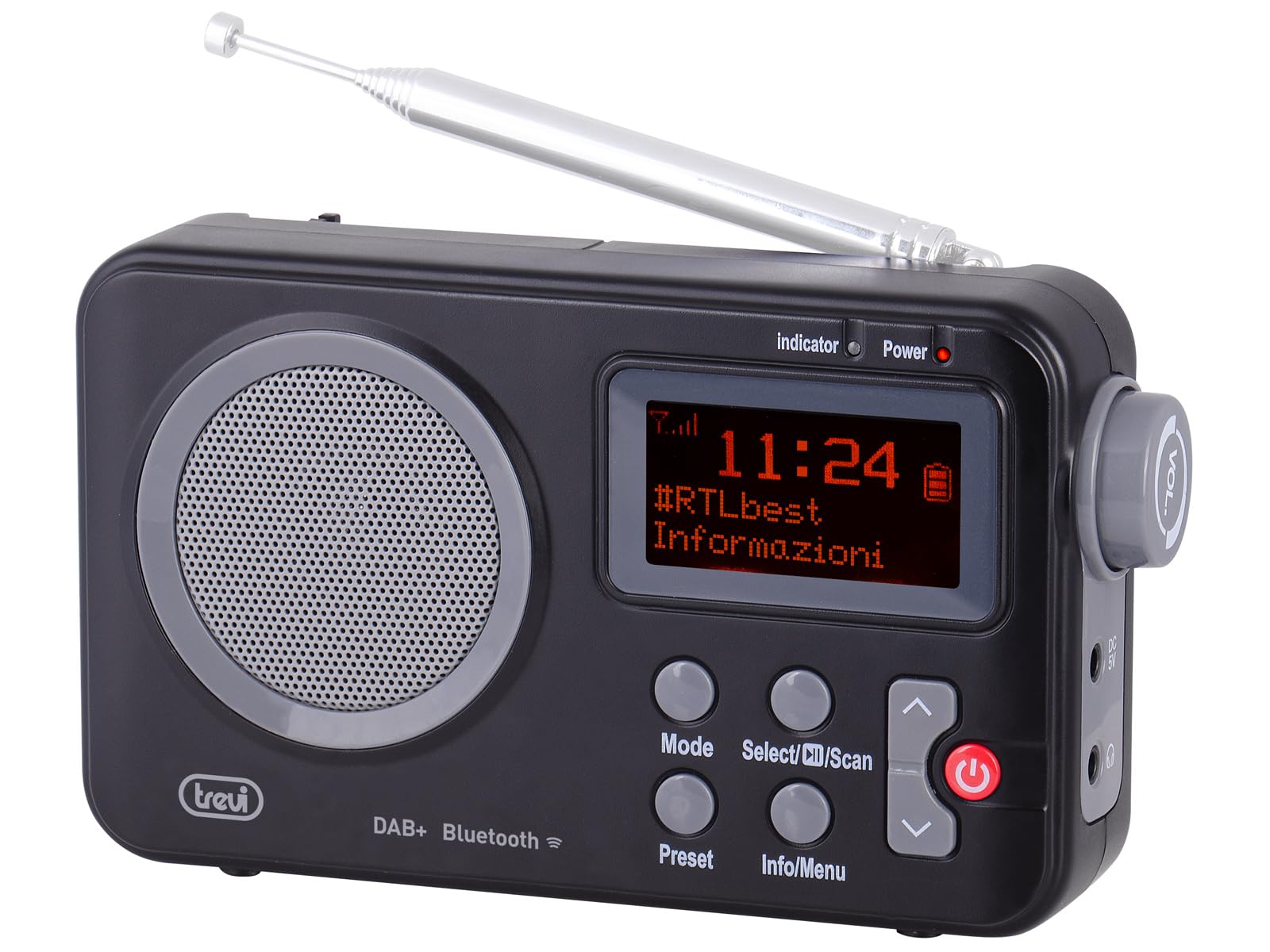
Figura 1: Fronte view of the Trevi DAB 7F80 R radio. This image displays the Dot Matrix screen, the main speaker grille, and the primary control buttons including Mode, Select/Scan, Preset, Info/Menu, and Power. The extendable telescopic antenna is visible at the top.
Controis e características:
- Visualización: High-readability Dot Matrix screen for station information, time, and menu navigation.
- Relator: Altofalante integrado para saída de son.
- Botón de encendido: Acende/apaga a radio.
- Botón de modo: Switches between DAB/DAB+, FM, and Bluetooth modes.
- Select/Scan Button: Confirms selections in menus, initiates station scans.
- Botón predefinido: Accesses and stores favorite radio stations.
- Botón Info/Menú: Displays station information and accesses system settings.
- Botóns de frecha arriba/abaixo: Navigates through menus, adjusts volume, changes stations.
- Jack para auriculares: Saída de 3.5 mm para escoita privada.
- Antena: Antena telescópica extensible para unha mellor recepción de radio.
5. Configuración
5.1 Alimentación do dispositivo
The Trevi DAB 7F80 R can be powered by batteries or an external AC adapter.
- Instalación da batería: Open the battery compartment cover on the back of the unit. Insert 4 x AAA batteries (not included), ensuring correct polarity (+/-). Close the cover securely.
- Adaptador de CA (opcional): For continuous power, connect a compatible 5V DC, 1A AC adapter (not included) to the DC IN port on the side of the radio.
Aviso importante: Do not use batteries in the device when it is connected to an AC adapter for extended periods. This may lead to battery leakage or damage to the unit. If using the AC adapter, remove the batteries. If using batteries, disconnect the AC adapter.
5.2 Initial Power On and Station Scan
- Estenda a antena telescópica completamente para unha recepción óptima.
- Preme o Poder botón para acender a radio.
- Upon first use, the radio may prompt you to select a language. Use the Frecha arriba / abaixo botóns para navegar e Select/Scan para confirmar.
- The radio will automatically perform a full scan for DAB/DAB+ stations. This process may take a few minutes. Once complete, the first available station will begin playing.
6. Instrucións de funcionamento
6.1 Radio Mode (DAB/DAB+, FM)
- Modos de cambio: Preme o Modo button repeatedly to cycle between DAB, FM, and Bluetooth modes.
- Busca de estacións:
- In DAB mode, a full scan is usually performed on first use. To perform a new scan, press and hold Select/Scan.
- No modo FM, prema Select/Scan para buscar automaticamente a seguinte emisora dispoñible.
- Seleccionando estacións: Usa o Frecha arriba / abaixo buttons to browse through available stations.
- Almacenamento de preajustes: The radio can store up to 20 DAB/DAB+ and 20 FM stations.
- Sintonice a emisora desexada.
- Manteña premido o Predefinido botón ata que apareza "Preset Store" na pantalla.
- Usa o Frecha arriba / abaixo botóns para seleccionar un número predefinido (1-20).
- Preme Select/Scan para confirmar e gardar a emisora.
- Recordando presets: Preme o Predefinido botón brevemente. Use o botón Frecha arriba / abaixo botóns para seleccionar o número predefinido desexado e, a seguir, prema Select/Scan.
- RDS/DLS Information: In FM or DAB mode, press the Información/Menú button repeatedly to cycle through available information such as station name, program type, time, and song title (if broadcast).
6.2 Modo Bluetooth
- Preme o Modo button until 'Bluetooth' appears on the display. The radio will enter pairing mode, indicated by a flashing Bluetooth icon.
- No teu teléfono intelixente, tableta ou portátil, activa o Bluetooth e busca os dispositivos dispoñibles.
- Select 'Trevi DAB 7F80 R' from the list of devices to pair. Once connected, the Bluetooth icon will stop flashing.
- You can now play audio from your connected device through the radio. Use your device's controls for playback and the radio's volume controls for audio level.
6.3 Funcións de reloxo e alarma
The radio features an integrated clock and two programmable alarms.
- Axuste da hora:
- Manteña premido o Información/Menú botón para entrar no menú principal.
- Use Frecha arriba / abaixo buttons to navigate to 'Time/Date' and press Select/Scan.
- Select 'Set Time/Date' and adjust the hour, minute, day, month, and year using the Frecha arriba / abaixo buttons and confirming each step with Select/Scan.
- Setting Alarms (Alarm 1 / Alarm 2):
- From the main menu, navigate to 'Alarm' and press Select/Scan.
- Select 'Alarm 1 Setup' or 'Alarm 2 Setup'.
- Configure the alarm settings: 'On Time' (hour/minute), 'Duration', 'Source' (Buzzer or last used radio station), 'Volume', and 'Frequency' (Daily, Weekdays, Weekends, Once). Use Frecha arriba / abaixo buttons to adjust values and Select/Scan para confirmar cada configuración.
- Ensure the alarm is set to 'On' in the alarm setup menu.
- Deactivating a sounding alarm: Preme o Poder botón para apagar a alarma.
6.4 Uso de auriculares
To listen privately, insert standard 3.5mm headphones into the headphone jack located on the side of the radio. The internal speaker will automatically mute.
7. Mantemento
- Limpeza: Limpe a radio cun pano suave, seco e sen fiapos. Non empregue produtos de limpeza abrasivos, ceras nin disolventes.
- Substitución da batería: When the low battery indicator appears on the display, replace all four AAA batteries with new ones.
- Almacenamento: If the radio will not be used for an extended period, remove the batteries to prevent leakage and potential damage. Store the device in a cool, dry place.
8 Solución de problemas
If you encounter issues with your Trevi DAB 7F80 R, please refer to the following common problems and solutions:
- A radio non se acende:
- Check if batteries are correctly inserted and not depleted. Replace if necessary.
- If using an AC adapter, ensure it is properly connected and the power outlet is functional.
- Sen son ou mala calidade de son:
- Axuste o volume.
- Ensure headphones are not connected if you want sound from the speaker.
- Check radio reception. Extend and adjust the antenna. Try moving the radio to a different location.
- For Bluetooth, ensure the device is paired and audio is playing from the source.
- Clock resets after power loss or battery change:
- This model does not feature a backup battery for the clock. It is normal for the time to reset when power is completely removed (e.g., batteries removed or AC adapter unplugged). You will need to re-set the time manually as described in section 6.3.
- Autonomía curta da batería:
- Battery life can vary depending on usage and battery quality. Use high-quality alkaline batteries for best performance.
- For prolonged use, consider using a compatible 5V DC AC adapter (not included).
- Difficulty with setup or navigation (e.g., station search, alarm setup):
- The radio uses a limited number of buttons for various functions. Refer to the specific operating instructions in section 6 for detailed, step-by-step guidance. Some functions may require pressing buttons multiple times or holding them down.
- Radio turns off when switching between battery and AC power:
- This is expected behavior. The radio will power cycle when changing its primary power source. Ensure you have saved any settings or presets before switching.
9. Especificacións
| Marca | Trevi |
| Modelo | DAB 7F80 R |
| Cor | Negro |
| Tecnoloxía de afinación | DAB/DAB+, FM |
| Bandas de radio compatibles | DAB, DAB+, FM (3 bands) |
| Bluetooth | Si |
| Mostrar | High-readability Dot Matrix |
| Alarmas | 2 alarmas programables |
| Presets | 20 DAB/DAB+, 20 FM |
| Fonte de enerxía | 4 x AAA batteries (not included) or 5V DC adapter (not included) |
| Dispositivos compatibles | Smartphone, tablet, laptop |
| Dimensións do produto (L x W x H) | 14 x 3.5 x 8.5 cm |
| Compoñentes incluídos | Main unit, user manual, warranty certificate |
10. Garantía e soporte
This product is supplied with a warranty certificate. For detailed information regarding warranty terms and conditions, please refer to the certificate included in your package.
For technical support, troubleshooting beyond this manual, or warranty claims, please contact your retailer or the manufacturer's customer service using the contact information provided with your purchase.