1. Introdución
Welcome to the user manual for your MESWAO MES-B3 15.6-inch Android 13 Tablet. This document provides essential information for setting up, operating, maintaining, and troubleshooting your device. The MES-B3 tablet features a large 15.6-inch IPS HD display, an Octa-Core processor, 6GB RAM, 128GB internal storage (expandable), and a 12000mAh battery, designed for a versatile user experience.

Figure 1: MESWAO MES-B3 Tablet Overview
2. Información de seguridade
Please read all safety instructions carefully before using your tablet to prevent injury or damage to the device. Keep this manual for future reference.
- Seguridade da batería: Do not attempt to replace the battery yourself. Do not expose the tablet to extreme temperatures, direct sunlight, or fire. Do not puncture, drop, or disassemble the battery.
- Auga e humidade: This tablet is not waterproof. Avoid exposing it to water, rain, or high humidity.
- Limpeza: Use a soft, dry cloth to clean the tablet. Do not use liquid cleaners or aerosols.
- Manexo: Evite deixar caer a tableta ou sometela a impactos fortes.
- Protección auditiva: When using headphones, set the volume to a moderate level to avoid hearing damage.
3. Contido do paquete
Verifica que todos os elementos estean presentes no paquete:
- MESWAO MES-B3 15.6-inch Android 13 Tablet
- Adaptador de alimentación
- Cable USB-C
- Manual de usuario (este documento)
4. Dispositivo rematadoview
Familiarize yourself with the physical components of your MESWAO MES-B3 tablet.

Figure 2: Buttons and Connectors
- Botón de encendido: Press and hold to turn the tablet on or off. Press briefly to turn the screen on or off.
- Botóns de volume: Axusta o volume de audio.
- Cámara frontal: Para videochamadas e selfies (5 MP).
- Rear Camera with Flashlight: Para facer fotos e vídeos (13MP).
- Porto de tipo C: Para cargar a tableta e conectala a un ordenador.
- Ranura para tarxetas TF: Insert a MicroSD card to expand storage.
- Altofalantes estéreo: Proporcionar saída de audio.
5. Configuración
5.1 Cargar a tableta
Before first use, fully charge your tablet. Connect the USB-C cable to the tablet's Type-C port and the other end to the power adapter. Plug the adapter into a wall outlet. The battery indicator on the screen will show charging status.
5.2 Acendido/Apagado
- Para acender: Press and hold the Power Button until the MESWAO logo appears.
- Para apagar: Press and hold the Power Button until the power options appear, then select 'Power off'.
- Para reiniciar: Press and hold the Power Button until the power options appear, then select 'Restart'.
5.3 Asistente de configuración inicial
Ao acendelo por primeira vez, a tableta guiarache a través dun proceso de configuración inicial:
- Seleccione o seu idioma preferido.
- Conéctate a unha rede wifi.
- Inicia sesión coa túa conta de Google ou crea unha nova.
- Review e aceptar os termos e condicións.
- Configurar o bloqueo de pantalla (PIN, patrón, contrasinal).
5.4 Inserción dunha tarxeta MicroSD
To expand the tablet's storage, you can insert a MicroSD card (up to 256GB, as per some product information, though 1TB is also mentioned in images, please verify with product packaging for exact maximum). Locate the TF card slot on the side of the tablet. Gently insert the MicroSD card with the gold contacts facing down until it clicks into place.

Figure 3: Storage Expansion with MicroSD Card
6. Uso da tableta
6.1 Navegación básica
The MESWAO MES-B3 runs on Android 13, offering an intuitive touch interface.
- Toca: Selecciona un elemento ou abre unha aplicación.
- Pasar o dedo: Navigate through screens, scroll lists, or dismiss notifications.
- Pinch-to-Zoom: Ampliar ou reducir o contido da pantalla.
- Pantalla de inicio: Access your apps and widgets. Swipe down from the top for notifications and quick settings.
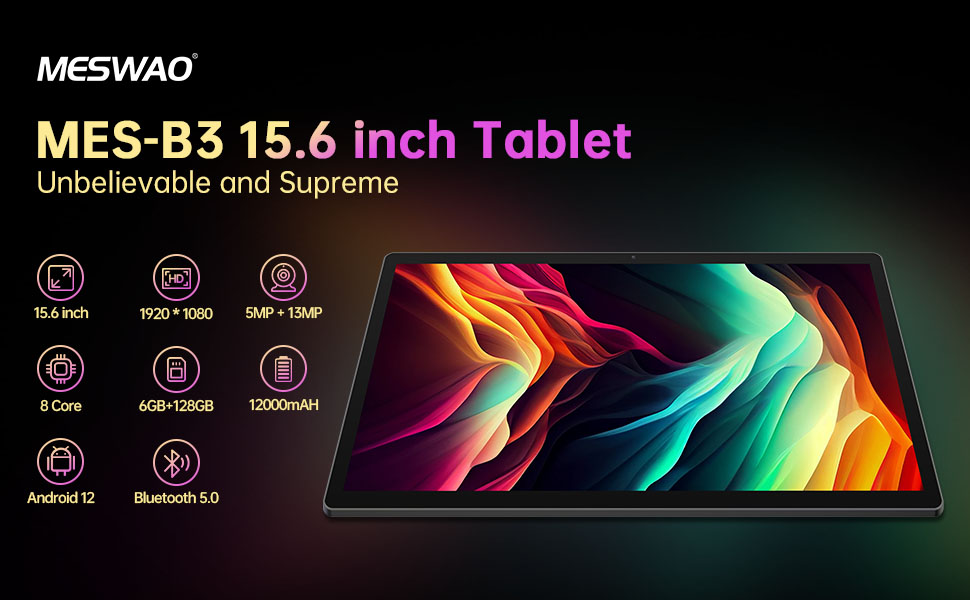
Figura 4: Interface de Android 13
6.2 Conexión Wi-Fi
- Ir a Configuración > Rede e internet > Internet.
- Activa a wifi.
- Selecciona a rede desexada da lista e introduce o contrasinal se se che solicita.
6.3 Emparejamento Bluetooth
The tablet supports Bluetooth 5.0 for connecting wireless accessories.
- Ir a Configuración > Dispositivos conectados > Preferencias de conexión > Bluetooth.
- Activa o Bluetooth.
- Asegúrate de que o teu dispositivo Bluetooth estea no modo de emparellamento.
- Select your device from the 'Available devices' list and follow on-screen prompts to pair.
6.4 Xestión de aplicacións
- Instalar aplicacións: Abre a aplicación Google Play Store, busca a aplicación que desexas e toca en "Instalar".
- Desinstalar aplicacións: Mantén premida a icona dunha aplicación na pantalla de inicio ou no caixón de aplicacións e, a seguir, arrástraa ata "Desinstalar" ou selecciona "Información da aplicación" e escolle "Desinstalar".
- Manage Apps: Ir a Configuración > Aplicacións a view, force stop, or clear data for installed applications.
6.5 Configuración da pantalla
Personaliza o teu viewexperiencia:
- Ir a Configuración > Mostrar.
- Axustar Nivel de brillo.
- Establecer Tempo de espera da pantalla (sleep duration).
- Cambiar Tamaño da fonte e Tamaño de visualización.
- Activar Tema escuro for reduced eye strain.
6.6 Xestión da batería
The MES-B3 features a 12000mAh battery for extended use.

Figura 5: Duración prolongada da batería
- Ir a Configuración > Batería a view usage and optimize settings.
- Activar Aforro de batería mode to extend battery life when needed.
- Pecha as aplicacións non utilizadas que se executan en segundo plano.
- Reduce o brillo da pantalla.
7. Mantemento
7.1 Limpeza
- Usa un pano suave e sen fiapos para limpar con coidado a pantalla e a carcasa.
- Para manchas difíciles, lixeiramente dampEnxágüe o pano con auga ou cun limpador de pantallas deseñado especificamente para dispositivos electrónicos.
- Avoid using abrasive materials, alcohol, or chemical solvents.
7.2 Almacenamento
- Garde o comprimido nun lugar fresco e seco, lonxe da luz solar directa e de temperaturas extremas.
- If storing for an extended period, ensure the battery is charged to about 50% to prolong its lifespan.
7.3 Actualizacións de software
Comprobe regularmente se hai actualizacións de software para garantir un rendemento e unha seguridade óptimos.
- Ir a Configuración > Sistema > Actualización do sistema.
- The tablet will check for available updates. Follow the on-screen instructions to download and install any updates.
8 Solución de problemas
Aquí tes solucións para problemas comúns cos que podes atoparte:
| Problema | Solución |
|---|---|
| A tableta non se acende | Asegúrate de que a tableta estea cargada. Conéctaa ao cargador durante polo menos 30 minutos e, a continuación, tenta acenderla de novo. |
| Problemas de conexión wifi | Restart your Wi-Fi router and the tablet. Go to Settings > Network & internet > Internet, forget the network, and reconnect. |
| Rendemento lento | Close unused apps. Clear cache for frequently used apps (Settings > Apps > [App Name] > Storage & cache > Clear cache). Restart the tablet. |
| A batería esgotarase rapidamente | Reduce screen brightness. Disable Wi-Fi/Bluetooth when not in use. Close background apps. Check battery usage in Settings > Battery to identify power-hungry apps. |
| As aplicacións fallan ou conxélanse | Force stop the app (Settings > Apps > [App Name] > Force stop). Clear the app's cache. If the problem persists, uninstall and reinstall the app. |
9. Especificacións
Detailed technical specifications for the MESWAO MES-B3 tablet:

Figura 6: Características e especificacións principais
| Característica | Especificación |
|---|---|
| Marca | MESWAO |
| Número de modelo | MES-B3 |
| Sistema Operativo | Android 13 |
| Procesador | MediaTek Octa-Core (MTK6789) |
| RAM | 6 GB |
| Almacenamento interno | 128 GB |
| Almacenamento ampliable | Up to 256 GB (via TF/MicroSD card) |
| Tamaño da pantalla | 15.6 polgadas |
| Resolución de pantalla | 1920 x 1080 píxeles (IPS HD) |
| Cámara frontal | 5 MP |
| Cámara traseira | 13 MP |
| Capacidade da batería | 12000 mAh |
| Duración da batería | Approximately 10 hours (usage dependent) |
| Conectividade | Bluetooth 5.0, Wi-Fi (802.11ac, 2.4G/5G) |
| Portos | USB Type-C, TF Card Slot |
| Cor | Gris |
| Dimensións (L x W x H) | 36.85 x 22.25 x 0.93 cm |
| Peso | 1.1 quilogramos |
10. Garantía e soporte
Your MESWAO MES-B3 tablet is covered by a standard manufacturer's warranty. Please refer to the warranty card included in your package for specific terms and conditions, including warranty duration and coverage details.
For technical support, troubleshooting assistance beyond this manual, or warranty claims, please contact MESWAO customer service through the retailer where you purchased the product or visit the official MESWAO websitio para información de contacto.


