Introdución
Thank you for choosing the Mars Gaming MS-H RGB Flow Gaming Speakers. These compact speakers are designed to provide an immersive audio experience with 3D Surround sound and dynamic RGB Flow lighting. This manual will guide you through the setup, operation, and maintenance of your new speakers.
Contido do paquete
- Mars Gaming MS-H RGB Flow Gaming Speakers (2 units)
- Cable de alimentación USB integrado
- Integrated 3.5mm Auxiliary Audio Cable
- Manual de usuario
Características
- Deseño compacto: Space-saving design suitable for any desk setup.
- RGB Flow Lighting: Dynamic LED lighting for an enhanced visual experience.
- Potencia de saída de 10 W: Ofrece audio nítido e potente.
- Son envolvente 3D: Immersive audio experience with an innovative inverted driver system.
- Integrated Volume Control: Convenient inline control box for easy volume adjustment.
- Conectividade universal: Powered via USB and connects to audio sources via a 3.5mm auxiliary jack.
Instrucións de configuración
1. Colocación:
Place the two speakers on a stable, flat surface, ideally on either side of your monitor or listening area for optimal stereo separation.
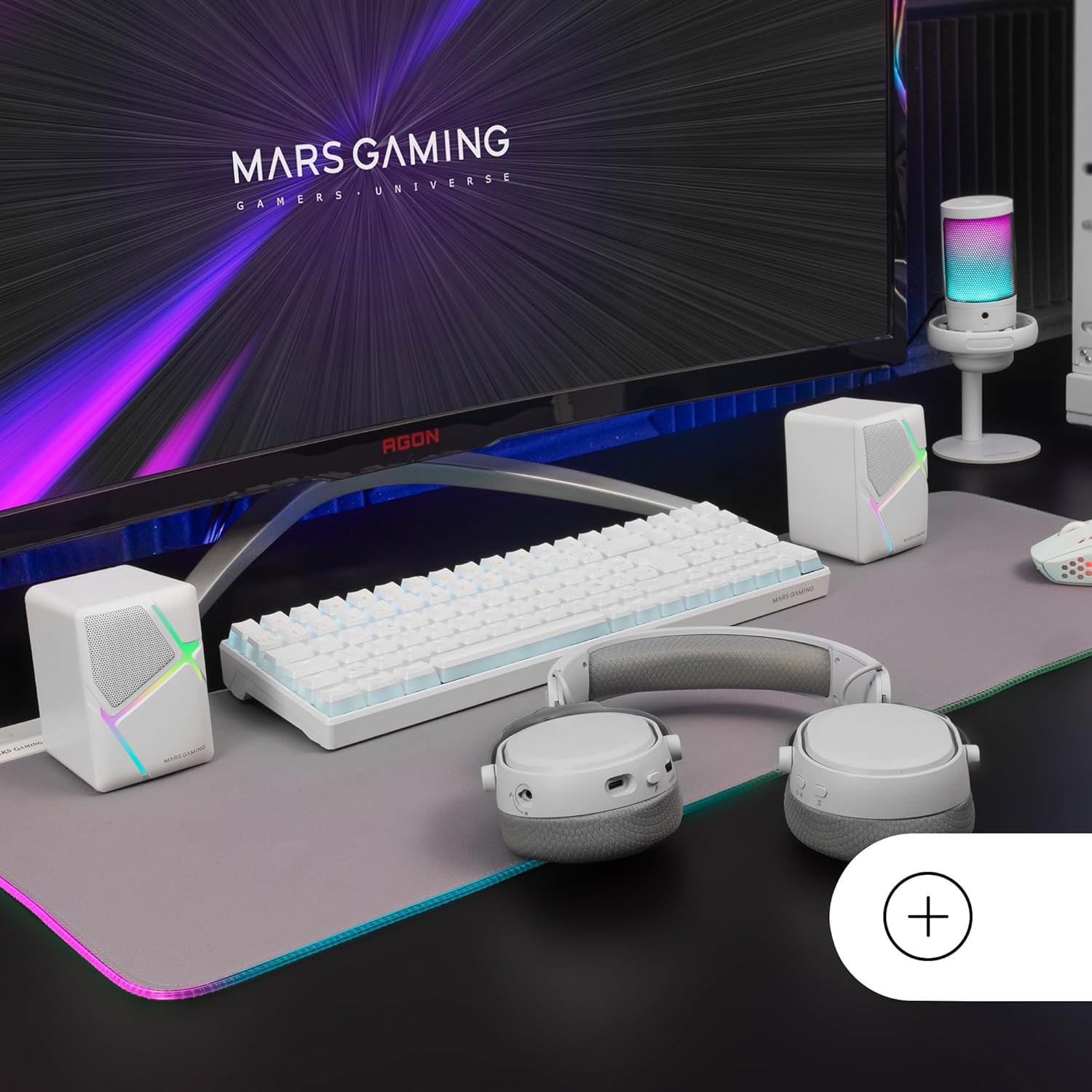
Image: Mars Gaming MS-H speakers set up on a desk with other gaming peripherals.
2. Connect Audio Cable:
Plug the 3.5mm auxiliary audio jack from the speakers into the audio output port of your computer, smartphone, tablet, or music player.

Image: Illustration showing the universal 3.5mm jack connection.
3. Connect USB Power:
Plug the USB-A connector into an available USB port on your computer, a USB wall adapter (not included), or any other compatible USB power source. The speakers will power on and the RGB lighting will activate.
Image: The Mars Gaming MS-H speakers showcasing their RGB Flow lighting feature.
Instrucións de funcionamento
1. Encendido/apagado:
The speakers power on automatically when the USB cable is connected to a power source. Disconnect the USB cable to power off the speakers.
2. Axuste do volume:
Use the inline volume control box to adjust the audio output level. Rotate the knob clockwise to increase volume and counter-clockwise to decrease it.

Image: The integrated volume control box with a rotary knob.
3. Iluminación RGB:
The RGB Flow lighting activates automatically when the speakers are powered on. The lighting pattern is pre-set and cannot be adjusted or turned off independently.
Mantemento
- Keep the speakers away from water, moisture, and direct sunlight.
- Clean the speaker surfaces with a soft, dry cloth. Do not use abrasive cleaners or solvents.
- Avoid placing heavy objects on the speakers or cables.
- Do not attempt to open or repair the speakers yourself. Contact qualified service personnel for assistance.
Resolución de problemas
| Problema | Causa posible | Solución |
|---|---|---|
| Sen son |
|
|
| A iluminación RGB non funciona |
|
|
| Son distorsionado |
|
|
Especificacións
| Modelo | MSHW |
| Potencia de saída | 10 vatios |
| Tecnoloxía de conectividade | Auxiliary (3.5mm Jack), USB (for power) |
| Modo de saída de audio | Envolvente |
| Impedancia | 4 ohmios |
| Resposta en frecuencia | Ata 20 kHz |
| Método de control | Rotary Knob (Inline Volume Control) |
| Características especiais | RGB Flow LED Lighting |
| Usos recomendados | Music player, Computer, Smartphone or tablet |
| Dispositivos compatibles | Smartphones, tablets, computers, music players |
| Cor | Branco |
| Material | Acrilonitrilo Butadieno Estireno (ABS) |
| Dimensións do produto (L x W x H) | 10 x 7.9 x 7 cm |
| Peso do elemento | 375 gramos |
| Tipo de montaxe | Mesa |
| País de Orixe | España |
Garantía e Soporte
Para obter información sobre a garantía e asistencia técnica, consulte o sitio web oficial do fabricante websitio web ou póñase en contacto co seu vendedor. Garde o comprobante de compra para calquera reclamación de garantía.
Manufacturer: Mars Gaming


