1. Produto rematadoview
The Lorex 4MP Pan & Tilt Indoor Smart Security Camera (Model: AZT2KIDPT-E) is a wireless 2K Wi-Fi camera designed for indoor surveillance. It features person detection, a privacy mode, two-way talk functionality, and smart home compatibility. With its 360° pan and tilt view, it offers comprehensive coverage for your indoor spaces. The camera includes a 16GB Micro SD card for local storage, eliminating the need for monthly fees.

Figure 1.1: Lorex 4MP Pan & Tilt Indoor Smart Security Camera, including its retail packaging and the bundled 16GB Micro SD card.
2. Que está incluído
Verifique que todos os compoñentes que se indican a continuación estean presentes no seu paquete:
- Cámara Wi-Fi interior
- Tarxeta MicroSD de 16 GB
- Power Cable & Adapter
- Mounting Bracket & Template
- Camera Mounting Kit & Quick Start Guide

Figure 2.1: Contents of the Lorex camera package, showing the camera, power supply, 16GB MicroSD card, mounting hardware, and quick start guide.
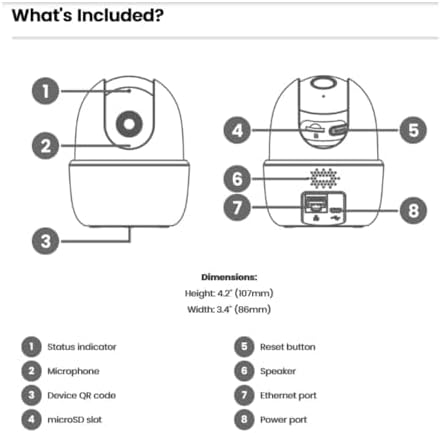
Figure 2.2: Detailed diagram of the camera's components and their functions, including ports and indicators.
3. Características clave
- Detección de persoas: Receive notifications when a person is detected, minimizing unnecessary alerts.
- Conversa bidireccional: Communicate with individuals near the camera using the Lorex Home app.
- Panorámica e inclinación: The camera swivels horizontally and tilts vertically for expanded coverage. Digital zoom is available via the Lorex app. Night vision extends up to 32ft (10m).
- Smart Home Monitoring: Plug and Play setup with compatibility for Alexa and Google Assistant. Operates on 2.4 GHz Wi-Fi networks.
- Almacenamento local: Secure your footage with the included 16GB MicroSD card (upgradable to 256GB), with no monthly fees.

Figure 3.1: Visual comparison demonstrating the enhanced clarity and detail of 2K Quad HD resolution compared to 1080p.

Figure 3.2: The camera's pan and tilt feature allows for a 360° view, providing extensive coverage of your indoor environment.

Figure 3.3: Smart AI Motion Detection provides instant alerts, such as when a person is detected in the camera's view.

Figure 3.4: Enable Privacy Mode through the Lorex app to temporarily disable recording and live view for enhanced privacy.

Figure 3.5: The camera supports local storage via a MicroSD card, ensuring your footage is kept private and secure without recurring fees.

Figure 3.6: The 2-Way Talk feature allows for instant communication through the camera, enabling you to hear and speak to those on the other end.
4. Guía de configuración
Follow these steps to set up your Lorex 4MP Pan & Tilt Indoor Smart Security Camera:
- Download the Lorex Home App: Busca "Lorex Home" in your smartphone's app store (available for Android and iOS).
- Crear unha conta: Abre a aplicación Lorex Home e segue as instrucións que aparecen na pantalla para crear unha conta nova ou iniciar sesión nunha xa existente.
- Encender a cámara: Connect the provided power cable and adapter to the camera and plug it into a power outlet. The camera will power on and initiate its startup sequence.
- Engadir dispositivo: In the Lorex Home app, tap the '+' icon to add a new device. Select your camera model from the list.
- Escanear código QR: Use your phone's camera to scan the QR code located on the bottom of the camera (refer to Figure 2.2).
- Conectar a wifi: Follow the app's prompts to connect the camera to your home Wi-Fi network. Ensure you are connecting to a 2.4 GHz Wi-Fi band.
- Montar a cámara (opcional): If desired, use the included mounting bracket and kit to securely install the camera in your preferred indoor location.
- Configuración completa: Once connected, the app will guide you through any final setup steps, including naming your camera and adjusting initial settings.
5. Instrucións de funcionamento
Utilize the Lorex Home app to control and manage your camera:
- En directo View: Access the live video feed from your camera anytime, anywhere.
- Control de panorámica e inclinación: Use the directional controls within the app to remotely adjust the camera's viewing angle (360° pan and tilt).
- Zoom dixital: Belisca para ampliar a imaxe en directo view to get a closer look at details.
- Conversa bidireccional: Tap the microphone icon in the app to speak through the camera's speaker and hear audio from the camera's microphone.
- Modo de privacidade: Activate Privacy Mode via the app to temporarily disable video and audio recording for personal moments.
- Detección de persoas: Configure motion detection settings to specifically alert you when a person is detected.
- Gravación local: Footage is automatically recorded to the installed 16GB MicroSD card upon event detection. You can review recorded events through the app's timeline.
- Visión nocturna: The camera automatically switches to night vision in low-light conditions, providing clear black and white video up to 32 feet.
Video 5.1: Demonstration of the Lorex W462 camera's panning capabilities, showcasino seu amplo campo de view.
6. Mantemento
To ensure optimal performance and longevity of your Lorex camera:
- Limpeza: Limpe con coidado a lente e o corpo da cámara cun pano suave e seco. Evite o uso de produtos químicos agresivos ou produtos de limpeza abrasivos.
- Actualizacións de firmware: Regularly check the Lorex Home app for available firmware updates. Updates often include performance improvements and security enhancements.
- Xestión de tarxetas MicroSD: Periodically check the storage status of your MicroSD card in the app. While the camera overwrites old footage, you may want to back up important recordings.
- Estabilidade da rede: Ensure your Wi-Fi network is stable and provides a strong signal to the camera for consistent performance.
7 Solución de problemas
If you encounter issues with your Lorex camera, refer to the following common solutions:
| Problema | Posible Solución |
|---|---|
| A cámara non se conecta á wifi: |
|
| Mala calidade da imaxe: |
|
| Two-way talk echo or distortion: |
|
| Camera loses connectivity intermittently: |
|
For further assistance, visit the Lorex support websitio ou póñase en contacto co servizo de atención ao cliente.
8. Especificacións
| Característica | Detalle |
|---|---|
| Marca | lorex |
| Número de modelo | AZT2KIDPT-E |
| Tecnoloxía de conectividade | WiFi (2.4 GHz band only) |
| Resolución de captura de vídeo | 2K |
| Características especiais | Adjustable, Night Vision, PTZ Control, Two-Way Audio, Person Detection |
| Número de canles | 1 |
| Capacidade de almacenamento da memoria | 16 GB (MicroSD card included, upgradable to 256GB) |
| Cor | Branco |
| Fonte de enerxía | Eléctrico con cable |
| Dimensións do artigo (L x W x H) | 5 x 6 x 5 polgadas |
| Compatibilidade do sistema operativo | Android, iOS |
| Usos recomendados | Interior |
| Campo de View | 125 ° (diagonal) |
| Range de visión nocturna | Ata 32 pés (10 m) |
| Velocidade de cadros | 30 fps |
| Modo de gravación | Event, Manual |
| Tecnoloxía de sensores ópticos | CMOS |
| Interface de hardware | 802.11 ac/b/g/n |
| Tipo de lente | Fixo |
| Peso do elemento | 1.04 libras |
9. Garantía e soporte
For detailed warranty information and technical support, please visit the official Lorex website or contact their customer service. You can find more resources and contact options at the Lorex Brand Store on Amazon.


