1. Introdución
Grazas pola compraasing the Singer SN777αIII Computerized Sewing Machine. This machine is designed for ease of use and versatility, offering 100 stitch patterns, including alphanumeric characters, to support a wide range of sewing projects. Please read this manual thoroughly before operating your machine to ensure safe and efficient use.

Image: The Singer SN777αIII sewing machine is available in white, pink, and a white and pink combination, allowing users to choose a color that suits their preference or room decor.
2. Configuración
2.1 Desembalaxe e colocación
- Retire con coidado a máquina e todos os accesorios da embalaxe.
- Coloque a máquina sobre unha superficie estable e plana. Asegúrese de que haxa espazo suficiente arredor da máquina para un funcionamento cómodo.
2.2 Conexión de alimentación
- Asegúrese de que o interruptor de alimentación estea na posición "OFF".
- Conecte o cable de alimentación á máquina e despois a unha toma de corrente axeitada.
2.3 Derolamento da bobina
- Coloque un carrete de fío no pasador do carrete.
- Follow the winding path indicated on the machine.
- Coloque unha bobina baleira no eixo do devanador da bobina e empúxea cara á dereita.
- Start winding by pressing the foot controller or start/stop button. Stop when the bobbin is full.
2.4 Enfiar o fío superior
- Levante a panca do prensatelas.
- Follow the numbered threading path on the machine, ensuring the thread is correctly seated in all guides and the tension discs.
- Use the automatic needle threader for easy threading of the needle eye.
2.5 Setting the Lower Thread (Bobbin)
- Abra a tapa da bobina.
- Insert the wound bobbin into the bobbin case, ensuring the thread unwinds in the correct direction.
- Guide the bobbin thread through the tension spring and out the bobbin case opening.
- Close the bobbin cover. The easy bobbin setting feature allows you to start sewing without pulling up the bobbin thread manually.
2.6 Instalación de accesorios
- Mesa ancha: Attach the wide table to the machine to expand your work area, especially useful for larger projects.
- Controlador de pé: Connect the foot controller to the designated port on the machine for hands-free speed control.
3. Instrucións de funcionamento
3.1 Panel de control rematadoview
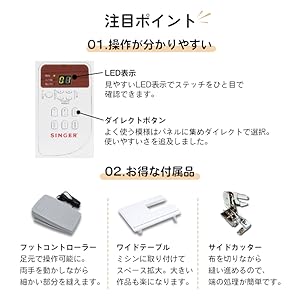
Image: The control panel features a clear LED display to show the selected stitch and direct buttons for frequently used patterns, simplifying operation.
- Pantalla LED: Shows the selected stitch pattern number and other relevant settings.
- Direct Buttons: Allows quick selection of commonly used stitch patterns.
- Stitch Selection Buttons: Use these to navigate and select from the 100 available stitch patterns.
3.2 Selecting Stitch Patterns

Image: The machine offers 100 stitch patterns, including utility stitches, decorative stitches, buttonholes, satin stitches, cross stitches, patchwork quilt stitches, and alphanumeric characters (numbers and alphabets).
- Refer to the stitch chart on the machine or in the manual.
- Use the stitch selection buttons to choose the desired pattern. The selected pattern number will appear on the LED display.
- For alphanumeric stitches, select the corresponding pattern and then use the adjustment buttons to choose specific letters or numbers.
3.3 Basic Sewing Operations

Image: This illustration highlights key operational features such as hand-focused controls for start/stop, automatic buttonhole creation, the free arm for cylindrical sewing, stepless speed adjustment, drop feed for free-motion quilting, and the presser foot lifter button for smooth sewing over varying fabric thicknesses.
- Botón Inicio / Parada: Press to start and stop sewing.
- Axuste de velocidade: Use the slide control for stepless speed adjustment from low to high.
- Botón de puntada inversa: Press and hold to sew in reverse for securing stitches.
- Botón para subir/baixar a agulla: Positions the needle up or down.
- Presser Foot Lifter Button: Automatically keeps the presser foot horizontal, making it easy to start sewing thick fabrics.
3.4 Características especiais
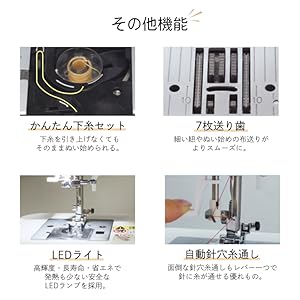
Image: This illustration details the easy bobbin setting for quick starts, the 7-point feed dog for smooth fabric feeding, the bright LED light for clear visibility, and the automatic needle threader for effortless threading.
- Enhebrador automático de agullas: A lever-operated system that threads the needle automatically.
- Alimentador de 7 puntos: Ensures smooth and consistent fabric feeding, especially for delicate or thick materials.
- Luz LED: Provides bright, long-lasting, and energy-efficient illumination of the sewing area.
- Brazo libre: Remove the accessory box to reveal the free arm, ideal for sewing cuffs, sleeves, and other cylindrical items.
- Fully Automatic Buttonhole: Simply set the button, and the machine automatically creates a perfectly sized buttonhole.
- Drop Feed: Lower the feed dogs for free-motion quilting or darning.
4. Mantemento
4.1 Limpeza
- Apague e desconecte sempre a máquina antes de limpala.
- Regularly clean lint and dust from the bobbin case area and under the needle plate using the brush provided.
- Limpe o exterior da máquina cun pano suave e seco. Non empregue produtos químicos agresivos.
4.2 Substitución da agulla
- Apague a máquina e desconéctea.
- Afrouxa a agulla clamp parafuso e retira a agulla vella.
- Insert a new needle with the flat side facing the back, pushing it up as far as it will go.
- Apretar a agulla clamp parafuso firmemente.
5 Solución de problemas
This section addresses common issues you might encounter. For problems not listed here, please consult the full instruction DVD or contact customer support.
| Problema | Causa posible | Solución |
|---|---|---|
| A máquina non arranca | Power cord not connected; Power switch off; Foot controller not connected. | Check power connections; Turn on power switch; Ensure foot controller is plugged in. |
| Puntadas saltadas | Incorrect needle; Bent needle; Incorrect threading. | Use correct needle type for fabric; Replace bent needle; Re-thread machine carefully. |
| Roturas de fíos | Incorrect tension; Poor quality thread; Improper threading; Needle bent or dull. | Adjust tension; Use good quality thread; Re-thread machine; Replace needle. |
| O tecido non se alimenta | Feed dogs lowered; Presser foot pressure too low. | Raise feed dogs; Adjust presser foot pressure. |
6. Especificacións

Image: The Singer SN777αIII machine's dimensions are 404mm width x 188mm depth x 298mm height, with a weight of 5.8 kg.
- Modelo: SN777αIII
- Fabricante: Cantante
- Dimensións (produto): 40.4 cm (Ancho) x 18.8 cm (Fondo) x 29.8 cm (Alto)
- Peso (produto): 5.8 kg
- Material: Acrilonitrilo Butadieno Estireno (ABS)
- Patróns de punto: 100 types (including numbers and alphabets)
6.1 Accesorios incluídos

Image: A comprehensive diagram illustrating all standard accessories, including various presser feet, bobbins, screwdrivers, a seam ripper, needle set, seam guide, spool caps, auxiliary spool pin, spool pin felt, soft cover, power cord, instruction manual, and instruction DVD.
- Pé en zigzag
- Pé de cremalleira
- Pé de ojal
- Pé de costura de botón
- Pé de sobrepunto
- Pé de puntada cega
- Pé de puntada de raso
- Bobinas
- Triangular Screwdriver
- Desaparafusador pequeno
- Seam Ripper with Brush
- Set de agullas
- Guía de costura
- Spool Cap (Large)
- Spool Cap (Small)
- Pasador de carrete auxiliar
- Feltro de carrete
- Tapa blanda
- Cable de alimentación
- Manual de instrucións
- DVD de instrucións
- Controlador de pé
- Mesa Ancha
- Cortador lateral
7. Garantía e soporte
For warranty information, please refer to the warranty card included with your product or contact your retailer. For technical support or service inquiries, please refer to the contact information provided in your purchase documentation or visit the official Singer websitio.


