1. Introdución
This instruction manual provides comprehensive guidance for the safe and efficient use of your Charmast 20000mAh 20W Portable Charger, Model C2046S. Please read this manual thoroughly before operating the device and retain it for future reference.
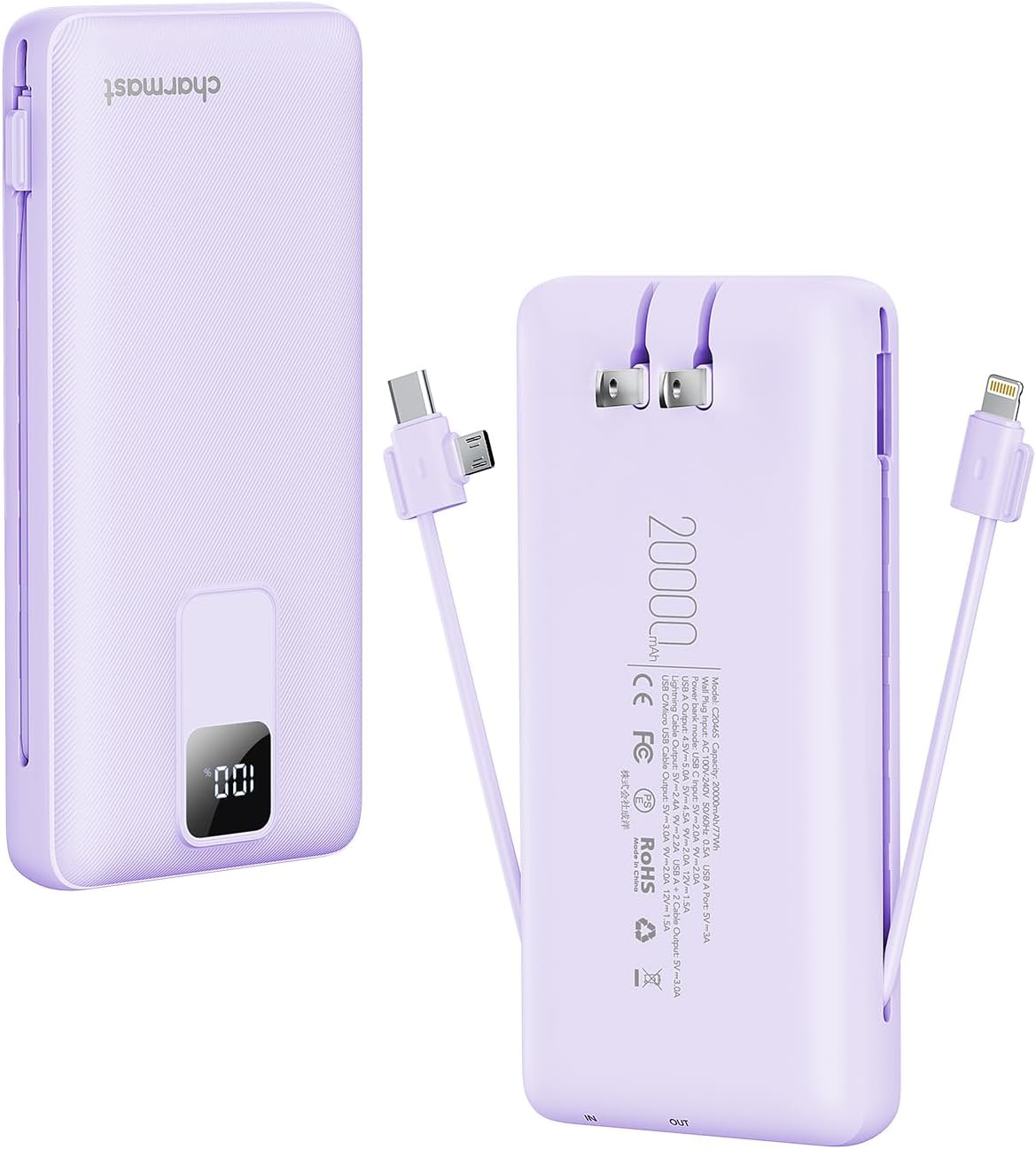
The Charmast portable charger is designed to provide convenient power on the go, featuring built-in charging cables and an integrated wall plug for versatile recharging and device charging.
2. Que hai na caixa
- Charmast Portable Charger (Model C2046S)
- Mesh Pouch
- Manual de instrucións

3. Características do produto
The Charmast portable charger offers a range of features for efficient and convenient power delivery:
- Alta capacidade: Batería de 20000 mAh para uso prolongado.
- Carga rápida: Supports 20W Power Delivery (PD) and 18W Quick Charge (QC 3.0) for rapid device charging.
- Cables incorporados: Integrated cables for various devices, eliminating the need for external cables.
- Integrated Wall Plug: Direct wall charging capability for convenient recharging of the power bank.
- Pantalla dixital: LED screen indicates remaining battery percentage.
- Deseño compacto: Slim profile and comfortable grip for portability.
- Múltiples proteccións de seguridade: Includes over-discharge, short-circuit, over-current, and over-voltage protección.

4. Configuración
4.1 Carga inicial do banco de enerxía
Before first use, fully charge the portable charger. This ensures optimal battery performance.
- Usando o enchufe de parede incorporado: Fold out the integrated AC wall plug. Insert the charger directly into a standard wall outlet. The digital display will show the charging progress.
- Using the USB-C Input Port: Alternatively, connect a USB-C cable (not included) to the charger's USB-C input port and a compatible USB wall adapter (9V-2A recommended, not included).
The digital display will show '100%' when fully charged.

5. Instrucións de funcionamento
5.1 Carga dos seus dispositivos
The portable charger can charge multiple devices simultaneously using its various outputs.
- Usando cables integrados: Extend the appropriate built-in cable (USB-C or Lightning) and connect it to your device's charging port.
- Usando o porto de saída USB-A: For devices requiring a standard USB-A connection, use your own USB cable and plug it into the USB-A output port on the charger.
The digital display will illuminate, showing the remaining battery percentage of the power bank. Disconnect your device once it is fully charged or when you no longer require charging.
5.2 Fast Charging Capability
This charger supports 20W Power Delivery (PD) and 18W Quick Charge (QC 3.0) for compatible devices. This allows for significantly faster charging times compared to standard chargers.


6. Información de seguridade
Your Charmast portable charger is equipped with multiple safety features to protect both the device and your connected electronics:
- Protección contra descarga excesiva: Prevents the battery from being excessively discharged.
- Protección contra curtocircuítos: Corta automaticamente a corrente en caso de curtocircuíto.
- Protección contra sobrecorriente: Protección contra o fluxo excesivo de corrente.
- Sobre Voltage Protección: Protexe contra o volumetage subidas.
Importantes precaucións de seguridade:
- Non expoñas o dispositivo a temperaturas extremas, á luz solar directa nin á auga.
- Non desmonte, modifique nin intente reparar o dispositivo.
- Manter fóra do alcance dos nenos.
- Evite deixar caer ou someter o dispositivo a fortes impactos.
- Desfágase do dispositivo segundo a normativa local para residuos electrónicos.


7. Especificacións
| Característica | Especificación |
|---|---|
| Número de modelo | C2046S |
| Capacidade da batería | 20000 millónsamp Horas (mAh) |
| Dimensións do produto | 5.91 x 2.83 x 1.09 polgadas |
| Peso do elemento | 14.9 onzas |
| Input (Wall Plug) | CA 100-240 V, 50/60 Hz |
| Input (USB Type C) | 5 V/3 A, 9 V/2 A, 12 V/1.5 A (18 W máx.) |
| Output (USB Type C) | 5V/3A, 9V/2.22A, 12V/1.67A (20W Max PD) |
| Output (USB Type A) | 5V/3A, 9V/2A, 12V/1.5A (18W Max QC 3.0) |
| Características especiais | 20W Fast Charging, Built-in Cables, Built-in Wall Plug, Digital Display, Over Charging Protection |
8. Mantemento
Proper maintenance ensures the longevity and performance of your portable charger:
- Limpeza: Usa un pano suave e seco para limpar o exterior do cargador. Non empregues produtos de limpeza líquidos nin aerosois.
- Almacenamento: Garda o cargador nun lugar fresco e seco, lonxe da luz solar directa e de temperaturas extremas. Se o gardas durante períodos prolongados, cárgao aproximadamente entre o 50 e o 70 % cada tres meses para manter a batería en bo estado.
- Manexo: Avoid bending or stressing the built-in cables excessively to prevent damage.
9 Solución de problemas
If you encounter issues with your Charmast portable charger, refer to the following common problems and solutions:
- Charger not charging devices:
- Ensure the portable charger itself is sufficiently charged (check the digital display).
- Verify that the charging cable (built-in or external) is securely connected to both the charger and your device.
- Try a different cable or device to isolate the issue.
- Charger not recharging:
- When using the wall plug, ensure it is fully extended and inserted into a live power outlet.
- When using the USB-C input, ensure the cable and wall adapter are functional and correctly connected.
- Comprobe se a toma de corrente funciona conectando outro dispositivo.
- Carga lenta:
- Ensure your device supports fast charging and that you are using a compatible port/cable.
- Cargar varios dispositivos simultaneamente pode reducir as velocidades de carga individuais.
- A pantalla dixital non funciona:
- The display should activate when charging or being charged. If it remains off, the unit may be completely discharged or faulty. Attempt to recharge the unit.
If the problem persists after attempting these solutions, please contact Charmast customer service for further assistance.
10. Garantía e soporte
Charmast provides a 24 meses de garantía for this portable charger. We are committed to customer satisfaction and offer 7-day/24-hour friendly customer service.
Should you encounter any issues or have questions regarding your product, please do not hesitate to contact us. We aim to resolve all inquiries within 24 hours.
For support, please refer to the contact information provided on the product packaging or the official Charmast websitio.


