Introdución
Grazas pola compraasing the 7artisans AF 50mm F1.8 Full Frame Lens. This manual provides essential information for the safe and effective use of your new lens. Please read it thoroughly before use and keep it for future reference.
This 50mm F1.8 lens is designed for Sony E-Mount full-frame cameras, offering a large aperture, fast autofocus, and support for advanced features like face and eye recognition. Its versatile focal length makes it suitable for a wide range of photographic applications, from portraits to street photography.
Información de seguridade
- Do not look at the sun or bright light sources through the lens, as this may cause permanent vision impairment.
- Keep the lens away from direct sunlight when not in use to prevent fire hazards or damage to internal components.
- Avoid exposing the lens to extreme temperatures, high humidity, or dust.
- Do not attempt to disassemble or repair the lens yourself. Contact authorized service personnel for assistance.
- Manter fóra do alcance dos nenos.
Contido do paquete
Verifica que todos os elementos estean presentes no teu paquete:
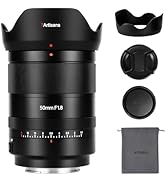
- 7artisans AF 50mm F1.8 Full Frame Lens
- Tapón de lente dianteira
- Tapa de lente traseira
- Parasol de lente
- Bolsa para lentes
- Manual de instrucións (este documento)

Image: The 7artisans AF 50mm F1.8 lens shown with its included accessories: front and rear lens caps, lens hood, and a soft pouch.
Produto rematadoview
The 7artisans AF 50mm F1.8 lens features a robust metal construction with a sleek black finish. Key components include:
- Anel de enfoque: For manual focusing.
- Anel de apertura: Allows switching between automatic and manual aperture control.
- Interruptor AF/MF: Alterna entre os modos de enfoque automático e enfoque manual.
- Montaxe da lente: Sony E-Mount compatible.
- Porto USB-C: Para actualizacións de firmware.
Imaxe: Primeiro plano view of the lens barrel, highlighting the AF/MF switch for mode selection.

Imaxe: Unha detallada view of the lens mount, showing the electronic contacts and the integrated USB-C port for firmware updates.
Configuración
- Colocación da lente:
- Align the white dot on the lens barrel with the white dot on your camera's lens mount.
- Insira con coidado a lente na montura da cámara.
- Xire a lente no sentido das agullas do reloxo ata que encaixe no seu lugar, o que indica que está ben bloqueada.
- Eliminación da lente:
- Manteña premido o botón de liberación da lente no corpo da cámara.
- Rotate the lens counter-clockwise until it detaches from the camera mount.
- Coloque as tapas dianteira e traseira da lente para protexer os elementos da lente.
- Colocación do parasol da lente:
- Aliñe a tapa da lente coa parte dianteira da lente.
- Twist the hood clockwise until it locks securely.
- The lens hood helps reduce flare and provides physical protection to the front element.

Image: The 7artisans AF 50mm F1.8 lens securely mounted on a Sony mirrorless camera, viewed dende o lado.
Funcionamento da lente
1. Focus Mode Selection (AF/MF)
Use the AF/MF switch on the lens barrel to select your desired focus mode:
- AF (Enfoque automático): The camera will automatically focus on the subject. This lens features a high-speed STM stepping motor for quick and accurate autofocus performance.
- MF (Enfoque manual): You can manually adjust the focus by rotating the focus ring on the lens.
Imaxe: Unha detallada view of the AF/MF switch, allowing users to toggle between autofocus and manual focus modes.
2. Control de apertura
The lens features an aperture ring that can be switched between automatic and manual control:
- Automatic Aperture: Set the aperture ring to the 'A' position. The camera will control the aperture settings.
- Manual Aperture: Rotate the aperture ring to select your desired F-stop (F1.8 to F16). This provides precise control over depth of field and exposure.
The large F1.8 aperture allows for excellent low-light performance and the creation of beautiful background blur (bokeh).
3. Face/Eye Recognition Support
This lens supports your camera's face and eye recognition functions. When enabled on your camera, the lens will automatically set accurate focusing points and exposure for human faces or eyes, ensuring sharp portraits.

Image: A photograph illustrating the camera's eye recognition feature actively focusing on a subject's eye.
4. Actualizacións de firmware
The integrated USB-C port allows for easy firmware updates. Connect the lens to your computer using a USB-C cable and follow the instructions provided on the 7artisans official website to update the firmware. This ensures optimal performance and compatibility with future camera models.
Imaxe: Unha detallada view of the lens mount, showing the electronic contacts and the integrated USB-C port for firmware updates.
Mantemento
- Limpeza: Use a soft, lint-free cloth to clean the lens barrel. For lens elements, use a lens brush to remove dust, then gently wipe with a lens cleaning cloth and lens cleaning solution.
- Almacenamento: When not in use, store the lens with both caps attached in a cool, dry place away from direct sunlight and moisture. Consider using a desiccant to prevent mold growth.
- Manexo: Avoid dropping or subjecting the lens to strong impacts, as this can damage internal optical elements.
Resolución de problemas
1. Lens not focusing:
- Ensure the AF/MF switch is set to the desired mode (AF for autofocus).
- Check camera settings to ensure autofocus is enabled and the correct focus area is selected.
- Limpa os contactos da lente tanto na lente como no corpo da cámara.
2. Images are blurry:
- Comprobe que a lente estea enfocada correctamente.
- Check shutter speed to avoid camera shake, especially in low light.
- Ensure the lens elements are clean and free from smudges or dust.
3. Lens not recognized by camera:
- Retire e volva colocar a lente, asegurándose de que encaixe firmemente no seu lugar.
- Limpa os contactos electrónicos tanto da lente como do corpo da cámara cun pano limpo e seco.
- Check for available firmware updates for both the lens and your camera.
Especificacións
| Característica | Detalle |
|---|---|
| Marca | 7 artesáns |
| Número de modelo | AF5018EB |
| Distancia focal | 50 mm |
| Apertura máxima | F1.8 |
| Apertura mínima | F16 |
| Tipo de lente | Lente Prime estándar |
| Montaxes compatibles | Sony con montura tipo E |
| Estrutura óptica | 11 elementos en 9 grupos |
| Láminas de diafragma | 11 pezas |
| Ángulo de View | D:46.8°, H:39.6°, V:27.0° |
| Distancia de enfoque máis curta | 0.5M - ∞ |
| Tamaño do filtro | 58 mm |
| Peso do elemento | 1.78 libras (aprox. 807 g) |
| Dimensións do produto | 40.94 x 28.35 x 28.35 polgadas |
Garantía e Soporte
For warranty information, technical support, or service inquiries, please visit the official 7artisans websitio web ou póñase en contacto co seu distribuidor autorizado. Garde o comprobante de compra para reclamacións de garantía.
For the latest firmware updates and additional resources, please visit: 7artisans Official Store
Vídeos oficiais de produtos
Watch these official videos for more information on the 7artisans AF 50mm F1.8 lens:
7artisans AF50mm F1.8
Vídeo: Presentación oficial dun produto en vídeoasing the features and capabilities of the 7artisans AF 50mm F1.8 lens.
7artisans AutoFocus 50mm F1.8
Video: Another official product video demonstrating the autofocus performance and image quality of the 7artisans 50mm F1.8 lens.

