1. Introdución
Thank you for choosing the iJoy Disney Lilo & Stitch Expressions Bluetooth Over-Ear Headphones. These wireless headphones are designed to provide a comfortable audio experience with the added charm of Lilo & Stitch designs. This manual will guide you through the setup, operation, and maintenance of your new headphones.

Image: iJoy Disney Lilo & Stitch Bluetooth Over-Ear Headphones.
2. Produto rematadoview
Características principais:
- Conexión Bluetooth sen fíos: Enjoy audio without tangled cords.
- Micrófono incorporado: Para unha comunicación clara durante as chamadas.
- Indicadores LED: Provide battery and connection status.
- Deseño plegable: Para facilitar o transporte e o almacenamento.
- Micro SD Card Plug-in: Reproduce música directamente desde unha tarxeta Micro SD.
- Built-in Radio Receiver: Sintoniza as túas emisoras de radio favoritas.
- Aux Cable Included: Option for wired listening when battery is low or Bluetooth is not available.
Que hai na caixa:
- iJoy Disney Lilo & Stitch Expressions Bluetooth Over-Ear Headphones
- Funda protectora
- Cable de carga (USB)
- Auxiliary Audio Cable with Microphone
3. Configuración
3.1 Carga dos auriculares
Before initial use, fully charge your headphones. Connect the provided USB charging cable to the charging port on the headphones and to a compatible USB power source. The LED indicator will show charging status and turn off or change color when fully charged. A full charge provides approximately 15 hours of playtime.

Image: Headphones highlighting 15 hours of playtime.
3.2 Emparejamento Bluetooth
- Asegúrese de que os auriculares estean apagados.
- Manteña premido o botón de acendido/apagado ata que o indicador LED parpadee en azul e vermello, o que indica o modo de emparellamento.
- No teu dispositivo (teléfono intelixente, tableta, etc.), activa o Bluetooth e busca os dispositivos dispoñibles.
- Select "iJoy Stitch Headphones" (or similar name) from the list.
- Unha vez conectado, o indicador LED normalmente amosará unha luz azul fixa ou parpadeará en azul lentamente.

Image: Headphones demonstrating universal compatibility with Apple and Android devices.
4. Instrucións de funcionamento
4.1 Controisview
The headphone controls are located on the ear cup. Refer to the diagram below for button functions:
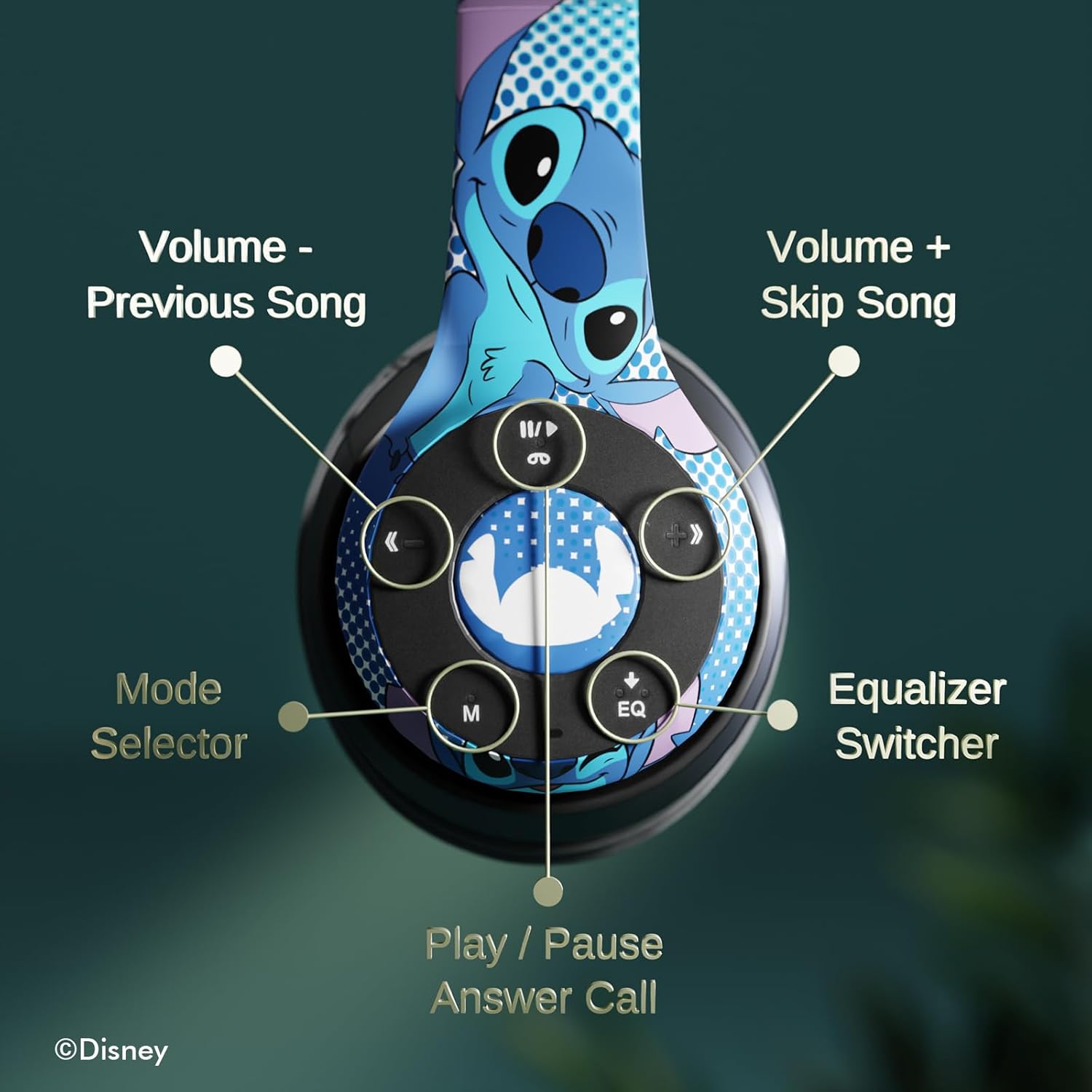
Imaxe: Detallada view of the headphone controls, including Volume -, Previous Song, Volume +, Skip Song, Mode Selector, Equalizer Switcher, and Play/Pause/Answer Call buttons.
- Play/Pause/Answer Call Button: Press once to play/pause music or answer/end a call. Press and hold to reject a call.
- Volume + / Skip Song Button: Press once for Volume Up. Press and hold to skip to the next song.
- Volume - / Previous Song Button: Press once for Volume Down. Press and hold to go to the previous song.
- Selector de modo (M): Press to switch between Bluetooth, Micro SD card, and FM Radio modes.
- Selector de ecualización (EQ): Prema para cambiar entre os diferentes preajustes do ecualizador.
4.2 Facer e recibir chamadas
With the built-in microphone, you can make and receive calls when connected via Bluetooth:
- Responder/Finalizar chamada: Press the Play/Pause/Answer Call button once.
- Rexeitar a chamada: Press and hold the Play/Pause/Answer Call button.
4.3 Reprodución de música
- Modo Bluetooth: After pairing, music from your connected device will play through the headphones. Use the controls to manage playback.
- Modo tarxeta micro SD: Insert a Micro SD card with MP3 files into the designated slot. Press the 'M' button to switch to Micro SD card mode. The headphones will automatically begin playing music from the card.
Modo de radio FM 4.4
Press the 'M' button to switch to FM Radio mode. Use the Volume +/- buttons to scan for stations or adjust volume.
5. Mantemento
- Limpeza: Usa un pano suave e seco para limpar os auriculares. Non empregues produtos químicos agresivos nin materiais abrasivos.
- Almacenamento: When not in use, store the headphones in the provided protective case. The foldable design allows for compact storage.
- Evitar a humidade: Manteña os auriculares lonxe da auga e da humidade excesiva.
- Temperatura: Evite expoñer os auriculares a temperaturas extremas.

Image: Headphones demonstrating their foldable design for easy storage.
6 Solución de problemas
| Problema | Posible Solución |
|---|---|
| Os auriculares non se acenden. | Asegúrate de que os auriculares estean completamente cargados. |
| Non se pode emparellar co dispositivo. | Asegúrate de que os auriculares estean en modo de emparellamento (LED azul/vermello intermitente). Desactiva e activa o Bluetooth no dispositivo. Acércate máis ao dispositivo. |
| Sen son. | Check volume levels on both headphones and connected device. Ensure headphones are correctly paired. Try using the auxiliary cable. |
| Mala calidade de son. | Move closer to the connected device to avoid interference. Check audio source quality. |
| O micrófono non funciona. | Ensure headphones are properly connected. Check microphone settings on your device. |
7. Especificacións
| Característica | Detalle |
|---|---|
| Nome do modelo | Disney Lilo & Stitch Expressions |
| Número de modelo | DS20137 |
| Tecnoloxía de conectividade | Sen fíos (Bluetooth) |
| Tecnoloxía de comunicación sen fíos | Bluetooth |
| Versión Bluetooth | 4.0 |
| Alcance Bluetooth | 10 metros |
| Colocación do oído | Sobre orella |
| Factor de forma | Sobre orella |
| Control de ruído | Illamento acústico |
| Tipo de control | Control de volume, táctil |
| Características especiais | Built-in Radio Receiver, Foldable and Adjustable headband, Micro SD Card Plug-in, Microphone Included |
| Dispositivos compatibles | Bluetooth-enabled devices (e.g. smartphones, tablets, laptops) |
| Material | Memory Foam, Plastic |
| Peso do elemento | 0.29 quilogramos (10.2 onzas) |
| Baterías | 1 batería de polímero de litio (incluída) |
| Dimensións do paquete | 8.78 x 6.26 x 3.62 polgadas |
| UPC | 810116712489 |
8. Vídeo oficial do produto
Vídeo: Presentación oficial dun produto en vídeoasing the Disney Lilo & Stitch Bluetooth Headphones, highlighting their features and design.
9. Garantía e soporte
For warranty information and customer support, please refer to the documentation included with your product or visit the official iJoy websitio. Conserve o recibo de compra para reclamacións de garantía.


