1. Introdución
Thank you for choosing the Olympia Vitus 2G Senior Mobile Phone. This device is designed with ease of use in mind, featuring a foldable design, large buttons, and essential functions to keep you connected. It is also hearing aid compatible for enhanced accessibility.

Image 1.1: The Olympia Vitus 2G phone in both open and closed positions, alongside its charging dock.

Image 1.2: A selection of Olympia Vitus 2G phones, showcasing available colors and their charging docks.
2. Información de seguridade
- Lea atentamente todas as instrucións antes de usar o dispositivo.
- Manteña o dispositivo lonxe da auga e da humidade.
- Non expoña o dispositivo a temperaturas extremas.
- Empregue só baterías, cargadores e accesorios homologados.
- Evite deixar caer o dispositivo nin someterlo a impactos fortes.
- Consult a qualified service professional for any repairs.
- Desfágase do dispositivo e da súa batería de forma responsable segundo a normativa local.
3. Configuración
3.1. Desembalaxe e contido da embalaxe
Carefully unpack your Olympia Vitus 2G phone. The package should contain:
- Olympia Vitus 2G Senior Mobile Phone
- Base de carga
- Cable de carga USB-C
- Adaptador de alimentación
- Batería
- Manual de usuario (este documento)
3.2. Instalación e carga da batería
- Retire a tapa traseira do teléfono.
- Insert the battery, ensuring the gold contacts align with the phone's terminals.
- Volva colocar a tapa traseira.
- Connect the USB-C charging cable to the phone or place the phone in the charging dock.
- Conecta o outro extremo do cable ao adaptador de corrente e conéctao a unha toma de corrente.
- Allow the phone to charge fully before first use. The battery indicator on the display will show charging status.
The Vitus 2G offers a standby time of up to 240 hours and a talk time of up to 3.5 hours. An automatic SMS notification will alert you when the battery level is low, prompting timely charging.

Image 3.1: The Olympia Vitus 2G phone securely placed in its charging dock, indicating the charging process.
3.3. Instalación da tarxeta SIM
- Asegúrate de que o teléfono estea apagado.
- Retire a tapa traseira e a batería.
- Locate the SIM card slot(s). This phone supports 2G cellular technology.
- Carefully insert your SIM card(s) into the designated slot(s) with the gold contacts facing down, following the diagram usually found near the slot.
- Reinsert the battery and replace the back cover.
3.4. Acendido/apagado
- Para acender: Manteña prema o botón Acender/Finalizar chamada botón ata que se ilumine a pantalla.
- Para apagar: Manteña premido o botón Acender/Finalizar chamada button, then select "Power off" from the options on the screen.
4. Instrucións de funcionamento
The Olympia Vitus 2G is designed for straightforward operation with its intuitive user interface and large, easy-to-press buttons.

Image 4.1: A user demonstrating the ease of making a call with the Olympia Vitus 2G, highlighting its large buttons and clear display.
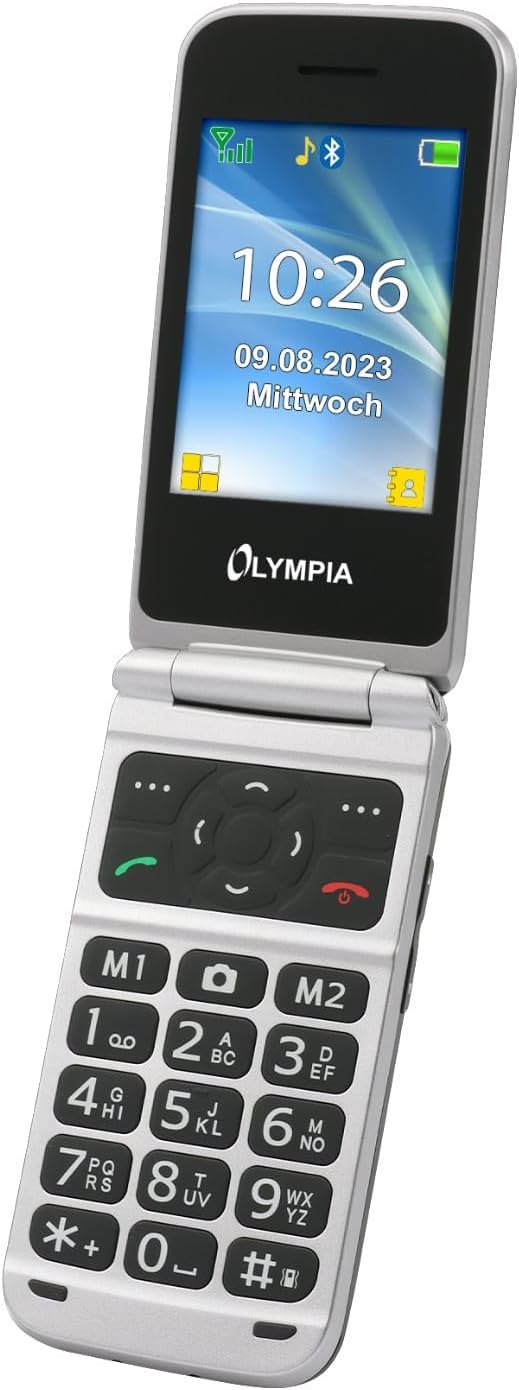
Imaxe 4.2: Detallada view of the Olympia Vitus 2G's keypad, emphasizing the large, well-spaced, and clearly labeled buttons for easy dialing and navigation.
4.1. Realización e recepción de chamadas
- To make a call: Dial the number using the large keypad and press the Chamar botón (icona verde do receptor).
- To answer a call: Press the Chamar botón cando soa o teléfono.
- Para finalizar unha chamada: Prema a tecla Finalizar chamada botón (icona do receptor vermello).
4.2. Emergency Call Button (SOS Function)
The Vitus 2G features a dedicated SOS button for emergencies. When activated, it can trigger an SOS sound alarm, send SOS SMS messages, and initiate calls to pre-programmed emergency contacts.

Image 4.3: The rear view of the Olympia Vitus 2G, clearly showing the prominent red SOS emergency call button.
- Para activar: Manteña premido o botón Botón SOS on the back of the phone for a few seconds.
- Ensure emergency contacts are set up in the phone's settings for this feature to function correctly.
4.3. Speed Dial and Direct Dial Buttons
The phone supports image speed dialing and includes two direct dial buttons (M1, M2) for quick access to important contacts.
- To set up: Refer to the phone's menu for "Speed Dial" or "Direct Dial" settings to assign contacts to M1, M2, or other number keys.
- To use: Simply press the assigned M1 or M2 button, or hold down a number key for speed dial.
4.4. Multimedia and Extra Features
Your Vitus 2G phone includes several useful features:
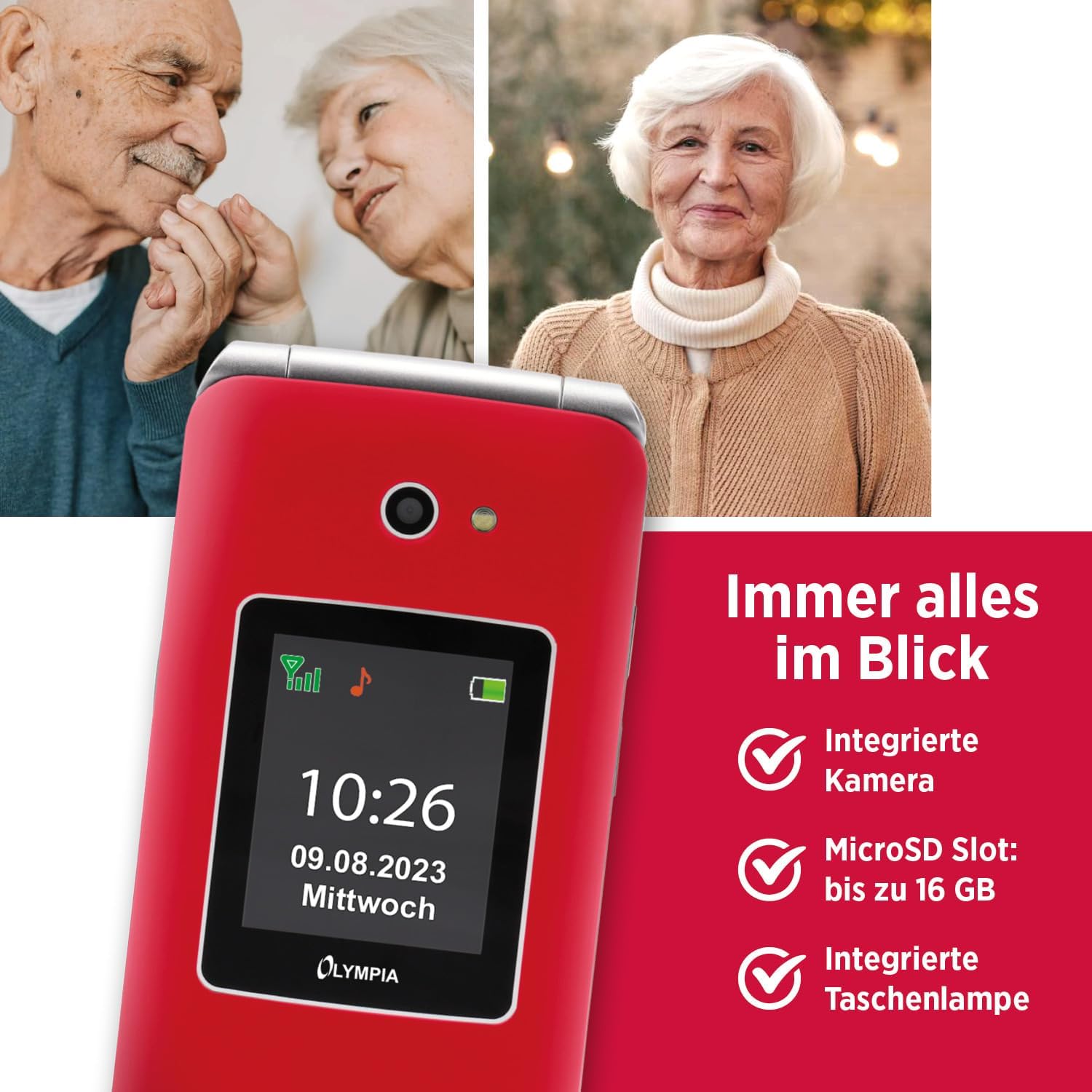
Image 4.4: The Olympia Vitus 2G phone, showcasing its integrated camera, microSD card slot for expandable storage, and built-in torch.
- Cámara: Capture photos using the integrated camera. Access it via the main menu.
- Radio FM: Listen to your favorite radio stations. Headphones may be required for optimal reception.
- Facho: Activate the built-in torch for illumination in dark environments.
- Ranura MicroSD: Expand storage up to 16GB for photos, music, and other files.
- Calendar, Calculator, Alarm Clock: Access these utility functions from the main menu.
- Bluetooth: Connect wirelessly to compatible devices such as headsets or other phones.
4.5. Hearing Aid Compatibility (HAC)
The Olympia Vitus 2G is designed to be compatible with hearing aids, reducing interference and improving call clarity for users with hearing devices.

Image 4.5: The Olympia Vitus 2G phone in its closed state, featuring the Hearing Aid Compatible (HAC) logo, indicating its suitability for users with hearing aids.
- When using a hearing aid, position the phone near your hearing aid to find the optimal listening position.
- Adjust the volume on both your phone and hearing aid for the best experience.
5. Mantemento
5.1. Limpeza do teléfono
- Use a soft, dry, lint-free cloth to clean the phone's exterior.
- Non use produtos químicos agresivos, disolventes de limpeza ou deterxentes fortes.
- Evite a entrada de humidade en calquera abertura.
5.2. Coidado da batería
- Para prolongar a duración da batería, evite descargala completamente con frecuencia.
- Charge the phone regularly, especially when the low battery notification appears.
- Garda o teléfono nun lugar fresco e seco cando non o uses durante períodos prolongados.
5.3. Actualizacións de software
Periodically check for software updates in the phone's settings menu. Updates can improve performance, add new features, and enhance security.
6 Solución de problemas
| Problema | Posible Solución |
|---|---|
| O teléfono non se acende | Ensure the battery is correctly installed and charged. Connect to charger and try again. |
| Non se poden facer/recibir chamadas | Check SIM card installation. Ensure you have network signal. Contact your service provider. |
| Mala calidade das chamadas | Move to an area with better network reception. If using a hearing aid, adjust phone position. |
| A batería esgotarase rapidamente | Reduce o brillo da pantalla. Pecha as aplicacións non utilizadas. Limita o uso de datos en segundo plano. |
| O botón SOS non funciona | Asegúrate de que os contactos de emerxencia estean configurados correctamente nos axustes do teléfono. |
7. Especificacións
The following are the technical specifications for the Olympia Vitus 2G Senior Mobile Phone:

Imaxe 7.1: Unha sobreview of the Olympia Vitus 2G's key features and specifications, including its SOS button, USB-C, FM Radio, Bluetooth, and battery life.
- Nome do modelo: VITUS 2G
- Número de modelo do artigo: 2225
- Marca: OLIMPIA
- Sistema operativo: KaiOS
- Modelo CPU: Snapdragon
- Visualización: 1.7 inches (outer), 2.88 inches (inner)
- Resolución: 240 x 320 píxeles
- Operador sen fíos: Desbloqueado para todos os transportistas
- Tecnoloxía móbil: 2G
- Tecnoloxía de conectividade: USB-C, Bluetooth
- Cor: Red (other colors may be available)
- Tempo de espera da batería: Ata 240 horas
- Tempo de conversación da batería: Ata 3.5 horas
- MicroSD Support: Ata 16 GB
- Dimensións (ancho x alto x prof.): 56 x 19 x 106 mm (closed)
- Peso: 115 g
8. Información da garantía
Your Olympia Vitus 2G Senior Mobile Phone comes with a standard manufacturer's warranty. Please refer to the warranty card included in your package for specific terms, conditions, and duration. Keep your proof of purchase for warranty claims.
9. Atención ao cliente
For technical assistance, troubleshooting, or further inquiries regarding your Olympia Vitus 2G, please contact Olympia customer support. Contact details can typically be found on the manufacturer's websitio web ou na tarxeta de garantía.
Please note: Product specifications and features are subject to change without prior notice.


